
1. Увод
The Cellet Portable Bluetooth Wireless Keyboard BKP200 offers a convenient and functional solution for typing on the go. Its foldable design and QWERTY layout with low-profile keys provide an efficient typing experience. The built-in rechargeable lithium battery ensures extended use, making it ideal for smartphones, tablets, laptops, and other Bluetooth-enabled devices.
Шта је у кутији
- Wireless foldable keyboard
- Keyboard case (doubles as a phone holder stand)
- Мицро УСБ кабл за пуњење
- Упутство за употребу

Image: The Cellet Portable Bluetooth Wireless Keyboard, shown unfolded, alongside its protective case which functions as a phone/tablet stand, and a micro USB charging cable.
2. Важна безбедносна упутства
Before using this product, please read all instructions carefully and retain them for future reference. Adherence to these guidelines ensures safe operation and prevents damage.
- This product may be used by children and individuals with physical, sensory, or mental disabilities, or those lacking experience and knowledge, provided they receive proper supervision or instruction regarding safe use and understanding of associated hazards.
- Чишћење и одржавање не смеју да обављају деца без надзора.
- Деца треба да буду под надзором како би се осигурало да се не играју са уређајем.
- Користите производ само за његову намену.
- For indoor use only. Do not expose the product to water, excessive moisture, or snow.
- Do not place the product in or near flammable, explosive, or hazardous objects.
- Немојте користити производ са оштећеним каблом или утикачем.
- Не користите производ ако је на било који начин оштећен.
- Не растављајте производ. Растављање може довести до опасности по безбедност.
- Avoid throwing or shaking the product.
3. Подешавање
Почетно пуњење
Before first use, fully charge the keyboard for approximately 1.5 to 2 hours using the provided Micro USB charging cable. The charging indicator light will glow red during charging and turn off once fully charged. If the battery is low, the Bluetooth status light will flash.
Кораци Блуетоотх упаривања
- 1. корак: Unfold the keyboard. The Bluetooth status indicator light will illuminate for 3 seconds and then turn off.
- 2. корак: Притисните тастер Фн + Ц buttons simultaneously. The Bluetooth indicator light will begin blinking, indicating it is in pairing mode.
- 3. корак: On your device (smartphone, tablet, etc.), activate Bluetooth and search for available devices. Select "Cellet BKP200 Keyboard" from the list to connect.
- 4. корак: Once successfully connected, the Bluetooth indicator light on the keyboard will turn off.

Image: The Cellet foldable keyboard displayed with a tablet and smartphone, illustrating its universal compatibility.
4. Упутство за употребу
Избор оперативног система
To optimize keyboard functionality for your device, select the correct operating system:
- For Android devices: Press and hold Фн + К.
- For Windows devices: Press and hold Фн + В.
- For iOS devices: Press and hold Фн + Е.
Функције тастера пречице
To use the shortcut keys, press and hold the Fn key while simultaneously pressing the desired shortcut key.
| Функција | Комбинација тастера | Напомене |
|---|---|---|
| Превиоус Трацк | Фн + КСНУМКС | |
| Утишавање звука | Фн + КСНУМКС | |
| Волуме Уп | Фн + КСНУМКС | |
| Пусти/Паузирај | Фн + КСНУМКС | |
| Промена језика | Фн + КСНУМКС | |
| Pretraga | Фн + КСНУМКС | |
| Копирај | Фн + КСНУМКС | |
| Цут | Фн + КСНУМКС | |
| Изаберите Све | Фн + КСНУМКС |
System-Specific Functions:
| Андроид системи | Функција |
|---|---|
| ПгУп | Последња страница |
| ПгДн | Следећа страница |
| iOS Systems | Функција |
|---|---|
| Хоме | Хоме |
| ПгУп | Cursor to the top |
| ПгДн | Cursor to the bottom |
| Виндовс системи | Функција |
|---|---|
| Web претраживач | Отвори web претраживач |
| ЕСЦ | Есцапе |
| ПгУп | Последња страница |
| ПгДн | Следећа страница |

Image: The keyboard case is shown transforming into a stand, holding both a smartphone and a tablet in landscape orientation for convenient viewing while typing.
5. Одржавање
Proper care and maintenance will extend the life of your Cellet keyboard.
- Очистите тастатуру меком крпом дampнапуњен водом или алкохолом.
- Држите тастатуру даље од оштрих предмета.
- Не стављајте тешке предмете на тастатуру.
- Do not microwave the keyboard.
- Немојте на силу или изобличити тастатуру.
- Keep away from any oil, chemicals, or other organic liquids.
КСНУМКС. Решавање проблема
If you encounter issues with your keyboard, consider the following:
- Тастатура се не упарује: Ensure the keyboard is fully charged and in pairing mode (Bluetooth indicator blinking). Check your device's Bluetooth settings to ensure it's discoverable and try re-scanning for devices.
- Тастери не реагују: Verify the keyboard is connected to your device. If connected, try restarting both the keyboard and your device. Ensure no debris is lodged under the keys.
- Повремена веза: Ensure the keyboard is within the 10-meter operating range of your device and there are no significant obstructions. Other wireless devices might cause interference.
- Incorrect characters typed: Confirm that you have selected the correct operating system for your device (Fn + Q for Android, Fn + W for Windows, Fn + E for iOS).
- Батерија се не пуни: Check the Micro USB cable and charging port for damage. Try using a different charging cable or power source.
If problems persist, refer to the Cellet support webсајт или контактирајте корисничку службу за додатну помоћ.
7. Спецификације
Detailed technical specifications for the Cellet BKP200 Portable Bluetooth Wireless Keyboard:
| Феатуре | Спецификација |
|---|---|
| Блуетоотх верзија | 5.1 |
| Интерфејс | USB-C (за пуњење) |
| Оперативна удаљеност | До 10 метара |
| Систем модулације | ГФСК |
| Оператинг Волtage | 3.0-4.2В |
| Оператинг Цуррент | <3.0мА |
| Струја приправности | <0.3мА |
| Струја спавања | <0.1мА |
| Цхаргинг Цуррент | <200мА |
| Време приправности | Око 100 дана |
| Време пуњења | <2 сата |
| Капацитет литијумске батерије | 110мАх |
| Непрекидно радно време | >40 сати |
| Трајање литијумске батерије | 3 године |
| Lithium Battery Dimensions | 30 к 15 к 23 мм |
| Key Force | 50-80г |
| Кеи Лифе | 3 милиона удараца |
| Радна температура | -10 до +55 ℃ |
| Тежина артикла | 7.5 унци |
| Димензије производа (склопљено) | 5.75 к 3.5 к 0.75 инча |
| Димензије производа (отклопљено) | 11.5 x 3.3 x 0.27 инча (приближно, изведено са слике) |
| Боја | Црно |
| Компатибилни оперативни системи | Андроид, иОС, Виндовс |
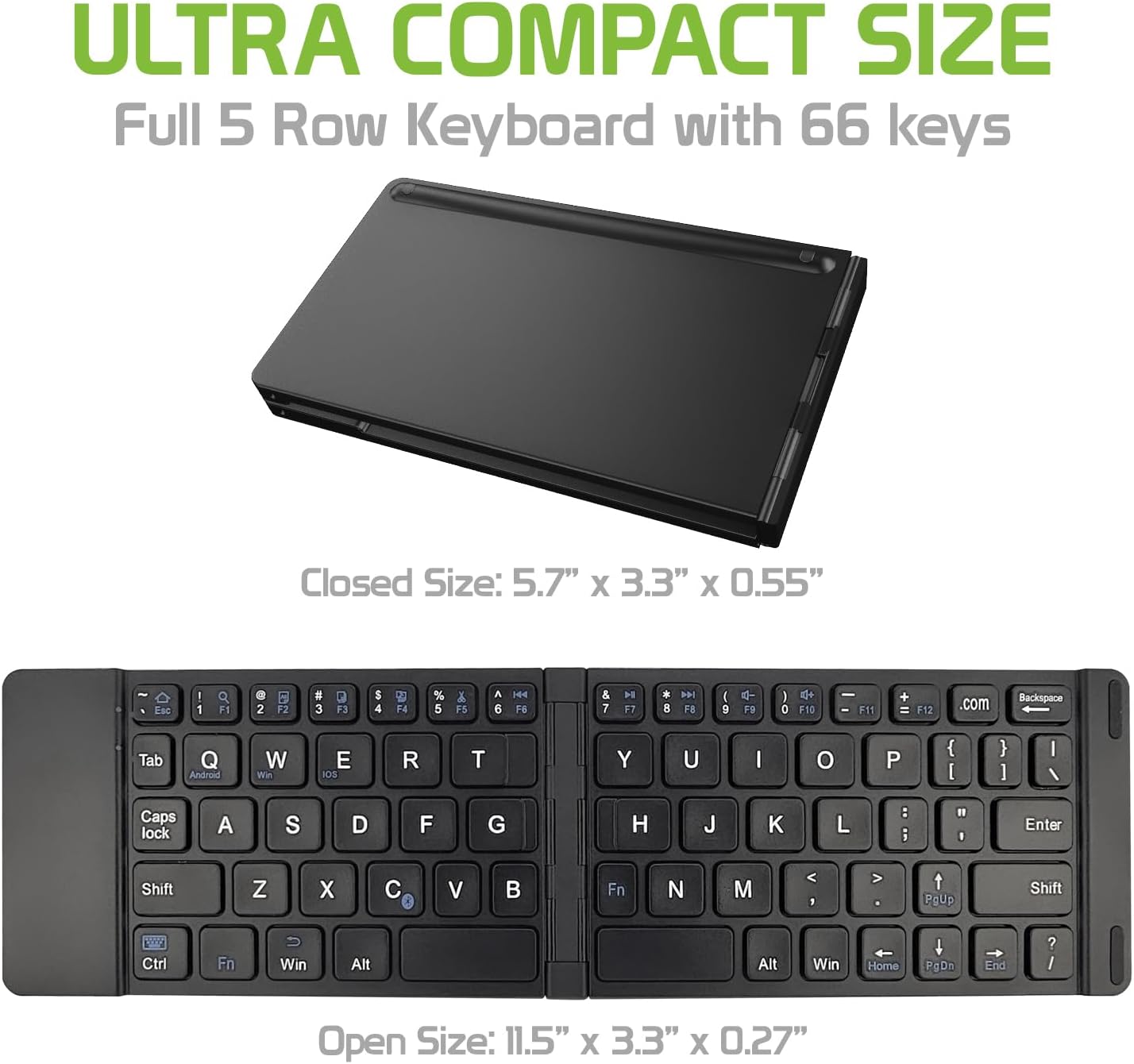
Image: The Cellet keyboard in both its closed, compact state and its unfolded, full-size state, with dimensions indicating its portability and functional size.
8. Гаранција и подршка
For warranty information or technical support, please visit the official Cellet webсајт или контактирајте њихову службу за кориснике. Сачувајте рачун за куповину за потребе гаранције.
Еколошки прихватљиво одлагање
To dispose of the product responsibly, follow these guidelines:
- Carefully pry up the plastic top to remove it completely. This action will likely render the keyboard unusable.
- Turn the top over and remove any tape securing the battery.
- Separate the battery from the circuit board.
- Dispose of the battery according to local regulations and laws. Recycle remaining keyboard parts where possible.