
tech21 204996
Tech 21 SansAmp Para Driver DI (v2) Instruction Manual
Бренд: tech21 | Модел: 204996
Увод
The Tech 21 SansAmp Para Driver DI (v2) is a versatile floor-based direct box and preamp designed to provide detailed tone shaping for various signal sources. It is particularly effective with acoustic, electric, and bass guitars, as well as upright bass, whether connected directly to a mixing console or an instrument amplifier. The SansAmp circuitry imparts a natural warmth and presence, emulating the sound of a miked tube pre-amp, while effectively eliminating harsh, unnatural harmonics often associated with piezo pickups. The Drive control allows for adding subtle to pronounced edge to your sound.
Кључне карактеристике
- Versatile Tone Shaping: Provides detailed tone shaping possibilities for any signal source, including acoustic, electric, and bass guitars, and upright bass.
- Natural Warmth and Presence: СансAmp circuitry delivers a tube pre-amp like warmth and presence, while eliminating harsh harmonics from piezo pickups.
- Контрола вожње: Offers a tasteful edge, from subtle grit to over-the-top distortion.
- Version 2 Enhancements: Includes two new features: the Rumble Filter and Air Button.
- Rumble Filter: Removes unwanted sub-sonic frequencies that can cause boominess and audible handling noises, especially with acoustic guitars.
- Air Button: Boosts high frequencies for added clarity and sparkle to acoustic instruments.
- Вишеструки излази: Features both XLR and 1/4" outputs for flexible connectivity.
- Компатибилност фантомског напајања: Can be powered via phantom power through the XLR output.
Контроле и везе

Слика 1: Врх view of the SansAmp Para Driver DI (v2) showing control layout.
Контролна дугмад:
- НИВО: Подешава укупни излазни ниво педале.
- ТРЕБЛЕ: Контролише изједначавање високих фреквенција.
- СРЕДИНА: Контролише изједначавање средњих фреквенција.
- БАСС: Контролише изједначавање ниских фреквенција.
- ПОГОН: Adjusts the amount of SansAmp цев amplifier emulation and overdrive.
- МЕШАВИНА: Mixes the direct instrument signal with the SansAmp цев amplifier emulation.
- MID SHIFT (160Hz - 3kHz): Selects the specific mid-frequency point to be affected by the MID control.
Дугмад:
- PHANTOM & GROUND CONNECT XLR: Engages phantom power for the XLR output and connects/disconnects the ground.
- -20dB XLR: Attenuates the XLR output by 20dB for hotter signals.
- RUMBLE FILTER: Activates a high-pass filter to remove unwanted low-end rumble.
- ВАЗДУХ: Boosts high frequencies for added clarity and sparkle.

Слика 2: Страна view showing Input and Parallel Output.
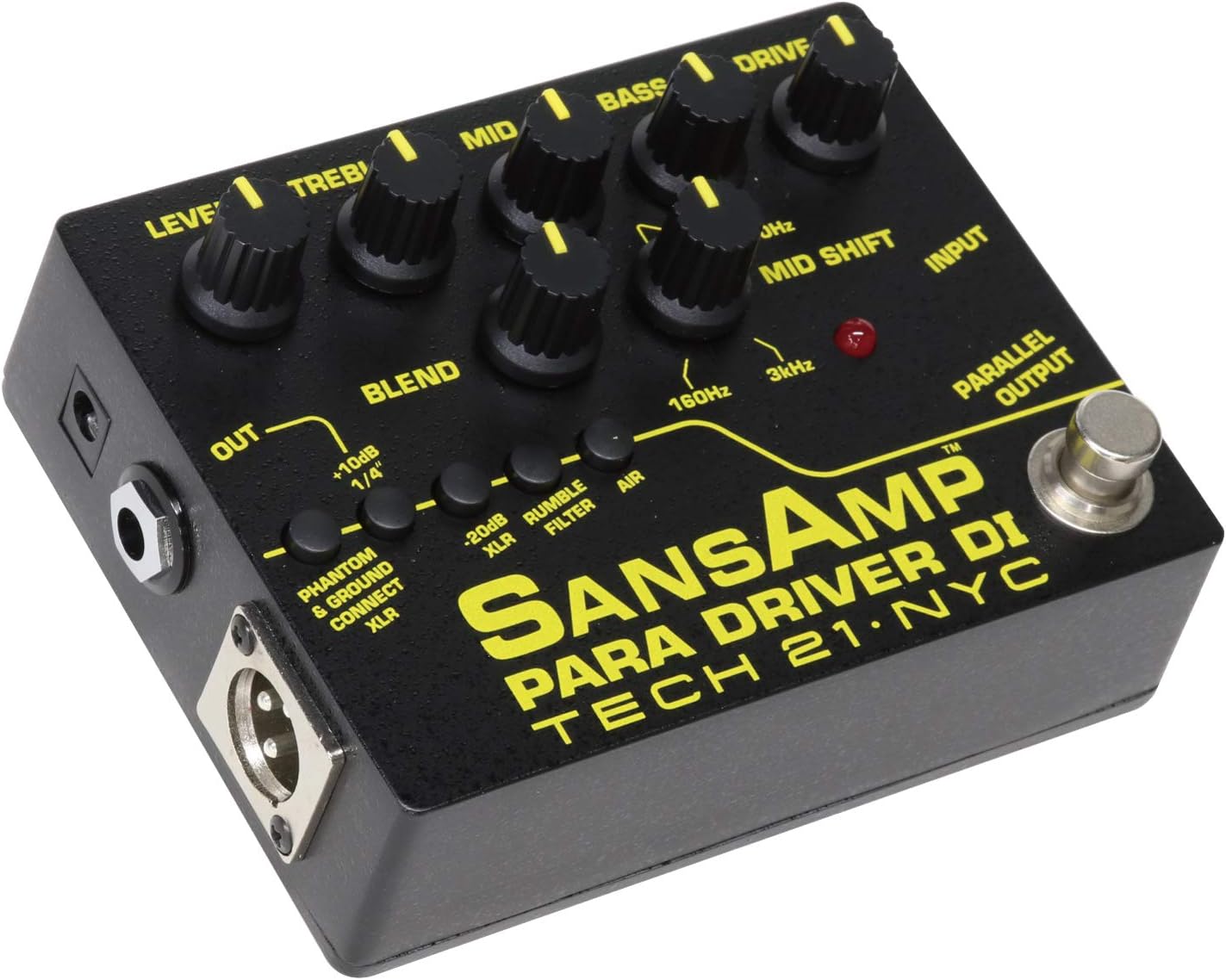
Слика 3: Страна view showing XLR Output and 1/4" Output.
Везе:
- УЛАЗНИ: Улаз за инструмент од 1/4 инча.
- PARALLEL OUTPUT: 1/4-inch output that passes the unaffected input signal. Useful for sending a clean signal to an amplifier while the processed signal goes to a mixer.
- OUT (1/4"): Излаз од 1/4 инча за повезивање са ampлифиер или други ефекти.
- КСЛР ИЗЛАЗ: Балансирани XLR излаз за директно повезивање са миксерском конзолом или аудио интерфејсом.
Водич за подешавање
- Прикључак за напајање: Connect a 9V DC power supply (not included) to the power input jack, or utilize phantom power from a mixer via the XLR output by engaging the "PHANTOM & GROUND CONNECT XLR" button.
- Прикључак инструмента: Повежите свој инструмент (гитару, бас итд.) са ИНПУТ прикључак помоћу стандардног инструменталног кабла од 1/4 инча.
- Излазна веза:
- For direct connection to a mixer or audio interface, use an XLR cable from the КСЛР ОУТ to your mixer's input.
- For connection to an instrument amplifier or other pedals, use a 1/4-inch cable from the OUT (1/4") Јацк.
- To send an unaffected signal to another device (e.g., a tuner or a separate amplifier), use the ПАРАЛЕЛНИ ИЗЛАЗ.
- Почетна подешавања: Before powering on, set all control knobs (LEVEL, TREBLE, MID, BASS, DRIVE, BLEND) to their 12 o'clock (noon) position. Ensure all push-buttons are disengaged for a neutral starting point.
Упутство за употребу
The SansAmp Para Driver DI (v2) offers extensive tonal flexibility. Experiment with the controls to find your desired sound.
Обликовање тонова:
- EQ Controls (TREBLE, MID, BASS): Adjust these to shape the overall frequency response. The МИД СХИФТ knob allows you to select the specific frequency (from 160Hz to 3kHz) that the MID control will boost or cut, providing precise control over your instrument's presence.
- ПОГОН: Increase this knob to add warmth, grit, or full-on overdrive. This emulates the sound of a driven tube ampлифиер.
- МЕШАВИНА: This control is crucial for mixing your direct instrument signal with the SansAmp processed signal. A lower BLEND setting will result in a cleaner sound with less SansAmp character, while a higher setting will emphasize the SansAmp's tube emulation and drive.
- RUMBLE FILTER: Engage this button to remove unwanted low-frequency noise, particularly useful for acoustic instruments or in situations where excessive bass frequencies are problematic.
- ВАЗДУХ: Press this button to add a subtle high-frequency boost, enhancing the clarity and "airiness" of your tone, especially beneficial for acoustic guitars.
Output Level Management:
- НИВО: Use this to set the overall output volume. Adjust it to match the input requirements of your ampлифиер или миксер.
- -20dB XLR: If the signal sent to your mixer via the XLR output is too hot and causing clipping, engage this button to reduce the output level by 20dB.
Одржавање
- Чишћење: Користите меку, суву крпу за чишћење спољашњости уређаја. Избегавајте абразивна средства за чишћење или раствараче.
- Складиштење: Чувајте уређај на хладном и сувом месту, даље од директне сунчеве светлости и екстремних температура.
- Напајање: Always use a compatible 9V DC power supply with the correct polarity (center negative).
- Нега каблова: Ensure all cables are in good condition and properly connected to prevent signal loss or damage.
Решавање проблема
| Проблем | Могући узрок | Решење |
|---|---|---|
| Нема излаза звука | No power; incorrect cable connections; volume knobs set to zero. | Check power supply/phantom power; ensure all cables are securely connected; increase LEVEL knob. |
| Distorted/Clipping Sound | Input signal too hot; DRIVE knob set too high; output level too high. | Reduce instrument output; lower DRIVE knob; engage -20dB XLR pad if using XLR output. |
| Excessive Low-End Rumble | Unwanted sub-sonic frequencies. | Engage the RUMBLE FILTER button. |
| Lack of Clarity/Sparkle | Insufficient high-frequency presence. | Engage the AIR button. |
Спецификације
- Назив модела: 204996
- Тежина артикла: Приближно 15.4 унце (0.96 фунте)
- Димензије производа: 7.48 к 7.48 к 1.57 инча
- Боја: Црно
- Компатибилни уређаји: Guitar (Acoustic, Electric, Bass), Upright Bass
- Тип конектора: 6.35mm Jack (1/4"), XLR
- Извор напајања: Corded Electric (9V DC, center negative) or Phantom Power via XLR
- Датум прве доступности: 23. августа 2012. године
Информације о гаранцији
For detailed warranty information, please refer to the official tech21 webсајт или директно контактирајте њихову корисничку подршку. Сачувајте доказ о куповини за потребе гаранције.
Корисничка подршка
Should you require further assistance, technical support, or have questions regarding your SansAmp Para Driver DI (v2), please visit the official tech21 website for contact details and support resources. You can also refer to the tech21 Store on Amazon за додатне информације о производу.
Ask a question about this manual
Ask about setup, troubleshooting, compatibility, parts, safety, or missing instructions. Manuals+ will review the question and use this page’s manual context to help answer it.