ЦAMPUS Poppy Music is a compact and portable Bluetooth 3.0 speaker designed for on-the-go music enjoyment. It features a unique pop-art design with interchangeable silicone covers, allowing you to customize its appearance. Equipped with a built-in microphone, it also supports hands-free calling.
Image: The CAMPUS Poppy Music speaker, showcasing its compact design and blue silicone cover.
Блуетоотх 3.0 повезивање: Seamlessly connect to smartphones, tablets, and other Bluetooth-enabled devices.
Interchangeable Silicone Covers: Comes with four vibrant colors (red, blue, green, gray) to personalize your speaker.
Дуг век трајања батерије: Enjoy 5 to 8 hours of playback on a single charge.
Хандс-фрее позивање: Built-in microphone for convenient call management.
Компактан и преносив: Designed to fit comfortably in your hand, perfect for travel.
Пуњење преко микро-УСБ-а: Easy charging via a standard 5V micro-USB cable.
Водич за подешавање
1. Садржај пакета
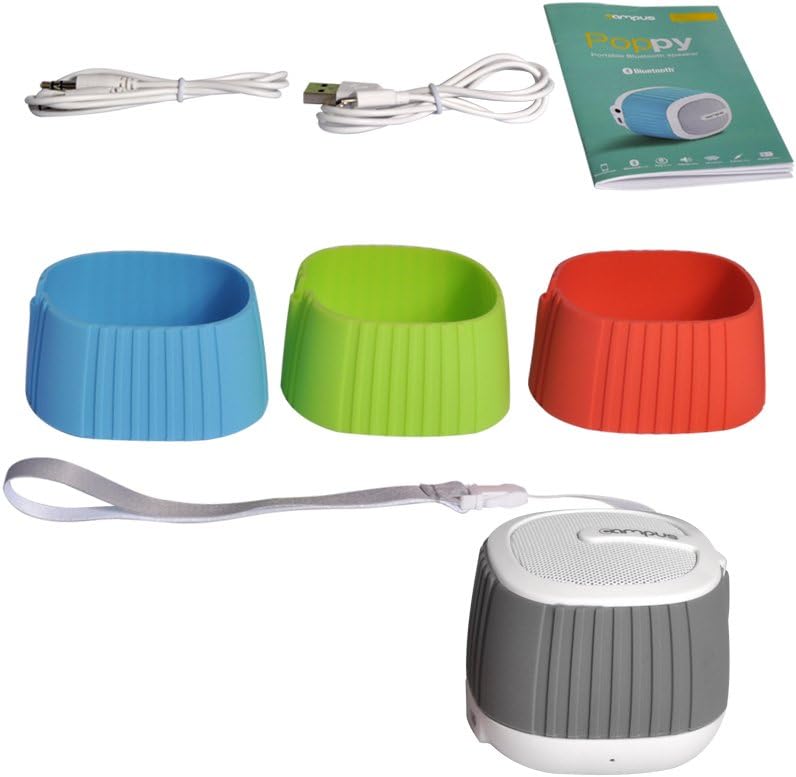
Пре него што почнете, уверите се да су све ставке присутне у пакету:
Image: The complete package contents, including the speaker, multiple silicone covers, charging cable, audio cable, and user manual.
For optimal performance, fully charge the speaker before first use.
Connect the supplied Micro-USB cable to the charging port (DC 5V) on the speaker.
Повежите други крај USB кабла са USB адаптером за напајање (није укључен) или USB портом рачунара.
The LED indicator will illuminate during charging.
Charging typically takes 2 to 3 hours. The LED indicator will change or turn off once fully charged.
3. Changing Silicone Covers
Customize your speaker's look by easily swapping the silicone covers.
Слика: Растављено view of the speaker, showing how the silicone cover can be removed and replaced.
Gently peel off the current silicone cover from the speaker body.
Select your desired color cover.
Align the new cover with the speaker and carefully stretch it over the body until it fits snugly.
Image: Four CAMPUS Poppy Music speakers, each with a different colored silicone cover (red, blue, green, gray), demonstrating the customization options.
Упутство за употребу
1. Укључивање/искључивање
За укључивање: Locate the power button (often integrated with play/pause or a dedicated switch) and press and hold it until you hear an audible prompt or the LED indicator lights up.
За искључивање: Press and hold the power button again until the speaker powers down.
2. Блуетоотх упаривање
Connect your speaker wirelessly to your device.
Ensure the speaker is powered on and in pairing mode (the LED indicator may flash rapidly).
На паметном телефону, таблету или другом уређају који подржава Bluetooth, идите на подешавања Bluetooth-а.
Тражи available devices. The speaker should appear as "Poppy Music" or similar.
Select the speaker from the list to pair. You will hear a confirmation sound once successfully connected.
Звучник ће се аутоматски поново повезати са последњим упареним уређајем када се укључи, ако је Bluetooth уређаја активан и у домету.
3. Audio Playback and Controls
Control your music and calls using the speaker's integrated controls.
Пусти/паузирај: Press the Play/Pause button (often a central button) to start or pause music playback.
Контрола јачине звука: Користите дугмад за појачавање (+) и смањивање (-) јачине звука да бисте подесили ниво звука.
Следећа/претходна нумера: Press and hold or short press (depending on model) the volume buttons or dedicated track buttons to skip tracks.
Хандс-фрее позивање:
Одговори на позив: Притисните дугме за репродукцију/паузирање једном да бисте одговорили на долазни позив.
Заврши позив: Притисните дугме Репродукуј/Паузирај једном током позива да бисте га прекинули.
Одбиј позив: Притисните и држите дугме за репродукцију/пауза да бисте одбили долазни позив.
4. AUX улаз (жичана веза)
For devices without Bluetooth, use the 3.5mm audio cable.
Повежите један крај 3.5 мм аудио кабла са AUX улазним портом на звучнику.
Connect the other end to the headphone jack of your audio device (e.g., MP3 player, computer).
Звучник ће се аутоматски пребацити у AUX режим.
Одржавање
Чишћење: Use a soft, dry cloth to wipe the speaker's surface. For silicone covers, a damp cloth with mild soap can be used, then dry thoroughly. Do not use harsh chemicals or abrasive cleaners.
Складиштење: Чувајте звучник на хладном и сувом месту, даље од директне сунчеве светлости и екстремних температура.
Одржавање батерије: Да бисте продужили век трајања батерије, избегавајте често потпуно пражњење батерије. Редовно пуните звучник, чак и ако га не користите дуже време.
Отпорност на воду: Овај звучник није водоотпоран. Избегавајте излагање течностима.
Решавање проблема
Проблем
Могући узрок
Решење
Звучник се не укључује.
Батерија је празна или је истрошена.
Пуните звучник 2-3 сата.
Није могуће упаривање преко Bluetooth-а.
Звучник није у режиму упаривања.
Блутут је искључен на вашем уређају.
Звучник је већ повезан са другим уређајем.
Too far from the device.
Ensure speaker is powered on and LED is flashing (pairing mode).
Омогућите Блуетоотх на свом уређају.
Disconnect from other devices or turn off their Bluetooth.
Move speaker closer to your device (within 10 meters).
Нема звука.
Јачина звука је прениска.
Incorrect input mode (Bluetooth/AUX).
Device not playing audio.
Појачајте јачину звука и на звучнику и на повезаном уређају.
Ensure correct mode is active (Bluetooth connected or AUX cable inserted).
Check if audio is playing on your source device.
Лош квалитет звука.
Сметње или удаљеност.
Ниска батерија.
Move speaker closer to the device, away from obstacles or other wireless devices.
Напуните звучник.
Спецификације
Бранд
Campus
Назив модела
Poppy Music
Број модела
SP-FY24
Технологија повезивања
Bluetooth 3.0, AUX (3.5mm)
Максимална излазна снага звучника
3 Ватт РМС
Трајање батерије
5 до 8 сата
Време пуњења
2 to 3 hours (via Micro-USB, 5V)
Компатибилни уређаји
Smartphones, Tablets, Bluetooth-enabled devices
Димензије (пакет)
15.4 к 9.2 к 8.2 цм
Тежина (пакет)
240.4 г
Тип контролера
Touchpad (Pekplatta)
Гаранција и подршка
This product is covered by standard consumer warranty laws in your region. Please retain your proof of purchase for any warranty claims.
For technical support or further assistance, please refer to the contact information provided by your retailer or visit the official Campus webсајту.
Note: Software updates are not guaranteed for this product.