
1. Увод
This manual provides essential information for the proper installation, operation, and maintenance of your Master-Bilt MBCB60 Fusion Chef Stand. Please read these instructions thoroughly before operating the unit to ensure safe and efficient performance. Retain this manual for future reference.
2. Безбедносне информације
Observe all safety precautions to prevent injury and damage to the unit. This appliance is intended for commercial use only.
- електрична безбедност: Ensure the unit is connected to a grounded 115 Volt electrical supply. Do not use extension cords. Disconnect power before any service or cleaning.
- вентилација: Maintain adequate clearance around the refrigeration unit for proper airflow. Blocking vents can lead to overheating and reduced efficiency.
- Капацитет тежине: Do not exceed the maximum weight capacity of the chef stand top surface. Refer to specifications for details.
- Запаљиви материјали: Do not store flammable or explosive materials inside or near the unit.
- Померање јединице: Use caution when moving the unit, especially on uneven surfaces. Ensure casters are locked once in position.
3. Производ је готовview
The Master-Bilt MBCB60 Fusion Chef Stand is a robust, stainless steel refrigerated base designed for commercial kitchens. It features two spacious drawers for cold storage and a durable top surface suitable for supporting cooking equipment.
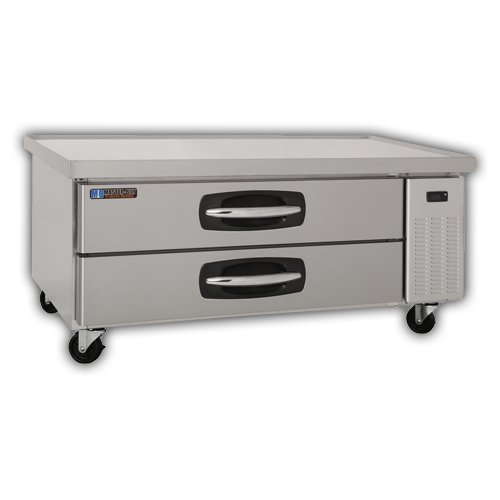
Кључне компоненте:
- Екстеријер од нерђајућег челика: Издржљив и лак за чишћење.
- Refrigerated Drawers: Two pull-out drawers for organized cold storage.
- Котачићи: Four heavy-duty casters for mobility, with locking mechanisms.
- Контролна табла: (Typically located near the refrigeration unit) For temperature adjustment and display.
- Condenser Unit: Located on the right side, responsible for cooling.
4. Подешавање и инсталација
4.1 Распакивање
- Carefully remove all packaging materials, including any protective films or tapes.
- Inspect the unit for any shipping damage. Report any damage immediately to your supplier.
4.2 Постављање
- Position the chef stand on a level, sturdy surface capable of supporting its weight plus the weight of any equipment placed on top.
- Ensure adequate ventilation. Maintain a minimum of 4 inches (10 cm) clearance from walls or other equipment on all sides, especially around the condenser unit.
- Avoid direct sunlight or proximity to heat-generating appliances (ovens, fryers) to optimize performance.
- Lock the casters once the unit is in its final position.
4.3 Електрични прикључак
- Connect the unit to a dedicated 115 Volt, 60 Hz, single-phase grounded electrical outlet.
- Немојте користити адаптерске утикаче или продужне каблове.
- Verify that the power supply matches the requirements listed on the unit's data plate.
4.4 Почетно чишћење
- Пре прве употребе, очистите унутрашње и спољашње површине благим раствором сапуна и воде. Добро исперите и осушите.
5. Упутство за употребу
5.1 Укључивање
- After connecting to power, the unit will typically power on automatically or require a press of the power button on the control panel.
- Allow the unit to run for several hours empty to reach the desired temperature before loading with food products.
5.2 Контрола температуре
- The digital control panel allows for precise temperature adjustment. Refer to the specific controller's instructions for detailed programming.
- Recommended operating temperature for food safety is typically between 33°F and 41°F (0.5°C and 5°C).
5.3 Loading Drawers
- Load drawers evenly to ensure proper airflow and temperature distribution.
- Do not block internal air vents.
- Ensure drawers are fully closed after each use to maintain temperature and energy efficiency.
6. Одржавање и чишћење
Regular maintenance ensures optimal performance and extends the lifespan of your chef stand.
6.1 Дневно чишћење
- Wipe down interior and exterior stainless steel surfaces with a soft cloth and mild, non-abrasive cleaner.
- Clean drawer gaskets to ensure a tight seal.
6.2 Monthly Cleaning (or as needed)
- Кондензаторска завојница: Disconnect power. Carefully clean the condenser coil using a brush or vacuum cleaner to remove dust and debris. A dirty coil reduces efficiency and can lead to compressor failure.
- Посуда за одвод: Inspect and clean the drain pan to prevent blockages and odors.
КСНУМКС. Решавање проблема
Пре него што контактирате сервис, поновоview ови уобичајени проблеми и решења.
| Проблем | Могући узрок | Решење |
|---|---|---|
| Јединица се не хлади | Проблем са напајањем Прљава завојница кондензатора Door/drawer not sealed Подешавање термостата | Проверите прикључак за напајање и осигурач Очистите намотај кондензатора Ensure drawers are fully closed; check gaskets Adjust thermostat to lower setting |
| Прекомерна бука | Лабаве компоненте Зачепљење вентилатора Јединица није ниво | Проверите да ли има лабавих делова и затегните их Check fan for obstructions Level the unit using caster adjustments |
| Вода на поду | Зачепљен одводни вод Прекомерна влажност | Очистите одводну линију Ensure drawers are closed; reduce ambient humidity if possible |
8. Спецификације
| Феатуре | Детаљ |
|---|---|
| Модел | MBCB60 (02-72539) |
| Бранд | Мастер-Билт |
| Димензије производа (Ш к Д к В) | 60 к 31 к 25.5 инча |
| Тежина артикла | 250 фунти |
| Капацитет | 9.8 кубних стопа |
| Електрични захтеви | 115 Волтс |
| Материјал | нерђајући челик |
| Врста инсталације | Самостални |
9. Гаранција и подршка
For warranty information, technical support, or service inquiries, please contact Master-Bilt customer service or your authorized dealer. Keep your purchase receipt and model number (MBCB60) readily available when contacting support.
Master-Bilt Contact Information: Refer to the official Master-Bilt website or product documentation for the most current contact details.