
Увод
This manual provides comprehensive instructions for the setup, operation, maintenance, and troubleshooting of your Proscan CRK83X PSVR82 TV Remote Control. This remote is designed to work seamlessly with various Proscan TV and VCR models, offering a direct replacement or compatible control solution.
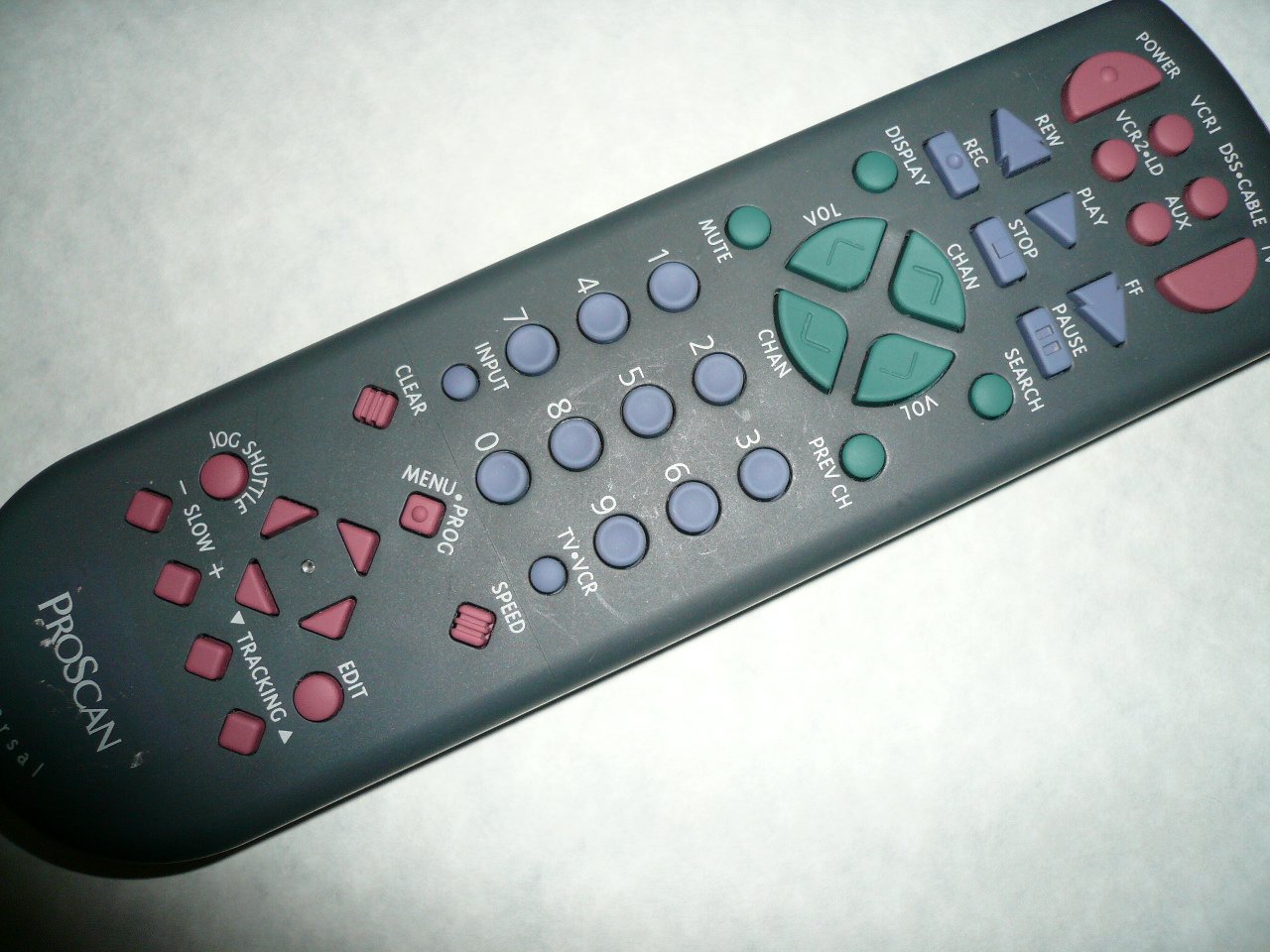
An image showing the Proscan CRK83X PSVR82 TV Remote Control, highlighting its ergonomic design and button layout. The remote is dark gray with purple and teal buttons, clearly labeled for various functions.
Сетуп
1. Инсталација батерије
- Пронађите поклопац одељка за батерије на задњој страни даљинског управљача.
- Померите поклопац надоле или притисните резу да бисте га отворили.
- Уметните две (2) ААА батерије (нису укључене), водећи рачуна да позитивни (+) и негативни (-) терминали буду правилно поравнати са ознакама унутар одељка.
- Вратите поклопац одељка за батерију тако што ћете га вратити на место док не кликне чврсто.
2. Прва употреба
The Proscan CRK83X PSVR82 remote control is typically pre-programmed for compatible Proscan TV and VCR models. No complex programming steps are usually required for initial use with supported devices. Simply point the remote at your device and press the desired function button.
This remote is compatible with a wide range of models, including but not limited to: P5VR74, PAVR57, PCVR72, PRVR71, PSDR72, PSDR73, PSNKVSR72, PSNPSVR57, PSNPSVR65, PSNPSVR70, PSNPSVR71, PSNPSVR72, PSNPSVR73, PSNPSVR74, PSNPSVRR73, PSNR65, PSNVR74, PSRV65, PSRV71, PSRV72, PSRV74, PSRVR65, PSRVR71, PSUR70, PSUR72, PSV174, PSV65, PSV71, PSV72, PSVDR73, PSVER72, PSVH57, PSVP71, PSVR22, PSVR27, PSVR57, PSVR61, PSVR62, PSVR65, PSVR72L, PSVR72VCR, PSVR75, PSVR79, PSVR83, PSVT73, PSVV73, PSZR65, PSZR71, PSZR73, PVSR73, R65, RCU800, RSVR73, SPVR65, SSVR62, VR653HF, VR730, VR730HF.
Упутство за употребу
Familiarize yourself with the buttons and their functions for optimal control of your television and VCR.
| Име дугмета | Функција |
|---|---|
| ПОВЕР | Turns the connected device (TV/VCR) on or off. |
| VCR1, DSS/CABLE, VCR2/LD, AUX | Selects the input source for the television or VCR. |
| МУТЕ | Искључује или укључује аудио излаз. |
| ВОЛ +/- | Подешава ниво јачине звука горе или доле. |
| CHAN +/- | Мења канал нагоре или надоле. |
| ПРЕВ ЦХ | Пребацује се на претходно viewед цханнел. |
| ДИСПЛАИ | Displays on-screen information such as channel number or time. |
| РЕЦ | Initiates recording on the VCR. |
| РЕВ | Rewinds the tape during VCR playback. |
| ПЛАИ | Starts playback of a tape or disc. |
| FF | Fast forwards the tape during VCR playback. |
| СТОП | Зауставља репродукцију или снимање. |
| ПАУСЕ | Pauses playback or recording. |
| ТРАЖИ | Activates search function, typically for VCR content. |
| Бројчана табла (0-9) | Директно уноси бројеве канала или изборе менија. |
| ИНПУТ | Кружи кроз доступне изворе улаза. |
| ЦЛЕАР | Clears entered numbers or menu selections. |
| MENU / PROG | Accesses the on-screen menu or programming functions. |
| ТВ-ВЦР | Toggles control between TV and VCR modes. |
| ЈОГ СХУТТЛЕ | Provides frame-by-frame or variable speed control for VCR playback. |
| СПОРО +/- | Adjusts slow-motion speed during VCR playback. |
| СПЕЕД | Adjusts playback speed, typically for VCR. |
| TRACKING ▲/▼ | Adjusts the VCR tracking for optimal picture quality. |
| ЕДИТ | Activates editing functions, typically for VCR. |
Одржавање
Чишћење даљинског управљача
- Обришите даљински управљач меком, сувом крпом.
- За тврдокорну прљавштину, благо дampОчистите крпу водом или благим, неабразивним средством за чишћење. Не прскајте средство за чишћење директно на даљински управљач.
- Избегавајте употребу јаких хемикалија, растварача или абразивних сунђера за чишћење, јер они могу оштетити површину или унутрашње компоненте даљинског управљача.
Замена батерије
Replace batteries when the remote's response becomes sluggish or it stops functioning. Refer to the "Battery Installation" section under Setup for detailed instructions.
Увек одлажите искоришћене батерије одговорно у складу са локалним прописима.
Решавање проблема
| Проблем | Могући узрок / решење |
|---|---|
| Даљински управљач не ради. |
|
| Даљински управљач ради повремено. |
|
| Certain buttons do not respond. |
|
Спецификације
- Бренд: ПРОСЦАН
- Модел: CRK83X PSVR82
- Произвођач: Просцан
- Компатибилни уређаји: Television (and various Proscan VCR models as listed in Setup section)
- Технологија повезивања: Инфрацрвени
- Тип контролера: Контрола дугмета
- Посебна карактеристика: Ергономски дизајн
- ASIN: B00P82T2LS
- Датум прве доступности: 4. новембар 2014
Гаранција и подршка
Specific warranty information for the Proscan CRK83X PSVR82 TV Remote Control is not provided in this manual. Please refer to the product packaging or contact your retailer for details regarding warranty coverage.
For further assistance or technical support, please contact the manufacturer or your point of purchase. No specific support contact details are available in this document.