
Креатив X7
Упутство за употребу Creative Sound Blaster X7
Модел: КСКСНУМКС
1. Увод
The Creative Sound Blaster X7 is a high-resolution audio device designed to function as an external USB Digital-to-Analog Converter (DAC) and a powerful audio amplifier. It features low-latency Bluetooth connectivity and an integrated Dolby Digital decoder, providing an enhanced audio experience for various applications.
This manual provides detailed instructions for setting up, operating, and maintaining your Sound Blaster X7 to ensure optimal performance and longevity.

Слика 1: Предња страна view of the Creative Sound Blaster X7, showcasing its design and main volume control.
2. Садржај пакета
Проверите да ли су све ставке присутне у пакету:
- Creative Sound Blaster X7 јединица
- Повер Адаптер
- УСБ кабл
- Стерео РЦА до 3.5 мм кабл
- Оптицал Цабле
- Водич за брзи почетак (ако је применљиво)
3. Подешавање
3.1 Повезивање на напајање
Connect the provided power adapter to the DC IN 24V port on the rear of the Sound Blaster X7, then plug it into a wall outlet.
3.2 Аудио везе
The Sound Blaster X7 offers various audio input and output options. Refer to the diagram below for connection points.
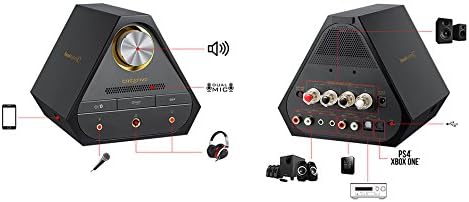
Image 2: Rear panel connections of the Sound Blaster X7, including speaker terminals, line out, optical in/out, and USB ports.
- USB Connection (PC/Mac): Use the supplied USB cable to connect the Sound Blaster X7 to your computer for high-resolution audio playback and control.
- Optical In/Out: Connect to compatible devices such as game consoles (PS4, Xbox One) or AV receivers using an optical cable for digital audio transmission.
- Лине Оут (РЦА): Connect to external speakers or ampЛифиери који користе РЦА каблове.
- Звучнички терминали: For passive bookshelf speakers, connect speaker wires to the binding posts. Ensure correct polarity (+/-). The impedance switch allows selection between 4-8 ohms.
- Излази за слушалице: Two 3.5mm and one 6.3mm (1/4-inch) headphone jacks are available on the front panel for connecting headphones.
- Улаз за микрофон: A 3.5mm microphone input is available on the front panel.
3.3 Инсталација драјвера (за PC/Mac)
For optimal performance and access to all features, download and install the latest drivers and software from the official Creative webсајт. Пратите упутства на екрану током инсталације.
4. Упутство за употребу
4.1 Укључивање/искључивање
Press the power button on the front panel to turn the unit on or off. The LED indicator will illuminate when powered on.
4.2 Контрола јачине звука
Rotate the large knob on the front panel to adjust the master volume. Press the knob to mute/unmute audio.
4.3 Избор улазног извора
Use the input selection buttons on the front panel or the companion software/app to switch between connected audio sources (e.g., USB, Optical, Bluetooth).
4.4 Блуетоотх упаривање
Да бисте упарили Блуетоотх уређај:
- Ensure the Sound Blaster X7 is powered on.
- Press and hold the Bluetooth button on the front panel until the Bluetooth indicator blinks rapidly.
- On your mobile device, search for Bluetooth devices and select "Sound Blaster X7".
- Once paired, the Bluetooth indicator will glow solid.
4.5 Software and Mobile App Control
The Sound Blaster X7 can be controlled and customized using the Creative Sound Blaster software on PC/Mac or the Sound Blaster Central mobile app (iOS/Android). These applications allow for advanced audio adjustments, sound profiles, and input/output management.
Видео 1: Оверview of the Creative Sound Blaster X7's features and connectivity options. This video demonstrates the product's versatility across different devices.
5. Одржавање
- Чишћење: Use a soft, dry cloth to clean the exterior of the Sound Blaster X7. Avoid using liquid cleaners or abrasive materials.
- вентилација: Ensure the unit has adequate ventilation to prevent overheating. Do not block the ventilation grilles.
- Складиштење: Када се уређај не користи дуже време, чувајте га на хладном и сувом месту, даље од директне сунчеве светлости и екстремних температура.
КСНУМКС. Решавање проблема
| Проблем | Могући узрок | Решење |
|---|---|---|
| Нема аудио излаза | Incorrect input source selected; cables not connected properly; volume too low. | Verify input source; check all cable connections; increase volume. Ensure drivers are installed for PC/Mac. |
| Проблеми са Блуетоотх упаривањем | Device too far; Sound Blaster X7 not in pairing mode; interference. | Ensure devices are within range; put Sound Blaster X7 into pairing mode (blinking LED); restart both devices. |
| Изобличен звук | Volume too high; incorrect audio settings; faulty cable. | Reduce volume; check audio settings in software/app; try a different cable. |
7. Спецификације
- Модел: X7
- Аудио резолуција: До 24-бита / 192kHz
- Импеданса слушалица: Supports up to 600 ohms
- AmpЛифиер Излаз: 100W stereo (with appropriate speakers)
- Повезивање: USB, Optical In/Out, RCA Line Out, Speaker Terminals, 3.5mm/6.3mm Headphone Out, 3.5mm Mic In, Bluetooth
- ДАЦ: Burr-Brown PCM1794 127dB
- Декодер: Долби Дигитал
- Бежична технологија: Блуетоотх
8. Гаранција и подршка
За информације о гаранцији и техничку подршку, посетите званичну веб страницу Creative-а. webсајт или контактирајте њихову корисничку службу. Сачувајте доказ о куповини за потребе гаранције.
Креативна подршка: us.creative.com/support/
Ask a question about this manual
Ask about setup, troubleshooting, compatibility, parts, safety, or missing instructions. Manuals+ will review the question and use this page’s manual context to help answer it.