
1. Увод
The Aputure Amaran HR672S is a high-performance LED video light panel designed for professional photography and videography. Featuring a high Color Rendering Index (CRI) of 95+, it ensures accurate and vibrant color reproduction. This light panel operates at a fixed color temperature of 5500K, providing a daylight-balanced output. It includes a wireless remote control for convenient adjustments and can be powered by either an AC adapter or NP-F series batteries.
2. Безбедносне информације
- Do not operate the light panel with wet hands or in damp окружења.
- Уверите се да је напајање волtage matches the product's requirements (110-240V).
- Avoid direct eye exposure to the LED light, as it can cause discomfort or damage.
- Keep the light panel away from flammable materials.
- Do not disassemble or modify the product. Refer servicing to qualified personnel.
- Always use the provided power adapter and recommended batteries.
- Обезбедите одговарајућу вентилацију током рада како бисте спречили прегревање.
3. Садржај пакета
Проверите да ли су све ставке наведене у наставку укључене у ваш пакет:
- 1 x Aputure Amaran HR672S LED Light Panel
- 1 к бежични даљински управљач
- 1 x Power Adapter (AC 110-240V to DC 15V)
- 1 x Light Bracket with 1/4 to 3/8 Screw
- 1 x White Diffusion Filter
- 1 x Orange Diffusion Filter
- 1 к торба за ношење
- 1 x Упутство за употребу (енглески)
- 2 x NP-F970 Batteries (if included in specific kit)
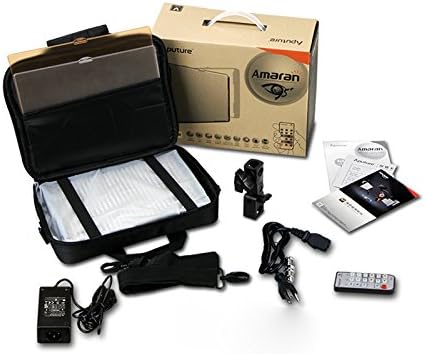
Image: All components included in the Aputure Amaran HR672S LED Video Light Panel package, neatly arranged.
4. Производ је готовview
4.1 Фронт View
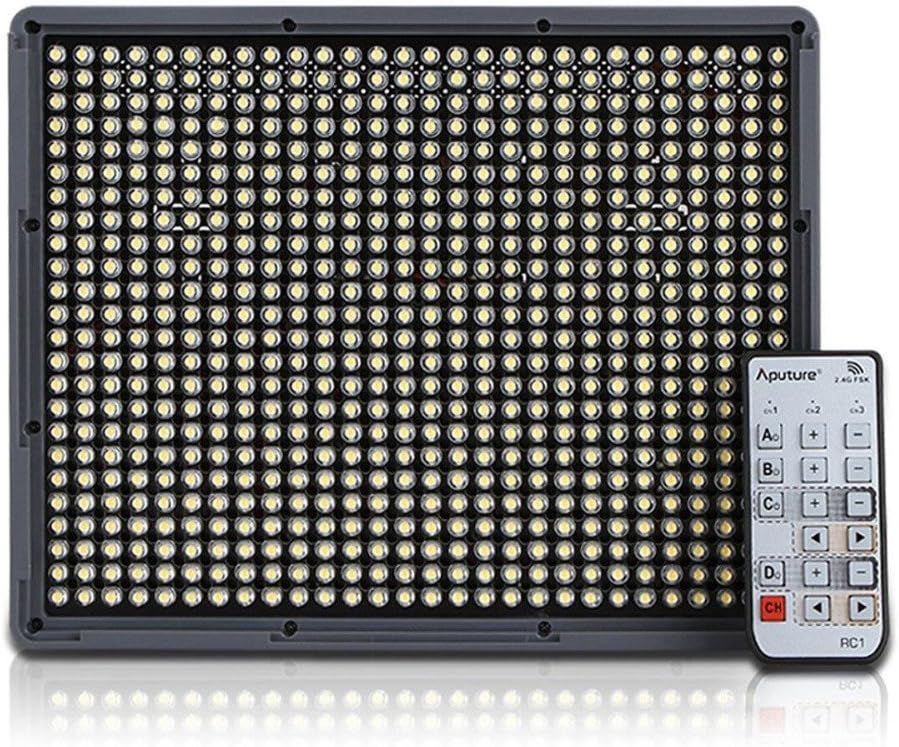
Image: The front face of the Aputure Amaran HR672S LED light panel, showing the array of 672 LED bulbs.
4.2 Back Panel Controls and Battery Slots

Image: The rear of the light panel, displaying the digital display, power switch, dimmer knob, channel/group buttons, and dual NP-F battery slots.
4.3 Diffusion Filter Installation

Image: A hand demonstrating the process of sliding a diffusion filter into the designated slot on the light panel.
5. Подешавање
5.1 Монтирање светлосног панела
- Attach the provided light bracket to the 1/4-inch screw thread at the bottom of the HR672S light panel.
- Secure the light bracket onto a standard light stand or tripod using the 1/4-inch or 3/8-inch screw adapter. Tighten securely.
- Adjust the angle of the light panel using the tilt mechanism on the bracket.
5.2 Powering the Light Panel
The HR672S can be powered in two ways:
- АЦ напајање: Connect the DC 15V power adapter to the DC input port on the back of the light panel. Plug the adapter into a suitable wall outlet (110-240V).
- Снага батерије: Insert two fully charged NP-F series batteries (e.g., NP-F970) into the battery slots on the back of the light panel. Ensure they click into place. The light will automatically draw power from the batteries when AC power is not connected or is interrupted.
5.3 Attaching Diffusion Filters
Slide either the white or orange diffusion filter into the grooves on the front of the light panel. The white filter provides softer light, while the orange filter can be used for color correction or creative effects.
6. Операција
6.1 Укључивање/искључивање
Locate the power switch on the back of the light panel. Flip it to the 'ON' position to power on the device. Flip it to 'OFF' to power off.
6.2 Подешавање осветљености
Rotate the dimmer knob on the back panel to adjust the light intensity. The brightness level will be displayed on the digital screen.
6.3 Коришћење бежичног даљинског управљача
The HR672S comes with a 2.4GHz wireless remote control for convenient operation.
- Setting Channels: Press the 'Channel' button on the light panel to cycle through available channels (1-3). Ensure the remote control is set to the same channel.
- Групе подешавања: Press the 'Group' button on the light panel to assign it to a group (A, B, C, D). The remote control can then control lights assigned to specific groups or all groups simultaneously.
- Даљинско управљање: Use the corresponding buttons on the remote to power on/off, adjust brightness, and select channels/groups.
6.4 Температура боје
The Aputure Amaran HR672S has a fixed color temperature of 5500K. No adjustment is needed or possible for color temperature on this model.
7. Одржавање
- Чишћење: Use a soft, dry cloth to clean the light panel. Do not use abrasive cleaners or solvents.
- Складиштење: Када се не користи, чувајте светлосни панел у његовој торби за ношење на хладном и сувом месту, даље од директне сунчеве светлости и влаге.
- Одржавање батерије: If using batteries, remove them if the light will not be used for an extended period. Store batteries in a cool, dry place.
- Инспекција каблова: Regularly inspect power cables and connections for any signs of damage. Replace damaged cables immediately.
КСНУМКС. Решавање проблема
| Проблем | Могући узрок | Решење |
|---|---|---|
| Светло се не пали | No power supply; Batteries depleted; Power switch off | Check AC adapter connection; Replace/recharge batteries; Ensure power switch is 'ON' |
| Даљински управљач не ради | Incorrect channel/group; Remote battery depleted; Obstruction | Match channel/group on light and remote; Replace remote battery; Ensure clear line of sight |
| Светло трепери | Unstable power; Faulty connection; Overheating | Ensure stable power source; Check all cable connections; Allow light to cool down |
| Light output is too harsh | No diffusion filter used | Attach the white diffusion filter to soften the light |
9. Спецификације
| Феатуре | Детаљ |
|---|---|
| Модел | Amaran HR672S |
| ЦРИ | 95+ |
| Повер | 45В |
| Беам Англе | 25 степени |
| Температура боје | 5500К |
| Повер Инпут | АЦ 110-240В |
| Повер Суппли | ДЦ 15В |
| Даљинска фреквенција | 2.4ГХз |
| Удаљени канали | 3 |
| Remote Groups | 4 (A/B/C/D) |
| Luminous Flux (0.5m) | 18800 лукса |
| Luminous Flux (1m) | 6040 лукса |
| Тежина артикла | 4 фунти (приближно 1.81 кг) |
| Димензије пакета | 10.9 x 8.8 x 4.8 инча (приближно 27.7 x 22.4 x 12.2 цм) |
| Батерије су потребне | 2 Lithium Ion (NP-F series) |
10. Гаранција и подршка
Aputure products are covered by a limited warranty. For specific warranty terms and conditions, please refer to the warranty card included with your product or visit the official Aputure website. For technical support, troubleshooting assistance, or service inquiries, please contact Aputure customer support through their official channels.
Онлине ресурси:
- Званична апутура Webсајт: ввв.апутуре.цом
- Product Support Page: Refer to the official webсајт за странице подршке за одређене производе.