
1. Подешавање
1.1 Распакивање и садржај
Пажљиво извадите телевизор и сву додатну опрему из паковања. Уверите се да су све компоненте присутне:
- Sharp LC-40LE653U 40-Inch Smart LED TV
- Ремоте Цонтрол
- 2 АА батерије
1.2 Инсталација постоља
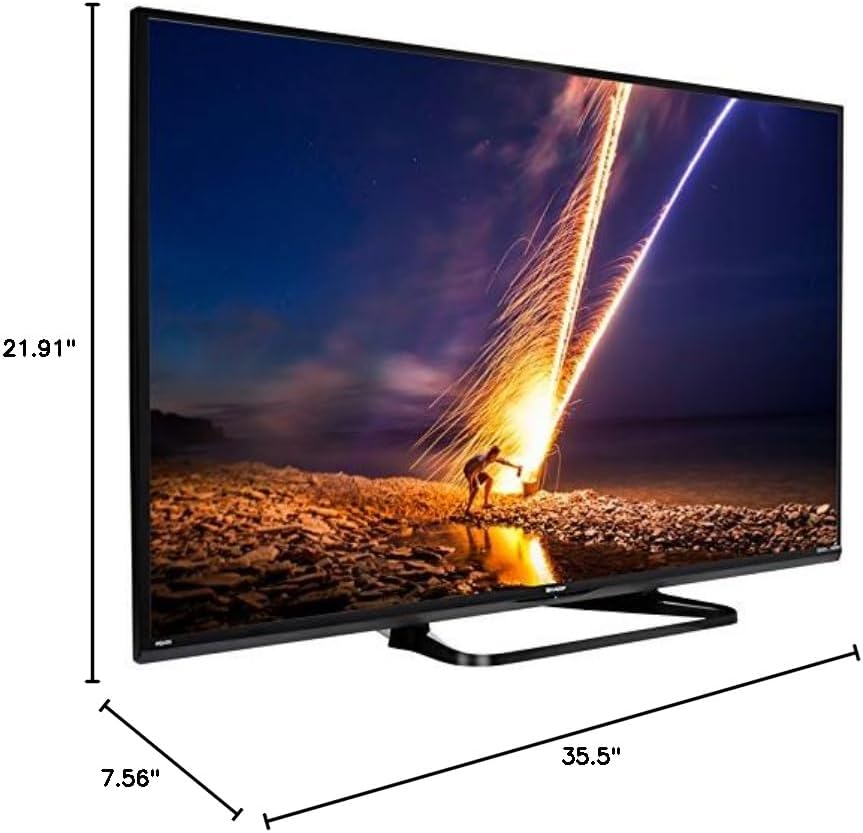
If placing the TV on a table, attach the included stand. Refer to the diagram below for proper assembly. Ensure all screws are securely fastened.
1.3 Повезивање екстерних уређаја
Connect your external devices such as cable boxes, Blu-ray players, or gaming consoles to the TV's input ports. The TV features multiple connectivity options.


Доступни портови укључују:
- ДВИ: 2 ports for high-definition audio and video. One HDMI port supports MHL (Mobile High-Definition Link).
- УСБ: 1 port for media playback or connecting a USB device.
- Етхернет: За жичану мрежну везу.
- Component/Video: For older video devices.
- DTV/TV (Antenna): За повезивање антене или кабловске телевизије.
- Аудио излаз: Optical for digital audio, and RCA for analog audio.
1.4 Прикључак за напајање
After connecting all necessary devices, plug the TV's power cord into a wall outlet.
1.5 Почетно подешавање
Upon first power-on, the TV will guide you through an initial setup process. This includes language selection, time zone, and network configuration. For Wi-Fi setup, select your network and enter the password.
2. Упутство за употребу
2.1 Функције даљинског управљача
The remote control allows you to access all TV functions. Insert the two AA batteries into the remote control, ensuring correct polarity.

- Напајање (црвено дугме): Укључује или искључује ТВ.
- Улаз: Бира извор улаза (HDMI, TV, USB, итд.).
- ВОЛ +/-: Подешава ниво јачине звука.
- ЦХ +/-: Мења ТВ канале.
- Навигациона дугмад (горе/доле/лево/десно/Ентер): Користи се за навигацију кроз меније и избор опција.
- ОШТРОУМАН: Accesses the Smart Central Apps menu.
- МЕНИ: Opens the main TV menu for settings adjustments.
- НЕТФЛИКС: Direct access button for the Netflix application.
2.2 Smart TV Features (Smart Central Apps)
The Sharp LC-40LE653U features Smart Central Apps, providing access to various online services and a web browser. Ensure your TV is connected to the internet via Wi-Fi or Ethernet.

- Приступ апликацијама: Press the 'SMART' button on your remote to open the Smart Central Apps menu.
- Подржане услуге: Includes Hulu Plus, Netflix, Pandora, Vudu, and YouTube.
- Web Прегледач: Користите уграђени web browser for general internet browsing. Navigation is done via the remote control.
2.3 Wallpaper Mode
When the TV is turned off, Wallpaper Mode can display virtually any image. To use this feature, connect a USB drive containing your desired images to the TV's USB port. Navigate to the Wallpaper Mode settings in the TV menu to select and configure your images.
3. Одржавање
3.1 Чишћење телевизора
Да бисте очистили екран, нежно га обришите меком, сувом крпом која не оставља влакна. За тврдокорне мрље, благо обришитеampen the cloth with water or a specialized screen cleaner. Avoid using harsh chemicals, abrasive cleaners, or direct spraying of liquids onto the screen or cabinet.
Clean the TV cabinet with a soft, dry cloth. Ensure the TV is unplugged before cleaning.
3.2 Ажурирања софтвера
Periodically check for software updates through the TV's settings menu to ensure optimal performance and access to the latest features. Updates can be performed via the internet connection.
КСНУМКС. Решавање проблема
If you encounter issues with your Sharp LC-40LE653U TV, refer to the following common solutions:
- Нема напајања: Ensure the power cord is securely plugged into both the TV and a working wall outlet. Check if the power indicator light on the TV is on.
- Нема слике/звука: Verify the correct input source is selected using the 'Input' button on the remote. Check all cable connections (HDMI, component, etc.) are secure.
- Лош квалитет слике: Подесите подешавања слике (осветљеност, контраст, оштрина) у менију телевизора. Уверите се да улазни извор пружа сигнал високог квалитета.
- Нема интернет везе: Check your Wi-Fi router or Ethernet cable connection. Re-enter your Wi-Fi password in the TV's network settings. Restarting your router may resolve connectivity issues.
- Даљински управљач не ради: Замените батерије у даљинском управљачу. Уверите се да нема препрека између даљинског управљача и инфрацрвеног сензора телевизора.
For more detailed troubleshooting steps, consult the full online manual or contact customer support.
5. Спецификације
Key technical specifications for the Sharp LC-40LE653U 40-Inch Smart LED TV:
| Феатуре | Спецификација |
|---|---|
| Број модела | ЛЦ-40ЛЕ653У |
| Величина екрана | 39.5 инча (класа од 40 инча) |
| Дисплаи Тецхнологи | ЛЦД |
| Резолуција | 1080p (Full HD) |
| Рефресх Рате | 60 Хз |
| Аспецт Ратио | 16:9 |
| Технологија повезивања | Ви-Фи |
| Хардверски интерфејс | Етхернет, ХДМИ, УСБ |
| Total Number of HDMI Ports | 2 (one with MHL support) |
| Укупно УСБ портова | 1 |
| Аудио улаз | HDMI, оптички, USB |
| Максимална излазна снага звучника | 20 Ваттс |
| Димензије производа (Д x Ш x В) | 7.56 cm x 35.5 cm x 21.91 cm |
| Тежина артикла | 16.3 фунти |
| Тип монтаже | Табле Моунт |
| Подржане Интернет услуге | Hulu Plus, Netflix, Pandora, Vudu, YouTube |
| Сертификат Енерги Стар | Да |
6. Гаранција и подршка
6.1 Гаранција на производ
This Sharp LC-40LE653U TV comes with a 1-годишња ограничена гаранцијаМолимо вас да сачувате доказ о куповини за потребе гаранције. Гаранција покрива производне недостатке у нормалним условима употребе.
6.2 Корисничка подршка
For technical assistance, troubleshooting beyond this manual, or warranty service, please contact Sharp customer support. Refer to the official Sharp webсајт или вашу картицу за регистрацију производа за најновије контакт информације.