
1. Увод
This manual provides detailed instructions for the installation, operation, and maintenance of your Antec P50 Window R Mid-Tower PC Case. The Antec P50 Window R is designed for silent computing with optimized airflow and support for Micro ATX and Mini-ITX motherboards. It features a dual-chamber structure, liquid cooling support, and multiple drive bays for a versatile build.
Please read this manual thoroughly before beginning installation to ensure proper setup and to maximize the performance and longevity of your system.
2. Подешавање и инсталација
2.1 Распакивање и преглед
Carefully remove the PC case from its packaging. Inspect the case for any signs of damage that may have occurred during shipping. Retain the packaging for future transport or warranty claims.
2.2 Уклањање бочних панела
Locate and unscrew the thumbscrews on the rear of the case. Slide the side panels backward and lift them off to access the interior.

Слика: Под углом view of the Antec P50 Window R PC Case, showing its compact mid-tower design and front panel.
2.3 Инсталација матичне плоче
- Инсталирајте И/О штит у задњи отвор кућишта.
- Ensure the motherboard standoffs are correctly aligned for your Micro ATX or Mini-ITX motherboard.
- Пажљиво поставите матичну плочу на одстојнике, поравнавајући рупе за вијке.
- Причврстите матичну плочу приложеним вијацима.

Слика: Унутрашњост view of the Antec P50 Window R PC Case, highlighting the motherboard tray and cable routing options.
2.4 Инсталација напајања
The P50 Window R supports bottom-mount power supplies. Install your power supply into the designated compartment at the bottom rear of the case and secure it with screws.
2.5 Инсталација погона
The case features 6 drive bays:
- One 5.25" external drive bay (for optical drives).
- Three 3.5" HDD drive bays.
- Two 2.5" SSD drive bays.
Follow the case's internal guides for tool-less or screw-based installation of your storage devices.

Слика: Унутрашњост view of the Antec P50 Window R PC Case, showing the rear of the motherboard tray with cable management space and drive bay locations.
2.6 Инсталација картице за проширење
The case provides 4 expansion slots. Remove the slot covers as needed and install your graphics card or other expansion cards, securing them with screws.
2.7 Уградња вентилатора и радијатора
The P50 Window R comes with pre-installed fans: two 120mm fans and one 80mm fan at the front, and one 80mm fan at the rear. It supports additional 80mm/120mm fan mounts and a 240mm radiator in the front or top for liquid cooling.
- For liquid cooling, install the 240mm radiator in the designated front or top mounting points.
- Ensure fans are oriented correctly for optimal airflow (intake at front, exhaust at rear/top).
2.8 Управљање кабловима
Користите изрезе за усмеравање каблова и тачке за везивање иза лежишта матичне плоче да бисте управљали кабловима. Ово побољшава проток ваздуха и естетику.
2.9 Connecting Front Panel I/O
Connect the front panel cables (USB 3.0, USB 2.0, HD Audio, Power Switch, Reset Switch, Power LED, HDD LED) to the corresponding headers on your motherboard. Refer to your motherboard manual for header locations.
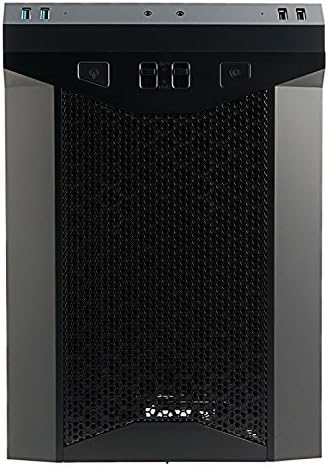
Слика: Фронт view of the Antec P50 Window R PC Case, showing the mesh intake and front panel controls.
3. Операција
3.1 Контроле и портови на предњој плочи
Предња плоча пружа лак приступ:
- Дугме за напајање: Да бисте укључили или искључили систем.
- Дугме за ресетовање: Да поново покренете систем.
- УСБ 3.0 портови (к2): За пренос података великом брзином.
- УСБ 2.0 портови (к2): За стандардне УСБ уређаје.
- Аудио прикључци: За слушалице и микрофон.
- Контроле вентилатора: Two fan control switches are available to adjust fan speeds for optimal balance between cooling and noise.
3.2 Проток ваздуха и хлађење
The P50 Window R features a dual-chamber structure designed for direct airflow, separating heat-generating components. The pre-installed fans and additional mounting options ensure efficient cooling for your system.
4. Одржавање
4.1 Чишћење филтера за прашину
Regularly clean the dust filters to maintain optimal airflow and prevent dust buildup inside the case. Dust filters are typically located at the front, top, and bottom (for the power supply intake). Gently remove them and clean with compressed air or rinse with water (ensure they are completely dry before reinstallation).
4.2 Генерално чишћење
Користите меку, дamp cloth to clean the exterior surfaces of the case. Avoid abrasive cleaners. For interior cleaning, use compressed air to remove dust from components and internal surfaces.
КСНУМКС. Решавање проблема
5.1 Систем се не укључује
- Ensure all power cables (24-pin ATX, 8-pin CPU, GPU power) are securely connected to the motherboard and components.
- Verify the power supply switch is in the 'ON' position.
- Check that the front panel power switch cable is correctly connected to the motherboard header.
5.2 Прекомерна бука
- Check if any cables are obstructing fan blades.
- Ensure all fans are securely mounted.
- Utilize the front panel fan controls to adjust fan speeds.
5.3 Poor Cooling Performance
- Clean all dust filters to ensure unrestricted airflow.
- Verify that fans are oriented correctly (intake/exhaust).
- Ensure proper cable management to avoid blocking airflow.
5.4 Front Panel USB/Audio Ports Not Working
- Confirm that the front panel USB and audio cables are correctly connected to the corresponding headers on your motherboard.
6. Спецификације
| Феатуре | Детаљ |
|---|---|
| Назив модела | P50 WINDOW R |
| Тип случаја | Мид Товер |
| Компатибилност матичне плоче | Micro ATX, Mini-ITX |
| Димензије (Д к Ш к В) | 355mm x 260mm x 355mm (13.98"D x 355"H) |
| Материјал | Поликарбонат (ПЦ) |
| Дриве Баис | 1 x 5.25" (external), 3 x 3.5" HDD, 2 x 2.5" SSD |
| Слотови за проширење | 4 |
| Предњи И / О портови | 2 x USB 3.0, 2 x USB 2.0, Audio In/Out, 2 x Fan Controls |
| Унапред инсталирани вентилатори | Front: 2 x 120mm, 1 x 80mm; Rear: 1 x 80mm |
| Подршка за хлађење течности | 240mm radiator (front/top) |
| Max Video Card Size | 300мм |
| Максимална висина ЦПУ хладњака | 130мм |
| Монтажа напајања | Боттом Моунт |
| Тежина артикла | 11.7 фунти |
7. Информације о гаранцији
The Antec P50 Window R PC Case comes with a Limited Warranty period (parts): 1 year. Please retain your proof of purchase for warranty claims. For specific terms and conditions, refer to the official Antec webсајту или контактирајте корисничку подршку.
8. Подршка
For further assistance, technical support, or to inquire about replacement parts, please visit the official Antec website or contact their customer service department. You can often find FAQs, driver downloads, and additional resources on the manufacturer's support pages.
Званичник компаније Antec Webсајт: ввв.антец.цом