
1. Увод
Thank you for choosing the TFA 35.1133.01 Sun Funk Weather Station. This device provides accurate indoor and outdoor temperature readings, along with a weather forecast based on atmospheric pressure changes. This manual will guide you through the setup, operation, and maintenance of your weather station to ensure optimal performance and longevity.
2. Безбедносне информације
- Read this instruction manual carefully before using the device.
- Сачувајте ово упутство за будућу употребу.
- Не излажите уређај екстремним температурама, вибрацијама или ударцима.
- Избегавајте директну сунчеву светлост и влагу.
- Не урањајте уређај у воду.
- Use only specified batteries. Ensure correct polarity.
- Remove depleted batteries promptly to prevent leakage.
- Do not attempt to repair the device yourself. Contact qualified personnel for service.
- Држите уређај и батерије ван домашаја деце.
3. Садржај пакета
Молимо проверите да ли су све компоненте присутне и неоштећене:
- TFA 35.1133.01 Main Weather Station Unit
- Бежични отворни сензор
- Упутство за употребу
- Note: Batteries (4 x AAA) are typically required and may not be included.
4. Производ је готовview
The TFA 35.1133.01 Sun Funk Weather Station consists of a main display unit and a wireless outdoor sensor. The main unit displays indoor temperature, outdoor temperature, and a weather forecast. The outdoor sensor transmits temperature data wirelessly to the main unit.
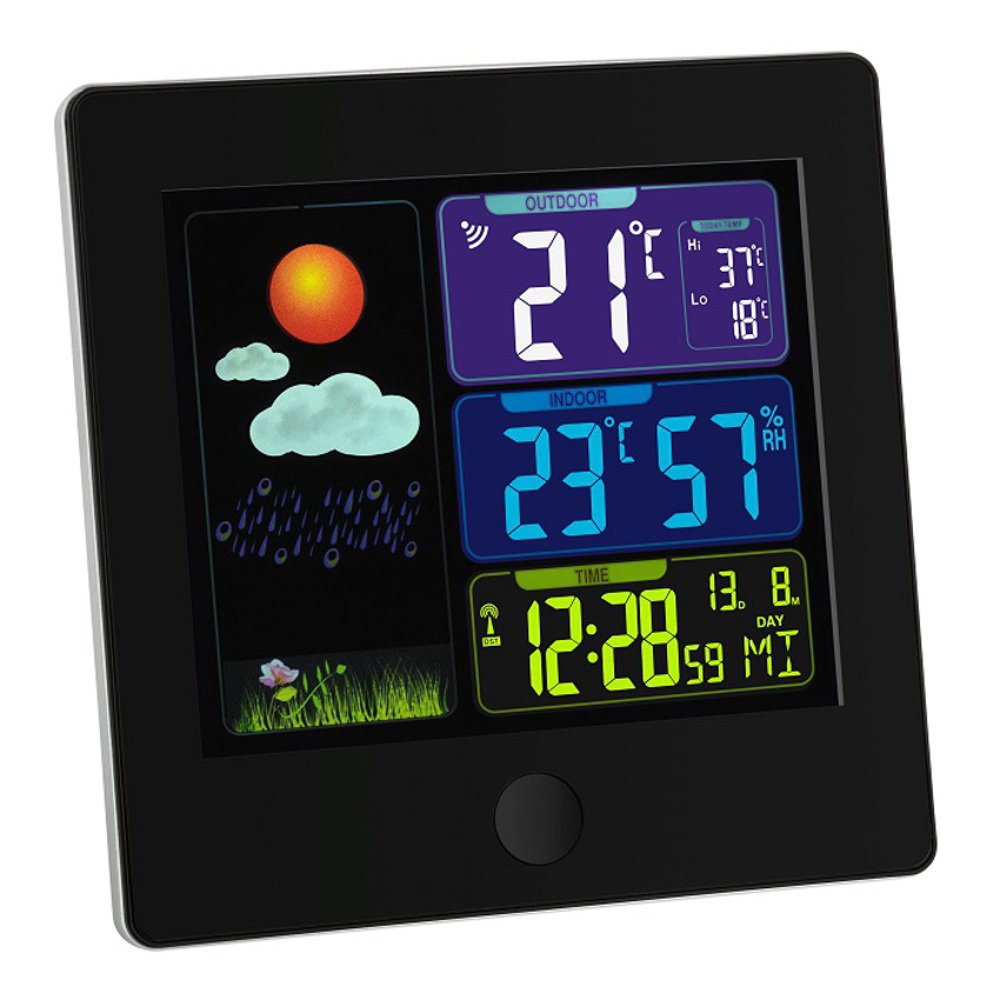
Image 1: TFA 35.1133.01 Sun Funk Weather Station. This image shows the main display unit and the compact wireless outdoor sensor. The main unit features a clear digital display, while the outdoor sensor is designed for external placement.
Карактеристике главне јединице:
- Large LCD display for easy reading.
- Indoor temperature display.
- Outdoor temperature display (from wireless sensor).
- Weather forecast icons (sunny, partly cloudy, cloudy, rainy).
- Radio-controlled clock (DCF77 signal for automatic time synchronization).
- Одељак за батерије.
Карактеристике спољног сензора:
- Сензор температуре.
- Wireless transmission to the main unit.
- Одељак за батерије.
- Wall mounting option.
5. Подешавање
5.1 Инсталација батерије
- Спољни сензор: Open the battery compartment cover on the back of the outdoor sensor. Insert 2 x AAA batteries, observing the correct polarity (+/-). Close the cover securely.
- Главна јединица: Open the battery compartment cover on the back of the main unit. Insert 2 x AAA batteries, observing the correct polarity (+/-). Close the cover securely.
- Important: Always insert batteries into the outdoor sensor first, then into the main unit. This ensures proper synchronization.
5.2 Постављање сензора
- Place the outdoor sensor in a shaded, dry location, protected from direct sunlight and rain, to ensure accurate temperature readings.
- Ensure the sensor is within the wireless range of the main unit (typically up to 30 meters in open air). Walls and other obstacles can reduce this range.
- Avoid placing the sensor near heat sources (e.g., vents, windows) or cold sources (e.g., refrigerators).
5.3 Почетна синхронизација и подешавање времена
- After inserting batteries, the main unit will automatically search for the outdoor sensor signal. This may take a few minutes. The outdoor temperature will appear on the display once connected.
- The main unit will also attempt to receive the DCF77 radio time signal. This signal automatically sets the correct time and date. Place the main unit near a window for better reception. This process can take several minutes or even hours, depending on your location and signal strength.
- If the DCF77 signal is not received, you may need to manually set the time and date. Refer to the specific button functions on your device (e.g., MODE, SET buttons) for manual adjustment.
6. Упутство за употребу
6.1 Приказ информација
The main unit's display typically shows the following information:
- Време и датум: Automatically set by the DCF77 radio signal.
- Унутрашња температура: Тренутна температура коју мери главна јединица.
- Спољна температура: Current temperature transmitted from the wireless sensor.
- Временска прогноза: Represented by icons (e.g., sun, clouds, rain) indicating predicted weather changes based on atmospheric pressure trends.
- Индикатор јачине сигнала: For both the outdoor sensor and the DCF77 time signal.
6.2 Button Functions (Exampле)
While specific button labels may vary, common functions include:
- МОДЕ/СЕТ: Used to switch between display modes (e.g., time, alarm) or to enter setting mode.
- +/ADJ: Used to increase values during setting or to manually adjust time/date.
- -/MEM: Used to decrease values during setting or to view minimum/maximum temperature records.
- КАНАЛ: If multiple outdoor sensors are supported, this button cycles through channels.
Refer to the specific button layout on your device for precise functions.
7. Одржавање
7.1 Замена батерије
- When the battery indicator appears on the display, replace the batteries in the respective unit (main unit or outdoor sensor).
- Always replace all batteries in a unit at the same time with new ones of the same type.
- Истрошене батерије одложите у складу са локалним прописима.
7.2 Чишћење
- Очистите уређај меком, дamp тканина. Немојте користити абразивна средства за чишћење или раствараче.
- Ensure no moisture enters the device's interior.
7.3 Складиштење
- If the device will not be used for an extended period, remove all batteries to prevent leakage.
- Чувајте уређај на хладном и сувом месту.
КСНУМКС. Решавање проблема
| Проблем | Могући узрок | Решење |
|---|---|---|
| Нема дисплеја на главној јединици. | Depleted or incorrectly inserted batteries. | Замените батерије, водећи рачуна о исправном поларитету. |
| Outdoor temperature not displayed or flashing. | Outdoor sensor out of range, depleted batteries, or interference. |
|
| Incorrect outdoor temperature reading. | Сензор је изложен директној сунчевој светлости или извору топлоте. | Relocate the outdoor sensor to a shaded, well-ventilated area. |
| Time not automatically set (DCF77 signal). | Poor signal reception due to location or interference. |
|
9. Спецификације
| Феатуре | Детаљ |
|---|---|
| Број модела | 35.1133.01 |
| Бранд | ТФА-Достманн |
| Димензије производа | Main Unit: 2.5 x 12 x 12 cm; 168 g |
| Power (Main Unit) | 2 к ААА батерије (нису укључене) |
| Power (Outdoor Sensor) | 2 к ААА батерије (нису укључене) |
| Материјал | Пластика |
| Посебна карактеристика | Lightweight, Radio-controlled time (DCF77) |
| Препоручена употреба | Indoor/Outdoor temperature monitoring |
| Домет | Up to 30 meters (open air, may vary with obstacles) |
10. Гаранција и подршка
10.1 Информације о гаранцији
This product is typically covered by a 1-годишња комерцијална гаранција from the date of purchase. This warranty covers manufacturing defects and material faults. It does not cover damage caused by improper use, accidents, unauthorized repairs, or normal wear and tear. Please retain your proof of purchase for warranty claims.
10.2 Корисничка подршка
For technical assistance, warranty claims, or further information, please contact your retailer or the manufacturer's customer service department. Contact details can usually be found on the product packaging or the manufacturer's official webсајту.
Произвођач: ТФА-Достманн