
Увод
The Cambridge Audio Azur 851N is a high-performance digital preamplifier and network player designed to deliver exceptional audio quality from various digital sources. It functions as a digital preamplifier, a network player for streaming audio, and a high-performance Digital-to-Analog Converter (DAC). This manual provides essential information for setting up, operating, and maintaining your Azur 851N.
Безбедносне информације
Please read all safety instructions before operating this unit. Keep this manual for future reference.
- Напајање: Only use the power cable supplied with the unit. Ensure the voltagе одговара вашем локалном извору напајања.
- вентилација: Не блокирајте вентилационе отворе. Оставите довољно простора око уређаја за правилан проток ваздуха.
- Влага: Не излажите уређај киши, влази, капању или прскању. Не стављајте предмете напуњене течношћу, као што су вазе, на уређај.
- топлота: Не постављајте близу извора топлоте као што су радијатори, грејни регистри, пећи или други апарати (укључујући ampлифиерс) који производе топлоту.
- Сервисирање: Не покушавајте сами да сервисирате овај производ. Све сервисирање препустите квалификованом сервисном особљу.
Шта је у кутији
Carefully unpack your Azur 851N. The package should contain the following items:
- Азур 851Н мрежни плејер
- Повер Цабле
- 3 к ААА батерије
- Ремоте Цонтрол
- Цонтрол Бус Цабле
- Ви-Фи Донгле
Производ је завршенview
The Azur 851N integrates multiple audio components into one unit, offering versatile connectivity and high-fidelity sound processing.
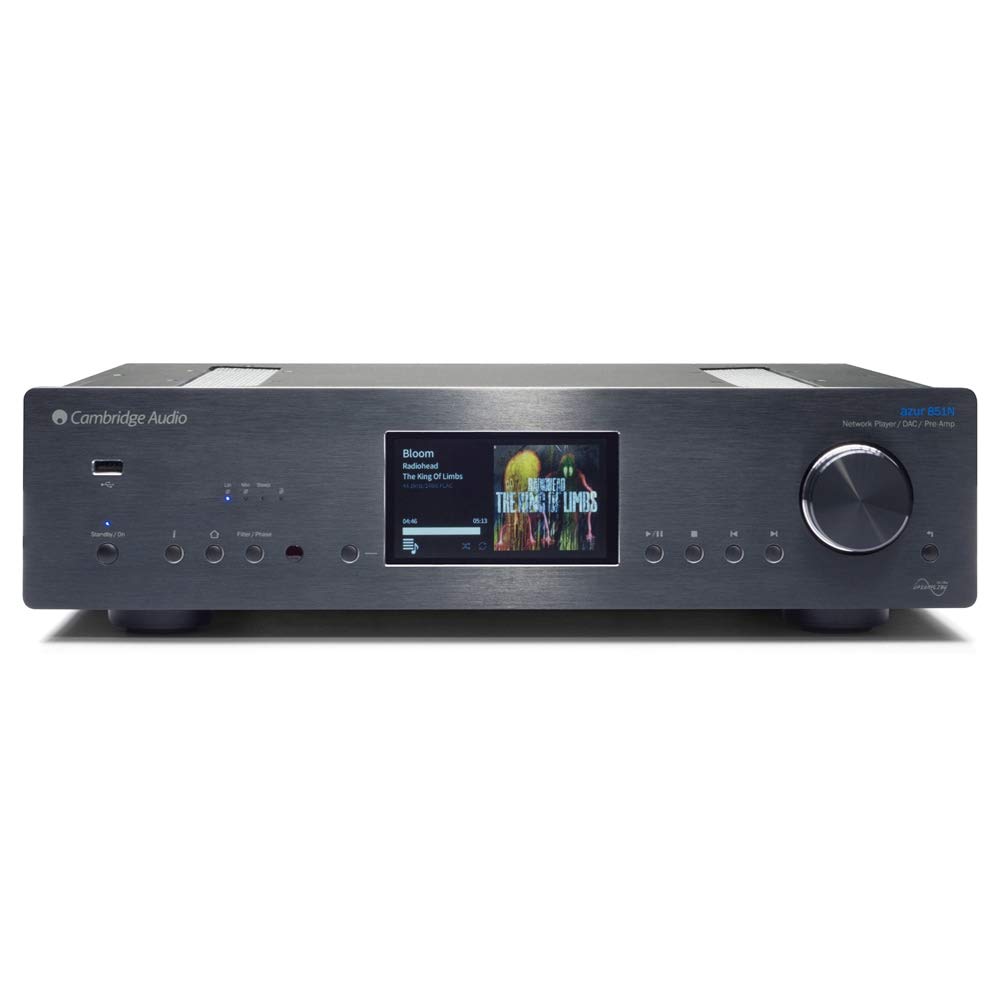
Фронт view of the Cambridge Audio Azur 851N, showing the display, control knob, and various buttons.
Кључне карактеристике:
- Дигитал Преampдизалица: Connects directly to power ampлифиерс или интегрисани ampлифиерс.
- Мрежни плејер: Streams audio via wired Ethernet or Wi-Fi.
- High-Performance DAC: Features Twin Analog Devices AD1955 24-bit DACs.
- Advanced Upsampлинг: ATF2 up-s друге генерацијеampling to 24-bit/384kHz with selectable filter modes.
- Екстензивно повезивање: Includes AES/EBU, S/PDIF coaxial, TOSLINK optical, USB Type B, Balanced XLR, and Unbalanced RCA outputs.
- Бежични стриминг: Supports UPnP, Internet Radio, Spotify, Tidal, Apple AirPlay, and Bluetooth (via BT100 receiver).
- Контролна апликација: Compatible with Cambridge Audio's control app for Apple and Android devices.
Сетуп
1. Физичко смештање
Place the Azur 851N on a flat, stable surface away from direct sunlight, heat sources, and excessive moisture. Ensure there is adequate ventilation around the unit to prevent overheating.
2. Везе
Before making any connections, ensure the Azur 851N and all other audio components are powered off.
- Дигитални аудио улази: Connect your digital sources (CD players, media servers, etc.) to the 1 x AES/EBU, 2 x S/PDIF coaxial, or 2 x TOSLINK optical inputs.
- USB Audio Input (Type B): Connect your computer to this input for high-resolution audio playback. Select USB Audio profile 1.0 or 2.0 as required.
- Analogue Audio Outputs: Connect the Balanced XLR or Unbalanced RCA analogue audio outputs to your ampлифиер или активни звучници.
- Етхернет: For the most stable network connection, connect an Ethernet cable from your router to the Ethernet port on the 851N.
- Ви-Фи: Insert the supplied Wi-Fi dongle into an available USB port on the rear panel for wireless network connectivity.
- Control Bus: Use the Control Bus Cable to connect to other compatible Cambridge Audio components for integrated control.
3. Прикључак за напајање
Once all audio and network connections are made, connect the supplied power cable to the Azur 851N and then to a suitable wall outlet.
Упутство за употребу
1. Укључивање/искључивање
Press the power button on the front panel or the remote control to turn the unit on or off. The display will illuminate upon power-up.
2. Podešavanje mreže
Upon first power-up or after a factory reset, the unit may guide you through network setup. Follow the on-screen prompts to connect to your wired or wireless network. For Wi-Fi, select your network and enter the password using the front panel controls or the remote.
3. Стриминг сервиси
- УПнП: Приступ музици files stored on your local network via UPnP servers.
- Интернет радио: Прегледајте и слушајте хиљаде интернет радио станица.
- Спотифи Цоннецт: Stream music directly from the Spotify app on your device.
- плима: Access your Tidal subscription for high-fidelity streaming.
- Епл ЕрПлеј: Stream audio wirelessly from Apple devices.
- Блуетоотх: Pair your Bluetooth device (via BT100 dongle) to stream audio.
4. Репродукција USB медија
Connect a USB storage device (thumb drive or external hard drive) to the USB A ports on the front or rear panel. The 851N will scan the device for compatible audio files. Navigate through folders and select tracks using the front panel controls or the remote.
5. Control App Usage
Download the Cambridge Audio StreamMagic app from the Apple App Store or Google Play Store. This app provides a comprehensive interface for controlling the Azur 851N, browsing music libraries, and managing streaming services.
6. Режими дигиталног филтера
The Azur 851N features 2nd Generation ATF2 up-sampling with selectable digital filter modes: Linear Phase, Minimum Phase, or Steep. Experiment with these settings to find the sound profile that best suits your preferences and audio content.
Одржавање
To ensure the longevity and optimal performance of your Azur 851N, follow these maintenance guidelines:
- Чишћење: Use a soft, dry, lint-free cloth to clean the unit's exterior. Do not use abrasive cleaners, waxes, or solvents.
- вентилација: Regularly check that the ventilation openings are clear of dust and debris.
- Искључивање: Disconnect the unit from the power outlet if it will be unused for an extended period.
Решавање проблема
If you encounter issues with your Azur 851N, refer to the following common solutions:
| Проблем | Могући узрок / решење |
|---|---|
| Нема струје | Ensure the power cable is securely connected to the unit and the wall outlet. Check the power switch. |
| Нема излаза звука | Verify correct audio cable connections to your amplifier. Ensure the correct input source is selected on the 851N and your amplifier. Check volume levels. |
| Проблеми са мрежном везом | For wired connections, check the Ethernet cable. For Wi-Fi, ensure the dongle is inserted, the network is selected, and the password is correct. Restart your router and the 851N. |
| USB media playback problems | Ensure the USB device is formatted correctly (FAT32 or NTFS). Check for compatible audio file formats. Some external hard drives may require external power. |
| Даљински управљач не ради | Check and replace batteries. Ensure there are no obstructions between the remote and the unit's IR sensor. |
If the problem persists after attempting these solutions, please contact Cambridge Audio customer support.
Спецификације
| Феатуре | Детаљ |
|---|---|
| Д/А претварачи | Twin Analog Devices AD1955 24-битни DAC-ови |
| Дигитални филтер | ATF2 up-s друге генерацијеampling to 24-bit/384kHz (Linear Phase, Minimum Phase, Steep modes) |
| Аналогни филтер | 2-pole differential Bessel with DC servo (XLR and RCA outputs) |
| Дигитални аудио улази | 1 x AES/EBU, 2 x S/PDIF coaxial, 2 x TOSLINK optical |
| УСБ аудио улаз | USB Type B (USB Audio profile 1.0 or 2.0 selectable) |
| Аналогни аудио излази | Balanced XLR and Unbalanced RCA |
| Compatibility (UPnP, Local USB) | Linear PCM 16-24 bit, 11.025-192kHz |
| Compatibility (USB Audio 1.0) | Linear PCM 16-24 bit, 44.1-96kHz |
| Compatibility (USB Audio 2.0) | Linear PCM 16-24 bit, 44.1-192kHz or DSD x64 |
| Compatibility (TOSLINK, S/PDIF, AES3/EBU) | 16-24 bit, 32-192kHz |
| Блуетоотх | BT100 Bluetooth receiver: A2DP plus aptX |
| Интернет Радио | 16-24 bit, 11.025-192kHz |
| Аудио формати | АЛАЦ, ВАВ, ФЛАЦ, АИФФ, ДСД (к64), ВМА, МП3, ААЦ, ХЕ ААЦ, ААЦ+, ОГГ Ворбис |
| Етхернет | ИЕЕЕ 802.3, 10 Басе-Т или 100 Басе-Т |
| Ви-Фи | IEEE 802.11 b/g or n (2.4GHz) |
| Потрошња енергије у стању приправности | 0.5В |
| Димензије (В к Ш к Д) | КСНУМКС к КСНУМКС к КСНУМКСмм (КСНУМКС к КСНУМКС к КСНУМКС инча) |
| Тежина | 8.1 кг (17.9 лбс) |
Гаранција и подршка
Cambridge Audio products are designed and built to high standards. For warranty information and technical support, please refer to the documentation included with your product or visit the official Cambridge Audio webсајт. Сачувајте доказ о куповини за потребе гаранције.