
1. Увод
This manual provides essential information for the safe and efficient operation of your InFocus IN112a SVGA DLP Projector. Please read it thoroughly before using the projector and retain it for future reference. The InFocus IN112a is designed to deliver clear and bright projections for various applications, featuring SVGA resolution, HDMI connectivity, and 3D support.
2. Безбедносне информације
Придржавајте се следећих мера предострожности како бисте спречили оштећење пројектора и осигурали безбедност корисника:
- Do not look directly into the projector lens када је лamp је укључено. Интензивно светло може изазвати оштећење ока.
- Обезбедите одговарајућу вентилацију. Не блокирајте вентилационе отворе.
- Only qualified service personnel should open the projector casinг. Унутра нема делова које корисник може сам да поправи.
- Користите само кабл за напајање који се испоручује са пројектором.
- Држите пројектор даље од воде или влажног окружења.
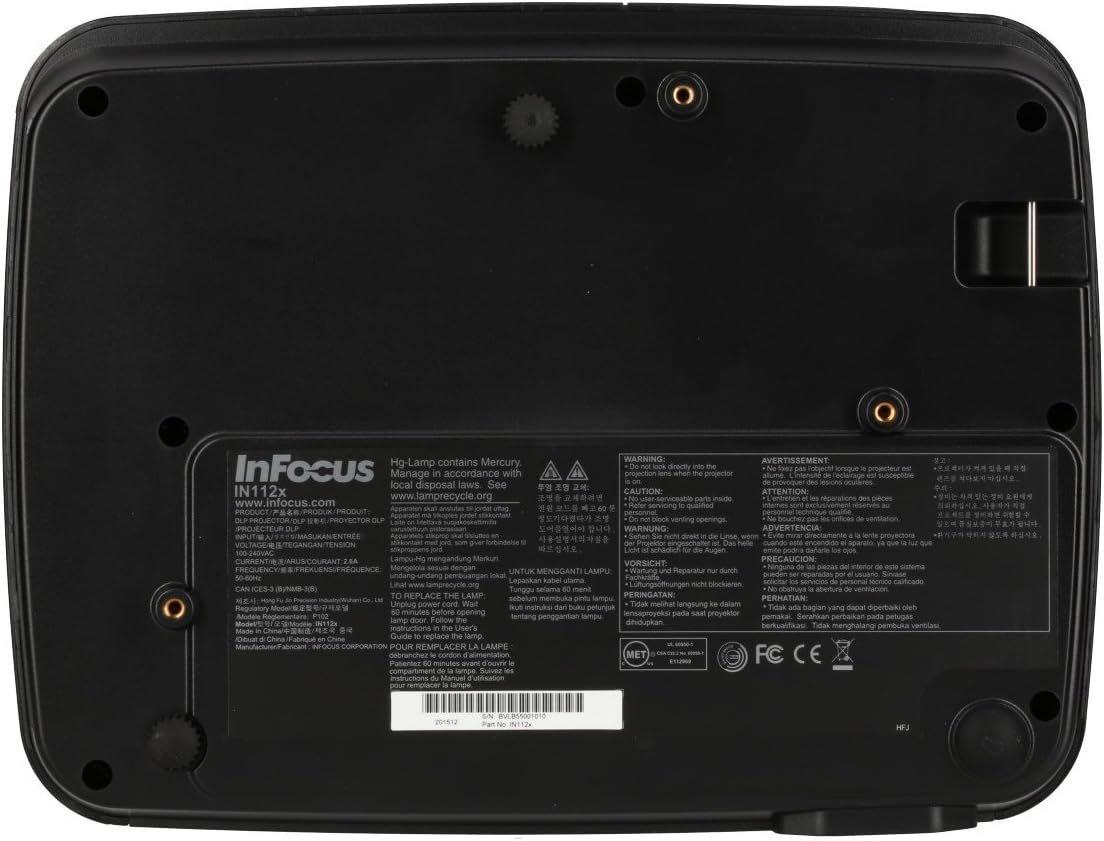
- Пројектор лamp садржи живу. Одложите лamps according to local regulations. Visit ввв.лampрецицле.орг за више информација.

Слика: Доња страна view of the InFocus IN112a projector, displaying various warning labels, regulatory compliance marks (like CE, FCC), and information regarding the mercury content in the lamp and recycling instructions.
3. Производ је готовview
3.1. Projector Dimensions

Слика: Фронт view of the InFocus IN112a projector, illustrating its physical dimensions. The projector measures approximately 292 mm in width, 220 mm in depth, and 108 mm in height.
3.2. Контроле на горњем панелу
Слика: Врх view of the InFocus IN112a projector, highlighting the control panel. This panel includes buttons for power, menu access, source selection, and directional navigation for menu adjustments.
The top panel features buttons for power on/off, menu access, input source selection, and navigation arrows for adjusting settings within the on-screen display (OSD) menu. The focus and zoom rings are located near the lens.
3.3. Прикључци задње плоче

Слика: Позади view of the InFocus IN112a projector, displaying its comprehensive array of connectivity ports. These include HDMI 1.4, two VGA inputs (Computer 1, Computer 2), a VGA monitor output, S-Video, Composite video, two 3.5mm stereo audio inputs, one 3.5mm stereo audio output, an RS232C control port, and a USB-B port.
The rear panel provides a variety of connection options:
- ХДМИ КСНУМКС: For digital video and audio input.
- VGA (Computer 1, Computer 2): Two inputs for analog computer signals.
- VGA Monitor Out: For connecting an external monitor.
- Композитни видео: For standard definition video input.
- С-Видео: For enhanced standard definition video input.
- Audio In (3.5mm x 2): За стерео аудио улаз.
- Аудио излаз (3.5 мм): For stereo audio output to external speakers.
- РС232Ц: За управљање пројектором преко рачунара или система за управљање.
- USB-B: За сервис или ажурирања фирмвера.
4. Подешавање
КСНУМКС. Постављање
Position the projector on a stable, flat surface or mount it securely to a ceiling. Ensure there is adequate space around the projector for ventilation. The distance from the screen will determine the image size. Refer to the specifications section for throw ratio details.
4.2. Повезивање напајања
Connect the supplied power cord to the projector's power inlet and then to a grounded electrical outlet. The power LED will illuminate, indicating standby mode.
4.3. Повезивање видео извора
Connect your video source (e.g., computer, Blu-ray player, cable box) to the appropriate input port on the projector's rear panel using a compatible cable. For best quality, use the HDMI input.
- ДВИ: Connect an HDMI cable from your source to the projector's HDMI port.
- ВГА: Connect a VGA cable from your computer to either the Computer 1 or Computer 2 port.
- Composite/S-Video: Connect the respective cable for older video sources.
4.4. Повезивање звука
If using VGA, Composite, or S-Video inputs, connect an audio cable from your source's audio output to one of the projector's 3.5mm Audio In ports. HDMI carries both video and audio, so a separate audio connection is not typically needed for HDMI sources.
4.5. Подешавање фокуса и зума
After powering on the projector and displaying an image, rotate the Прстен за фокус around the lens until the image is sharp and clear. Use the Зум прстен to adjust the image size to fit your screen.
5. Операција
5.1. Укључивање/искључивање
- За укључивање: Press the Power button on the projector's top panel or the remote control. The power indicator will turn green.
- За искључивање: Press the Power button twice. The projector will enter a cooling cycle, and the power indicator will turn red (standby) once complete.
5.2. Избор улазног извора
Press the "Source" button on the projector or remote control repeatedly to cycle through available input sources (HDMI, VGA1, VGA2, S-Video, Video). The projector will automatically detect an active signal if "Auto Source" is enabled in the menu.
5.3. Мену Навигатион
Press the "Menu" button to access the On-Screen Display (OSD) menu. Use the directional arrows to navigate through menu options and the "Enter" button to select. Press "Menu" again to exit.
5.4. 3D Content Playback
The IN112a supports 3D content from Blu-ray players, cable boxes, dish services (over HDMI), and PC-based 3D content at 120Hz. To view 3D content, you will need 144 Hz DLP Link 3D glasses (sold separately).
- Ensure your 3D source is connected via HDMI.
- Play 3D content from your source.
- Turn on your 144 Hz DLP Link 3D glasses. The projector should automatically detect the 3D signal.
6. Одржавање
6.1. Cleaning the Projector Lens
Gently wipe the lens with a soft, lint-free cloth specifically designed for optical surfaces. Do not use abrasive cleaners or excessive force, as this can scratch the lens.
6.2. Лamp Замена
Пројектор лamp has a lifespan of up to 10,000 hours. When the lamp life is nearing its end, a warning message may appear, or the lamp indicator LED may illuminate. Refer to the full service manual for detailed lamp упутства за замену. Упозорење: лamp садржи живу. Одлагати искоришћене лampу складу са локалним прописима о заштити животне средине.
6.3. Cleaning Air Filters
Regularly clean the air filters to ensure proper ventilation and prevent overheating. Dust and debris can accumulate, reducing cooling efficiency. Gently remove the filter cover and clean the filter with a soft brush or vacuum cleaner. Replace the filter cover securely.
КСНУМКС. Решавање проблема
| Проблем | Могући узрок | Решење |
|---|---|---|
| Нема приказане слике |
|
|
| Слика је мутна |
|
|
| Нема звука |
|
|
| Пројектор се прегрева и гаси |
|
|
8. Спецификације
| Феатуре | Детаљ |
|---|---|
| Број модела | ИН112Кс |
| Дисплаи Тецхнологи | ДЛП |
| Нативе Ресолутион | СВГА (800 к 600) |
| Осветљеност | До КСНУМКС Лумена |
| Однос контраста | 15,000:1 |
| Lamp Живот | До 10,000 сати |
| Повезивање | HDMI 1.4, VGA x 2, Composite video, S-Video, 3.5 mm stereo in x 2, 3.5mm stereo out, VGA monitor out, RS232C, USB-B |
| 3Д подршка | Yes (requires 144 Hz DLP Link 3D glasses) |
| Тхров Ратио | 1.9 - 2.09 |
| Димензије производа | 14.25 x 12 x 7.75 инча (приближно 36.2 x 30.5 x 19.7 цм) |
| Тежина артикла | 5.4 фунти (приближно 2.45 кг) |
| Препоручена употреба | Индоор/Оутдоор |
| Посебна карактеристика | Уграђени звучници |
9. Гаранција и подршка
For warranty information and technical support, please refer to the documentation included with your purchase or visit the official InFocus webсајт. Сачувајте доказ о куповини за потребе гаранције.