
1. Увод
The Innovo Medical FR201 is a non-contact infrared thermometer designed for accurate and reliable temperature measurement of the human body. It offers a safe and hygienic method for temperature screening, suitable for infants, children, adults, and the elderly. This device is CE and FDA cleared, ensuring its quality and safety standards.
Кључне карактеристике укључују:
- Non-contact measurement for hygiene.
- One-second reading for quick results.
- Switchable between Fahrenheit (°F) and Celsius (°C).
- Silent and audible mode options.
- Memory recall for up to 20 previous readings.
2. Безбедносне информације и мере предострожности
Please read this manual thoroughly before using the thermometer. Improper use may lead to inaccurate readings or device damage.
- Не урањајте термометар у воду или друге течности.
- Држите уређај даље од директне сунчеве светлости, прашине и екстремних температура.
- Избегавајте испуштање термометра или његово излагање јаким ударцима.
- Не покушавајте сами да раставите или поправите уређај.
- Користите само наведени тип батерија (2 ААА батерија).
- Држите батерије ван домашаја деце.
- Consult a medical professional if you have concerns about temperature readings.
- This thermometer is intended for household use and should not replace professional medical advice.
3. Производ је готовview
Familiarize yourself with the components of your Innovo FR201 thermometer.
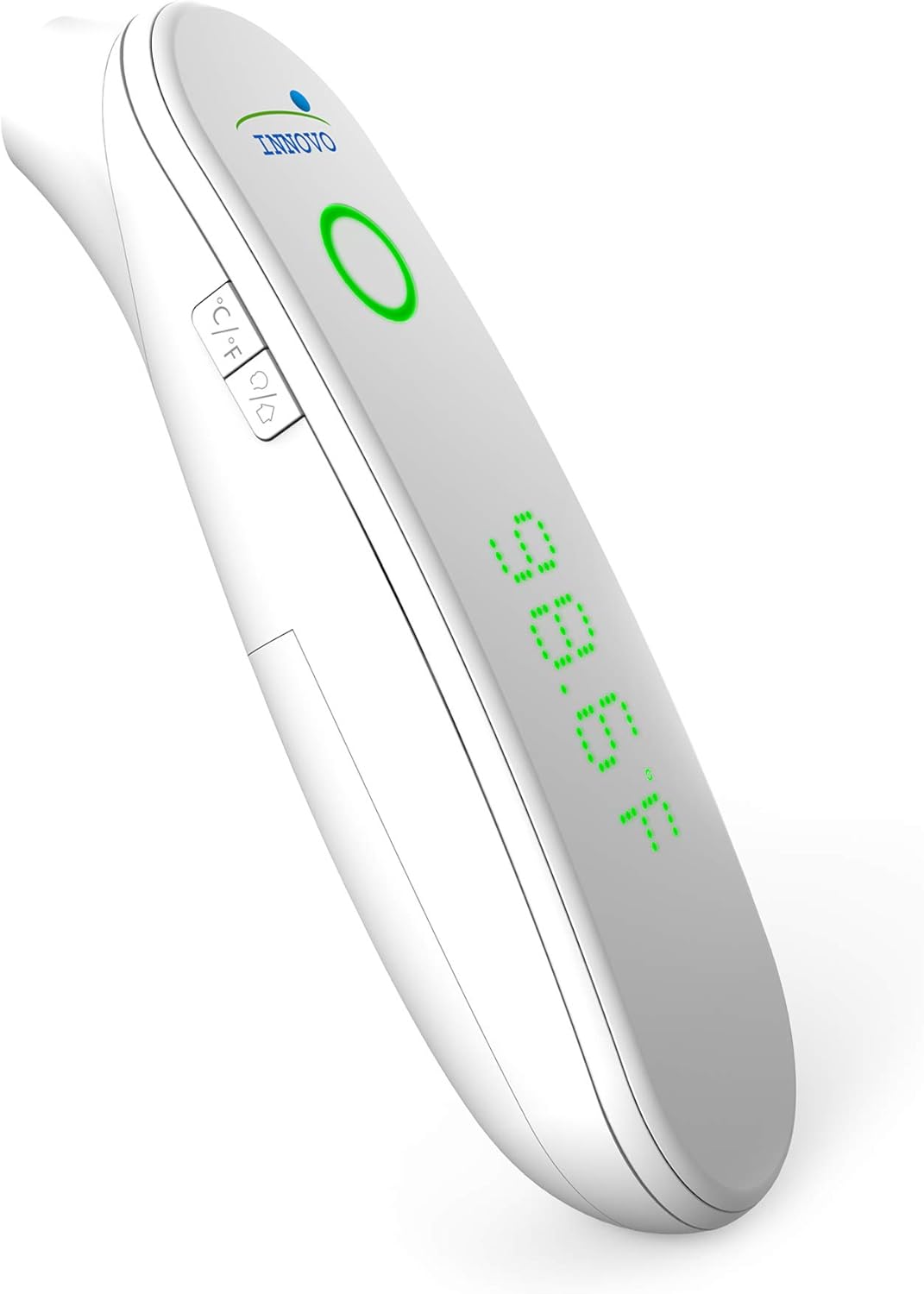
Слика 1: Предња страна view of the Innovo FR201 thermometer, highlighting the display, measurement button, and mode selection buttons.
The thermometer features a clear LCD display, a measurement button, and buttons for switching between Fahrenheit/Celsius and silent/audible modes. The infrared sensor is located at the front of the device.
4. Подешавање
4.1 Инсталација батерије
The Innovo FR201 thermometer requires 2 AAA batteries (included).
- Пронађите поклопац одељка за батерије на задњој страни термометра.
- Отворите поклопац.
- Уметните две ААА батерије, водећи рачуна о исправном поларитету (+ и -) као што је назначено унутар одељка.
- Затворите поклопац одељка за батерије док не кликне на своје место.
Термометар је сада спреман за употребу.
5. Упутство за употребу
5.1 Taking a Forehead Temperature Measurement
- Ensure the thermometer is in forehead measurement mode. If not, press the mode button to switch.
- Држите термометар отприлике 2-5 цм од средишта чела.
- Притисните и отпустите дугме за мерење.
- Очитавање температуре ће се приказати на ЛЦД екрану у року од једне секунде.
- A beep will sound (if not in silent mode) to indicate the measurement is complete.
Напомена: For best accuracy, ensure the forehead is clean and dry, free from hair or sweat. Wait at least 30 seconds between measurements if taking multiple readings on the same person.
5.2 Switching Between Fahrenheit and Celsius
With the thermometer turned on, press the °C/°F button to toggle between Fahrenheit and Celsius display modes.
5.3 Silent and Audible Mode
To switch between silent and audible modes, press the speaker icon button. The display will indicate if silent mode is active.
5.4 Позивање из меморије
Термометар може да сачува до 20 претходних мерења температуре.
- With the thermometer turned on, press the "MEM" button (or similar memory icon, refer to device for exact icon).
- Each press of the "MEM" button will cycle through the stored readings, from most recent to oldest.
6. Одржавање
6.1 Чишћење термометра
Regular cleaning ensures accurate readings and extends the life of your device.
- Wipe the thermometer body with a soft, dry cloth.
- For the infrared sensor, gently wipe with a cotton swab lightly moistened with alcohol. Allow to dry completely before use.
- Не користите абразивна средства за чишћење нити потапајте уређај у воду.
6.2 Складиштење
When not in use, store the thermometer in its protective carrying case in a cool, dry place, away from direct sunlight and extreme temperatures.

Image 2: Innovo FR201 thermometer with its user manual and protective carrying case, illustrating proper storage.
If the thermometer will not be used for an extended period, remove the batteries to prevent leakage.
КСНУМКС. Решавање проблема
| Проблем | Могући узрок | Решење |
|---|---|---|
| Приказано је „Lo“ или „Hi“ | Temperature is outside the measurement range (e.g., below 89.6°F / 32°C or above 109.2°F / 42.9°C). | Ensure the thermometer is used within the specified ambient temperature range. Re-measure correctly. |
| Нетачна очитавања | Dirty sensor, incorrect measurement distance, environmental factors (drafts, direct sunlight), recent activity (eating, exercising). | Clean the sensor. Ensure correct distance and stable environment. Wait 15-30 minutes after activity before measuring. |
| No display / Device won't turn on | Празне или неправилно уметнуте батерије. | Замените батерије новим ААА батеријама, водећи рачуна о исправном поларитету. |
| Порука „Грешка“ | System error or malfunction. | Remove batteries, wait 1 minute, then reinsert. If error persists, contact customer support. |
8. Спецификације
| Модел: | FR201 (10499DC2-O) |
| Опсег мерења: | Body: 89.6°F - 109.2°F (32.0°C - 42.9°C) |
| Тачност мерења: | ± 0.4 ° Ф (± 0.2 ° Ц) |
| Резолуција екрана: | 0.1°Ф / 0.1°Ц |
| Удаљеност мерења: | 1-2 инча (2-5 цм) |
| Меморија: | 20 читања |
| Извор напајања: | 2 к ААА батерије (укључене) |
| Аутоматско искључивање: | Approximately 30 seconds after last measurement |
| Димензије производа: | 6.8 к 5 к 2.6 инча |
| Тежина артикла: | 0.5 фунте (8 унци) |
| Спецификација испуњена: | ЦЕ, ФДА |
9. Гаранција и подршка
Innovo Medical products are designed for reliability and durability. For specific warranty details, please refer to the warranty card included with your product or visit the official Innovo Medical webсајту.
If you encounter any issues or have questions regarding your Innovo FR201 thermometer, please contact Innovo Medical customer support. Contact information can typically be found on the product packaging or the official Innovo Medical webсајту.
Напомена: The provided product data does not contain explicit warranty duration or direct support contact details. Please refer to the manufacturer's official resources for the most current information.