
1. Увод
Хвала вам на куповиниasing the Marvo G904 6D Optical Wired Gaming Mouse. This manual provides essential information for the proper setup, operation, and maintenance of your new gaming mouse. Please read this manual thoroughly before use to ensure optimal performance and longevity of the product.
2. Производ је готовview
The Marvo G904 is a high-performance 6D optical wired gaming mouse designed for precision and comfort. It features an AVago3050 sensor, adjustable DPI settings, and programmable buttons to enhance your gaming experience.

Figure 1: Marvo G904 Gaming Mouse with blue LED lighting, showcasing its ergonomic design and illuminated accents.

Figure 2: Marvo G904 Gaming Mouse displaying green LED lighting, indicating different lighting modes or DPI settings.
3. Подешавање
Follow these steps to set up your Marvo G904 gaming mouse:
- Распакујте миш: Carefully remove the mouse and any accessories from its packaging.
- Повежите се са рачунаром: Plug the USB connector of the mouse into an available USB port on your computer. The mouse is plug-and-play for basic functionality.
- Install Driver (Optional for Advanced Features): For full functionality, including macro programming and advanced DPI settings, insert the provided CD driver into your computer's optical drive and follow the on-screen instructions to install the software. If your computer does not have an optical drive, please visit the official Marvo webсајт за преузимање драјвера.

Figure 3: Marvo G904 Gaming Mouse packaging, which includes the driver CD.
4. Упутство за употребу
The Marvo G904 mouse features 6 buttons and adjustable DPI settings for versatile control.
4.1 Функције дугмета
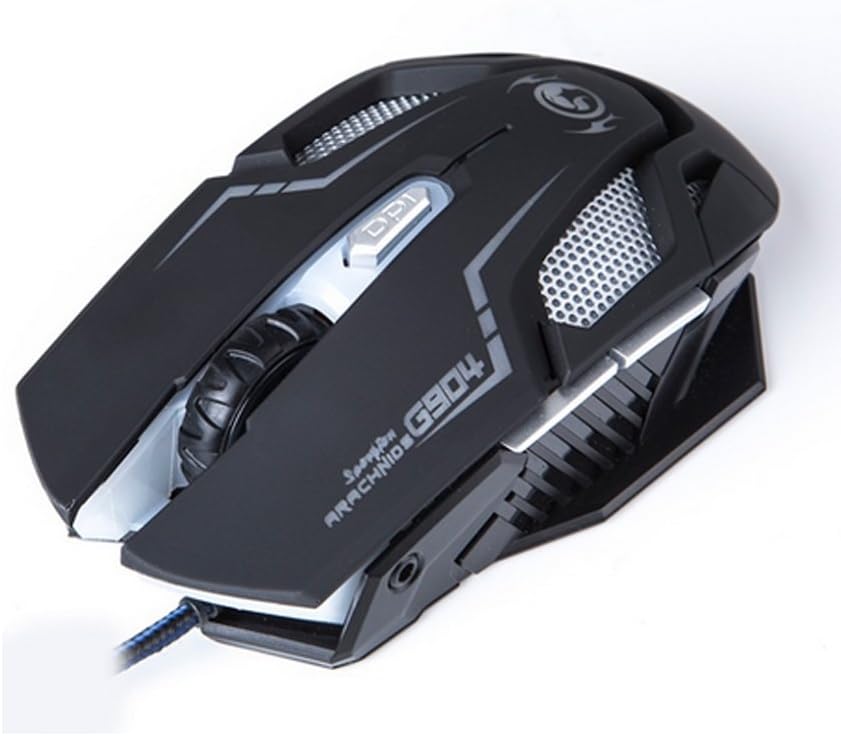
Слика 4: Врх view of the Marvo G904 Gaming Mouse, highlighting the placement of its 6 buttons.
- Леви клик: Стандардна функција примарног клика.
- Десни клик: Стандардна функција секундарног клика.
- Точак за померање: Scrolls up/down. Can also be pressed for a middle click function.
- DPI Shift Button: Cycles through DPI settings (1000, 2000, 3000, 4000).
- Бочна дугмад (2): Typically function as 'Forward' and 'Back' in web претраживачи и file explorers. These can be programmed using the driver software.
4.2 ДПИ подешавање
Притисните тастер DPI Shift Button (located behind the scroll wheel) to cycle through the available DPI settings: 1000, 2000, 3000, and 4000 DPI. Each DPI level may be indicated by a change in the mouse's LED lighting color or pattern, depending on the current light mode.
4.3 Macro Programming (with Light Mode)
Utilize the included CD driver software to customize button functions and create macros. The software also allows you to configure the mouse's LED lighting modes. Refer to the software's help section for detailed instructions on macro creation and light mode customization.
5. Одржавање
Правилно одржавање осигурава дуготрајност и оптималне перформансе вашег играчког миша.
- Чишћење: Користите меку, суву крпу да обришете површину миша. За тврдокорну прљавштину, благо обришитеampОбришите крпу водом или благим раствором за чишћење. Избегавајте употребу јаких хемикалија или абразивних материјала.
- Брига о сензорима: Keep the optical sensor on the bottom of the mouse clean and free from dust or debris. Use a cotton swab or compressed air if necessary.
- Управљање кабловима: Избегавајте оштра савијања или прекомерно повлачење USB кабла како бисте спречили оштећења.
- Складиштење: Када се не користи, чувајте миш на чистом и сувом месту, даље од екстремних температура.
КСНУМКС. Решавање проблема
If you encounter issues with your Marvo G904 mouse, refer to the following common problems and solutions:
| Проблем | Решење |
|---|---|
| Миш не реагује. |
|
| DPI settings not changing. |
|
| Buttons not functioning correctly. |
|
| Покрет курсора миша је неправилан или скачкав. |
|
7. Спецификације
Detailed technical specifications for the Marvo G904 Gaming Mouse:

Слика 5: Дно view of the Marvo G904 Gaming Mouse, displaying model number, DPI range, and certification marks.
| Феатуре | Детаљ |
|---|---|
| Модел | Г904 |
| Тип сензора | Optical (AVago3050) |
| ДПИ подешавања | 1000 / 2000 / 3000 / 4000 ДПИ |
| Дугмад | 6D (6 Buttons) |
| Репорт Рате | 1000 Хз |
| Кључна издржљивост | 10 милиона кликова |
| Цабле Ленгтх | 1.5 метара |
| Димензије (Д*Ш*В) | 143 * 76 * 42 мм |
| Ратед Волtage | 5V |
| Називна струја | 10 мА |
| Компатибилност | PC |
| Боја | Црно |
8. Гаранција и подршка
For warranty information and technical support, please refer to the documentation provided with your purchase or contact your retailer. You may also visit the official MARVO website for further assistance and updated driver software.