
Miops Miops
Miops Smart Digital Camera Trigger User Manual
Model: Miops
Увод
The Miops Smart Digital Camera Trigger is an advanced device designed to expand the capabilities of your DSLR or mirrorless camera. It offers various triggering modes, including lightning, sound, laser, and timelapse, allowing photographers to capture unique moments with precision. This manual provides detailed instructions for setup, operation, and maintenance to ensure optimal performance of your Miops device.
Безбедносне информације
- Не излажите уређај води или прекомерној влази.
- Избегавајте екстремне температуре.
- Не покушавајте сами да растављате или поправљате уређај. Обратите се квалификованом сервисеру.
- Чувати ван домашаја деце.
- Use only specified charging cables and power sources.
Садржај пакета
Проверите да ли су све ставке присутне у пакету:
- Miops Smart Digital Camera Trigger device
- УСБ кабл за пуњење
- Camera connection cable (specific to your camera model, may be sold separately)
- Водич за брзи почетак

Слика 1: Miops Smart Digital Camera Trigger product box, showing the device and key features.
Производ је завршенview
The Miops Smart Trigger features a compact design with an LCD screen and intuitive controls. It connects wirelessly to your smartphone via Bluetooth for advanced control and mode selection.

Слика 2: The Miops Smart Digital Camera Trigger device shown alongside a DSLR camera, illustrating its compact size and purpose.
Сетуп
1. Пуњење уређаја
Before first use, fully charge your Miops device using the provided USB cable. Connect the cable to the device's charging port and a standard USB power adapter (not included) or a computer USB port. The charging indicator will show the charging status.
2. Connecting to Your Camera
Connect the Miops device to your camera's remote port using the appropriate camera connection cable. Ensure the cable is securely plugged into both the Miops unit and your camera.
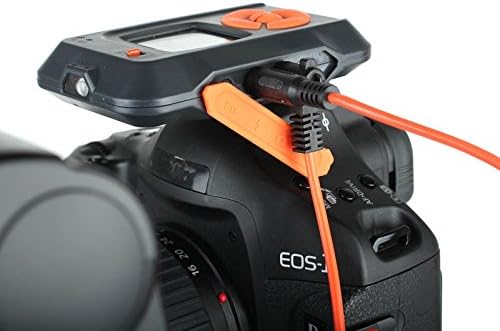
Слика 3: The Miops device connected to a camera's remote port using a dedicated cable, ready for operation.
3. Инсталација и упаривање апликације
- Download the Miops app from your smartphone's app store (iOS or Android).
- Turn on the Miops device.
- Омогућите Блуетоотх на свом паметном телефону.
- Open the Miops app and follow the on-screen instructions to pair with your device. The app will search for available Miops devices.
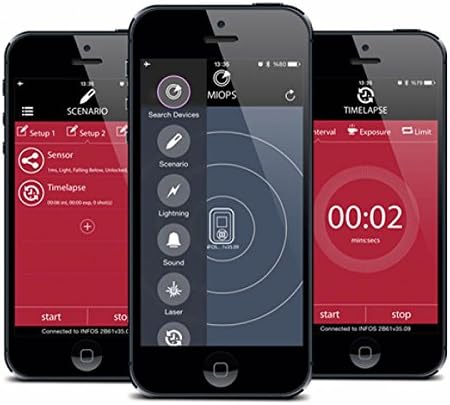
Слика 4: Screenshots of the Miops smartphone application interface, demonstrating its intuitive design for controlling the trigger.
Оперативни режими
The Miops Smart Trigger offers various modes for different photographic scenarios, controllable via the mobile app.
Лигхтнинг Моде
This mode is designed to capture lightning strikes. The device detects sudden changes in light and triggers the camera instantly. Adjust sensitivity settings in the app for optimal performance.

Слика 5: Бившиample photograph captured using the Miops Smart Trigger's lightning mode, showing multiple lightning bolts over a city.
Режим звука
The sound mode triggers the camera when a sound above a set threshold is detected. Ideal for capturing breaking objects, balloons popping, or other sound-activated events.
Ласерски режим
Utilizes a laser beam to detect movement. When the laser beam is broken, the camera is triggered. Useful for wildlife photography or capturing fast-moving subjects.
Timelapse Mode
Allows you to set intervals and exposure times for creating stunning timelapse sequences. Configure the number of shots, interval, and exposure duration directly from the app.

Слика 6: The Miops device mounted on a camera, demonstrating its use in capturing high-speed events, such as shattering glass.

Слика 7: A high-speed photograph illustrating the Miops trigger's capability to capture precise moments, such as an egg breaking upon impact.
Одржавање
- Чишћење: Use a soft, dry cloth to clean the device. Do not use liquid cleaners or solvents.
- Складиштење: Уређај чувајте на хладном и сувом месту, даље од директне сунчеве светлости и екстремних температура.
- батерија: For long-term storage, ensure the battery is partially charged (around 50%) to preserve its lifespan.
Решавање проблема
| Проблем | Могући узрок | Решење |
|---|---|---|
| Уређај се не укључује. | Ниска батерија. | У потпуности напуните уређај. |
| Не може се упарити са паметним телефоном. | Блутут је искључен; уређај није у режиму упаривања; сметње. | Ensure Bluetooth is on; restart both devices; try pairing in a different location. |
| Camera not triggering. | Incorrect cable connection; camera settings; trigger sensitivity. | Check cable connection; ensure camera is in remote trigger mode; adjust sensitivity in the app. |
Спецификације
| Феатуре | Детаљ |
|---|---|
| Бранд | Miops |
| Назив модела | Miops |
| Технологија повезивања | Блуетоотх |
| Компатибилни уређаји | Камера |
| Посебне карактеристике | Digital display, Rechargeable |
| Мак домет | 10 метара |
| Тип батерије | Потребна је 1 литијум-јонска батерија |
Гаранција и подршка
For warranty information and technical support, please refer to the official Miops webсајт или контактирајте њихову корисничку службу. Сачувајте доказ о куповини за потребе гаранције.
Произвођач: Miops
Ask a question about this manual
Ask about setup, troubleshooting, compatibility, parts, safety, or missing instructions. Manuals+ will review the question and use this page’s manual context to help answer it.