
1. Увод
The Edifier P180 is a stereo earbud headset designed for clear audio and convenient communication. Featuring an inline microphone and control, it offers a comfortable listening experience for various devices.

Figure 1: Edifier P180 Wired Earbud Headset
2. Шта је у кутији
- Edifier P180 Earbud Headset
- Кабл
3. Кључне карактеристике
- Classic Comfort: Ergonomic design for comfortable wear without irritating the ear canal.
- Врхунски квалитет звука: Equipped with 16mm neodymium magnetic monomers for high-fidelity audio playback.
- Integrated Microphone and Control: 3.5mm stereo earphones with a built-in microphone and remote button for mobile phone communication.
- Функционалност: Single button control for picking up/hanging up calls and skipping songs (device dependent for iOS/Android).
- Издржљив дизајн: Constructed with quality materials for longevity.

Figure 2: Ergonomic design for comfortable fit.
4. Подешавање
- Raspakujte: Carefully remove the Edifier P180 headset from its packaging.
- Прегледајте: Check the earbuds and cable for any visible damage.
- Повежите се: Insert the 3.5mm audio jack into the headphone port of your compatible device (smartphone, tablet, computer, etc.). Ensure the jack is fully inserted for proper audio and microphone function.
- позиција: Place the earbuds comfortably in your ears. The ergonomic design is intended to rest well without causing irritation.
5. Упутство за употребу
The Edifier P180 features an inline control button for easy management of calls and music playback.
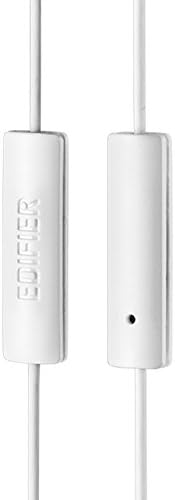
Figure 3: Inline microphone and control button.
- Одговарање / завршавање позива: Press the control button once to answer an incoming call. Press it again to end an active call.
- Пуштање/паузирање музике: Press the control button once to play or pause audio playback.
- Прескакање песама: Double-press the control button to skip to the next track. Triple-press to go to the previous track (functionality may vary by device and operating system).
- Гласовни асистент: Long-press the control button to activate your device's voice assistant (e.g., Siri, Google Assistant).
Видео 1: Званични производ је завршенview of the Edifier P180 Classic Earbud Headsets, demonstrating features and usage.
6. Одржавање
- Чишћење: Нежно обришите слушалице и кабл меком, сувом крпом. Избегавајте употребу јаких хемикалија или абразивних материјала.
- Складиштење: Када се не користе, чувајте слушалице на чистом и сувом месту, даље од екстремних температура и директне сунчеве светлости. Избегавајте запетљавање кабла.
- Избегавајте влагу: Do not expose the headset to water or excessive moisture, as this can damage the internal components.
КСНУМКС. Решавање проблема
- Нема звука:
- Уверите се да је 3.5 мм прикључак потпуно уметнут у аудио порт вашег уређаја.
- Проверите подешавања јачине звука на вашем уређају.
- Тестирајте слушалице са другим уређајем да бисте искључили проблем специфичан за тај уређај.
- Микрофон не ради:
- Уверите се да је 3.5 мм прикључак потпуно уметнут.
- Проверите подешавања улаза за микрофон на вашем уређају.
- Тестирајте микрофон са другим уређајем или апликацијом.
- Повремени звук:
- Check the cable for any kinks or damage.
- Уверите се да је аудио прикључак чист и без прљавштине.
8. Спецификације
| Феатуре | Спецификација |
|---|---|
| Број модела | П180 |
| Фреквенцијски одзив | 20 Hz - 20,000 Hz |
| Јацк за слушалице | 3.5 мм прикључак |
| Технологија повезивања | Виред |
| Тежина артикла | 1.76 унци (50 грама) |
| Димензије производа | 2.01 к 5.59 к 0.91 инча |
| Материјал | неодимијум |
| Тип контроле | Inline Control Button |
| Импеданса | 32 Охмс |
| Контрола буке | Звучна изолација |
9. Гаранција и подршка
The Edifier P180 headset is backed by a 1 година гаранције. For any support inquiries or warranty claims, please refer to the contact information provided with your purchase or visit the official Edifier webсајту.