
1. Увод
This manual provides detailed instructions for the safe and effective operation of the Meco 2250-HZ Auto Digital Clamp Meter. This device is designed for measuring various electrical parameters, including AC/DC voltage, AC current, frequency, continuity, and diode testing. Please read this manual thoroughly before use and retain it for future reference.
2. Безбедносне информације
Always observe standard safety precautions when working with electrical circuits. Failure to do so may result in injury or damage to the meter. This meter is designed with over-voltage protection up to 200V DC and AC Peak. However, exercise caution.
- Не покушавајте да мерите волtagили струје које прелазе наведене максималне границе.
- Ensure the test leads are in good condition and properly connected before making measurements.
- Do not operate the meter if it appears damaged or if the battery cover is not securely closed.
- Избегавајте коришћење мерача у влажним срединама или у присуству експлозивних гасова или прашине.
- Always disconnect power to the circuit before connecting or disconnecting test leads, especially for current measurements.
3. Производ је готовview
The Meco 2250-HZ Auto Digital Clamp Meter features a robust design for reliable performance. Familiarize yourself with the components shown below.
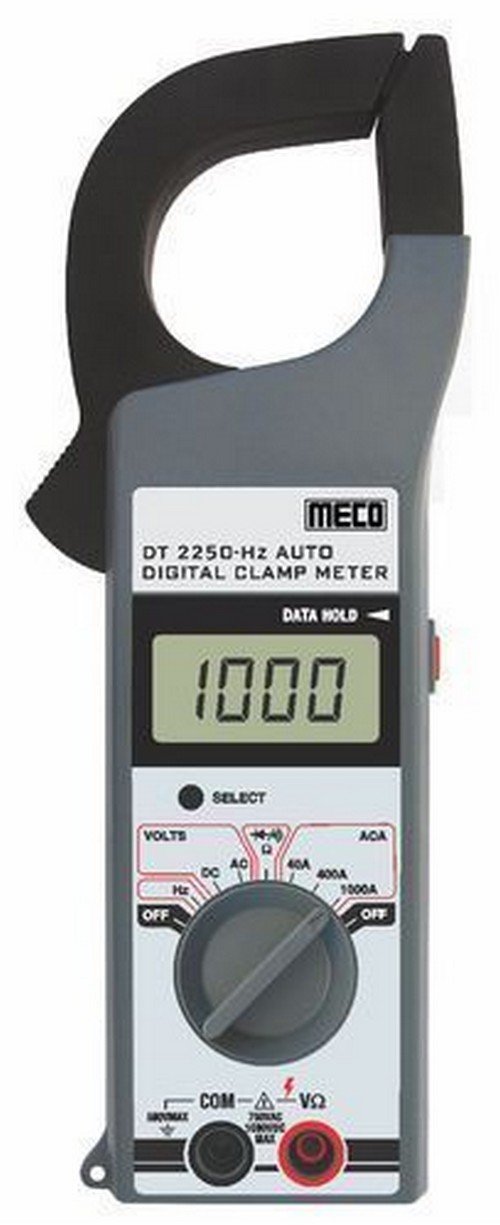
Слика 1: Фронт view of the Meco 2250-HZ Auto Digital Clamp Meter. This image displays the clamp jaw at the top, the LCD screen showing '1000', the function dial, and the input terminals at the bottom. The 'SELECT' and 'DATA HOLD' buttons are visible next to the display.
Кључне компоненте:
- Clamp вилица: Користи се за бесконтактно мерење наизменичне струје.
- ЛЦД екран: 3¾ digit liquid crystal display with a maximum reading of 3999. Shows measurement values, polarity, overrange indication (OL or -OL), and low battery indication.
- Точкић функција: Rotary switch to select measurement functions (OFF, Volts DC/AC, Hz, ACA 40A/400A/1000A).
- Дугме СЕЛЕЦТ: Used to switch between DC and AC voltage modes, or other sub-functions within a dial setting.
- DATA HOLD Button: Замрзава тренутно очитавање на екрану. Притисните поново да бисте отпустили.
- Улазни терминали (COM, VΩ): За повезивање мерних каблова за волуменtagе, отпор, континуитет и мерења диода.
4. Подешавање
4.1 Инсталација батерије
The Meco 2250-HZ Auto Digital Clamp Meter requires batteries for operation. Batteries are not included with the product. To install or replace batteries:
- Уверите се да је мерач ИСКЉУЧЕН.
- Пронађите одељак за батерије на задњој страни мерача.
- Користите одвијач да бисте отворили поклопац одељка за батерију.
- Уметните потребне батерије, водећи рачуна о исправном поларитету (+ и -).
- Вратите поклопац одељка за батерије и причврстите га завртњем.
A low battery indication will appear on the display when the battery voltage is low, signaling the need for replacement.
5. Упутство за употребу
5.1 Општи рад
- Turn the function dial to the desired measurement setting.
- Connect test leads to the appropriate input terminals (COM and VΩ) for voltage, resistance, continuity, or diode tests.
- For current measurements, use the clamp jaw around a single conductor.
- Притисните тастер СЕЛЕЦТ button to toggle between AC/DC modes or other sub-functions if available for the selected range.
- Притисните тастер ДАТА ХОЛД дугме да замрзнете тренутно очитавање на екрану. Притисните поново да бисте отпустили.
5.2 АЦ/ДЦ Волtagе Мерење
- Set the function dial to the "VOLTS" position.
- Connect the black test lead to the COM terminal and the red test lead to the VΩ terminal.
- Притисните тастер СЕЛЕЦТ button to choose between AC or DC voltage measurement. The display will indicate "AC" or "DC".
- Повежите мерне каблове паралелно са колом или компонентом која се тестира.
- Прочитајте књtagе вредност на ЛЦД екрану.
5.3 Мерење наизменичне струје (Clamp)
- Set the function dial to the desired AC current range (40A, 400A, or 1000A).
- Отворите цлamp вилицу притиском на окидач.
- Затворите само један проводник кола унутар clamp вилица. Уверите се да је вилица потпуно затворена.
- Очитајте вредност наизменичне струје на ЛЦД екрану.
5.4 Frequency (Hz) Measurement
- Set the function dial to the "Hz" position.
- Connect the black test lead to the COM terminal and the red test lead to the VΩ terminal.
- Connect the test leads in parallel to the circuit where frequency needs to be measured.
- Read the frequency value in Hertz (Hz) on the LCD display.
5.5 Audible Continuity Check
- Set the function dial to the continuity/diode symbol (often shared with resistance).
- Connect the black test lead to the COM terminal and the red test lead to the VΩ terminal.
- Touch the test probes across the component or circuit to be tested.
- Ако постоји континуитет (низак отпор), мерач ће емитовати звучни сигнал.
5.6 Тест диоде
- Set the function dial to the continuity/diode symbol.
- Connect the black test lead to the COM terminal and the red test lead to the VΩ terminal.
- Connect the red test lead to the anode of the diode and the black test lead to the cathode. The display will show the forward voltagе дроп.
- Reverse the test leads. The display should show "OL" (overload) for a good diode.
6. Одржавање
6.1 Чишћење
Обришите ц бројилаasinг са огласомamp cloth and a mild detergent. Do not use abrasives or solvents. Keep the display clean and dry.
6.2 Замена батерије
Refer to Section 4.1 for battery installation and replacement instructions. Replace batteries promptly when the low battery indicator appears to ensure accurate readings.
КСНУМКС. Решавање проблема
| Проблем | Могући узрок | Решење |
|---|---|---|
| Мерач се не укључује. | Мртве или неправилно инсталиране батерије. | Проверите поларитет батерија и замените батерије ако је потребно. |
| "OL" or "-OL" displayed. | Overrange condition; measurement exceeds meter's range. | Select a higher range or ensure the measured value is within the meter's capabilities. |
| Нетачна очитавања. | Low battery, poor test lead connection, or incorrect function selection. | Replace batteries, ensure secure connections, verify function dial setting. |
| No audible beep during continuity test. | Отворено коло или висок отпор. | Verify the circuit is closed and resistance is low enough for continuity. |
8. Спецификације
| Феатуре | Детаљ |
|---|---|
| Дисплаи | 3¾ digit LCD, max reading 3999 |
| Поларитет | Automatic, negative polarity indication |
| Индикација прекорачења | "OL" or "-OL" displayed |
| Зеро Адјустмент | Аутоматски |
| Трајање батерије | Типично 200 сати |
| Овер Волtagе Заштита | 200V DC and AC Peak |
| Audible Continuity Check | Да |
| Диодни тест | Да |
| Индикација слабе батерије | Да |
| Тежина артикла | 600 г (1.32 фунти) |
| Димензије производа | 21 к 13 к 6 цм |
| Материјал | Пластика |
| Произвођач | Meco Instruments |
9. Гаранција и подршка
For warranty information or technical support, please contact the retailer or the manufacturer, Meco Instruments, directly. Keep your purchase receipt as proof of purchase.