
1. Увод
This manual provides comprehensive instructions for the setup, operation, and maintenance of the EDUP EP-3701 USB WiFi Disk. The EP-3701 is a portable wireless storage device designed to expand storage and facilitate data sharing for iOS and Android smartphones and tablets without the need for cables or a computer.
Молимо вас да пажљиво прочитате ово упутство пре употребе уређаја како бисте осигурали правилно функционисање и спречили оштећења.
2. Производ је готовview
The EDUP EP-3701 acts as a bridge between your USB storage devices (like USB flash drives or external hard drives) and your mobile devices via a Wi-Fi connection. It creates its own Wi-Fi hotspot, allowing multiple devices to connect and access stored fileс истовремено.
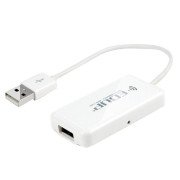
Слика 2.1: Предња страна view of the EDUP EP-3701 USB WiFi Disk, showing the USB host port and the integrated USB cable.
3. Кључне карактеристике
- Wireless Data Access: Приступ files on connected USB storage devices wirelessly from smartphones, tablets, and computers.
- Подршка за више корисника: Allows multiple users to connect and stream/access data simultaneously.
- Преносиви дизајн: Compact and lightweight, ideal for travel and on-the-go use.
- Извор напајања: Powered via USB, can be connected to a USB wall adapter, power bank, or computer USB port.
- Контрола апликације: Dedicated mobile application for easy file management and device configuration.
4. Садржај пакета
Проверите да ли су све ставке присутне у пакету:
- EDUP EP-3701 USB WiFi Disk
- Водич за брзи почетак (ово упутство)
5. Подешавање
5.1. Укључивање уређаја
- Connect the integrated USB cable of the EP-3701 to a USB power source (e.g., a 5V/1A USB wall adapter, a power bank, or a computer's USB port).
- The power indicator light on the device will illuminate, indicating it is powered on.
5.2. Connecting USB Storage
- Insert your USB flash drive or external hard drive into the USB host port on the EP-3701.
- Ensure the USB storage device is properly seated.
5.3. Connecting Mobile Device
- On your smartphone or tablet, go to Wi-Fi settings.
- Locate and connect to the Wi-Fi network named "EDUP_XXXXXX" (XXXXXX will be the last six digits of the device's MAC address).
- The default password is "12345678". It is recommended to change this password after initial setup.
- Download and install the "WiFi Disk" application from your device's app store (App Store for iOS, Google Play Store for Android).
- Open the "WiFi Disk" app. The app will automatically detect and connect to the EP-3701.
6. Упутство за употребу
6.1. File Менаџмент
- Прегледај Files: Within the "WiFi Disk" app, navigate through the folders and files on the connected USB storage.
- Уплоад Files: Трансфер files from your mobile device to the USB storage connected to the EP-3701.
- Преузми Files: Трансфер files from the USB storage to your mobile device.
- Стреам Медиа: Пуштајте видео записе, музику и view photos directly from the USB storage without downloading.
6.2. Мрежна подешавања
The "WiFi Disk" app allows you to configure network settings:
- Change Wi-Fi Name (SSID): Modify the name of the EP-3701's Wi-Fi network.
- Change Wi-Fi Password: Update the password for the Wi-Fi network.
- Internet Passthrough (Bridge Mode): Connect the EP-3701 to an existing Wi-Fi network to provide internet access to connected devices while still allowing access to the USB storage.
7. Одржавање
- Чишћење: Користите меку, суву крпу за чишћење спољашњости уређаја. Не користите течна средства за чишћење или аеросоле.
- Складиштење: Уређај чувајте на хладном и сувом месту, даље од директне сунчеве светлости и екстремних температура.
- Ажурирања фирмвера: Periodically check the "WiFi Disk" app or the EDUP official webсајт за ажурирања фирмвера како би се осигурале оптималне перформансе и безбедност.
- Безбедно уклањање: Always ensure data transfer is complete before disconnecting the USB storage device or powering off the EP-3701.
КСНУМКС. Решавање проблема
8.1. Уређај се не укључује
- Ensure the USB cable is securely connected to a working USB power source.
- Покушајте са другим УСБ портом или адаптером за напајање.
8.2. Не могу да се повежем са Wi-Fi мрежом
- Verify you are selecting the correct "EDUP_XXXXXX" network.
- Double-check the Wi-Fi password (default is "12345678").
- Restart the EP-3701 device and your mobile device.
8.3. USB Storage Not Detected
- Ensure the USB storage device is properly inserted into the EP-3701's USB host port.
- Check if the USB storage device is formatted in a supported file system (FAT32, NTFS, exFAT).
- Some high-power consumption external hard drives may require an external power source.
- Try a different USB storage device to rule out a faulty drive.
8.4. Апликација не функционише исправно
- Ensure your mobile device is connected to the EP-3701's Wi-Fi network.
- Close and reopen the "WiFi Disk" app.
- Reinstall the "WiFi Disk" app.
- Проверите да ли постоје ажурирања апликација у продавници апликација на вашем уређају.
9. Спецификације
| Феатуре | Опис |
|---|---|
| Модел | ЕП-КСНУМКС |
| Интерфејс | USB 2.0 (Host), USB 2.0 (Power Input) |
| вирелесс стандард | ИЕЕЕ 802.11б/г/н |
| Фрекуенци Банд | 2.4 ГХз |
| Безбедност | ВПА / ВПА2, ВПА-ПСК / ВПА2-ПСК |
| Подржано File Системи | ФАТ32, НТФС, екФАТ |
| Повер Инпут | DC 5V/1A (via USB) |
| Димензије | (Approximate, based on typical USB dongle size) 60mm x 25mm x 10mm |
| Радна температура | 0°Ц до 40°Ц (32°Ф до 104°Ф) |
10. Гаранција и подршка
EDUP products typically come with a limited warranty. Please refer to the warranty card included with your purchase or visit the official EDUP webсајт за детаљне услове гаранције специфичне за ваш регион.
For technical support, product inquiries, or warranty claims, please contact EDUP customer service through their official webсајт или контакт информације које су наведене у паковању вашег производа.
Webсајт: ввв.сзедуп.цом