
Увод
This manual provides essential information for the safe and efficient operation, installation, and maintenance of your HP 5065-5262 DYNAMITE Power Supply. This 340-watt power supply is designed with integrated cooling fans for reliable performance in disk systems. Please read this manual thoroughly before installation and use.
Безбедносне информације
Увек се придржавајте следећих мера безбедности како бисте спречили повреде или оштећење опреме:
- Ensure the power supply is disconnected from the main power source before installation, removal, or servicing.
- Само квалификовано особље треба да обавља инсталацију и одржавање.
- Не отварајте напајање цasing. There are no user-serviceable parts inside, and dangerous voltagес су присутни.
- Обезбедите правилно уземљење да бисте спречили струјни удар.
- Користите напајање у оквиру његове наведене јачине звукаtagе и тренутне оцене.
- Maintain adequate ventilation around the power supply to prevent overheating.
Подешавање и инсталација
Follow these steps for proper installation of the HP 5065-5262 DYNAMITE Power Supply:
- Припрема: Before beginning, ensure your system is powered off and unplugged from the wall outlet. Discharge any static electricity by touching a grounded metal object.
- Уклоните стари извор напајања (ако је применљиво): Disconnect all cables from the existing power supply. Unscrew and carefully remove the old unit from the chassis.
- Уметните ново напајање: Gently slide the HP 5065-5262 DYNAMITE Power Supply into the designated bay in your disk system chassis. Ensure it aligns correctly with the mounting holes.
- Secure the Power Supply: Use the appropriate screws to firmly secure the power supply to the chassis. Do not overtighten.
- Повежите каблове: Connect all necessary power cables from the power supply to the motherboard, disk drives, and any other components requiring power. Refer to your system's motherboard manual for specific power connector locations.
- Коначна провера: Double-check all connections to ensure they are secure and correctly seated. Ensure no loose cables are obstructing airflow.
- Укључено: Close the system chassis, plug the system back into a grounded power outlet, and power on the system.
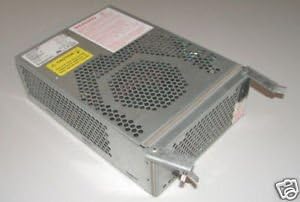
Слика 1: Под углом view of the HP 5065-5262 DYNAMITE Power Supply, illustrating its size and design for integration into a disk system.
Упутство за употребу
The HP 5065-5262 DYNAMITE Power Supply operates automatically once installed and connected. It provides stable power to your disk system components.
- Укључивање/искључивање: The power supply is controlled by the system's main power switch. When the system is powered on, the power supply will activate and deliver power.
- Вентилатори за хлађење: The integrated cooling fans will operate automatically to maintain optimal internal temperatures. Ensure fan vents are not obstructed.
- Индикатори статуса: Some systems may have diagnostic LEDs on the motherboard or chassis that indicate power supply status. Refer to your system's manual for details.
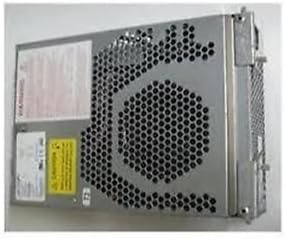
Слика 2: Страна view of the HP 5065-5262 DYNAMITE Power Supply, highlighting the ventilation design crucial for its cooling system.
Одржавање
Regular maintenance helps ensure the longevity and stable operation of your power supply:
- Уклањање прашине: Periodically (e.g., every 6-12 months), power off and unplug your system. Use compressed air to gently clear dust from the power supply's fan vents and internal components. Hold the fan blades to prevent them from spinning too fast during cleaning.
- Инспекција каблова: Check all power cables connected to the power supply for any signs of wear, fraying, or loose connections. Replace damaged cables immediately.
- Услови животне средине: Ensure the operating environment is clean, dry, and within the recommended temperature range to prevent dust buildup and moisture damage.
Решавање проблема
Ако наиђете на проблеме са напајањем, погледајте следеће уобичајене проблеме и решења:
| Проблем | Могући узрок | Решење |
|---|---|---|
| Систем се не укључује. | Loose power cable connection. Неисправна зидна утичница. Квар напајања. | Check all power connections (wall, power supply, motherboard). Тестирајте утичницу са другим уређајем. Ако је могуће, тестирајте са познатим исправним напајањем. |
| Систем се укључује, али се неочекивано искључује. | Overheating (poor ventilation). Overload (too many components). Power supply instability. | Ensure proper airflow; clean dust from vents. Disconnect non-essential components to check for overload. Consider professional diagnosis or replacement. |
| Loud fan noise from power supply. | Накупљање прашине у вентилатору. Worn fan bearing. | Clean fan with compressed air. If noise persists, the fan may be failing; consider professional service or replacement of the power supply. |
If these steps do not resolve the issue, contact HP support or a qualified technician.
Спецификације
| Феатуре | Детаљ |
|---|---|
| Бранд | ХЕВЛЕТТ ПАЦКАРД |
| Број модела | 5065-5262 |
| Ватtage | 340 вати |
| Метод хлађења | Air (with integrated fans) |
| ASIN | B014S277MO |
| УПЦ | 787322237757 |
| Фирст Аваилабле | 9. јул 2013 |
Гаранција и подршка
This HP 5065-5262 DYNAMITE Power Supply is typically covered by Hewlett Packard's standard manufacturer warranty. For specific warranty terms and conditions, please refer to the documentation provided with your original system or contact HP customer support directly.
For technical support, service, or to inquire about replacement parts, please visit the official Hewlett Packard support website or contact their customer service line. Have your product model number (5065-5262) and serial number (if applicable) ready when contacting support.
ХП подршка Webсајт: https://www.hp.com/support