
Увод
This manual provides detailed instructions for the setup, operation, and maintenance of your Homtime C12PRO Docking Station Speaker. The C12PRO integrates a Bluetooth speaker, FM radio, alarm clock, and dual USB charging capabilities, designed for convenient everyday use.
Садржај пакета
Молимо вас да проверите да ли су све ставке наведене у наставку укључене у ваш пакет:
- 1 x Homtime C12PRO Speaker Unit
- 1 к адаптер за напајање
- 1 к Упутство за употребу
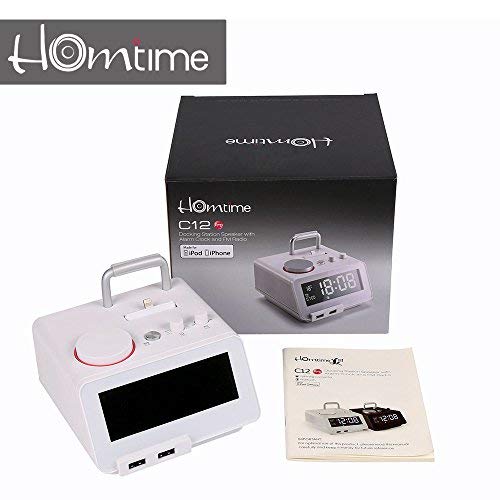
слика: Contents of the Homtime C12PRO package, showing the main speaker unit, power adapter, and the user manual.
Производ је завршенview
Familiarize yourself with the various components and controls of your C12PRO unit.

слика: Фронт view of the Homtime C12PRO with an iPhone docked. The large digital display shows time and temperature, and the front features dual USB charging ports.

слика: Фронт view of the Homtime C12PRO without a phone docked. This image clearly shows the digital display, the docking connector, and the control buttons on the top surface.
Front Panel and Display
- Велики ЛЦД екран од 4.2 инча: Shows time, alarm status, and room temperature (Celsius or Fahrenheit). Brightness is adjustable.
- Двоструки УСБ портови за пуњење: Located at the front base for convenient charging of external devices.
Контроле горње плоче
- Docking Connector: Apple Certified Lightning connector for iPod/iPhone.
- Control Buttons/Knobs: For setting time, alarm, volume, mode selection, and FM radio tuning.
Прикључци задњег панела
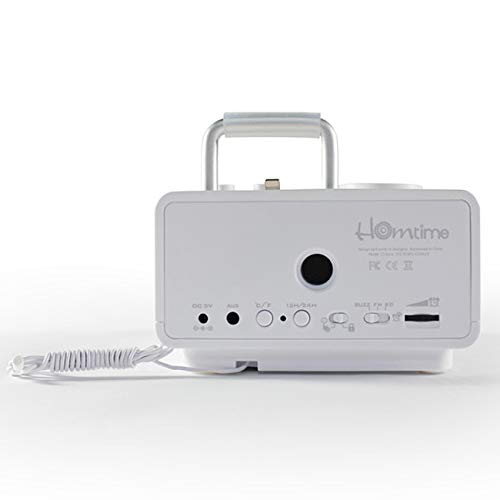
слика: Позади view of the Homtime C12PRO. This image displays the DC 9V power input, AUX-in port, 12H/24H time format button, and other rear controls.
- ДЦ 9В Улаз за напајање: Овде прикључите приложени адаптер за напајање.
- AUX-in порт: 3.5mm jack for connecting external audio sources.
- 12H/24H Button: Toggles between 12-hour and 24-hour time display formats.
- Остале контроле: May include snooze/dimmer, alarm on/off, and FM antenna connection.
Сетуп
- Распакујте јединицу: Carefully remove the C12PRO speaker and all accessories from the packaging.
- Прикључите напајање: Insert the DC plug of the power adapter into the DC 9V input port on the rear of the unit. Plug the power adapter into a standard wall outlet. The display will illuminate.
- Почетно подешавање времена:
- Притисните и држите ВРЕМЕНСКИ СКЛОП button (location may vary, typically on top or rear).
- Користите +/- buttons or rotary knob to adjust the hour. Press ВРЕМЕНСКИ СКЛОП поново да потврдим.
- Adjust the minute using the +/- buttons or rotary knob. Press ВРЕМЕНСКИ СКЛОП да бисте потврдили и изашли из режима подешавања времена.
- Да бисте прелазили између 12-часовног и 24-часовног формата, притисните 12Х/24Х дугме на задњој плочи.
- Подесите осветљеност екрана: Притисните тастер СНООЗЕ / ДИММЕР button (often combined) repeatedly to cycle through brightness levels.
- Подесите јединицу температуре: Ако је применљиво, притисните ° Ц/° Ф button to switch between Celsius and Fahrenheit display for room temperature.
Упутство за употребу
Укључивање/искључивање
Притисните тастер ПОВЕР button to turn the unit on or off. When off, the clock display remains active.
Постављање аларма
- Притисните и држите АЛАРМ СЕТ button. The alarm hour will flash.
- Користите +/- buttons or rotary knob to adjust the alarm hour. Press АЛАРМ СЕТ потврдити.
- Adjust the alarm minute. Press АЛАРМ СЕТ потврдити.
- Select the alarm source (Buzzer, FM Radio, or Docked Device). Use +/- or rotary knob and press АЛАРМ СЕТ потврдити.
- Да бисте активирали/деактивирали аларм, притисните дугме АЛАРМ УКЉУЧЕН / ИСКЉУЧЕН button. An alarm icon will appear on the display when active.
- Када се огласи аларм, притисните СНООЗЕ button to temporarily silence it for a few minutes. Press ПОВЕР да искључите аларм за тај дан.
Операција ФМ радија
- Притисните тастер МОДЕ дугме док се на екрану не појави „FM“.
- For automatic station scanning, press and hold the ПЛАИ/ПАУСЕ дугме (или наменско СЦАН button). The radio will scan and save available stations.
- За ручно подешавање користите ПРЕТХОДНО/СЛЕДЕЋЕ buttons or rotary knob to adjust the frequency.
- To select a saved station, press the ПРЕСЕТ дугме, а затим користите ПРЕТХОДНО/СЛЕДЕЋЕ за навигацију.
- Подесите јачину звука помоћу ВОЛУМЕ knob or buttons.
Блуетоотх упаривање
- Притисните тастер МОДЕ button until "BT" or "Bluetooth" appears on the display. The Bluetooth indicator will flash, indicating pairing mode.
- На мобилном уређају омогућите Bluetooth и потражите нове уређаје.
- Select "Homtime C12PRO" from the list of available devices.
- Once paired, the Bluetooth indicator on the C12PRO will stop flashing and remain solid. You can now play audio wirelessly from your device.
- Adjust volume on both the C12PRO and your connected device.
Коришћење прикључне станице
The C12PRO features an Apple Certified Lightning connector for compatible iPod/iPhone devices.
- Carefully align your iPhone/iPod with the Lightning connector on the top of the unit.
- Gently push down until the device is securely seated.
- The C12PRO will automatically charge your device and can play audio from it.
- Притисните тастер МОДЕ button to select the docking station as the audio source.
УСБ пуњење
The unit includes dual USB ports for charging other devices.
- Connect your USB charging cable to one of the USB ports on the front of the C12PRO.
- Connect the other end of the cable to your device (e.g., Android phone, tablet).
- The C12PRO will provide power to charge your device.
AUX-in Connection
Connect external audio players via the 3.5mm AUX-in port.
- Connect a 3.5mm audio cable (not included) from your external audio device's headphone jack to the AUX-in port on the rear of the C12PRO.
- Притисните тастер МОДЕ дугме док се на екрану не појави „AUX“.
- Play audio from your external device. Adjust volume on both the C12PRO and the external device.
Одржавање
- Чишћење: Disconnect the power adapter before cleaning. Use a soft, dry cloth to wipe the exterior surfaces. Do not use abrasive cleaners, waxes, or solvents.
- Складиштење: Ако складиштите уређај дуже време, искључите га из струје и чувајте га на хладном и сувом месту, даље од директне сунчеве светлости и екстремних температура.
- батерија: The unit contains a CR2 battery (included) for clock memory backup. This battery is not user-replaceable for general operation and should only be replaced by qualified service personnel if necessary.
Решавање проблема
| Проблем | Могући узрок | Решење |
|---|---|---|
| Нема напајања/Екран је искључен | Адаптер за напајање није повезан или је утичница неисправна. | Ensure the power adapter is securely plugged into the unit and a working wall outlet. |
| Нема звука из звучника | Volume too low; incorrect source selected; device not connected properly. | Повећај јачину звука. Притисни МОДЕ to select the correct audio source (BT, FM, Dock, AUX). Reconnect Bluetooth device or docked phone. |
| Блуетоотх упаривање није успело | C12PRO not in pairing mode; device too far; interference. | Ensure C12PRO is in BT mode and flashing. Move device closer. Turn off other Bluetooth devices. |
| FM radio static/poor reception | Слаб сигнал; антена није извучена. | Extend the FM antenna fully. Reposition the unit for better reception. Perform auto-scan again. |
| Аларм се не оглашава | Alarm not activated; alarm volume too low. | Ensure the alarm icon is visible on the display. Check alarm volume settings. |
| Device not charging via USB/Dock | Cable issue; device not compatible; unit not powered. | Try a different USB cable. Ensure the C12PRO is powered on. Verify device compatibility with the Lightning dock. |
Спецификације

слика: A table detailing the specifications of the Homtime C12PRO, including driver units, S/N ratio, Bluetooth version, range, radio frequency, power, and dimensions.
| Модел | Ц12 Про |
| Дривер Унитс | 2к40мм |
| С/Н однос | >70дБ |
| Блуетоотх верзија | 2.1 + ЕДР |
| Блуетоотх домет | 10М |
| Опсег радио фреквенција | 87.5 MHz - 108 MHz |
| Компатибилни уређаји | iPad, iPhone, Android, Windows Phone, Computer |
| Повер Адаптер | AC100-240V, 50/60Hz, DC 5V 3A |
| Излазна снага | 3W + 3W (6 Watts total) |
| Димензије (ДкШкВ) | 12.8 к 12.9 к 10.7 цм |
| Тежина артикла | 800 г |
| Аудио извори | Apple Lightning, USB, Bluetooth, Aux-in |
| Дисплаи Типе | Digital LCD (4.2 inches) |
| Батерије | 1 CR2 battery required (included for clock memory) |
Гаранција и подршка
Информације о гаранцији
The Homtime C12PRO comes with a 1-годишња ограничена гаранција from the date of purchase. This warranty covers manufacturing defects in materials and workmanship under normal use. It does not cover damage caused by misuse, accidents, unauthorized modifications, or external causes.
Сачувајте доказ о куповини за гаранцијске захтеве.
Корисничка подршка
For technical assistance, troubleshooting not covered in this manual, or warranty inquiries, please contact Homtime customer support. Refer to the contact information provided with your product packaging or visit the official Homtime webсајт за најновије информације о подршци.