
1. Увод
Хвала вам на куповиниasing the ELECOM M-XGM10DBBK Wireless 5-Button BlueLED Mouse. This mouse is designed for comfort and precision, featuring an ergonomic shape that fits naturally in your hand and BlueLED technology for reliable tracking on various surfaces. This manual provides essential information for proper setup, operation, and maintenance of your device.
2. Производ је готовview
The M-XGM10DBBK mouse is part of the "EX-G" series, known for its ergonomic design and comfortable grip. It features five buttons, including dedicated back and forward buttons, to enhance productivity.
Кључне карактеристике:
- Ергономски дизајн: Shaped to fit the hand for ultimate grip comfort.
- BlueLED Sensor: Provides precise tracking on a wide range of surfaces, including glass and fabric.
- 5-Button Functionality: Includes left, right, scroll wheel, and dedicated back/forward buttons.
- 2.4ГХз бежична веза: Offers a stable connection with a range of approximately 10 meters (3 meters on steel desks).
- Прилагодљива дугмад: Button functions can be re-assigned using the free "ELECOM Mouse Assistant" software (Windows/Mac only).
- Индикатор батерије: А лamp indicates remaining battery life.
Компоненте:
Familiarize yourself with the mouse components:

Слика 2.1: Врх view of the mouse, highlighting the main buttons.
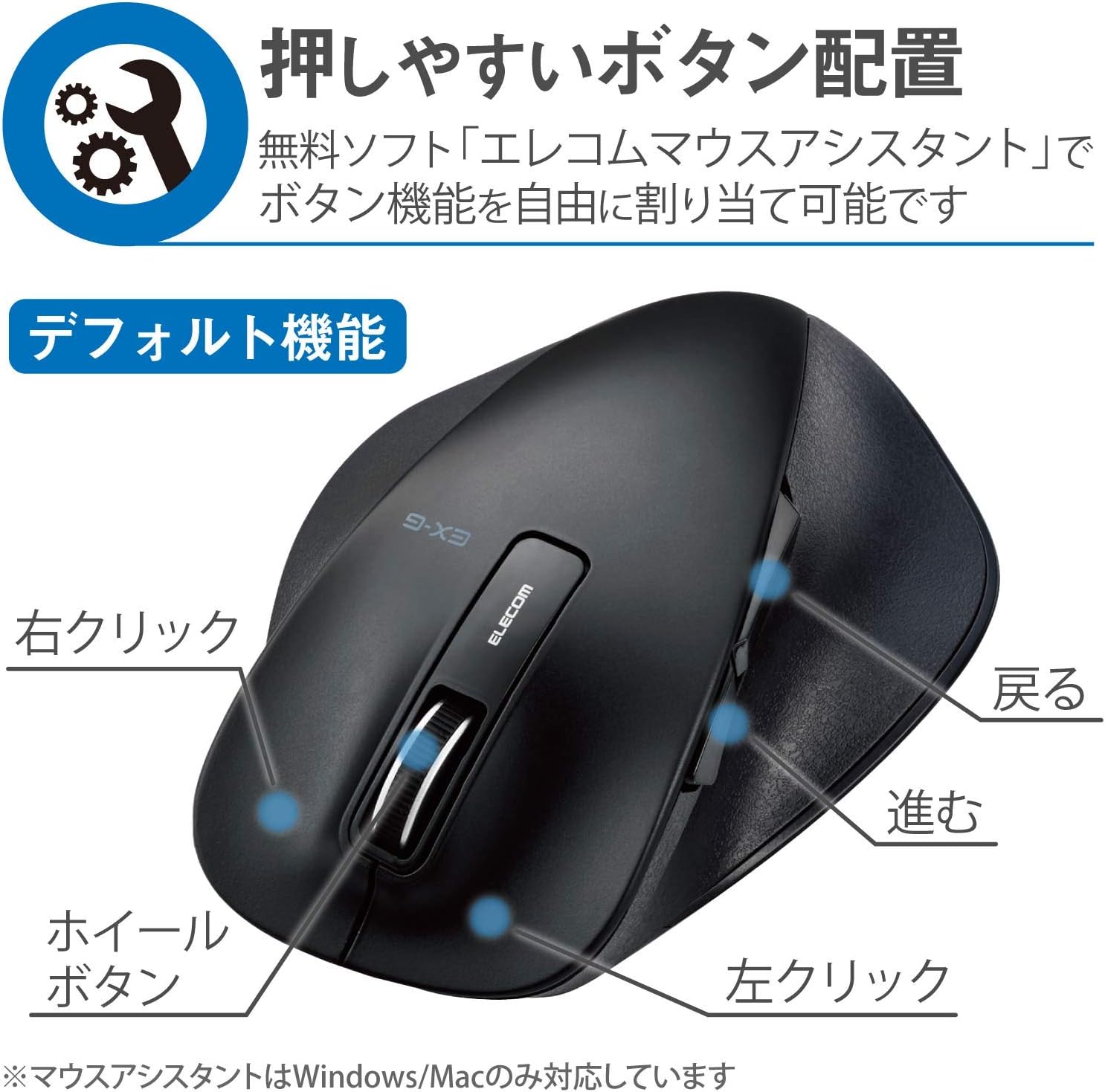
Слика 2.2: Страна view of the mouse, showing the back and forward buttons.
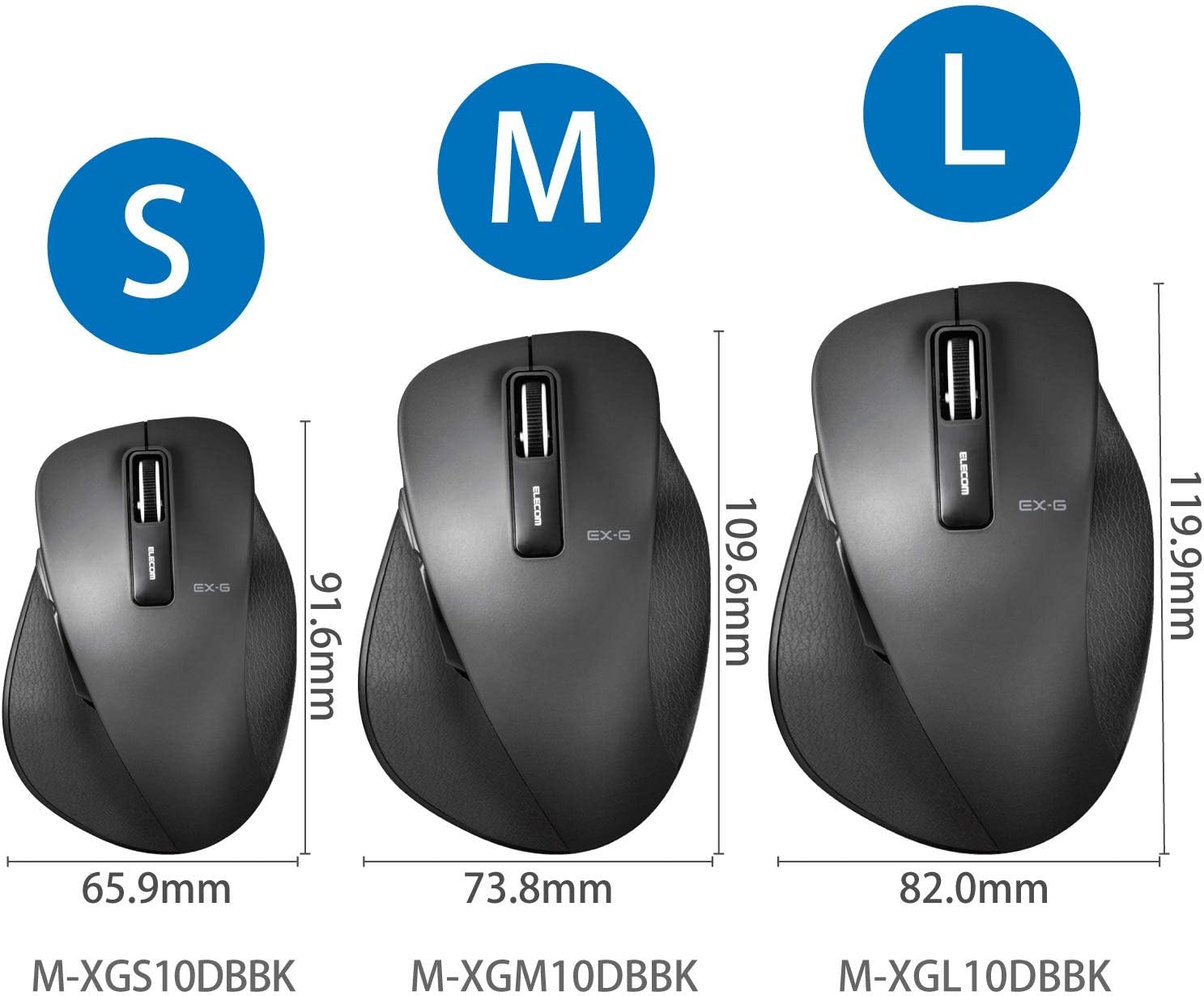
Figure 2.3: Size comparison of EX-G mice (S, M, L). The M-XGM10DBBK is the M size.

Слика 2.4: Дно view of the mouse, indicating the optical sensor, power switch, and receiver storage compartment.

Figure 2.5: Illustration of the durable Omron switches used for the left and right click buttons.
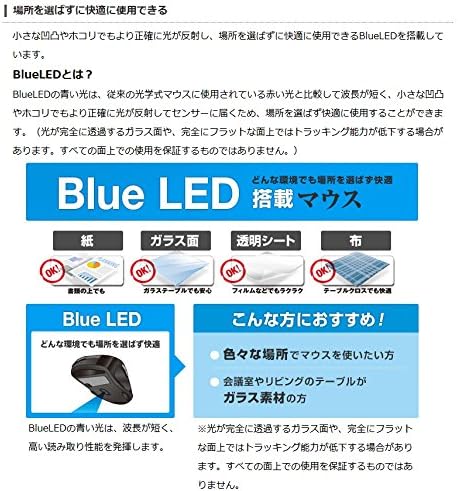
Figure 2.6: Explanation of BlueLED technology, demonstrating its versatility on different surfaces. Note: Tracking performance may decrease on completely transparent or perfectly flat surfaces.

Figure 2.7: Details on 2.4GHz wireless, battery indicator, and 2000 DPI resolution for smooth operation.

Figure 2.8: The ELECOM M-XGM10DBBK mouse is certified to work with Chromebooks.
3. Подешавање
3.1 Инсталација батерије
- Locate the battery cover on the bottom of the mouse.
- Отворите поклопац.
- Insert one AA alkaline, manganese, or nickel-metal hydride battery, ensuring correct polarity (+/-).
- Добро затворите поклопац батерије.
3.2 Веза са пријемником
- Remove the USB receiver from its storage compartment on the bottom of the mouse.
- Прикључите УСБ пријемник у слободан УСБ-А порт на рачунару.
- Ваш рачунар би требало аутоматски да детектује и инсталира потребне драјвере. Ово може потрајати неколико тренутака.
3.3 Укључивање
- Померите прекидач за напајање на дну миша у положај „УКЉУЧЕНО“.
- Миш је сада спреман за употребу.
4. Упутство за употребу
4.1 Основне функције
- Леви клик: Примарни избор и активација.
- Десни клик: Отвара контекстне меније.
- Точак за померање: Скролује документе и web pages vertically. Can also be clicked for middle-click functionality.
4.2 Back/Forward Buttons
The dedicated back and forward buttons located on the side of the mouse allow for quick navigation in web претраживачи и file истраживачи.
- Притисните тастер Назад button to go to the previous page or folder.
- Притисните тастер Напред button to go to the next page or folder.
4.3 Customizing Buttons (ELECOM Mouse Assistant)
For advanced customization, download the free "ELECOM Mouse Assistant" software from the official ELECOM website. This software allows you to re-assign functions to the mouse buttons according to your preferences. Please note that this software is compatible with Windows and macOS only.
5. Одржавање
5.1 Чишћење
Да бисте одржали оптималне перформансе и хигијену, редовно чистите миш:
- Искључите миш помоћу прекидача за напајање.
- Користите меку, суву крпу да обришете површину миша.
- За тврдокорну прљавштину, благо дampобришите крпу водом или благим средством за чишћење, а затим одмах обришите сувим.
- Избегавајте употребу јаких хемикалија, абразива или растварача.
- Gently clean the optical sensor area on the bottom of the mouse with a cotton swab if tracking issues occur.
5.2 Замена батерије
When the battery indicator lamp flashes or the mouse performance degrades, replace the battery:
- Искључите миш.
- Отворите поклопац батерије.
- Уклоните стару батерију и одложите је у складу са локалним прописима.
- Insert a new AA battery, ensuring correct polarity.
- Close the battery cover and turn the mouse back on.
КСНУМКС. Решавање проблема
If you encounter issues with your mouse, refer to the following common problems and solutions:
| Проблем | Могући узрок | Решење |
|---|---|---|
| Миш не реагује | Low battery; Power switch off; Receiver not connected; Receiver interference. | Replace battery; Turn power switch ON; Ensure receiver is firmly plugged in; Try a different USB port; Move closer to the receiver. |
| Неправилно кретање курсора | Прљав оптички сензор; Неодговарајућа површина; Сметње. | Clean optical sensor; Use on a suitable mouse pad or surface; Reduce interference from other wireless devices. |
| Дугмад не раде | Сукоб софтвера; Проблем са драјвером. | Restart computer; Reinstall mouse drivers; Check for conflicting software. |
| Проблеми са бежичном везом | Distance too far; Obstructions; Interference. | Ensure mouse is within range (10m); Remove obstructions between mouse and receiver; Avoid using near other 2.4GHz devices. |
7. Спецификације
| Феатуре | Детаљ |
|---|---|
| Број модела | M-XGM10DBBK |
| Начин повезивања | 2.4 GHz бежични (USB-A пријемник) |
| Тип сензора | BlueLED Optical |
| Дугмад | 5 buttons (Left, Right, Scroll Wheel, Back, Forward) |
| Резолуција | 2000 ДПИ |
| Димензије (Ш к Д к В) | 73.8 x 109.6 x 40.8 mm (M Size) |
| Тежина | Прибл. 151.95 г (укључујући батерију) |
| Извор напајања | 1 x AA battery (Alkaline, Manganese, or Ni-MH) |
| Процењени век трајања батерије | Approx. 722 days (based on typical usage) |
| Компатибилан ОС | Windows 11, 10, RT8.1, 8.1, 7, Vista; macOS High Sierra 10.13, OS X 10.10; Chrome OS |
| Боја | Црно |
8. Гаранција и подршка
8.1 Информације о гаранцији
Овај производ долази са а 6-месечна гаранција from the date of purchase. Please retain your proof of purchase for warranty claims. The warranty covers manufacturing defects under normal use. It does not cover damage caused by misuse, accidents, unauthorized modifications, or normal wear and tear.
8.2 Корисничка подршка
For technical assistance, troubleshooting, or warranty inquiries, please visit the official ELECOM website or contact ELECOM customer support. Contact details can typically be found on the ELECOM webсајт у одељку „Подршка“ или „Контактирајте нас“.