
1. Увод
The CamFi CF102 is a wireless remote control designed to enhance your DSLR photography experience. It allows for instant capture and transmission of photos, multi-device support, time-lapse shooting, and convenient remote viewing, providing greater flexibility and control over your camera.

Image: CamFi DSLR Remote Controller banner highlighting key features.
2. Карактеристике производа
- Instant Capture & Transmit: Achieve faster transmission speeds than built-in camera Wi-Fi. Connect wirelessly to live view on mobile devices (phones, tablets) or computers (PC, Mac).
- Подршка за више камера: Compatible with a wide range of DSLR cameras (refer to compatibility list). Supports advanced functions like focus stacking and HDR exposure bracketing, time-lapse on camera, and supports Android, iOS, and PC.
- Time-lapse Shooting: Configure time-lapse settings including shooting time, number of shots, and interval. Ideal for bullet time, 3D modeling, and multi-angle shooting.
- Згодно Viewпроналазач: Use your mobile phone or tablet as a remote viewfinder, enabling easy shooting from various angles without awkward physical positioning.

Image: The CamFi CF102 connected to a DSLR camera, wirelessly transmitting live view to a smartphone and tablet, demonstrating instant capture and multi-device support.
3. Садржај пакета
The CamFi CF102 package typically includes the following items:
- CamFi Remote Camera Controller (CF102 unit)
- Mini USB cable for camera connection
- Micro USB cable for battery charging
- Double screw for hot shoe adapter
- Водич за брзи почетак
- Кутија за паковање

Image: A visual representation of the CamFi CF102 package contents, including the main unit, various cables, and accessories.
4. Подешавање
- Charge the CamFi Unit: Connect the Micro USB cable to the CamFi unit and a power source to ensure it is fully charged.
- Install CamFi Software/App: Download and install the CamFi app on your mobile device (Android/iOS) or the software on your PC/Mac.
- Connect CamFi to Camera: Use the Mini USB cable to connect the CamFi unit to your DSLR camera's USB port. Ensure your camera is turned on.
- Power On CamFi: Turn on the CamFi unit. Wait for the network indicator light to stabilize.
- Connect Device to CamFi Network: On your mobile device or computer, disconnect from your regular Wi-Fi network and connect to the Wi-Fi network broadcast by the CamFi unit (e.g., "CAM NETWORK").
- Launch CamFi App/Software: Open the CamFi application. It may prompt for a firmware update; follow on-screen instructions if so (do not connect the camera during firmware update).
- Потврдите везу: Once connected, your camera settings and live view should appear in the CamFi app/software.
Video: Demonstrates the setup and connection process of the CamFi Wireless Camera Controller with a PC/phone, showing how to capture and transmit images.
5. Упутство за употребу
5.1 Основни рад
- Уживо View: Access the live feed from your camera on your connected device.
- Даљински затварач: Tap the shutter button in the app to take a photo.
- Adjust Camera Settings: Modify exposure settings (aperture, shutter speed, ISO) directly from the app interface.
5.2 Напредне функције
- Фокусирање: Utilize the app to set parameters for focus stacking, capturing multiple images at different focus points for enhanced depth of field.
- HDR Bracketing: Configure settings for High Dynamic Range (HDR) photography, capturing multiple exposures to combine into a single image with greater dynamic range.
- Круг: Set the interval, number of shots, and duration for automated time-lapse sequences.

Image: The CamFi application interface displayed on a smartphone, illustrating remote control over camera settings and a gallery of captured images.
Video: A demonstration of live shooting and usage of the CamFi102, showcasing its real-time capabilities.
6. Компатибилност
The CamFi CF102 is designed to be compatible with a wide range of DSLR cameras from various manufacturers. Please refer to the detailed compatibility list below to ensure your camera model is supported.
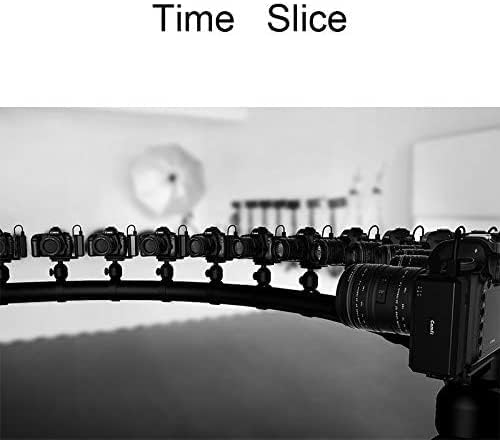
Image: A list detailing compatible Canon and Nikon DSLR camera models for the CamFi CF102. Note: Some cameras may require their original USB cable or may not support live view.
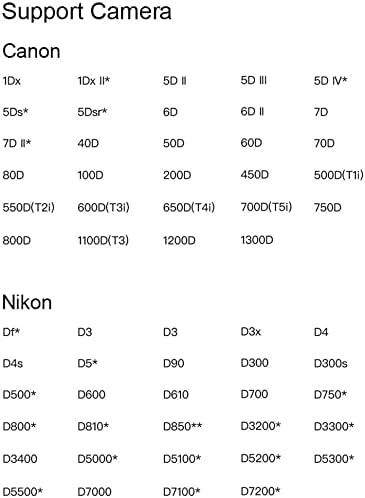
Image: A list detailing compatible Sony DSLR camera models for the CamFi CF102. Note: Some cameras may require their original USB cable or may not support live view.
Важне напомене:
- For some cameras, the USB cable included with CamFi may not match. Please use the original USB cable provided with your camera to connect with CamFi.
- Certain camera models may not support live view functionality through the CamFi unit.
- Grayed-out camera models in the compatibility list indicate future support.
7. Одржавање
- Чишћење: Use a soft, dry cloth to clean the CamFi unit. Avoid using liquid cleaners or solvents.
- Складиштење: Чувајте уређај на хладном и сувом месту, даље од директне сунчеве светлости и екстремних температура.
- Одржавање батерије: Recharge the internal Lithium Ion battery regularly, even if not in use, to maintain battery health. Avoid fully discharging the battery for extended periods.
- Управљање кабловима: Handle USB cables carefully to prevent damage. Avoid sharp bends or excessive pulling.
КСНУМКС. Решавање проблема
- Проблеми са везом:
- Ensure both the camera and CamFi unit are powered on.
- Verify your mobile device/computer is connected to the CamFi's Wi-Fi network.
- Check if the USB cable connecting the CamFi to the camera is securely attached and undamaged. Try using the camera's original USB cable if issues persist.
- Restart both the CamFi unit and your camera.
- App/Software Crashing:
- Ensure your device meets the minimum system requirements for the CamFi app/software.
- Update the CamFi app/software and the CamFi unit's firmware to the latest versions.
- Close other background applications on your device.
- Slow Transmission:
- Reduce the distance between the CamFi unit and your receiving device.
- Минимизирајте сметње од других бежичних уређаја.
- Ensure the CamFi unit has a clear line of sight to the receiving device.
9. Спецификације
| Број модела | ЦФ102 |
| Бранд | ЦамФи |
| Димензије производа | 5.98 к 4.02 к 1.61 инча |
| Тежина артикла | 3.99 унци |
| Батерије | Потребна је 1 литијум-јонска батерија (укључена) |
| Посебна карактеристика | Ергономски |
| Боја | Црно |
| Максимални број подржаних уређаја | 1 |
| Компатибилни уређаји | Камера |
10. Гаранција и подршка
CamFi offers customer support for their products. For any issues or questions regarding your CF102 Remote Control, please refer to the CamFi customer support center for assistance.
- Информације о гаранцији: Specific warranty details may vary. Please consult the product packaging or the official CamFi webсајт за најновију политику гаранције.
- Корисничка подршка: Visit the official CamFi website or contact their support team for technical assistance, troubleshooting, and service inquiries.