
Увод
The QualGear QG-TM-020-BLK Ultra Low Profile Articulating TV Wall Mount is designed for most 23 to 42 inch LED and LCD flat-panel televisions, supporting weights up to 66 lbs. This full-motion mount provides a wide range of movement, including panning, tilting, and swiveling, to optimize your viewing experience. It features integrated cable management and decorative covers for a clean installation. Built-in level adjustment ensures a perfectly level display.
Безбедносне информације
Always read and understand all instructions before installation and use. If you have any questions, contact QualGear customer support. Ensure the mounting surface can safely support the combined weight of the mount and your television. Use appropriate tools and follow all drilling and mounting guidelines. Improper installation may result in serious injury or damage.
Садржај пакета

Image: Components included in the QualGear QG-TM-020-BLK TV mount package, showing the mount, various screws, spacers, and the instruction manual.
- QG-TM-020-BLK TV mount
- Упутство у боји
- Wall marking template
- Гифтбок
- Pre-sorted hardware pack (for wood studs, concrete, and brick surfaces)
- Ниво мехурића
Спецификације

Image: Technical diagram illustrating the dimensions, tilt, and swivel capabilities of the QualGear QG-TM-020-BLK mount.
- Стил монтирања: Артицулатион Моунт
- Compatible TV Size: 23 до 42 инча
- Максимални капацитет тежине: До 66 фунти (30 кг)
- VESA Mounting Hole Patterns (mm): 75x75, 100x100, 200x100, 200x200
- Опсег нагиба: +5 степени до -15 степени
- Опсег окретања: 90 degrees left or right
- Продужетак од зида: 1.8 инча (45.7 мм) до 19.5 инча (497 мм)
- Подешавање нивоа: 3 degrees clockwise and counterclockwise
- Материјал: легирани челик
- Димензије производа: 12.88 к 11.22 к 2.48 инча (32.7 к 28.5 к 6.3 цм)
- Тежина артикла: 7 фунте (3.17 кг)
Провера ТВ компатибилности

Image: Visual guide for checking TV compatibility, detailing supported screen sizes, maximum weight, and VESA patterns.
- Size of TV: Supports most 23 to 42-inch TVs.
- Weight of TV: Supports TVs weighing up to 66 lbs.
- Mounting Hole Patterns (VESA) in mm: Supports standard mounting hole patterns from 75x75, 100x100, 200x100, 200x200.
Подешавање и инсталација
For detailed step-by-step instructions, please refer to the complete manual provided in the package or scan the QR code on the 'What You Will Get' image for a digital version: Digital Manual Link
Потребан алат (није укључен)
- Дозатор траке
- Меасуринг Тапе
- Спирит Левел
- Drill Bit (Wood: 5/32 in (4 mm), Concrete: 5/16 in (8 mm))
- Студ Детецтор
- Бушилица
- Socket & Wrench
- Оловка
- Шрафцигер
Инсталација је завршенаview
The installation process involves mounting the wall plate to your desired surface (wood stud, concrete, or brick) and then attaching the TV plate to the back of your television. Finally, the TV is secured onto the wall plate. Ensure all connections are tight and secure before releasinтелевизор.
Video: An Amazon Basics video demonstrating the assembly process for a full motion TV mount. This video provides a visual guide to the installation steps, including attaching the mount to the wall and securing the TV.
Упутство за употребу

Image: The QualGear QG-TM-020-BLK mount fully extended, showcasing its articulating arm and VESA plate.
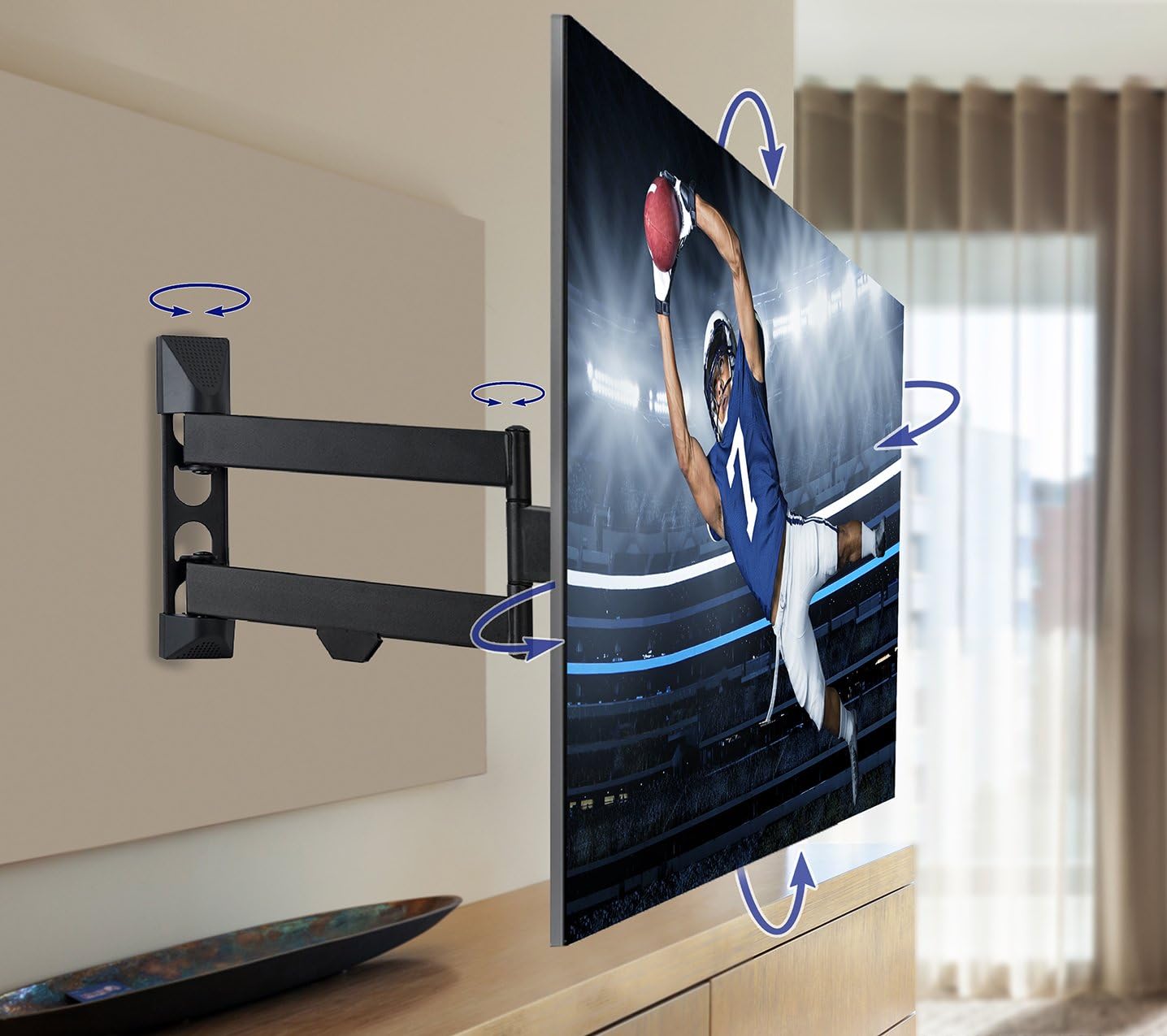
Image: A television mounted on the QualGear QG-TM-020-BLK, illustrating the range of motion for tilting and swiveling to achieve optimal viewинг углова.
- Додатак: Gently pull the TV away from the wall to extend the articulating arm.
- Повлачење: Push the TV gently back towards the wall until it is in the desired position. The super slim design allows the TV to sit just 1.8 inches from the wall when fully retracted.
- Окретни: Carefully pivot the TV left or right to achieve a 90-degree swivel in either direction.
- Нагиб: Adjust the tilt angle of the TV from +5 degrees (upward) to -15 degrees (downward) to reduce glare and find the best viewугао уласка.
- Нивелисање: Utilize the post-installation leveling adjustments to ensure the TV is perfectly horizontal after hanging.
Одржавање
Regularly check all screws and connections to ensure they remain tight and secure. Dust the mount and TV with a soft, dry cloth. Avoid using harsh chemicals or abrasive cleaners. Periodically inspect the mount for any signs of wear or damage. If any issues are found, discontinue use and contact customer support.
Решавање проблема
- ТВ није раван: Use the built-in level adjustment feature to correct the angle.
- Difficulty moving the arm: Ensure all adjustment bolts are sufficiently loosened. If the arm is too stiff, apply a small amount of silicone-based lubricant to the pivot points.
- Носач делује нестабилно: Re-check all wall and TV connections. Ensure lag bolts are securely fastened into studs or appropriate anchors are used for masonry. Do not exceed the maximum weight capacity.
Гаранција и подршка
The QualGear QG-TM-020-BLK Articulating TV Wall Mount comes with a 3 година ограничене гаранције. For warranty claims, technical assistance, or any product-related inquiries, please contact QualGear customer support through their official webсајт или контакт информације које су наведене у паковању вашег производа.