
Cree Lighting BA19-08027OMF-12CE26-1C100
Cree Lighting Connected LED Smart Bulb User Manual
Model: BA19-08027OMF-12CE26-1C100 | Brand: Cree Lighting
Увод
The Cree Connected LED bulb is designed to provide an easy-to-use and cost-effective solution for customizing lighting in your home. This smart bulb can be controlled from anywhere, offering convenience and flexibility. It integrates with compatible home automation systems, allowing you to manage your lighting settings via an app on your iOS or Android device.

The Cree Connected LED bulb offers convenient control from anywhere, enhancing your home lighting experience.
Безбедносне информације
Молимо вас да прочитате и разумете сва безбедносна упутства пре инсталирања или коришћења овог производа. Непоштовање ових упутстава може довести до струјног удара, пожара или других опасности.
- Само за унутрашњу употребу: This bulb is designed for indoor use in dry locations. Do not use in wet or damp окружења.
- Није за затворене уређаје: Do not use this bulb in fully enclosed luminaires or fixtures, as this can trap heat and shorten the bulb's lifespan.
- ЛЕД са могућношћу затамњивања: This bulb is dimmable, but it is not recommended for use with traditional wall dimmers. Control dimming via a compatible smart hub and app.
- Искључите напајање пре инсталације: Always turn off the power to the fixture at the circuit breaker before installing or removing the bulb.
- Волtagе Компатибилност: Уверите се да је јачина звука уређајаtage (120 Volts) matches the bulb's requirements.
- Пажљиво рукујте: Avoid dropping the bulb or subjecting it to excessive force.
Садржај пакета
The package for your Cree Connected LED Smart Bulb typically includes:
- 1 x Cree Connected LED Smart Bulb

The product packaging for the Cree Connected LED Smart Bulb.
Сетуп
To set up your Cree Connected LED Smart Bulb, you will need a compatible ZigBee certified hub (e.g., Wink, SmartThings, WeMo, or Alexa devices with built-in ZigBee hub like Echo Plus, Echo Studio, Echo Show 2nd Gen).
- Инсталирајте сијалицу: Screw the Cree Connected LED bulb into a standard E26 light socket. Ensure the power to the fixture is off before installation.
- Prepare Your Hub: Place your compatible ZigBee hub into device discovery mode. Refer to your hub's specific instructions for this step. It is often recommended to initiate discovery mode on the hub пре turning on the bulb.
- Power On the Bulb: Turn on the power to the light fixture. The bulb should light up. Your hub should detect and pair with the bulb automatically. A successful pairing is often indicated by the bulb blinking twice.
- Download and Launch App: Download the applicable app for your chosen hub (e.g., Wink app, SmartThings app, Alexa app) on your iOS or Android device. Launch the app and follow the on-screen instructions to add and configure your new bulb.
- Name Your Bulb: Once paired, you can name your bulb within the app for easy identification and control (e.g., "Living Room Lamp," "Kitchen Light").
Resetting the Bulb to Factory Defaults
If you experience difficulty pairing the bulb or need to reset it, follow this sequence:
- 1. Turn the bulb ОФФ за 2 секунде.
- 2. Turn the bulb ON за 1 секунду.
- 3. Turn the bulb ОФФ за 2 секунде.
- 4. Turn the bulb ON за 1 секунду.
- 5. Turn the bulb ОФФ за 2 секунде.
- 6. Turn the bulb ON за 1 секунду.
- 7. Turn the bulb ОФФ за 2 секунде.
- 8. Turn the bulb ON.
After the fourth ON cycle, the light will blink twice, indicating a successful reset. You can then attempt to pair the bulb again.

Cree Lighting offers a variety of smart lighting solutions.
Упутство за употребу
Once your Cree Connected LED Smart Bulb is successfully paired with your hub, you can control it using the associated mobile application or voice commands through compatible smart assistants.
- Контрола за укључивање/искључивање: Use the app to turn the bulb on or off instantly.
- Затамњење: Adjust the brightness of the bulb to your desired level using the dimming controls within the app. The bulb offers a full range of dimming.
- Заказивање: Set schedules for your lights to turn on or off automatically at specific times, or to simulate occupancy when you are away from home.
- Груписање: Group multiple Cree Connected bulbs together to control them simultaneously as a single unit.
- Контрола гласом: If connected to a voice assistant (e.g., Alexa), use voice commands to control your lights (e.g., "Alexa, turn on Living Room Light," "Alexa, dim Kitchen to 50%").
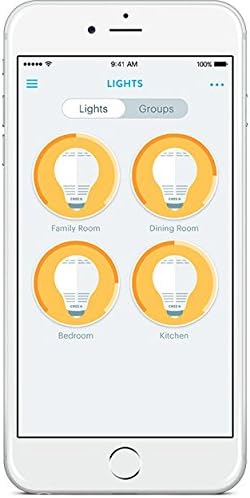
Control your smart bulbs easily through the mobile application.

Control your lights remotely for convenience and security.
Одржавање
The Cree Connected LED Smart Bulb requires minimal maintenance. Follow these guidelines to ensure optimal performance and longevity:
- Чишћење: Пре чишћења проверите да ли је сијалица хладна и да ли је напајање искључено. Обришите сијалицу меком, сувом крпом. Не користите течна или абразивна средства за чишћење.
- Складиштење: If storing the bulb for an extended period, keep it in its original packaging or a protective container in a cool, dry place.
- Избегавајте прегревање: Do not install the bulb in enclosed fixtures or areas with poor ventilation, as this can lead to overheating and reduce its lifespan.
Решавање проблема
If you encounter issues with your Cree Connected LED Smart Bulb, refer to the following common problems and solutions:
| Проблем | Могући узрок / решење |
|---|---|
| Сијалица не светли. |
|
| Bulb does not pair with the hub. |
|
| Bulb does not turn off completely (faint glow). |
|
| Bulb comes on at full brightness after being manually switched off and on. |
|
| Bulb loses connection or is unresponsive. |
|
Спецификације

Dimensions of the Cree Connected LED Smart Bulb.
| Феатуре | Детаљ |
|---|---|
| Бранд | Црее Лигхтинг |
| Назив модела | Cree Connected LED |
| Парт Нумбер | BA19-08027OMF-12CE26-1C100 |
| УПЦ | 849665009542 |
| Лигхт Типе | ЛЕД |
| Ватtage | 11 вати |
| Еквивалентни ват са жарном нитиtage | 60 Ваттс |
| Осветљеност | 815 лумена |
| Лигхт Цолор | Софт Вхите |
| Температура боје | 2700 Келвина |
| Величина облика сијалице | А19 |
| Булб Басе | Е26 |
| Волtage | 120 Волтс |
| Технологија повезивања | ЗигБее |
| Цоннецтивити Протоцол | Зигбее |
| Унутрашња/спољна употреба | Само за унутрашњу употребу |
| Просечан живот | 22 Years (25,000 hours rated life) |
| Димензије производа | 2.4" Ш x 4.4" В |
| Материјал | стакло |
| Индекс приказивања боја | 80 |
Гаранција и подршка
гаранција: The Cree Connected LED Smart Bulb comes with a 3-year limited warranty. Please refer to the product packaging for complete details regarding warranty coverage and terms.
Подршка: For additional support, frequently asked questions, or to access the latest user guides and installation manuals, please visit the official Cree Lighting website. You may also find helpful resources in the PDF documents provided by the manufacturer:
Ask a question about this manual
Ask about setup, troubleshooting, compatibility, parts, safety, or missing instructions. Manuals+ will review the question and use this page’s manual context to help answer it.