
Увод
This manual provides comprehensive instructions for the setup, operation, and maintenance of your Zelotes T90 Professional 9200 DPI High Precision USB Wired Gaming Mouse. Please read this manual thoroughly before using the product to ensure optimal performance and longevity.

Figure 1: Zelotes T90 Professional Gaming Mouse, showcasing its ergonomic design and LED lighting.
Садржај пакета
- 1 x Zelotes T90 Gaming Mouse
- 1 x Упутство за употребу (овај документ)
Сетуп
Системски захтеви
- Operating System: Windows 98/ 2000/ ME/ NT / XP/ win 7/ win 8/ win 10/ Mac OS and other OS
- Интерфејс: УСБ порт
Инсталација
- Распакујте миш: Carefully remove the Zelotes T90 Gaming Mouse from its packaging.
- Уклоните заштитни филм: Before use, please remove the foot pad protective film located on the underside of the mouse.
- Повежите се са рачунаром: Plug the USB connector of the mouse into an available USB port on your computer. The mouse is plug-and-play and does not require additional driver installation for basic functionality.
Упутство за употребу
Функције дугмета
The Zelotes T90 mouse features 8 programmable buttons designed for enhanced gaming and productivity.
- Дугме левог клика
- Десни клик на дугме
- Middle Button / Scroll Wheel
- Дугме за напред: Quick forward function when browsing the web or navigating folders.
- Дугме за назад: Quick backward function when browsing the web or navigating folders.
- Дугме ДПИ: Подешава осетљивост миша (DPI).
- Ватра кључ: Configurable for rapid actions.
- Прекидач светлосног режима: Controls the LED lighting effects.
Подешавање DPI (осетљивости)
The mouse supports 6-speed DPI adjustment, allowing you to customize sensitivity for different tasks or games. Press the Дугме ДПИ to cycle through the following settings:
- 1000 ДПИ: Indicated by red light flashing 3 times.
- 1600 ДПИ: Indicated by orange light.
- 2400 ДПИ: Indicated by green light.
- 3200 ДПИ: Indicated by light blue light.
- 5500 ДПИ: Indicated by blue light.
- 9200 ДПИ: Indicated by purple light.

Figure 2: Location of DPI and Fire Key buttons on the Zelotes T90 mouse.
Fire Key Function
- Кратки притисак: Performs a double click.
- Дуг притисак (више од 2 секунде): Switches to triple click mode. The light will flash 3 times to confirm the successful switch.
Прекидач за светлосни режим
The Zelotes T90 features various LED lighting modes:
- Кратки притисак: Cycles through 7-color breathing, 6 single-color breathing, and 6 single-color constant light modes (13 modes total).
- Дуг притисак (више од 2 секунде): Turns off the LED lights.

Figure 3: The Zelotes T90 mouse showcasing its 7-color cycle breathing and single-color lighting options.
Систем за подешавање тежине
The mouse includes 8 removable 2.5-gram weights, allowing you to customize the mouse's weight and balance for improved stability and control, especially during fast movements.
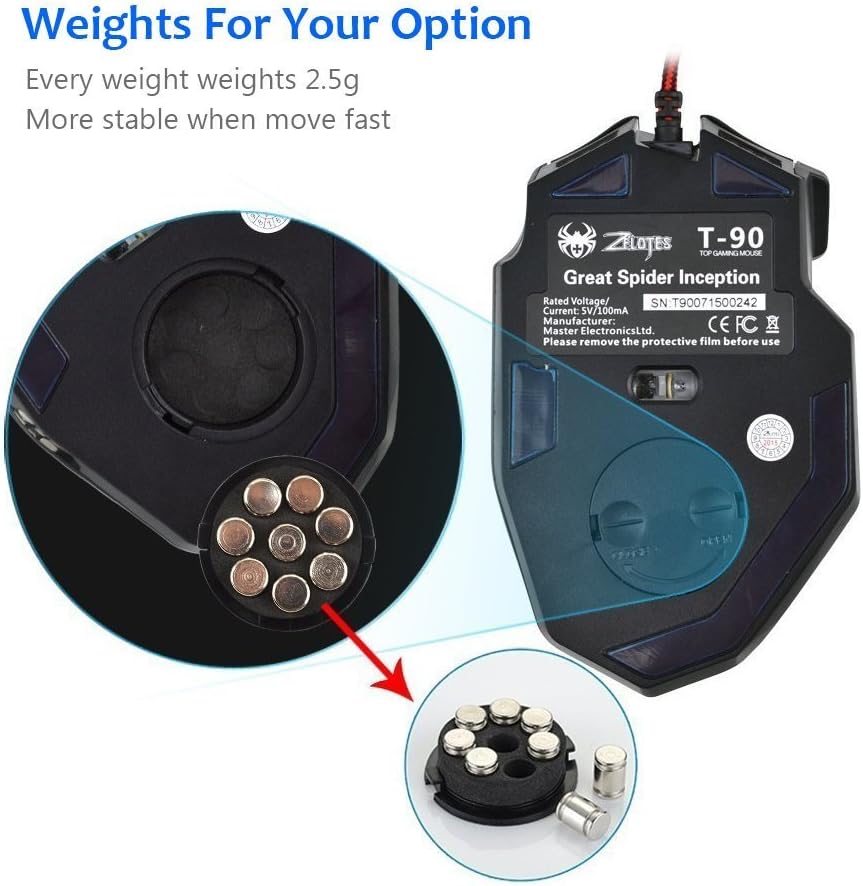
Figure 4: Location of the weight tuning system on the underside of the Zelotes T90 mouse.
Одржавање
Чишћење
- Користите меку, суву крпу да очистите површину миша.
- За тврдокорну прљавштину, благо дampОбришите крпу водом или благим раствором за чишћење. Избегавајте јаке хемикалије.
- Не потапајте миш у воду или било коју течност.
Складиштење
Чувајте миш на хладном и сувом месту, даље од директне сунчеве светлости и екстремних температура када се не користи дуже време.
Решавање проблема
| Проблем | Могући узрок | Решење |
|---|---|---|
| Миш не реагује | Лабава USB веза, неисправан USB порт, системска грешка. | Ensure the USB cable is securely plugged into the computer. Try a different USB port. Restart your computer. |
| ЛЕД светла не раде | Lights turned off, software issue. | Short press the Light Mode Switch button to cycle through modes. Long press the Light Mode Switch button for more than 2 seconds to turn lights on if they were off. |
| Подешавање DPI-ја се не мења | Дугме DPI није правилно притиснуто. | Ensure you are pressing the dedicated DPI button. Observe the light flashes to confirm DPI changes. |
| Mouse cursor erratic or jumpy | Прљави оптички сензор, неодговарајућа површина подлоге за миш. | Clean the optical sensor on the underside of the mouse. Use a clean, uniform mouse pad surface. |
| Mouse settings reset | Accidental factory reset. | Press the left and right buttons simultaneously for more than 2 seconds to restore factory settings. If settings are reset, reconfigure them as desired. |
Спецификације
| Модел | Т90 |
| Димензије (ДкШкВ) | 130 мм к 81 мм к 40 мм (5.12 к 3.19 к 1.57 инча) |
| Тежина | 145g ± 5g (excluding cable) |
| Противтежа | 8 x 2.5 Gram tuning weights |
| ДПИ подешавања | 1000/1600/2400/3200/5500/9200 DPI |
| ФПС | 6666 |
| Убрзање | 23Г |
| Поллинг Рате | 500Хз |
| Свитцх Лифе | 800 милиона пута |
| Дугмад | 8 |
| Дужина УСБ кабла | 1.8M braided-fiber cable |
| Интерфејс | УСБ |
| Optical Type | Red wave |
| Компатибилност | Windows 98/ 2000/ ME/ NT / XP/ win 7/ win 8/ win 10/ Mac OS and other OS |
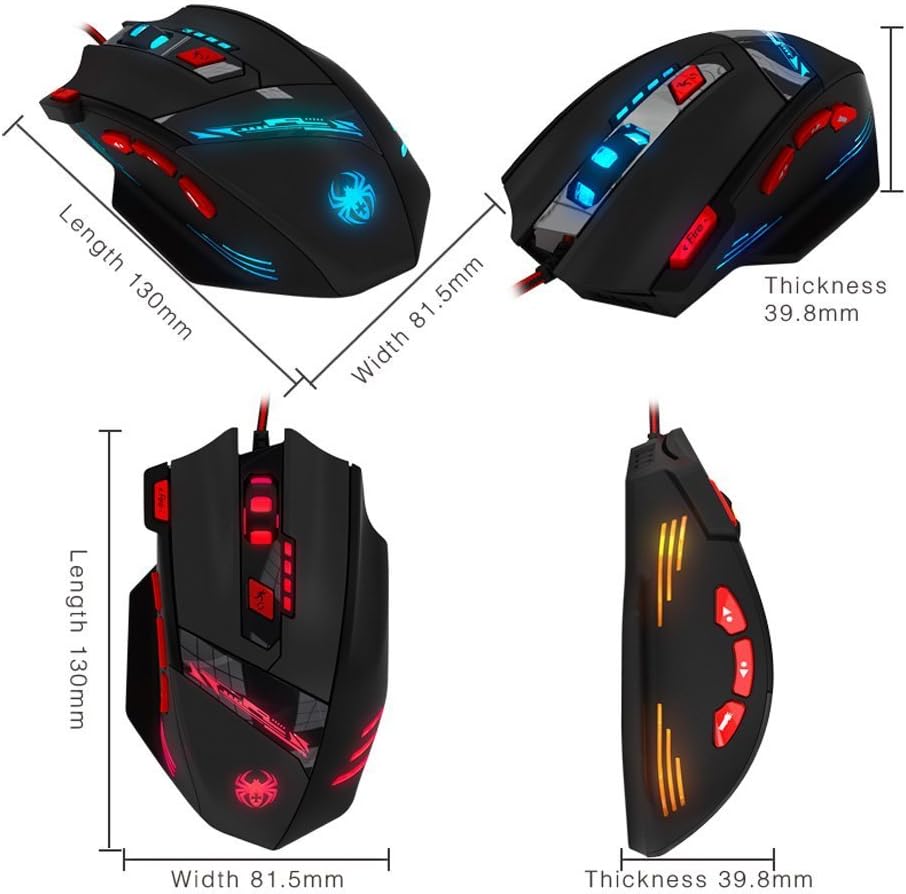
Figure 5: Detailed dimensions of the Zelotes T90 Professional Gaming Mouse.
Ергономски дизајн
The Zelotes T90 mouse is designed with ergonomics in mind, providing a comfortable fit for both fingertip and claw-style grips. This design aims to reduce fatigue during long periods of use.

Figure 6: Ergonomic design of the Zelotes T90 mouse, showing a comfortable hand grip.
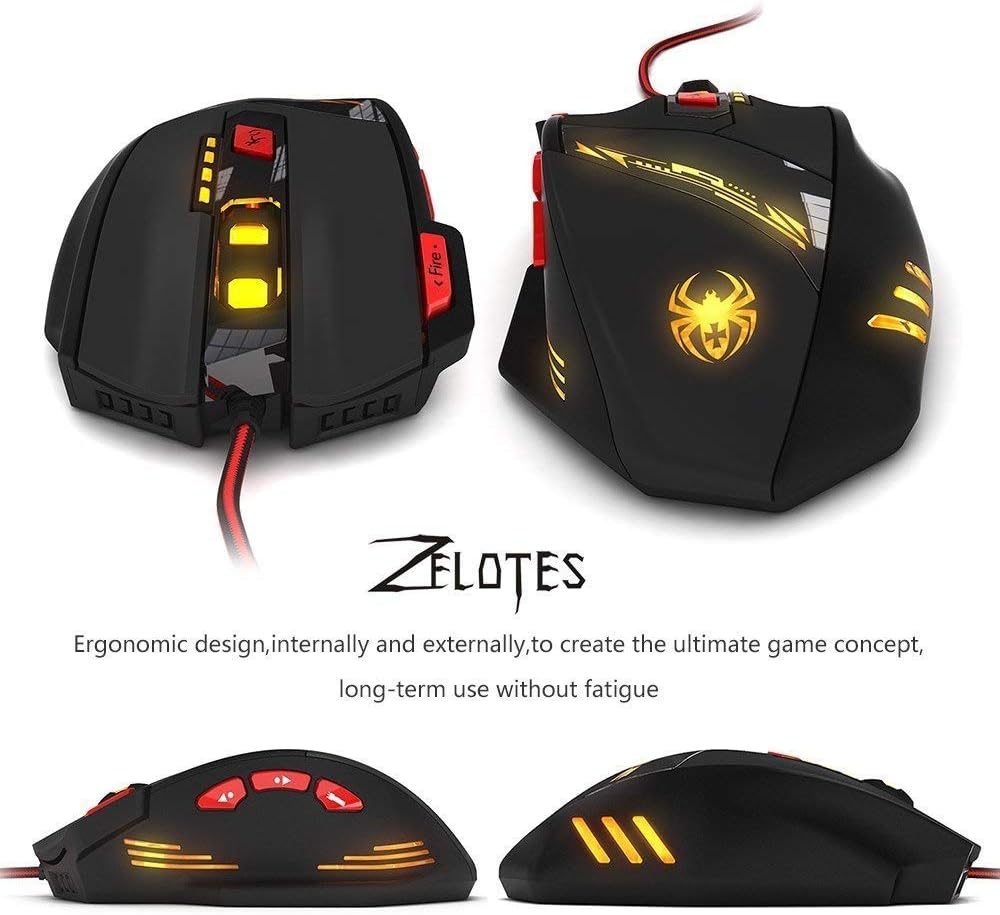
Слика 7: Разно views highlighting the ergonomic contours of the Zelotes T90 mouse.
Важне напомене
- Always remove the foot pad protective film before using the mouse.
- To restore the mouse to factory settings, press and hold the left and right mouse buttons simultaneously for more than 2 seconds.