
Увод
Welcome to the user manual for your iRobot Roomba 605 Robot Vacuum Cleaner. This manual provides essential information for setting up, operating, maintaining, and troubleshooting your Roomba to ensure optimal performance and a cleaner home.
The iRobot Roomba 605 is designed to simplify your daily cleaning routine. Equipped with intelligent sensors and a powerful 3-stage cleaning system, it efficiently handles dust, dirt, and pet hair on various floor types, including carpets and hard floors.

iRobot boasts over 30 years of expertise and innovation in robotics, with more than 30 million home robots sold worldwide.
Безбедносне информације
Please read all safety instructions carefully before using your Roomba. Failure to follow these instructions could result in electric shock, fire, or serious injury.
- The Roomba is for indoor use only. Do not use it outdoors or on wet surfaces.
- Do not handle the Roomba or its charging dock with wet hands.
- Keep loose clothing, hair, and body parts away from openings and moving parts.
- Do not allow children or pets to play with the Roomba. Supervise children when the Roomba is operating.
- Remove any loose cables, small objects, or fragile items from the floor before operation to prevent entanglement or damage.
- Do not use the Roomba to pick up large debris, broken glass, or anything that is burning or smoking.
- Use only the manufacturer-specified charger and battery.
- Редовно чистите четке и сензоре како бисте одржали оптималне перформансе и спречили оштећења.
Садржај пакета
Verify that you have all the following components:
- iRobot Roomba 605 Robot Vacuum Cleaner
- Станица за пуњење кућне базе
- Повер Цорд
- Integrated Cleaning Tool (Dusting Brush)
- Кориснички приручник (овај документ)
Производ је завршенview
Familiarize yourself with the main components of your Roomba 605.

Слика 1: Врх view of the iRobot Roomba 605, showing the central CLEAN button, SPOT button, and DOCK button.

Слика 2: Дно view of the iRobot Roomba 605, illustrating the multi-surface brushes, side brush, and removable dust bin.
Кључне карактеристике:
- 3-СtagСистем за чишћење: Loosens, lifts, and suctions dirt, dust, and debris from carpets and hard floors.
- Dirt Detect Sensors: Recognizes concentrated areas of dirt and prompts the robot to clean them more thoroughly.
- Auto-Adjust Cleaning Head: Automatically adapts its height to keep the two multi-surface brushes in direct contact with different floor types, ensuring effective cleaning.
- Cliff Detect Sensors: Prevents the robot from falling down stairs or other drop-offs.
- Једноставна операција: Just press the CLEAN button to start.
Сетуп
1. Place the Home Base
Place the Home Base charging station on a hard, level surface against a wall. Ensure there is at least 0.5 meters (1.5 feet) of clear space on each side of the Home Base and 1.2 meters (4 feet) in front of it. This allows the Roomba to easily find and dock for charging.
2. Прикључите напајање
Plug the power cord into the Home Base and then into a wall outlet. The power indicator light on the Home Base will illuminate.
3. Charge Roomba
Place your Roomba onto the Home Base, ensuring the metal charging contacts on the robot align with those on the Home Base. The battery indicator light on the Roomba will pulse amber while charging. A full charge typically takes 3 hours. The light will turn solid green when fully charged.
Важно: Fully charge the battery before the first use to maximize battery life.
Упутство за употребу
Покретање циклуса чишћења
To start a cleaning cycle, simply press the large ЦЛЕАН button on the top of your Roomba. The robot will begin cleaning and automatically adjust to different floor types.

Слика 3: The Roomba navigates systematically to cover your floor space.

Слика 4: The Roomba effectively cleans around various obstacles, demonstrating its maneuverability.
Чишћење на месту
For concentrated areas of dirt, place the Roomba on top of the debris and press the СПОТ button. The Roomba will clean in a spiral pattern, then return to its starting point.
Returning to Home Base
To send the Roomba back to its Home Base for charging, press the ДОЦК button. The Roomba will navigate back to the charging station.
Cleaning Under Furniture
Тхе лов-проfile design of the Roomba 605 allows it to clean under most furniture, reaching dust and dirt that traditional vacuums might miss.

Слика 5: The Roomba's compact design enables it to clean effectively under sofas and other low-clearance furniture.
Cliff Detection
Integrated cliff sensors prevent the Roomba from falling down stairs or other drop-offs, ensuring safe operation in multi-level homes.
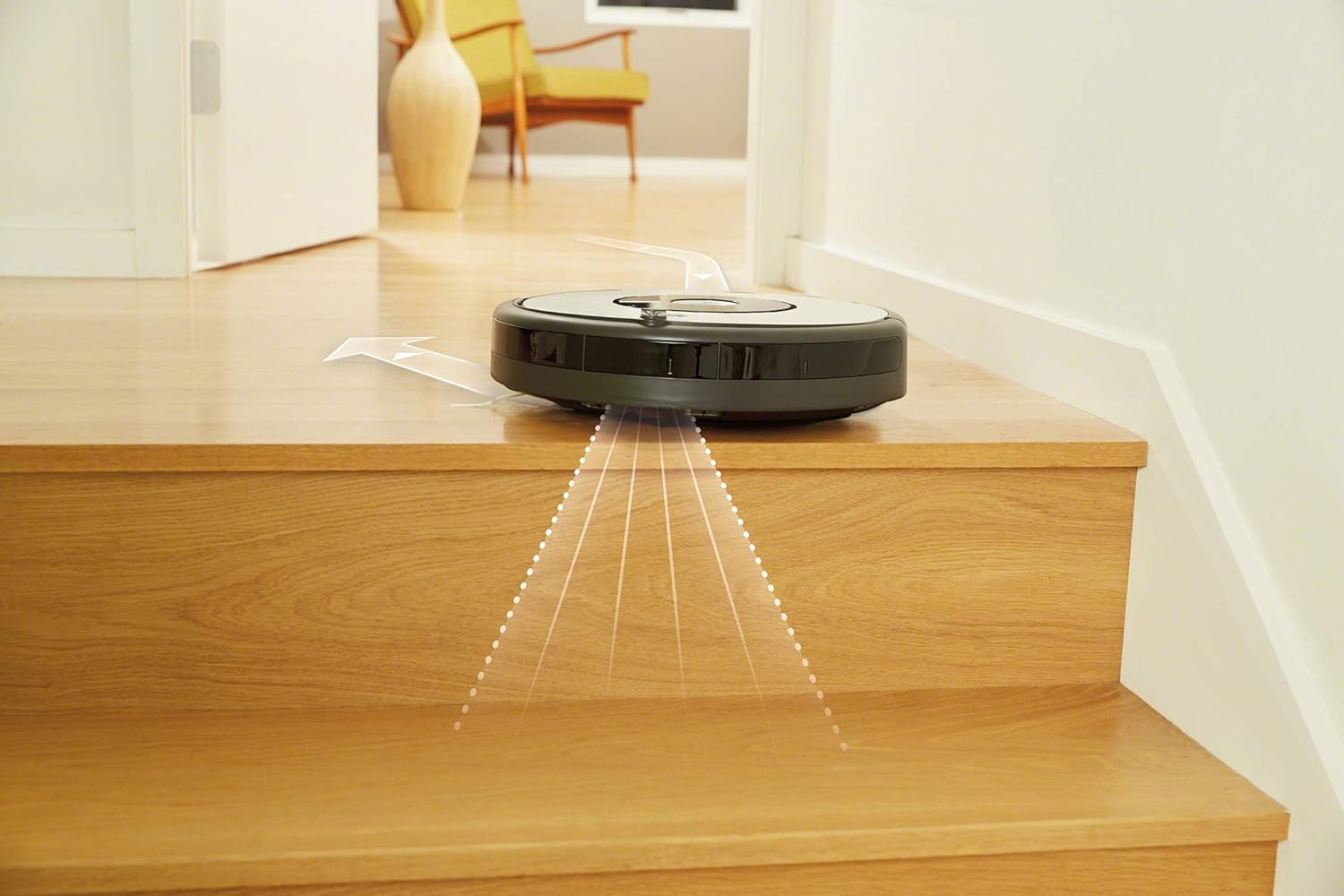
Слика 6: Cliff sensors detect edges and prevent the Roomba from falling down stairs.
Одржавање
Regular maintenance is crucial for your Roomba's performance and longevity. Perform these steps regularly.
1. Empty the Dust Bin
Empty the dust bin after each cleaning cycle. Press the bin release button and slide out the bin. Open the bin door and discard debris. Tap the bin to remove excess dirt.
2. Clean the Brushes
The multi-surface brushes should be cleaned weekly, or more often if you have pets. Remove the brush frame, then remove the brushes. Use the included cleaning tool to remove hair and debris from the brushes and brush bearings.

Слика 7: Цлосе-уп view of the Roomba's multi-surface brushes, designed to capture various types of debris.
3. Clean the Side Brush
Check the side brush weekly for hair or debris. Use a small screwdriver to remove the screw holding the side brush, then remove any tangled material.
4. Clean the Front Caster Wheel
Pull firmly on the front caster wheel to remove it. Clear any hair or debris from the wheel housing and the wheel itself. Reinsert the wheel, ensuring it clicks into place.
5. Clean the Sensors
Wipe the cliff sensors (located on the bottom of the robot) and the charging contacts (on the robot and Home Base) with a clean, dry cloth. This ensures proper navigation and charging.
Решавање проблема
If your Roomba encounters an issue, consult this section for common solutions.
Roomba Not Charging
- Ensure the Home Base is plugged in and its power indicator light is on.
- Wipe the charging contacts on both the Roomba and the Home Base with a clean, dry cloth.
- Ensure the Roomba is properly seated on the Home Base.
Roomba Gets Stuck or Stops
- Clear any tangled hair or debris from the main brushes, side brush, and front caster wheel.
- Remove obstacles like loose cables, rugs with tassels, or small objects from the cleaning area.
- If the Roomba gets stuck under furniture, consider using a Virtual Wall (sold separately) to block off problem areas.
Лоше перформансе чишћења
- Empty the dust bin. A full bin can reduce suction.
- Clean the main brushes and side brush thoroughly.
- Wipe the cliff sensors and other optical sensors on the robot's underside.
- Ensure the Roomba's battery is fully charged before starting a cleaning cycle.
Спецификације
| Бранд | иРобот |
| Број модела | Роомба 605 |
| Боја | Бела |
| Димензије (Д к Ш к В) | КСНУМКС к КСНУМКС к КСНУМКС цм (КСНУМКС к КСНУМКС к КСНУМКС инча) |
| Тежина | 3.6 килограма (7.9 лбс) |
| Повер | 33 Ваттс |
| Волtage | 240 Волтс |
| Материјал | Пластика |
| Ниво буке | 60 дБ |
| Тип батерије | Литијум-јонски (1 укључен) |
| Тип филтера | Цартридге |
| Препорука за површину | Floors, Hardwood, Carpet |
Гаранција и подршка
For warranty information, please refer to the warranty card included with your product or visit the official iRobot webсајт. Сачувајте доказ о куповини за потребе гаранције.
If you require technical support or have questions about your Roomba 605, please contact iRobot Customer Care. Contact details can typically be found on the iRobot webсајту или у паковању производа.
Напомена: Информације о доступности резервних делова за овај модел тренутно нису доступне.


