
Увод
The Reflexion PS07BT is a versatile mobile karaoke system designed for portable entertainment. This unit combines powerful audio output with various connectivity options, including Bluetooth, USB, and AUX-in, along with microphone and guitar inputs. It features integrated light effects and a rechargeable battery, making it suitable for both indoor and outdoor use. This manual provides essential information for the safe and effective operation of your PS07BT system.
Безбедносне информације
Пажљиво прочитајте сва безбедносна упутства пре употребе уређаја. Сачувајте ово упутство за будуће потребе.
- Не излажите уређај киши, влази или екстремним температурама.
- Avoid placing the unit near heat sources such as radiators, stoves, or other heat-producing appliances.
- Користите само струјни адаптер који је испоручен са јединицом.
- Не отварајте цasinг. Сва сервисирања препустите квалификованом особљу.
- Држите уређај даље од јаких магнетних поља.
- Обезбедите одговарајућу вентилацију и не блокирајте ниједан вентилациони отвор.
- Handle the microphone and cables with care to prevent damage.
Садржај пакета
Проверите да ли су све ставке присутне у пакету:
- Reflexion PS07BT Mobile Karaoke System
- Микрофон
- Упутство за употребу
- Адаптер за напајање (није експлицитно наведен, али се подразумева да је за пуњење)
Производ је завршенview
Familiarize yourself with the components and controls of your Reflexion PS07BT system.

Слика 1: Предња страна view of the Reflexion PS07BT Mobile Karaoke System, showcasing the speaker grille and blue LED light effects.

Слика 2: Завршеноview of the PS07BT system, highlighting its dimensions (49cm height, 20cm width), LCD display, and karaoke function.
Цонтрол Панел
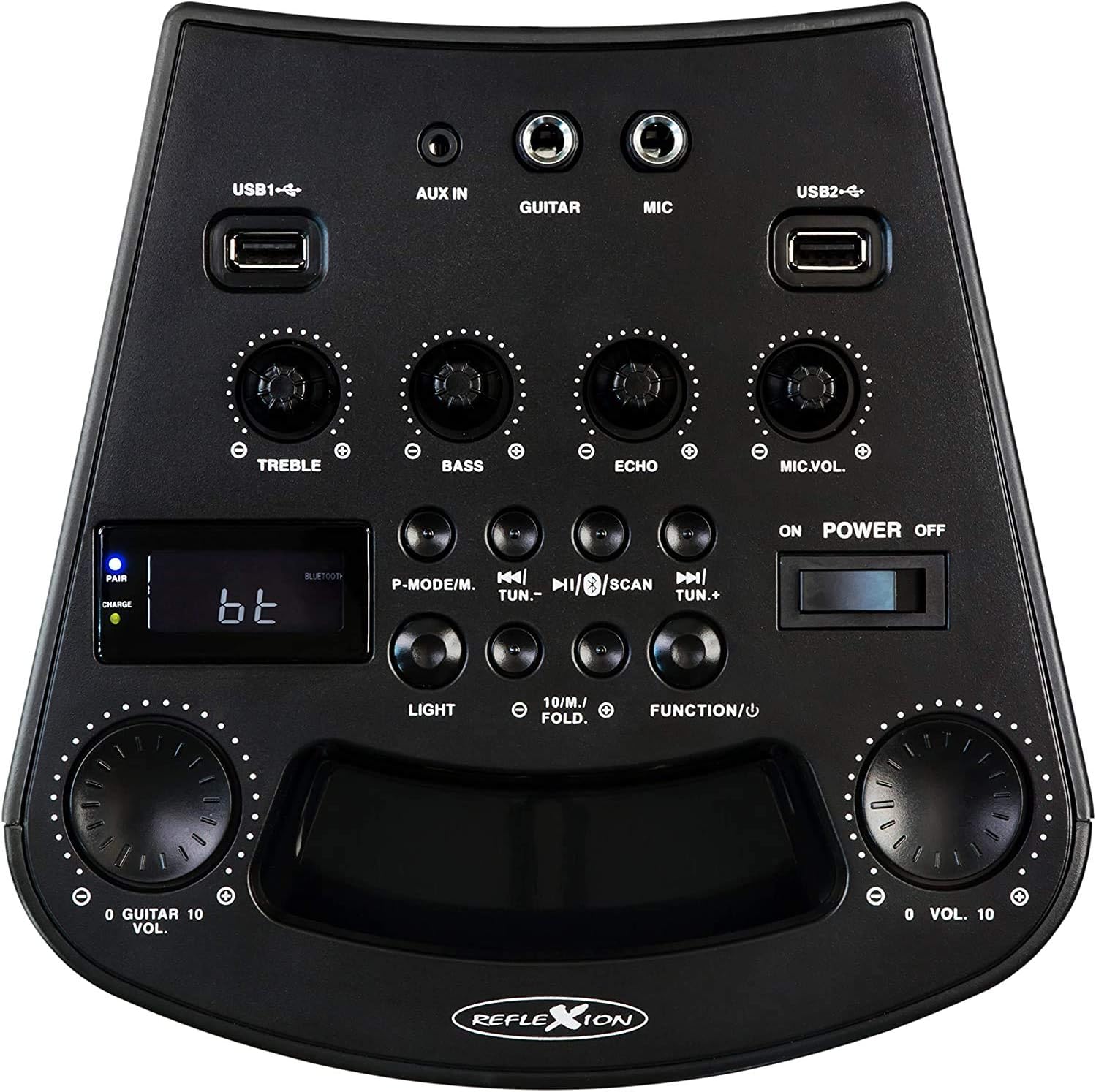
Слика 3: Детаљно view of the PS07BT control panel, showing input ports, sound adjustment knobs, and function buttons.
- USB1 / USB2 Ports: За репродукцију звука са УСБ уређаја за складиштење.
- АУКС ИН: 3.5 мм улаз за екстерне аудио изворе.
- ГИТАРА: 6.3mm input for connecting a guitar.
- МИЦ: 6.3mm input for connecting the microphone.
- ТРЕБЛЕ дугме: Подешава звук високих фреквенција.
- БАСС дугме: Подешава звук ниских фреквенција.
- ЕЦХО дугме: Подешава ефекат одјека за микрофонски улаз.
- Дугме за јачину звука микрофона: Подешава јачину звука микрофона.
- P-MODE/M Button: Program mode / Mode selection.
- TUN.- / TUN.+ Buttons: Tune down / Tune up for FM radio.
- Дугме СЦАН: Scans for FM radio stations.
- Дугме ЛИГХТ: Controls the LED light effects.
- FUNCTION/U Button: Switches between input modes (Bluetooth, USB, AUX, FM).
- VOL. Knob: Главна контрола јачине звука.
- Прекидач за УКЉУЧИВАЊЕ/ИСКЉУЧИВАЊЕ: Укључује или искључује јединицу.
- ЛЦД екран: Shows current mode, track information, or FM frequency.
- PAIR/CHARGE Indicators: Bluetooth pairing status and battery charging status.
Реар Панел

Figure 4: Rear panel of the PS07BT, displaying the AC power input and product information label.
- Улаз наизменичне струје: Connect the power adapter here for charging and operation.
- Ознака производа: Contains model number, serial number, and electrical specifications.
Сетуп
Пуњење батерије
The PS07BT features a built-in rechargeable battery. Before first use, fully charge the unit.
- Connect the supplied power adapter to the AC power input on the rear of the unit.
- Укључите адаптер за напајање у зидну утичницу.
- The CHARGE indicator light will illuminate during charging.
- A full charge takes approximately 4 hours. The CHARGE indicator may change or turn off once fully charged (refer to specific indicator behavior in the quick start guide if available).
A fully charged battery provides up to 4 hours of playback time.
Connecting Microphone and Guitar
To use the karaoke or instrument features:
- Insert the microphone cable into the МИЦ input on the control panel.
- If connecting a guitar, insert its cable into the ГУИТАР унос.
- Подесите МИЦ.ВОЛ и ЕЦХО knobs as desired during operation.
Упутство за употребу
Укључивање/искључивање
Померите ПОВЕР ОН/ОФФ switch to the 'ON' position to turn on the unit. Slide it to 'OFF' to power down.
Избор режима уноса
Притисните тастер FUNCTION/U button repeatedly to cycle through available input modes: Bluetooth (bt), USB, AUX, and FM Radio.
Блуетоотх веза
- Turn on the PS07BT and select 'bt' mode using the FUNCTION/U button. The 'PAIR' indicator will flash, indicating it's ready for pairing.
- Омогућите Блутут на свом мобилном уређају (паметном телефону, таблету итд.).
- Тражи available devices and select 'Reflexion PS07BT' from the list.
- Once connected, the 'PAIR' indicator will stop flashing and remain solid. You can now play audio from your device through the PS07BT.
УСБ репродукција
- Уметните USB уређај за складиштење (нпр. USB флеш диск) који садржи аудио fileс у било који од УСБ1 or УСБ2 лука.
- Select 'USB' mode using the FUNCTION/U дугме.
- Уређај ће аутоматски почети да репродукује аудио files from the USB device. Use the track control buttons (usually combined with TUN.-/TUN.+) to navigate tracks.
AUX-In Connection
- Connect an external audio source (e.g., MP3 player, laptop) to the АУКС ИН порт помоћу 3.5 мм аудио кабла.
- Select 'AUX' mode using the FUNCTION/U дугме.
- Play audio from your external device. The volume can be controlled via both the external device and the PS07BT's master volume knob.
Операција ФМ радија
- Select 'FM' mode using the FUNCTION/U дугме.
- Притисните тастер СЦАН button to automatically scan and save available FM radio stations.
- Користите ТУН.- и ТУН.+ buttons to manually tune to stations or select saved stations.
Караоке функција
With a microphone connected to the МИЦ input, you can sing along to music playing from any source (Bluetooth, USB, AUX, FM). Adjust the МИЦ.ВОЛ knob to control your voice volume and the ЕЦХО knob for an echo effect.
Лигхт Еффецтс
Притисните тастер ЛИГХТ button to activate or change the integrated blue LED light effects, which can synchronize with the music beat.
Подешавање јачине и звука
- Мастер јачина звука: Користите велико ВОЛ. knob to adjust the overall sound output level.
- Високи тонови/баси: Користите ТРЕБЛЕ и Басс knobs to fine-tune the audio's high and low frequencies.
Одржавање
Чишћење
Wipe the unit with a soft, dry cloth. Do not use abrasive cleaners, waxes, or solvents as they may damage the finish. Ensure the unit is powered off and unplugged before cleaning.
Складиштење
When not in use for extended periods, store the unit in a cool, dry place, away from direct sunlight and extreme temperatures. It is recommended to fully charge the battery before storing and to recharge it every few months to maintain battery health.
Решавање проблема
If you encounter issues with your PS07BT, refer to the following common problems and solutions:
| Проблем | Могуће решење |
|---|---|
| Нема струје | Ensure the power adapter is securely connected and plugged into a working outlet. Check if the battery is charged. Slide the POWER switch to ON. |
| Нема звука | Increase the master VOL. knob. Check the volume on your connected audio source (e.g., phone). Ensure the correct input mode (Bluetooth, USB, AUX, FM) is selected. Check all cable connections. |
| Блуетоотх се не повезује | Ensure the unit is in 'bt' mode and the 'PAIR' indicator is flashing. Turn off and on Bluetooth on your device. Move your device closer to the PS07BT. Forget the device from your phone's Bluetooth list and try pairing again. |
| Микрофон не ради | Ensure the microphone is securely plugged into the MIC input. Increase the MIC.VOL knob. Check if the microphone has its own ON/OFF switch and is turned on. |
| Проблеми са репродукцијом са USB-а | Ensure the USB device is formatted correctly (FAT32 recommended) and contains compatible audio fileс. Пробајте други УСБ уређај. |
Спецификације
Technical details for the Reflexion PS07BT Mobile Karaoke System:
- Назив модела: PS07BT
- Димензије (Д к Ш к В): 20.2 к 49 к 20.1 цм
- Тежина: 2 килограма
- Max Speaker Output Power: 320 Ваттс
- Технологија повезивања: Блуетоотх
- Режим аудио излаза: Стерео
- Материјал: Пластика
- Тип звучника: Субвоофер
- Посебне карактеристике: Bluetooth, USB Port
- Просечан век трајања батерије: 4 сата
- Време пуњења: 4 сата
- Метод контроле: Touch (referring to buttons/knobs)
- Total USB 2.0 Ports: 2
- Боја: Црно
- Извор напајања: Corded Electric / Battery

Figure 5: The PS07BT's integrated handle allows for easy portability.
Гаранција и подршка
The Reflexion PS07BT comes with a spare parts availability period of 1 year. For technical support or warranty inquiries, please contact your retailer or the manufacturer's customer service. Keep your proof of purchase for warranty claims.