
1. Увод
The Perixx PERIDUO-712B is a compact wireless keyboard and mouse combo designed for efficiency and convenience. This set includes a space-saving mini keyboard and a 3-button optical mouse, ideal for various environments such as home, office, or travel. It features a stable 2.4 GHz wireless connection and plug-and-play setup for immediate use.

Image 1.1: The Perixx PERIDUO-712B Wireless Mini Keyboard and Mouse Set, showcasing its compact design and included nano receiver.
Садржај пакета:
- 1 к бежична тастатура
- 1 к бежични миш
- 1 к УСБ нано пријемник
- 1 x Упутство за употребу (овај документ)
2. Почетак рада (Подешавање)
Follow these steps to set up your Perixx PERIDUO-712B wireless keyboard and mouse set.
2.1 Инсталација батерије
- тастатура: Locate the battery compartment on the underside of the keyboard. Insert two (2) AA alkaline batteries (not included), ensuring correct polarity.
- миш: Locate the battery compartment on the underside of the mouse. Insert one (1) AA alkaline battery (not included), ensuring correct polarity.
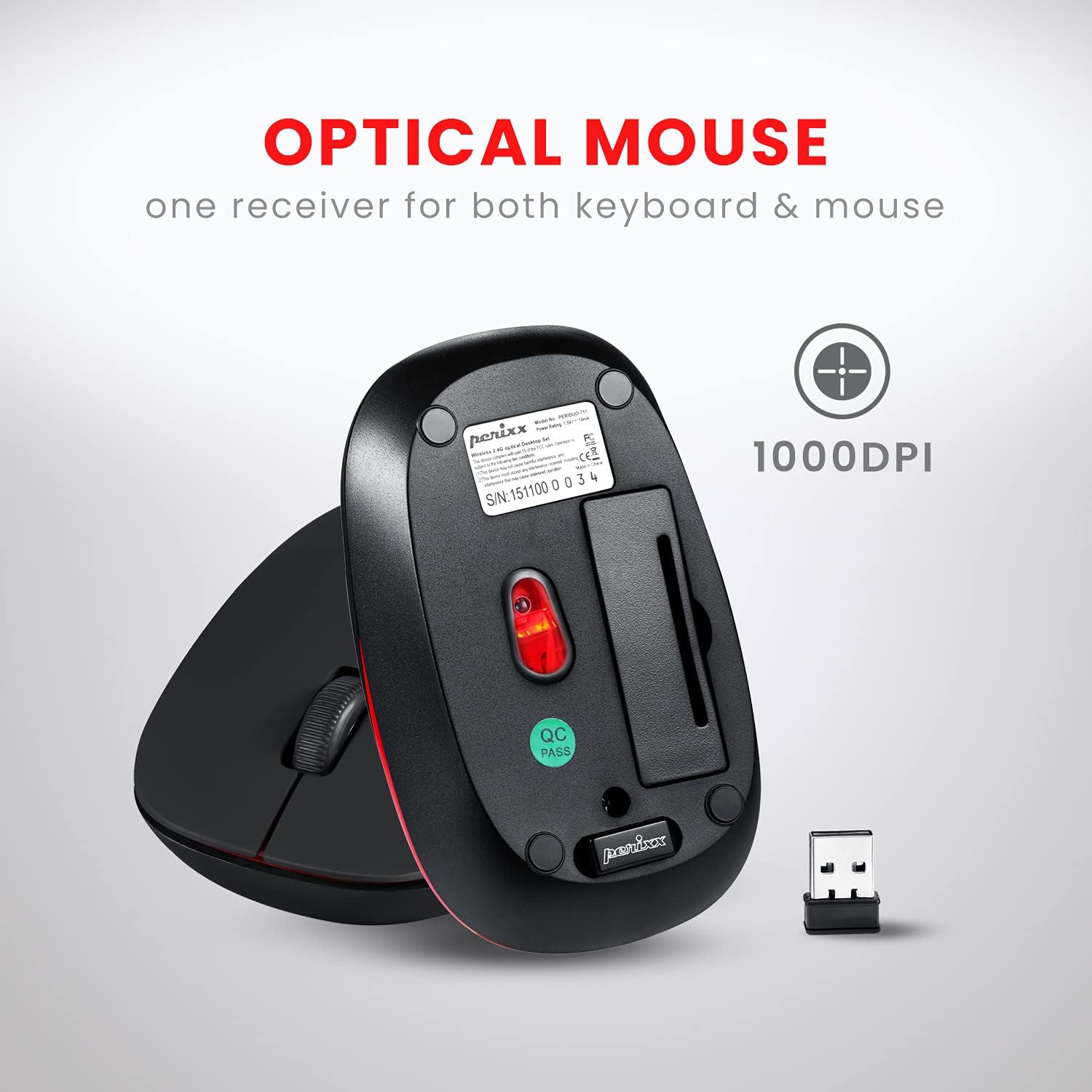
Image 2.1: Underside of the mouse, indicating the battery compartment and the storage slot for the USB nano receiver.
2.2 Повезивање пријемника
The USB nano receiver connects both the keyboard and mouse to your computer.
- Извадите УСБ нано пријемник из његовог отвора за складиштење на доњој страни миша.
- Прикључите USB nano пријемник у слободан USB порт на рачунару.
- Your computer will automatically detect and install the necessary drivers. No additional software is required.
- Тастатура и миш су сада спремни за употребу.
3. Упутство за употребу
3.1 Коришћење тастатуре
The keyboard features a low-profile design with membrane switches for comfortable and quiet typing. It has a standard US English QWERTY layout.

Image 3.1: Detailed diagram illustrating the keyboard layout, including standard keys and function key assignments.
Multimedia Function Keys (Fn + F1-F12):
The keyboard includes 12 integrated multimedia hotkeys for quick access to various functions. To activate these functions, press and hold the Fn тастер, а затим притисните одговарајући Ф-тастер (F1-F12).
- Фн + Есц: Медиа Плаиер
- Фн + Ф1: Превиоус Трацк
- Фн + Ф2: Пусти/Паузирај
- Фн + Ф3: Нект Трацк
- Фн + Ф4: Муте
- Фн + Ф5: Утишавање звука
- Фн + Ф6: Волуме Уп
- Фн + Ф7: Хоме
- Фн + Ф8: Pretraga
- Фн + Ф9: Емаил
- Фн + Ф10: Калкулатор
- Фн + Ф11: Фаворитес
- Фн + Ф12: Мој рачунар

Image 3.2: Visual guide to the multimedia function keys and their corresponding actions.
3.2 Коришћење миша
The 3-button optical mouse provides precise tracking and a comfortable grip with its soft rubber coating. It operates at 1000 DPI.
- Леви клик: Стандардни избор и активација.
- Десни клик: Приступ контекстном менију.
- Точак за померање: Скролујте документе и web странице. Такође се може притиснути за функцију клика средњим тастером миша.

Image 3.3: The Perixx mouse, highlighting its ergonomic design, nano receiver, 3-button functionality, 30 ft operating range, and 75g weight.
4. Нега и одржавање
- Чишћење: Use a soft, dry cloth to clean the keyboard and mouse. For stubborn dirt, slightly dampОбришите крпу водом или благим раствором за чишћење. Избегавајте јаке хемикалије или абразивне материјале.
- Замена батерије: Replace batteries when performance degrades. Always use fresh alkaline batteries of the specified type (AA).
- Складиштење: When not in use for extended periods, remove batteries to prevent leakage. Store the USB nano receiver in its dedicated slot on the mouse to prevent loss.
- Окружење: Избегавајте излагање уређаја екстремним температурама, директној сунчевој светлости или прекомерној влази.
КСНУМКС. Решавање проблема
If you encounter issues with your PERIDUO-712B set, refer to the following common solutions:
| Проблем | Решење |
|---|---|
| Тастатура или миш не реагују |
|
| Повремена веза или кашњење |
|
| Проблеми са праћењем миша |
|
| Caps Lock indicator light behaves erratically |
|
6. Техничке спецификације

Image 6.1: Technical drawing showing precise dimensions of the keyboard and mouse.
| Феатуре | Детаљ |
|---|---|
| Модел | PERIDUO-712B |
| Повезивање | 2.4 ГХз бежично |
| Оперативни опсег | До 30 стопа (10 м) |
| Димензије тастатуре | 11.46 × 5.43 × 0.77 инча (291 × 138 × 19.5 мм) |
| Тежина тастатуре | 0.78 фунте (приближно 354 г) |
| Распоред тастатуре | US English QWERTY, 84 keys |
| Димензије миша | 4.09 × 2.44 × 1.33 инча (104 × 62 × 34 мм) |
| Тежина миша | Прибл. 75г |
| ДПИ миша | 1000 ДПИ |
| Извор напајања | Keyboard: 2 x AA batteries; Mouse: 1 x AA battery (not included) |
| Компатибилан ОС | Windows 7, 8, 10, 11 (and older versions like XP, Vista) |
7. Гаранција и подршка
7.1 Информације о гаранцији
The Perixx PERIDUO-712B Wireless Mini Keyboard and Mouse Set is backed by a 12-месечна ограничена гаранцијаОва гаранција покрива производне недостатке од датума куповине. Молимо вас да сачувате доказ о куповини за потребе подношења захтева за гаранцију.
7.2 Корисничка подршка
For technical assistance, warranty claims, or general inquiries, please visit the official Perixx website or contact their customer support directly. Information regarding spare USB receivers can also be found on the Perixx website or Amazon.
Произвођач: Perixx Computer GmbH
За више информација посетите: Perixx продавница на Амазону