
Увод
The QUMOX CF Adapter Reader (Model B665U) is designed to enable the use of various SD memory card formats (SD, SDHC, SDXC) in devices equipped with a Compact Flash (CF) Type I slot. This adapter provides a convenient solution for expanding storage or utilizing readily available SD cards in compatible CF devices, supporting capacities up to 128GB.

Image: The QUMOX CF Adapter Reader, showcasing its design for converting SD cards to Compact Flash Type I format.
Упутства за подешавање
Inserting an SD Card into the Adapter
1. Carefully align your SD, SDHC, or SDXC card with the slot on the QUMOX CF Adapter Reader.
2. Gently push the SD card into the adapter until it clicks into place and is fully seated. Do not force the card.
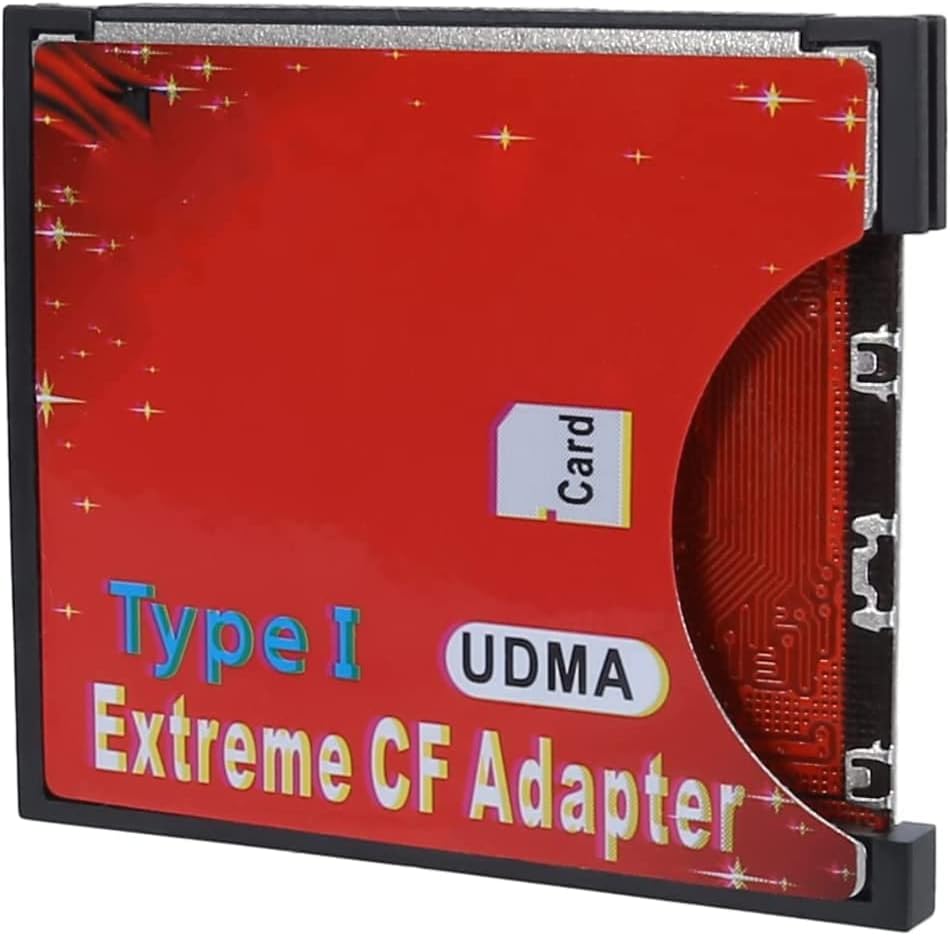
Слика: Са стране view of the adapter, illustrating the correct orientation for SD card insertion.
Inserting the Adapter into a CF Device
1. With the SD card securely inserted, align the QUMOX CF Adapter Reader with the Compact Flash Type I slot of your device (e.g., camera, media player).
2. Gently push the adapter into the CF slot until it is fully seated. Ensure proper orientation to avoid bending pins.

Слика: Доња страна view of the adapter, showing the Compact Flash pins for connection to a host device.
Removing the SD Card from the Adapter
To remove the SD card from the adapter, simply pull the card directly out. Note that it may require a firm but gentle pull as there is no spring-loaded ejection mechanism. Using a fingernail to get a grip on the edge of the SD card can assist in removal.
Removing the Adapter from a CF Device
To remove the QUMOX CF Adapter Reader from your device, gently pull it straight out from the CF slot.
Operating the CF Adapter Reader
Once the QUMOX CF Adapter Reader with an inserted SD card is installed in your compatible device, the device should recognize it as a Compact Flash card.
Пренос података
Data transfer operations (e.g., saving photos, recording video, transferring files) will function as they would with a standard Compact Flash card. Refer to your device's instruction manual for specific data management procedures.
Форматирање
It is recommended to format the SD card using your host device's formatting function after initial insertion or if you encounter any issues. This ensures optimal compatibility and performance.
Wi-Fi SD Card Usage
When using a Wi-Fi enabled SD card with this adapter in a CF-supported camera, adjust the camera's "Auto power off" setting. Ensure the setting allows sufficient time for the Wi-Fi SD card to complete its data transfer operations before the camera powers down.
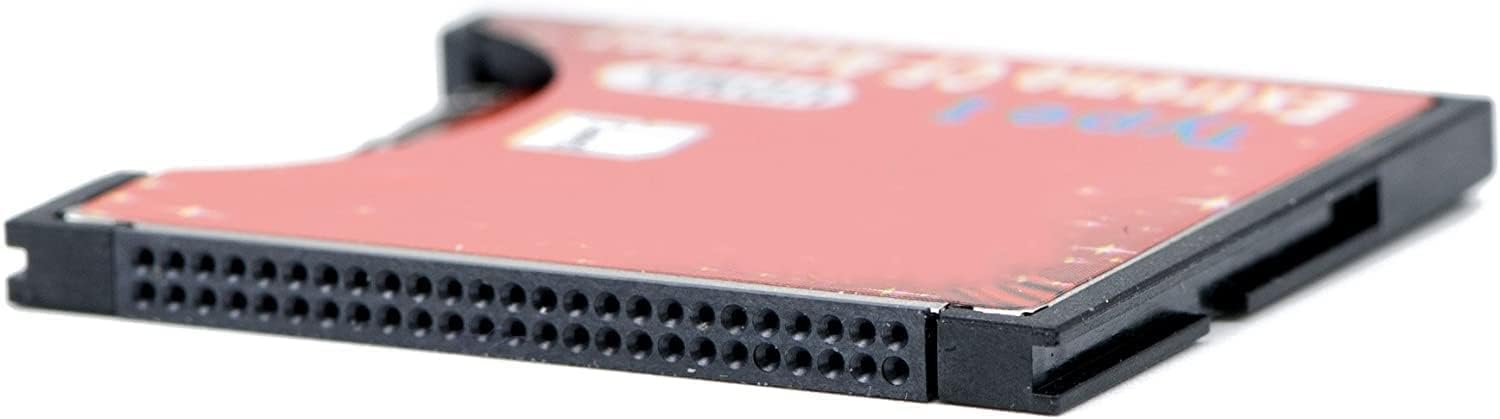
Image: A diagram showing the versatility of the CF adapter with various SD card types and compatible devices.
Нега и одржавање
- Адаптер одржавајте чистим и без прашине и остатака. За чишћење користите меку, суву крпу.
- Избегавајте излагање адаптера екстремним температурама, влажности или директној сунчевој светлости.
- Do not bend or apply excessive force to the adapter or its pins.
- Store the adapter in a protective case when not in use to prevent physical damage.
- Always handle memory cards and the adapter by their edges to avoid touching electrical contacts.
Решавање проблема
Device Not Recognizing the Card
- Ensure the SD card is fully and correctly inserted into the QUMOX CF Adapter Reader.
- Ensure the QUMOX CF Adapter Reader is fully and correctly inserted into the host device's CF slot.
- Try using a different SD card to rule out an issue with the card itself.
- Verify that your host device supports Compact Flash Type I cards and the capacity of your SD card.
- Some older devices or BIOS versions may have compatibility limitations (e.g., 8-bit PIO mode, specific drive size queries). Consult your device's manual or manufacturer for compatibility.
Slow Read/Write Speeds
- The adapter has a maximum write speed buffer of approximately 90MB/s. If your SD card is rated for faster speeds, the adapter may throttle performance to this limit.
- Ensure your host device's CF slot supports high-speed data transfer modes (e.g., UDMA).
- Try formatting the SD card within the host device.
Difficulty Removing SD Card
- The SD card slot in the adapter does not feature a spring-loaded ejection. Gently pull the SD card directly out. A fingernail can be used to gain purchase on the edge of the card for easier removal.
Wi-Fi SD Card Disconnects
- If using a Wi-Fi SD card, ensure your camera's "Auto power off" setting is adjusted to allow sufficient time for Wi-Fi transfers to complete.
Спецификације производа
| Феатуре | Детаљ |
|---|---|
| Бранд | КУМОКС |
| Број модела | Б665У |
| Димензије производа | 7.28 к 4.72 к 0.39 инча |
| Тежина артикла | 0.32 унци |
| Компатибилност оперативног система | Мац ОС, Виндовс |
| Подржани типови медија | СД, СДХЦ, СДКСЦ |
| Интерфејс | Compact Flash Type I |
| Maximum Supported Capacity | 128ГБ |
| Волtage | 5 Волтс |
| Посебна карактеристика | Цомпацт Десигн |
| Компатибилни уређаји | Cameras and other devices with CF Type I slot |

Image: A table detailing specific camera models compatible with the CF Adapter Reader.
Информације о гаранцији
No specific warranty information is provided with this product. Please refer to the retailer's return policy or contact QUMOX directly for details regarding product warranty.
Корисничка подршка
For further assistance or inquiries, please contact your product retailer or visit the official QUMOX webсајт. Конкретни контакт подаци нису наведени у овом упутству.