
Mars XBox Original Replacement Controller

Упутство за употребу: Заменски контролер за оригинални Xbox
Model: XBox Original Replacement Controller
Brand: Mars
Производ је завршенview
This manual provides essential information for the proper use and maintenance of your Mars Replacement Controller for the Original Xbox system. This controller is designed to offer a familiar gaming experience, serving as a direct replacement for your existing or worn Original Xbox controllers. It features a classic layout with ten buttons, a D-pad, and two joysticks, built for durability and extended gameplay sessions.
Упутства за подешавање
Follow these steps to connect your new controller to your Original Xbox console:
- Locate Controller Port: Identify an available controller port on the front of your Original Xbox console. The Original Xbox typically has four controller ports.
- Повежите контролер: Align the proprietary connector of the Mars Replacement Controller with the chosen port on the console. Gently push the connector firmly into the port until it clicks into place.
- Укључивање конзоле: Turn on your Original Xbox console. The controller should be automatically recognized by the system.
- Тест функционалност: Once the console is on, test all buttons, joysticks, and the D-pad to ensure proper functionality before starting a game.
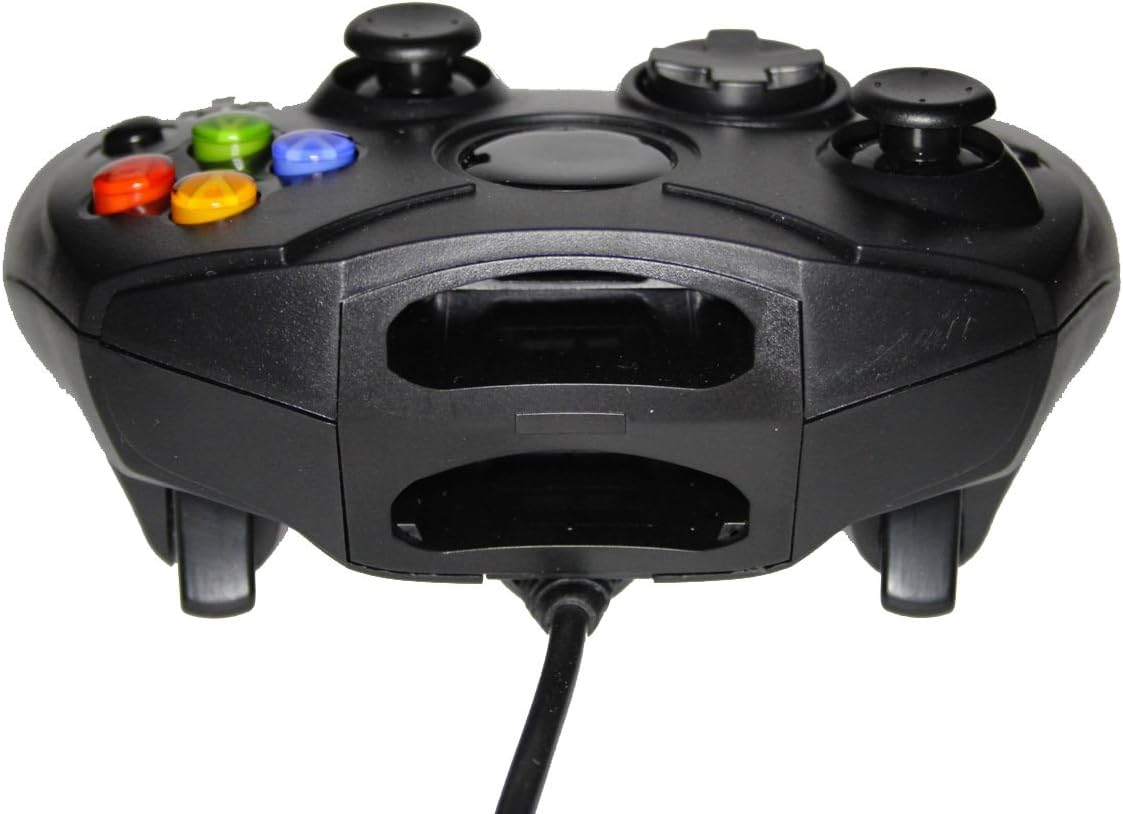
Слика 1: Предња страна view of the controller, highlighting the proprietary Xbox connector and memory card slots.
Управљање контролером
The Mars Replacement Controller features the standard button layout for the Original Xbox, providing intuitive control for your games.

Слика 2: Врх view of the controller, displaying the button layout.
Функције дугмета:
- Дугмад A, B, X, Y: Primary action buttons, typically used for jumping, attacking, interacting, or confirming selections.
- D-Pad (смерни тастер): Used for precise directional input, menu navigation, or specific in-game actions.
- Леви и десни аналогни штапићи: Provide 360-degree movement and camera control. Pressing them down often activates additional functions (L3/R3).
- Black and White Buttons: Auxiliary action buttons, often used for secondary actions or specific game mechanics.
- Старт дугме: Typically used to pause games, access in-game menus, or confirm selections.
- Дугме за назад: Often used to access maps, inventories, or return to previous menus.
- Left and Right Triggers: Analog triggers on the underside of the controller, commonly used for acceleration, braking, or firing weapons.
Specific button assignments may vary depending on the game. Refer to your game's instruction manual for detailed control schemes.
Нега и одржавање
To ensure the longevity and optimal performance of your Mars Replacement Controller, follow these care guidelines:
- Чишћење: Редовно бришите контролер меком, сувом крпом. За тврдокорну прљавштину, благо дрхтајтеampen the cloth with water or a mild, non-abrasive cleaner. Avoid excessive moisture, especially near buttons and ports.
- Складиштење: Store the controller in a clean, dry place away from direct sunlight, extreme temperatures, and excessive dust. Avoid wrapping the cable too tightly around the controller to prevent damage.
- Руковање: Do not drop the controller or subject it to strong impacts. Avoid pulling the cable forcefully when disconnecting it from the console; always grasp the connector itself.
- Изложеност течности: Keep the controller away from liquids. Spills can cause internal damage and void any potential warranty.
Решавање проблема
If you encounter issues with your controller, refer to the following common problems and solutions:
| Проблем | Могуће решење |
|---|---|
| Контролер не реагује. |
|
| Buttons or joysticks are unresponsive or sticky. |
|
| Контролер се повремено искључује. |
|
Ако проблем и даље постоји након што сте испробали ова решења, обратите се корисничкој подршци.
Техничке спецификације
| Феатуре | Детаљ |
|---|---|
| Димензије производа | 7 к 5.6 к 2.4 инча |
| Тежина артикла | 3.99 унци |
| Компатибилни уређаји | Original Xbox Console |
| Тип контролера | Гамепад |
| Повезивање | Wired (Proprietary Xbox Connector) |
| Боја | Црно |
| Произвођач | Mars Devices |
Информације о гаранцији
This Mars Replacement Controller is covered by a manufacturer's warranty. For specific details regarding warranty duration, coverage, and claims procedures, please refer to the official Mars Devices webсајт или директно контактирајте њихову корисничку подршку. Сачувајте доказ о куповини ради потврде гаранције.
Корисничка подршка
For further assistance, technical support, or inquiries regarding your Mars Replacement Controller, please contact Mars Devices customer support. Contact information can typically be found on the product packaging or the official Mars Devices webсајту.
Онлине ресурси: Mars Devices Store on Amazon