
Увод
This manual provides detailed instructions for the setup, operation, and maintenance of your A4tech Bloody Light Strike B314 Gaming Keyboard. Please read this manual thoroughly before using the product to ensure optimal performance and longevity.
Кључне карактеристике
- Bloody 4 Light Strike Mechanical Switches: Experience ultra-fast response times of 0.2ms with infrared optic switches, providing a competitive edge in gaming.
- Повећана издржљивост: Designed for intensive use, featuring A,S,D,W silicon keys with a convex shape for improved control and longevity.
- Neon Glare System LED Backlighting: Customize your gaming environment with vibrant LED backlighting, making keys easy to locate in low-light conditions.
- 9 програмабилна тастера: Personalize your gaming experience by assigning custom functions to 9 individually programmable keys.
- Double Secure Water-Resistance: The keyboard is electronically sealed with a water drain hole, protecting it from accidental spills and extending its lifespan.
Садржај пакета
Проверите да ли су све ставке присутне у пакету:
- Bloody Light Strike B314 Gaming Keyboard
- Кориснички приручник (овај документ)

Image: The retail packaging for the Bloody Light Strike B314 Gaming Keyboard, showing the keyboard with LED backlighting and key features highlighted.
Водич за подешавање
- Повежите тастатуру: Укључите УСБ конектор тастатуре у слободан УСБ порт на рачунару.
- Инсталација драјвера: The keyboard is typically plug-and-play. Your operating system should automatically detect and install the necessary drivers. If prompted, follow the on-screen instructions.
- Инсталација софтвера (опционо): For advanced customization, including programming keys and managing backlighting, download and install the official Bloody software from the A4tech webсајту.
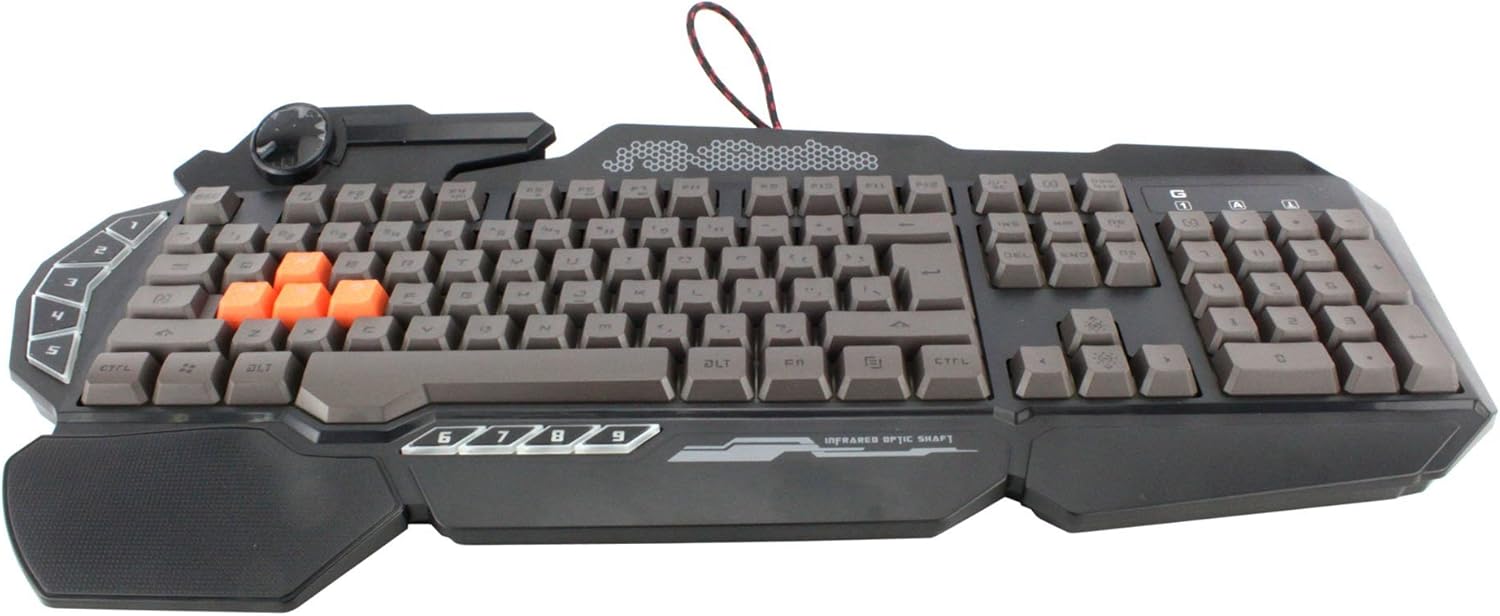
Слика: Одозго надоле view of the Bloody Light Strike B314 Gaming Keyboard, showcasing the full QWERTY layout with orange WASD keys and dedicated macro keys on the left.
Упутство за употребу
Основна употреба
The Bloody B314 functions as a standard QWERTY keyboard for everyday typing and gaming. Its infrared mechanical switches provide a fast and responsive typing experience.
Програмабилни тастери
The keyboard features 9 programmable keys, typically located on the left side. To customize these keys:
- Install the official Bloody software from the A4tech webсајту.
- Launch the software and navigate to the key customization section.
- Select the desired programmable key (e.g., G1-G9 or similar).
- Assign macros, key functions, or multimedia controls as needed.
- Сачувајте свог професионалцаfile да примени промене.
Контрола ЛЕД позадинског осветљења
The Neon Glare System LED backlighting can be adjusted using function key combinations:
- Фн + Ф12: Cycle through different backlighting modes (e.g., static, breathing, off).
- Fn + стрелица горе/доле: Подесите осветљеност позадинског осветљења.
- Fn + стрелица лево/десно: Adjust backlight speed or direction (if applicable to the mode).
Режим игре
Activate Game Mode to disable the Windows key and prevent accidental interruptions during gameplay.
- Фн + Ф8: Укључите/искључите Режим игре.

Слика: Угаона view of the Bloody Light Strike B314 Gaming Keyboard, highlighting the ergonomic wrist rest and the distinct orange WASD keys.
Одржавање
Чишћење
- Искључите тастатуру из рачунара пре чишћења.
- Користите меку, дamp крпу за брисање површине тастатуре. Избегавајте јаке хемикалије или абразивне материјале.
- За прашину и остатке између тастера користите компримовани ваздух.
- The water-resistant design helps protect against spills, but it is still recommended to clean up liquids promptly.
Складиштење
Чувајте тастатуру на хладном и сувом месту, даље од директне сунчеве светлости и екстремних температура када се не користи дуже време.
Решавање проблема
Тастатура не реагује
- Уверите се да је УСБ кабл безбедно прикључен и на тастатуру и на рачунар.
- Покушајте да прикључите тастатуру на други УСБ порт.
- Поново покрените рачунар.
- Check if the keyboard is recognized in your computer's Device Manager (Windows) or System Information (macOS).
Позадинско осветљење не ради
- Ensure the backlighting is not turned off using the Fn + F12 combination.
- Adjust brightness using Fn + Up Arrow.
- Ако користите прилагођени професионалацfiles, ensure the backlighting settings are correctly configured in the Bloody software.
Programmable Keys Not Working
- Verify that the Bloody software is installed and running.
- Ensure your custom profiles are loaded and active within the software.
- Check for any software updates for the Bloody keyboard utility.
Спецификације
| Феатуре | Детаљ |
|---|---|
| Бранд | A4tech |
| Број модела | A4TKLA45173 |
| Технологија повезивања | Инфрацрвени |
| Опис тастатуре | Механички |
| Тип прекидача | Mechanical (Light Strike Optic) |
| Посебна карактеристика | Backlit, Programmable Keys, Water Resistant |
| Боја | Црно |
| Подршка бојама позадинског осветљења тастатуре | RGB (Neon Glare System) |
| Број кључева | 104 |
| Програмабилна дугмад | 9 |
| Ниво отпорности на воду | Отпоран на воду |
| Тежина артикла | 2.9 фунти |
Гаранција и подршка
For warranty information and technical support, please refer to the official A4tech webсајт или директно контактирајте њихову корисничку службу. Сачувајте рачун као доказ о куповини за потребе гаранције.
Official A4tech Webсајт: ввв.а4тецх.цом