
Brydge BRY5103
Brydge 7.9 Keyboard User Manual for iPad Mini (2019) and iPad Mini 4
Model: BRY5103
1. Увод
The Brydge 7.9 Keyboard is designed to enhance the functionality of your iPad Mini (2019) or iPad Mini 4, transforming it into a versatile laptop-like device. This keyboard features a full QWERTY layout with backlit keys and dedicated iOS function keys, providing a comfortable and efficient typing experience. Constructed from 100% high-grade aluminum, it offers durability and a premium aesthetic that complements your iPad.
The patented hinges allow for a 180-degree viewing angle, securing your iPad in various positions. The keyboard connects wirelessly via Bluetooth and can be easily detached when not needed. Its slim and lightweight design ensures portability without compromising on build quality.

This manual provides detailed instructions for setting up, operating, and maintaining your Brydge 7.9 Keyboard.
2. Безбедносне информације
- Не излажите тастатуру течностима или екстремним температурама.
- Avoid dropping or subjecting the keyboard to severe impacts.
- Чувати ван домашаја деце.
- Користите само приложени кабл за пуњење или сертификовани еквивалент.
- Do not attempt to disassemble or repair the keyboard yourself. This may void the warranty.
3. Шта је у кутији
- Brydge 7.9 Keyboard
- УСБ кабл за пуњење
- Кориснички приручник (овај документ)
4. Подешавање
4.1 Повезивање iPad-а
- Ensure your iPad Mini (2019) or iPad Mini 4 is clean and free of debris.
- Gently align the iPad with the hinges of the Brydge keyboard.
- Carefully slide the iPad into the hinges until it is securely seated. The hinges are designed to hold the iPad firmly.

4.2 Пуњење тастатуре
Before initial use, fully charge your Brydge keyboard. Connect the provided USB charging cable to the charging port on the keyboard and the other end to a USB power adapter (not included) or a computer's USB port. The charging indicator light will show the charging status.
4.3 Блуетоотх упаривање
- Turn on the Brydge keyboard by pressing the power button.
- На вашем iPad-у идите на Подешавања > Блуетоотх.
- Уверите се да је Bluetooth омогућен на вашем iPad-у.
- On the Brydge keyboard, press and hold the Bluetooth key (often indicated by a Bluetooth symbol) for a few seconds until the Bluetooth indicator light flashes.
- On your iPad, select 'Brydge Keyboard' from the list of available devices.
- Follow any on-screen prompts to complete the pairing process. The indicator light on the keyboard will turn solid to confirm a successful connection.
5. Управљање тастатуром
5.1 General Typing
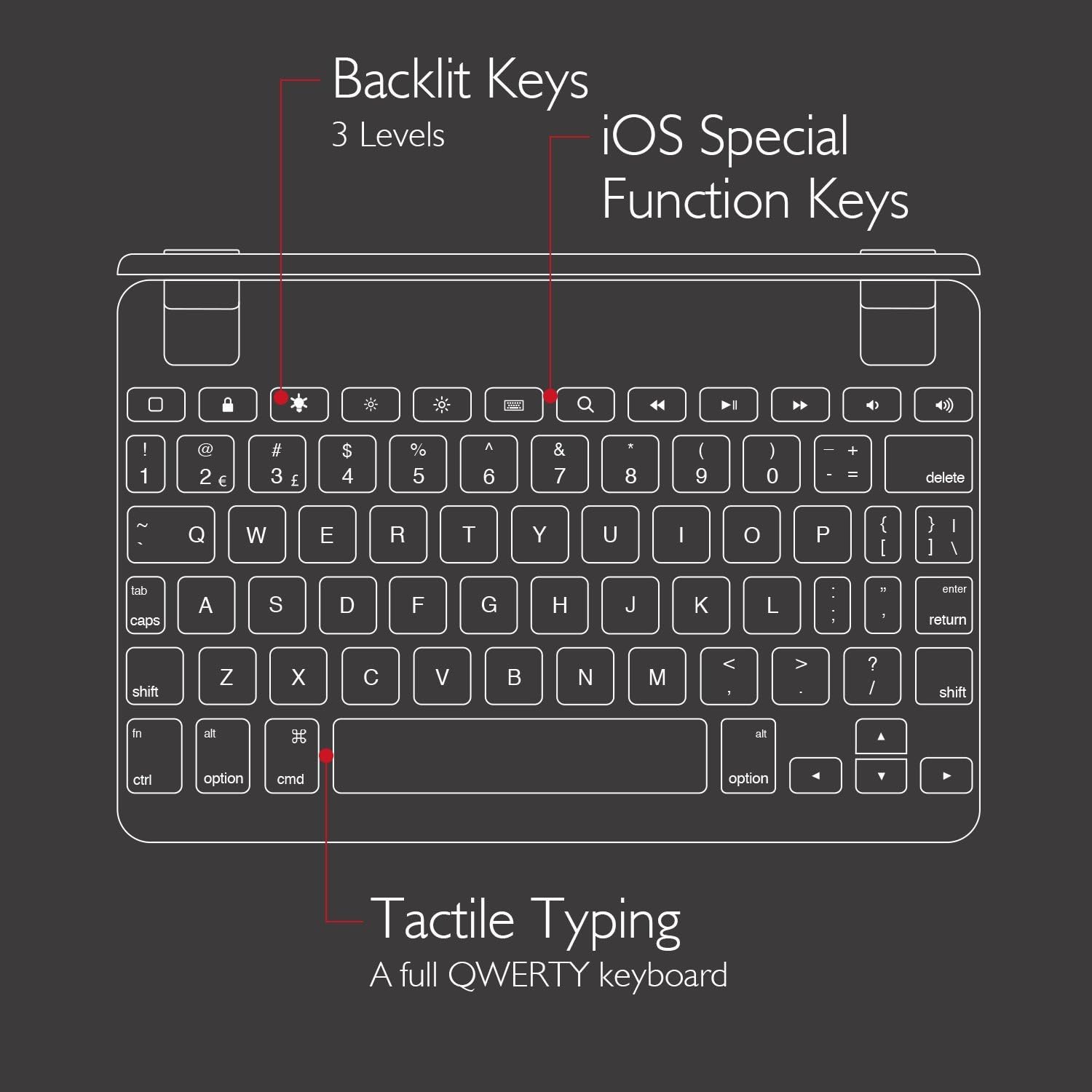
The Brydge 7.9 Keyboard provides a full QWERTY layout for comfortable and efficient typing. Keys offer a responsive tactile feedback.
5.2 Позадинско осветљење тастера
The keyboard features backlit keys with three adjustable brightness levels. To adjust the backlight, press the dedicated backlight key (often indicated by a sun or light bulb icon) repeatedly to cycle through the brightness settings or turn the backlight off.
5.3 iOS Special Function Keys
The top row of the keyboard includes dedicated iOS special function keys for quick access to common iPad features, such as:
- Почетни екран
- Подешавање осветљености екрана
- Pretraga
- Контроле за репродукцију медија (репродукција/пауза, следећа/претходна нумера)
- Контрола јачине звука
- Закључавање екрана

5.4 180 степени Viewing and Detachable Design
The keyboard's patented hinges allow the iPad to rotate up to 180 degrees, offering various viewing angles for typing, watching media, or presenting. The iPad can also be easily removed from the hinges if you prefer to use it as a standalone tablet.

6. Одржавање
6.1 Чишћење
- To clean the keyboard, use a soft, lint-free cloth.
- За тврдокорне трагове, благо дampи крпу са водом или благим, неабразивним средством за чишћење.
- Avoid spraying cleaners directly onto the keyboard.
- Ensure the keyboard is completely dry before use or charging.
6.2 Складиштење
When not in use, store the keyboard in a cool, dry place away from direct sunlight and extreme temperatures. If storing for an extended period, ensure the keyboard has a partial charge (around 50%) to preserve battery health.
КСНУМКС. Решавање проблема
7.1 Keyboard Not Connecting via Bluetooth
- Уверите се да је тастатура укључена и потпуно напуњена.
- Проверите да ли је Bluetooth омогућен на вашем iPad-у.
- Try unpairing and re-pairing the keyboard from your iPad's Bluetooth settings.
- Restart both your iPad and the Brydge keyboard.
- Move the keyboard closer to your iPad to rule out interference.
7.2 Тастери не реагују
- Проверите да ли је тастатура правилно повезана преко Блутут-а.
- Уверите се да је тастатура напуњена.
- If specific keys are not working, try cleaning around the keys to remove any debris.
- Perform a hard reset on the keyboard (refer to manufacturer's website for specific instructions if needed, as this model may not have a dedicated reset button).
7.3 Позадинско осветљење не ради
- Ensure the keyboard is sufficiently charged, as low battery can disable backlighting.
- Press the backlight key to cycle through brightness levels.
8. Спецификације
| Бранд | Бридге |
| Број модела | БРИ5103 |
| Компатибилни уређаји | iPad Mini (2019), iPad Mini 4 |
| Технологија повезивања | Блуетоотх |
| Опис тастатуре | Бежични |
| Посебне карактеристике | Backlit, Rechargeable, 180-degree rotating hinges, Detachable |
| Материјал | 100% High-Grade Aluminum |
| Боја | Gold (as per product listing, other colors may vary) |
| Тежина артикла | Отприлике 11 унци (312 грама) |
| Димензије производа (ДкШкВ) | 7.9 к 5.3 к 0.3 инча (20.07 к 13.46 к 0.76 цм) |
| Извор напајања | Напаја се батеријама (1 литијум-јонска батерија је укључена) |

9. Гаранција и подршка
9.1 Информације о гаранцији
Specific warranty details for your Brydge 7.9 Keyboard may vary by region and retailer. Please refer to the warranty card included with your product or visit the official Brydge webсајт за најажурније информације о гаранцији.
9.2 Корисничка подршка
For technical assistance, troubleshooting, or general inquiries, please contact Brydge customer support through their official website. You may also find additional resources, FAQs, and support articles online.