
1. Увод
Хвала вам на куповиниasing the Axess 2.1 HiFi Bluetooth Speaker SPBT1038BK. This portable speaker system is designed to provide clear audio and robust bass, suitable for various environments. It features Bluetooth connectivity, USB and SD card support, and a line-in function for versatile audio playback. This manual provides essential information for the safe and efficient use of your speaker.
Кључне карактеристике укључују:
- 2.1 outdoor passive HIFI Bluetooth speaker with 3-inch subwoofer.
- Secure and simple Bluetooth pairing with an operating range of up to 32 feet (10 meters).
- Support for USB drives, SD cards, and a line-in function for compatibility with various audio devices.
- Integrated slide panel control for volume adjustment.
- Durable leather handle for convenient portability.
- Built-in 1000mAh Lithium rechargeable battery.
2. Безбедносне информације
Please read all safety instructions carefully before using this product. Failure to follow these instructions may result in electric shock, fire, or other hazards.
- Не излажите звучник екстремним температурама, директној сунчевој светлости или високој влажности.
- Избегавајте испуштање или излагање звучника јаким ударима.
- Do not disassemble, repair, or modify the unit. Refer all servicing to qualified personnel.
- Држите звучник даље од воде и других течности.
- Користите само приложени кабл за пуњење или сертификовани еквивалент.
- Обезбедите одговарајућу вентилацију приликом рада са звучником.
- Одложите батерије у складу са локалним прописима. Не излажите батерије прекомерној топлоти.
3. Садржај пакета
Проверите да ли су све ставке присутне у вашем пакету:
- Axess SPBT1038BK Bluetooth Speaker
- УСБ кабл за пуњење
- 3.5mm Audio (AUX) Cable
- Упутство за употребу
4. Производ је готовview
Упознајте се са компонентама и контролама звучника.
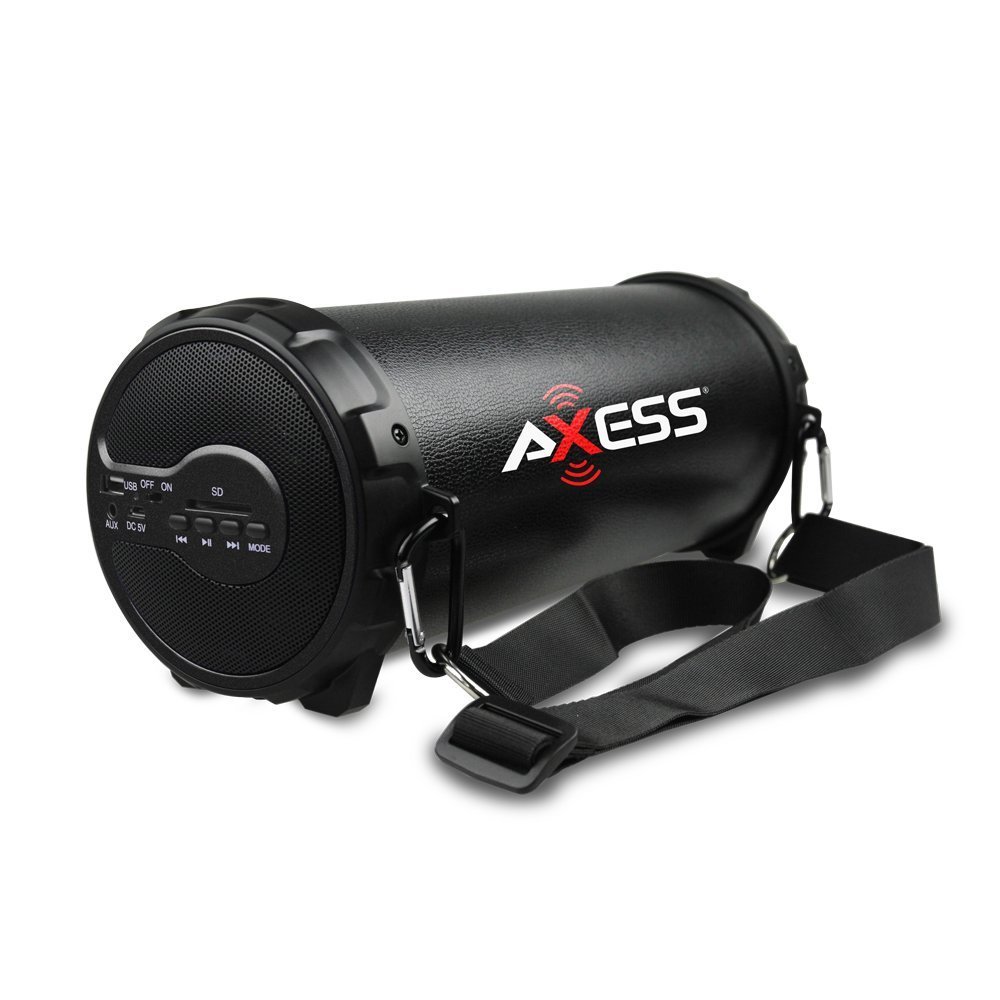
Слика 1: Предња страна view of the Axess SPBT1038BK Bluetooth Speaker, showcasing the speaker grille and overall design.

Слика 2: Страна view of the Axess SPBT1038BK, illustrating the control panel and input ports.
Controls and Ports (Typical Layout)
- Дугме за напајање: Притисните и држите да бисте укључили/искључили звучник.
- Дугме за режим: Short press to switch between Bluetooth, AUX, USB, and SD card modes.
- Клизач волумена: Slide to adjust the master volume level.
- Дугме за репродукцију/паузу: In Bluetooth/USB/SD mode, press to play or pause audio.
- Дугмад за претходну/следећу нумеру: In Bluetooth/USB/SD mode, press to skip tracks.
- УСБ порт: За повезивање УСБ флеш дискова за репродукцију звука.
- Слот за СД картицу: For inserting SD memory cards for audio playback.
- AUX улаз (3.5 мм): За повезивање екстерних аудио уређаја путем 3.5 мм аудио кабла.
- ДЦ 5В прикључак за пуњење: For connecting the USB charging cable to recharge the battery.
5. Подешавање
5.1 Пуњење батерије
- Connect the small end of the USB charging cable to the DC 5V charging port on the speaker.
- Повежите већи крај USB кабла за пуњење са USB адаптером за напајање (није укључен) или USB портом рачунара.
- The charging indicator light (if present) will illuminate, typically red, during charging.
- Once fully charged, the indicator light may change color (e.g., turn off or turn blue/green). A full charge takes approximately 3-4 hours.
Note: For optimal battery life, fully charge the speaker before first use.
5.2 Укључивање/искључивање
- To turn ON: Press and hold the Дугме за напајање for a few seconds until you hear an audible prompt or see an indicator light.
- To turn OFF: Press and hold the Дугме за напајање again for a few seconds.
5.3 Блуетоотх упаривање
- Ensure the speaker is powered ON and in Bluetooth mode. If not, press the Дугме за режим until you hear a Bluetooth pairing prompt. The Bluetooth indicator light will typically flash.
- Омогућите Блутут на свом мобилном уређају (паметном телефону, таблету итд.).
- Тражи available Bluetooth devices. You should see "SPBT1038BK" or a similar name in the list.
- Select "SPBT1038BK" to connect. Once paired, you will hear a confirmation tone, and the Bluetooth indicator light will stop flashing and remain solid.
- Сада можете да репродукујете звук са свог уређаја преко звучника.
Note: The speaker will attempt to reconnect to the last paired device automatically when powered on.
5.4 Повезивање преко AUX улаза
- Повежите један крај 3.5 мм аудио кабла са AUX улазним портом на звучнику.
- Connect the other end of the 3.5mm audio cable to the headphone jack or audio output of your external device (e.g., MP3 player, computer, TV).
- Притисните тастер Дугме за режим on the speaker until it enters AUX mode.
- Репродукујте звук са свог екстерног уређаја.
5.5 Using USB/SD Card
- Уметните УСБ флеш диск у УСБ порт or an SD card into the Слот за СД картицуУверите се да је картица правилно уметнута.
- The speaker should automatically switch to USB or SD card mode and begin playing audio fileс. Ако не, притисните Дугме за режим да бисте изабрали исправан режим.
- Користите дугмад Репродукција/Пауза и Претходна/Следећа нумера за контролу репродукције.
6. Управљање звучником
6.1 Контрола јачине звука
Adjust the overall volume by sliding the Клизач за јачину звука on the speaker. You can also control the volume from your connected Bluetooth device or external audio source.
6.2 Контрола репродукције
- Пусти/паузирај: Притисните тастер Дугме за репродукцију/паузу to toggle between playing and pausing audio.
- Следећа нумера: Притисните тастер Дугме за следећу нумеру да пређете на следећу песму.
- Претходни запис: Притисните тастер Дугме за претходну нумеру to go back to the beginning of the current song or to the previous song.
Note: Playback controls are primarily functional in Bluetooth, USB, and SD card modes. For AUX mode, control playback directly from your connected device.
7. Одржавање
7.1 Чишћење
- Always power off the speaker before cleaning.
- Користите меку, суву крпу за брисање спољашњих површина.
- Не користите абразивна средства за чишћење, воскове или раствараче.
- Избегавајте улазак влаге у било какве отворе.
7.2 Складиштење
- Чувајте звучник на хладном и сувом месту, даље од директне сунчеве светлости и екстремних температура.
- If storing for an extended period, charge the battery to approximately 50% every few months to maintain battery health.
7.3 Одржавање батерије
- Do not overcharge the battery. Disconnect the charger once the battery is full.
- Избегавајте често потпуно пражњење батерије, јер то може скратити њен век трајања.
КСНУМКС. Решавање проблема
Ако наиђете на проблеме са звучником, погледајте следеће уобичајене проблеме и решења:
| Проблем | Могући узрок | Решење |
|---|---|---|
| Звучник се не укључује. | Батерија је празна. | Напуните звучник помоћу приложеног УСБ кабла. |
| Нема звука. | Јачина звука је прениска; изабран је погрешан режим; уређај није правилно повезан. | Increase speaker volume and device volume. Ensure the correct mode (Bluetooth, AUX, USB, SD) is selected. Reconnect the device. |
| Блуетоотх упаривање није успело. | Звучник није у режиму упаривања; Bluetooth уређај је искључен; превише је удаљен од звучника. | Ensure speaker is in Bluetooth pairing mode. Turn device Bluetooth ON. Move device closer to speaker (within 32 feet). Forget previous pairings on your device and try again. |
| USB/SD картица не репродукује. | Нетачан режим; није подржано file формат; оштећен медиј. | Ensure speaker is in USB or SD mode. Check if audio files are in a supported format (e.g., MP3). Try a different USB drive or SD card. |
| Лош квалитет звука. | Low battery; device too far (Bluetooth); interference. | Charge the speaker. Move the Bluetooth device closer. Avoid sources of wireless interference. |
9. Спецификације
| Феатуре | Спецификација |
|---|---|
| Модел | СПБТ1038БК |
| Спеакер Типе | 2.1 HiFi Outdoor Passive Bluetooth Speaker with 3-inch Subwoofer |
| Технологија повезивања | Блуетоотх |
| Блуетоотх радни опсег | До 32 стопе (10 метара) |
| Извор напајања | Баттери Поверед |
| Тип батерије | Литхиум Ион |
| Капацитет батерије | 1000 мАх |
| Тежина артикла | 1.16 кг (2.56 лбс) |
| Димензије производа (Д к Ш к В) | КСНУМКС к КСНУМКС к КСНУМКС цм (КСНУМКС к КСНУМКС к КСНУМКС инча) |
| Посебне карактеристике | Portable, USB/SD Card Support, Line-in Function |
10. Гаранција и подршка
This product is covered by a limited warranty. For specific warranty terms and conditions, please refer to the documentation provided with your purchase or contact Axess customer support.
For technical assistance, troubleshooting not covered in this manual, or general inquiries, please visit the official Axess webсајт или контактирајте њихову службу за кориснике. Контакт информације се обично могу наћи на паковању производа или на произвођачевој webсајту.