
1. Увод
Thank you for choosing the Superfish Smart Timer. This digital timer is designed to automate the on/off cycles of your aquarium lighting and other electrical devices, providing a consistent and stable environment for your aquatic life. Please read this manual carefully before use to ensure proper operation and safety.
2. Безбедносна упутства
- Always disconnect the timer from the power supply before handling or performing any maintenance.
- This device is designed for indoor use only. Do not expose it to water splashes or high humidity.
- Ensure your hands are dry when plugging in or unplugging the timer.
- Do not exceed the maximum load capacity specified for this timer.
- Чувати ван домашаја деце.
- If the timer appears damaged, do not use it. Contact customer support.
- Do not attempt to open or repair the timer yourself. This will void the warranty.
3. Производ је готовview
The Superfish Smart Timer is a compact digital timer featuring a clear display and intuitive buttons for programming. It allows for precise control over the power supply to connected devices.
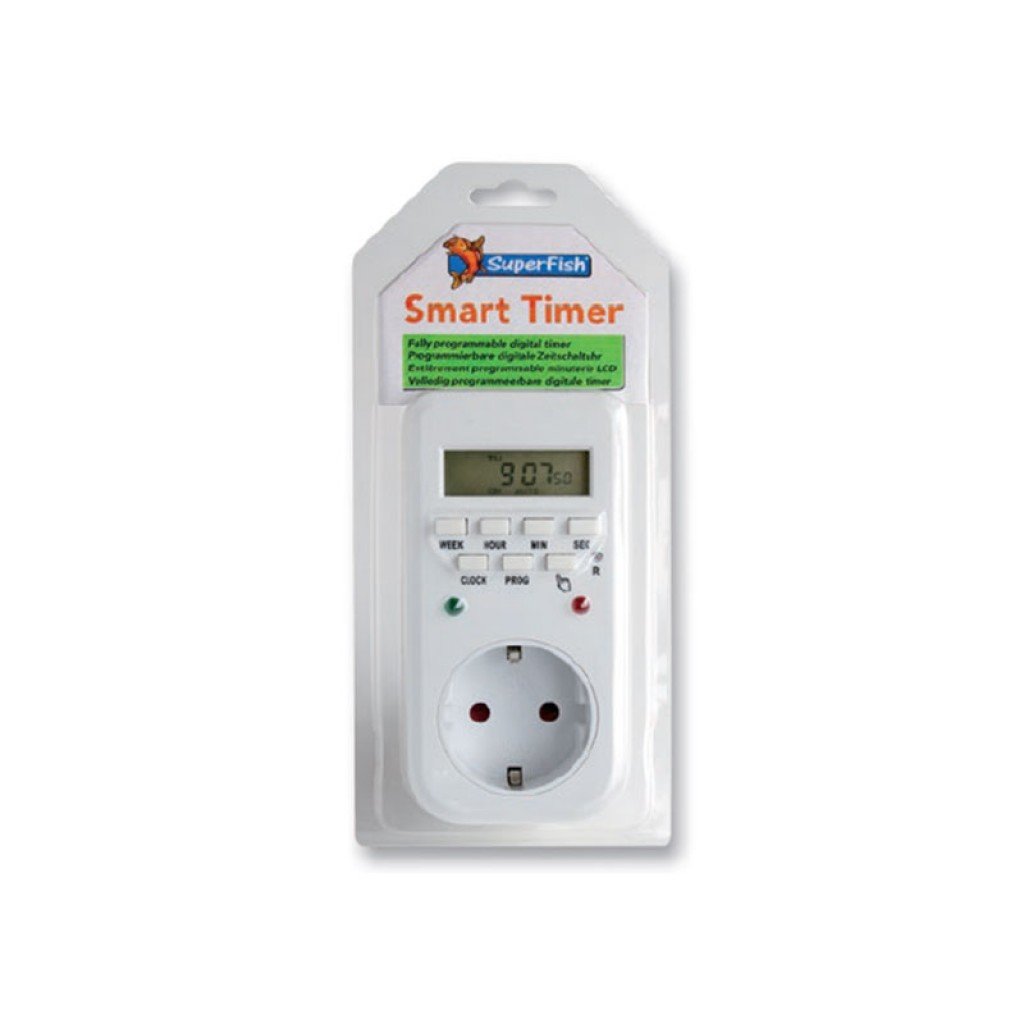
Image 1: Superfish Smart Timer. This image shows the front of the Superfish Smart Timer, highlighting its digital display and control buttons. The timer is designed for easy programming and monitoring of connected devices.
Key components typically include:
- Дигитални екран: Shows current time, program status, and settings.
- Контролна дугмад: For setting time, programs, and manual override.
- Утичница: Where you connect your appliance.
- Утикач: To connect the timer to a wall socket.
4. Подешавање
- Почетна наплата (ако је применљиво): If your timer has a built-in battery for memory backup, plug it into a wall socket for at least 30 minutes before first use to charge the internal battery.
- Обриши сва подешавања: Press the "R" (Reset) button with a pointed object (e.g., a pen tip) to clear all previous settings. The display will show "00:00".
- Подесите тренутно време:
- Press the "CLOCK" button and hold it.
- While holding "CLOCK", press "WEEK" to set the day of the week.
- While holding "CLOCK", press "HOUR" to set the hour.
- While holding "CLOCK", press "MINUTE" to set the minute.
- Release the "CLOCK" button. The current time is now set.
- Повежите уређај: Plug the appliance you wish to control (e.g., aquarium light) into the outlet on the Superfish Smart Timer.
- Plug Timer into Wall Socket: Insert the Superfish Smart Timer's plug into a standard wall socket.
5. Оперативни
5.1 Programming On/Off Cycles
The Smart Timer allows you to set multiple ON/OFF programs. Follow these steps to program your desired cycles:
- Press the "PROG" button once. The display will show "1 ON".
- Press "WEEK" to select the day(s) for this program (e.g., MO, TU, WE, TH, FR, SA, SU, or combinations like MO-FR, SA-SU, MO-SU).
- Press "HOUR" to set the desired ON hour.
- Press "MINUTE" to set the desired ON minute.
- Press "PROG" again. The display will show "1 OFF".
- Repeat steps 2-4 to set the desired OFF time for the first program.
- Continue pressing "PROG" to cycle through "2 ON", "2 OFF", and so on, up to the maximum number of programs supported by your timer.
- After setting all desired programs, press the "CLOCK" button to return to the current time display.
5.2 Ручно пребацивање
The "MANUAL" button allows you to override the programmed settings temporarily:
- Press "MANUAL" repeatedly to cycle through modes:
- НА: The connected appliance will remain ON continuously, ignoring programs.
- ВАН: The connected appliance will remain OFF continuously, ignoring programs.
- АУТО: The timer will operate according to the programmed ON/OFF cycles. This is the standard operating mode.
- Always ensure the timer is set to "AUTO" for automatic operation.
5.3 Random Function (if available)
Some models may include a "RANDOM" function, which can slightly vary the ON/OFF times to simulate a more natural environment or deter intruders. Consult your specific model's features for activation.
6. Одржавање
- Чишћење: Disconnect the timer from the power supply. Wipe the exterior with a soft, dry cloth. Do not use abrasive cleaners or immerse the timer in water.
- Складиштење: Ако тајмер складиштите дуже време, уверите се да је чист и сув. Чувати на хладном и сувом месту, заштићено од директне сунчеве светлости.
- Резервна батерија: The internal battery (if present) is designed for memory backup. If the display becomes dim or resets frequently after power outages, the internal battery may need recharging by keeping the timer plugged in for several hours.
КСНУМКС. Решавање проблема
| Проблем | Могући узрок | Решење |
|---|---|---|
| Екран тајмера је празан. | Нема напајања. | Check if the timer is properly plugged into a live wall socket. Check the wall socket with another appliance. |
| Appliance does not turn ON/OFF as programmed. | Incorrect program settings; Timer in Manual ON/OFF mode; Appliance not working. | Review program settings carefully. Ensure the timer is in "AUTO" mode. Test the appliance by plugging it directly into a wall socket. |
| Time or programs reset after power outage. | Internal backup battery low or not charged. | Keep the timer plugged into a live socket for at least 4 hours to fully charge the internal battery. |
| Дугмад не реагују. | Привремени софтверски квар. | Perform a full reset using the "R" button. Re-program all settings. |
8. Спецификације
- Модел: SF-SMARTIMER
- ASIN: B01CZTS47E
- Тежина артикла: 349.27 г
- Потребне батерије: No (internal backup battery for memory, not user-replaceable)
- Потребна монтажа: бр
- Референца произвођача: SF-SMARTIMER
- Први доступан датум: 2. децембра 2022. године
- Ажурирања софтвера гарантована до: Непознато
- Укинуо произвођач: бр
- Note: Specific electrical ratings (Voltage, Max Load) are typically printed on the device itself. Always adhere to these ratings.
9. Гаранција и подршка
Superfish products are manufactured to high-quality standards. For warranty information, please refer to the documentation provided with your purchase or visit the official Superfish webсајт. Сачувајте доказ о куповини за потребе гаранције.
For technical support or further assistance, please contact your retailer or the Superfish customer service department. Contact details can usually be found on the product packaging or the official Superfish webсајту.
Webсајт: www.superfish.com (Напомена: Ово је резервисано место URL, молимо вас да проверите стварног званичника website for Superfish.)


