
1. Увод
The GAMDIAS Hermes GKB3000 is a mechanical gaming keyboard designed for enhanced durability and performance. It features GAMDIAS Certified Blue Switches with a 50 million actuation lifecycle, a 7-color spectrum backlight with 14 lighting effects, and various functional keys for an optimized gaming and typing experience. This manual provides instructions for setting up, operating, and maintaining your keyboard.
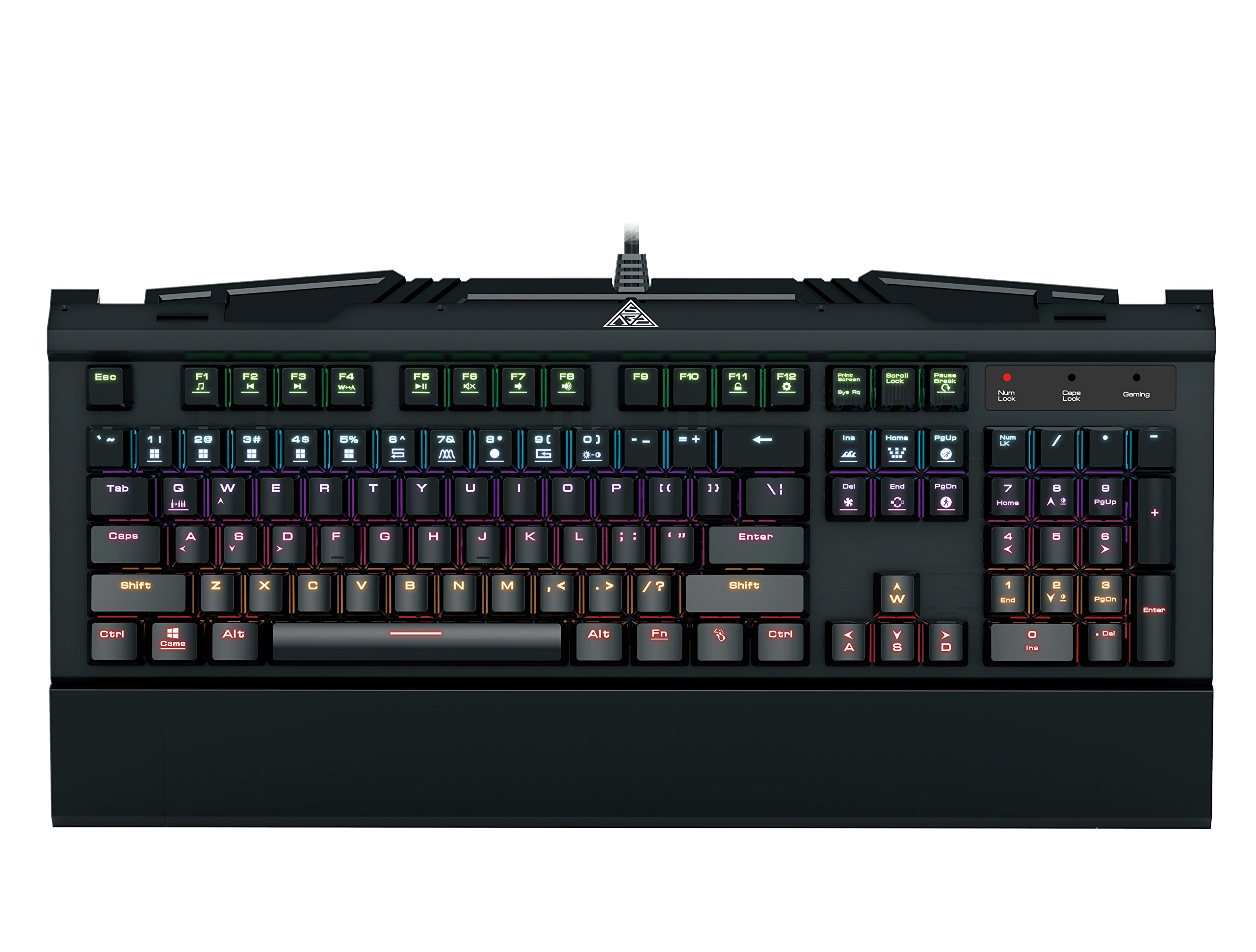
Image 1.1: The GAMDIAS Hermes GKB3000 Mechanical Gaming Keyboard. This image displays the full keyboard with its key layout and design, highlighting its compact yet robust build.
2. Садржај пакета
Молимо вас да проверите садржај пакета након распакивања како бисте били сигурни да су сви предмети присутни и да нису оштећени.
- GAMDIAS Hermes GKB3000 Mechanical Gaming Keyboard
- Кориснички приручник (овај документ)
3. Подешавање
Follow these steps to set up your GAMDIAS Hermes GKB3000 keyboard:
- Распакујте тастатуру: Пажљиво извадите тастатуру из паковања.
- Повежите се са рачунаром: Plug the USB-A connector of the keyboard cable into an available USB port on your computer.
- Инсталација драјвера: The keyboard is plug-and-play. Your operating system (e.g., Windows) will automatically detect and install the necessary drivers. No additional software installation is typically required for basic functionality.
- Пласман: Place the keyboard on a stable, flat surface for comfortable use.
4. Упутство за употребу
4.1. Светлосни ефекти
The Hermes GKB3000 features a 7-color spectrum backlight with 14 sets of lighting effects. These include 9 preset effects and 5 customizable patterns.
- Ефекти пребацивања: Use the dedicated function keys (often combined with the Fn key) to cycle through the preset lighting effects. Refer to the keyboard's keycap legends for specific combinations.
- Customizing Effects: The keyboard supports 5 customizable lighting patterns. Instructions for programming these patterns are typically found in the full software suite available for download from the GAMDIAS website, if applicable.
- Подешавање осветљености: Adjust backlight brightness using designated function key combinations.
4.2. Multimedia Control Keys
Access multimedia functions quickly using the dedicated multimedia control keys, often activated by holding the Fn key in combination with the F-keys (F1-F12).
- Контрола јачине звука: Појачајте, смањите или искључите звук.
- Репродукција медија: Репродукција/пауза, стоп, претходна нумера, следећа нумера.
- Остале функције: May include opening default browser, email client, or calculator.
4.3. Special Gaming Functions
- WASD-Arrow Key Swap: This feature allows you to swap the functionality of the WASD keys with the arrow keys. This is useful for certain games or user preferences. Activate this function using a specific Fn key combination (e.g., Fn + W).
- Consecutive Attack Mode: This mode enhances rapid key input for gaming. Refer to the keyboard's specific documentation or GAMDIAS software for activation and configuration details.
- Закључавање тастатуре: Temporarily disable the keyboard input to prevent accidental presses. Activate using a Fn комбинација тастера.
- Windows Key Disable: Prevent accidental presses of the Windows key during gaming, which can minimize your game. Activate using a Fn key combination (e.g., Fn + Win key).
- Н-Кеи Ролловер: The GKB3000 supports N-key rollover, meaning multiple keys can be pressed simultaneously without ghosting or missed inputs. This ensures accurate and responsive commands during intense gaming sessions.
5. Одржавање
Правилно одржавање осигурава дуготрајност и оптималне перформансе ваше тастатуре.
- Чишћење:
- Искључите тастатуру из рачунара пре чишћења.
- Користите меку крпу која не оставља длачицеampводом или благим раствором за чишћење да бисте обрисали површину.
- За прашину и остатке између тастера користите компримовани ваздух.
- Избегавајте употребу јаких хемикалија, абразивних средстава за чишћење или растварача.
- Складиштење: Чувајте тастатуру на хладном и сувом месту, даље од директне сунчеве светлости и екстремних температура када се не користи дуже време.
- Руковање: Avoid dropping the keyboard or exposing it to excessive force, as this can damage the mechanical switches or internal components.
КСНУМКС. Решавање проблема
If you encounter issues with your GAMDIAS Hermes GKB3000 keyboard, refer to the following common solutions:
| Проблем | Могуће решење |
|---|---|
| Тастатура не реагује. |
|
| Позадинско осветљење не ради или је слабо. |
|
| Одређени тастери не раде. |
|
| WASD keys are acting as arrow keys. |
|
If the problem persists after trying these solutions, please contact GAMDIAS customer support for further assistance.
7. Спецификације
The following are the technical specifications for the GAMDIAS Hermes GKB3000 Mechanical Gaming Keyboard:
| Феатуре | Детаљ |
|---|---|
| Бранд | ГАМДИАС |
| Број модела | ГКБ3000 |
| Тип прекидача | GAMDIAS Certified Mechanical Blue Switches |
| Actuation Lifecycle | 50 милиона тастера |
| Позадинско осветљење | 7-Color Spectrum, 14 Lighting Effects (9 preset, 5 customizable) |
| Анти-Гхостинг | Н-Кеи Ролловер |
| Повезивање | УСБ-А |
| Оперативни систем | Виндовс |
| Тежина артикла | 2.42 фунти (приближно 1.1 кг) |
| Димензије производа (ДкШкВ) | 18.8 x 10.5 x 2 инча (приближно 47.75 x 26.67 x 5.08 цм) |
| Материјал | Plastic with Elegant Metal Plate Design |
8. Гаранција и подршка
GAMDIAS производи се производе по највишим стандардима квалитета. За информације о гаранцији, условима и одредбама, погледајте гарантни лист који се испоручује уз ваш производ или посетите званичну веб страницу GAMDIAS-а. webсајту.
For technical support, troubleshooting assistance, or any product-related inquiries, please contact GAMDIAS customer support through their official webсајт или контакт информације које су наведене у паковању вашег производа.
Званични ГАМДИАС Webсајт: ввв.гамдиас.цом