
1. Увод
The Datavideo HRS-30 is a versatile portable recorder and integrated 10.1-inch monitor designed for professional field recording and playback applications. This device supports both HD and SD video equipment, accepting signals via HD/SD-SDI inputs. It is compatible with various video formats including 1080i, 720p, 576i, and 480i.
The HRS-30 offers flexible recording formats, including MPEG-II Long-GOP or intra-frame (i-frame) with 4:2:2 color sampling. Recorded files are stored in the MXF/OP1A format, ensuring compatibility with a wide range of Non-Linear Editing (NLE) systems and playout solutions. Storage is facilitated by a removable caddy, compatible with standard 2.5-inch HDD and SSD drives.
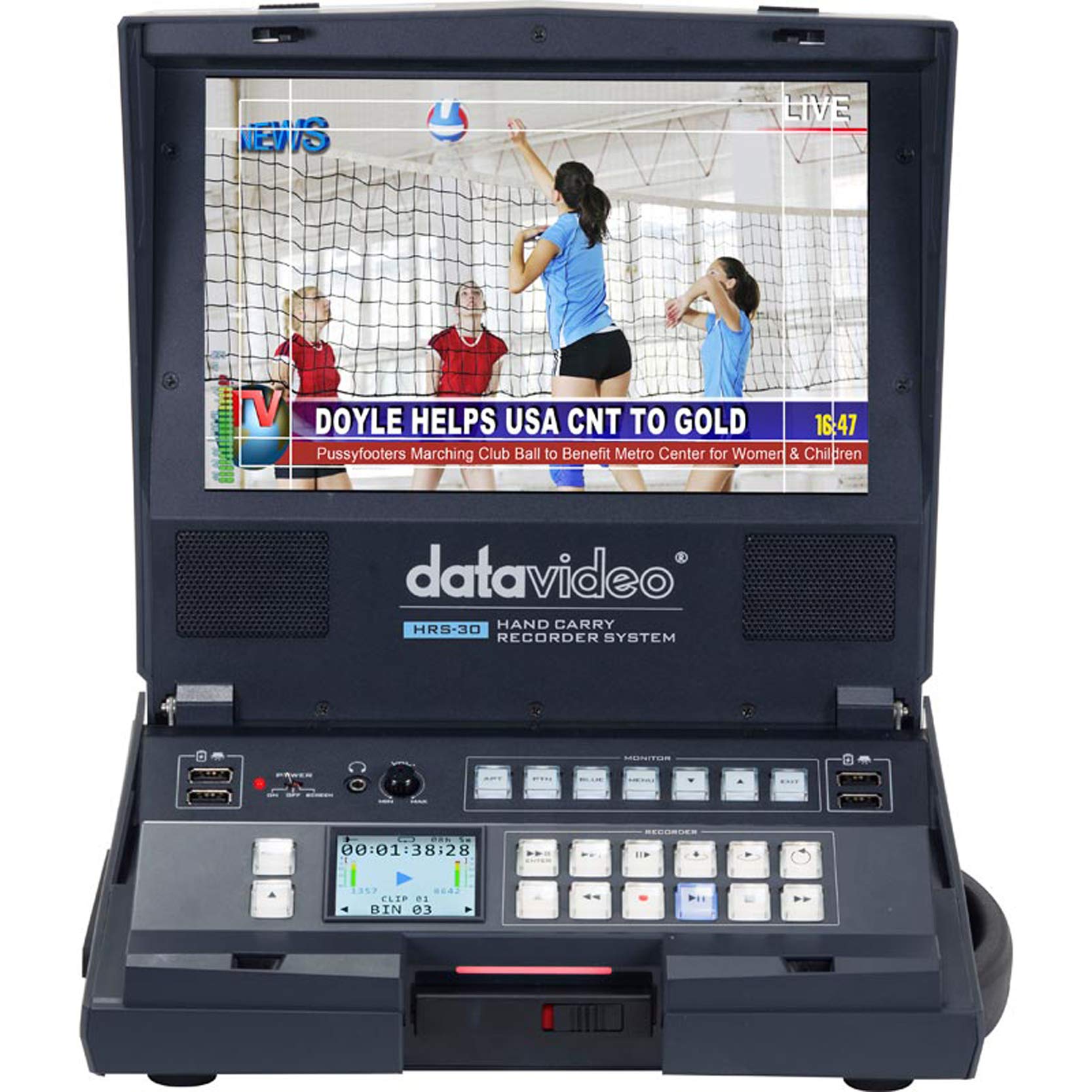
Слика 1.1: Предња страна view of the Datavideo HRS-30 Portable Recorder Monitor, showing the integrated screen and control interface.
2. Безбедносне информације
Please read and understand all safety instructions before operating the HRS-30. Failure to follow these instructions may result in electric shock, fire, or damage to the unit.
- Извор напајања: Use only the specified power adapter and ensure the voltagе одговара захтевима јединице.
- вентилација: Не блокирајте вентилационе отворе. Обезбедите адекватан проток ваздуха око уређаја како бисте спречили прегревање.
- Вода и влага: Не излажите уређај киши, влази или га потапајте у воду.
- Сервисирање: Не покушавајте сами да сервисирате овај производ. Све сервисирање препустите квалификованом сервисном особљу.
- Пласман: Поставите уређај на стабилну, равну површину. Избегавајте постављање на директно сунчево светло или близу извора топлоте.
3. Садржај пакета
Verify that all items are present in the package. If any items are missing or damaged, contact your dealer immediately.
- Datavideo HRS-30 Portable Recorder Monitor Unit
- Повер Адаптер
- Removable Caddy for 2.5" HDD/SSD
- Кориснички приручник (овај документ)
- Additional accessories as specified by your retailer
4. Подешавање
Follow these steps to set up your HRS-30 unit for operation.
4.1 Installing Storage Media
- Ensure the HRS-30 is powered off.
- Locate the removable caddy slot on the unit.
- Insert a compatible 2.5-inch HDD or SSD into the removable caddy.
- Slide the caddy with the installed drive into the HRS-30's caddy slot until it clicks securely into place.
4.2 Повезивање напајања
- Connect the power adapter to the DC IN 12V port on the rear of the HRS-30.
- Укључите адаптер за напајање у одговарајућу електричну утичницу.
- Press the POWER switch on the rear panel to turn on the unit.
4.3 Видео и аудио везе
The HRS-30 supports various input and output connections. Refer to the rear panel diagram for port locations.
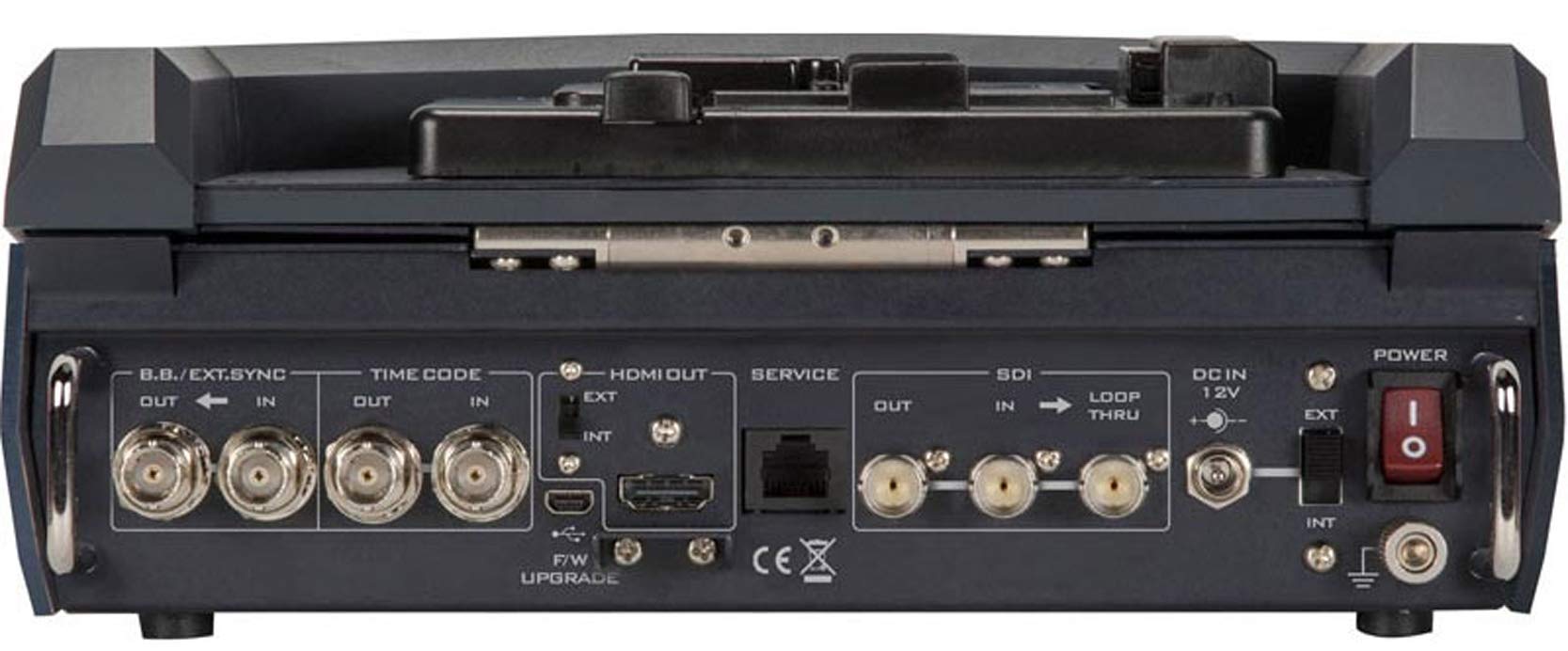
Figure 4.1: Rear panel connections of the Datavideo HRS-30, including SDI, HDMI, Timecode, and Power inputs/outputs.
- СДИ улаз: Connect your HD/SD-SDI video source to the SDI IN port. The unit also features an SDI LOOP THRU for connecting to another device.
- ХДМИ излаз: Connect an external monitor or display to the HDMI OUT port for video monitoring.
- Временски код: Use the TIME CODE IN/OUT ports for external timecode synchronization.
- BB/EXT.SYNC: Connect Black Burst or external sync signals to the BB/EXT.SYNC IN/OUT ports.
- Сервисни порт: For firmware upgrades and maintenance.
5. Упутство за употребу
This section details the basic operation of the HRS-30 for recording and playback.
5.1 Powering On and Initial Screen
- Ensure all necessary connections are made and the storage caddy is installed.
- Померите прекидач POWER на задњој плочи у положај „ON“.
- The integrated 10.1-inch monitor will display the boot-up sequence, followed by the live video input or the last recorded clip.
5.2 Снимање видео записа
The HRS-30 records video from HD/SD-SDI sources in various formats.
- Изаберите унос: Use the control panel buttons to select the desired SDI input source.
- Улаз монитора: Verify the incoming video signal on the integrated monitor.
- Започни снимање: Притисните тастер РЕЦ button on the control panel to begin recording. The recording indicator will illuminate.
- Заустави снимање: Притисните тастер СТОП button to end the recording. The recording indicator will turn off.
The HRS-30 supports recording in MPEG-II Long-GOP or intra-frame (i-frame) with 4:2:2 color sampling, producing MXF/OP1A files.
5.3 Репродукција
То реview recorded content:
- Access Playback Mode: Use the navigation buttons to enter playback mode.
- Select Clip: Browse through your recorded clips using the navigation controls.
- Започни репродукцију: Притисните тастер ПЛАИ button to start playback of the selected clip.
- Контролишите репродукцију: Користите ПАУСЕ, ФФВ (Премотавање унапред) и РЕВ (Rewind) buttons to control playback.
5.4 Навигација кроз мени
The HRS-30 features an on-screen menu system for configuring settings such as video format, recording quality, audio settings, and system preferences. Use the MENU button and directional arrows to navigate, and the ENTER button to confirm selections.
6. Одржавање
Proper maintenance ensures the longevity and optimal performance of your HRS-30.
- Чишћење: Use a soft, dry cloth to clean the exterior of the unit. For the screen, use a specialized screen cleaning solution and a microfiber cloth. Do not use abrasive cleaners or solvents.
- Складиштење: When not in use, store the HRS-30 in a cool, dry place, away from direct sunlight and extreme temperatures.
- Ажурирања фирмвера: Periodically check the Datavideo website for firmware updates to ensure your unit has the latest features and bug fixes. Follow the instructions provided with the firmware update carefully.
КСНУМКС. Решавање проблема
This section addresses common issues you might encounter with the HRS-30.
| Проблем | Могући узрок | Решење |
|---|---|---|
| Jedinica se ne uključuje | No power, faulty adapter, power switch off | Check power cable connection, verify power outlet, ensure power switch is ON. |
| No video on screen | Incorrect input selected, no signal from source, faulty cable | Select correct input, check video source, replace SDI/HDMI cable. |
| Није могуће снимити | No storage media, full storage, media error | Ensure caddy with drive is installed, check available storage space, format or replace drive if necessary. |
| Playback issues | Корумпиран file, incompatible format | Try playing another clip. Ensure recorded fileс нису оштећени. |
8. Спецификације
Detailed technical specifications for the Datavideo HRS-30.
- Модел: ХРС-30
- Видљива дијагонала екрана: 10 инча / 26 цм
- Димензије производа: 10.83 к 10.24 к 3.94 инча (27.5 к 26 к 10 цм)
- Тежина артикла: 7.92 фунте (3.6 кг)
- Видео улази: ХД/СД-СДИ
- Видео излази: HDMI, SDI Loop Thru
- Подржани видео формати: 1080i, 720p, 576i, 480i
- Формати снимања: MPEG-II Long-GOP, Intra-frame (i-frame) with 4:2:2 color sampлинг
- File Формат: MXF/OP1A
- Медији за складиштење: Removable caddy for 2.5" HDD & SSD drives
- Произвођач: Датавидео
- Датум прве доступности: 23. марта 2016. године
9. Гаранција и подршка
For warranty information and technical support, please refer to the official Datavideo website or contact your authorized Datavideo dealer. Keep your purchase receipt as proof of purchase for warranty claims.