
Увод
This manual provides detailed instructions for the setup, operation, maintenance, and troubleshooting of your EZCAP284 HD 1080P Capture HDMI YPbPr Recorder. Please read this manual thoroughly before using the device to ensure proper functionality and to prevent damage.
Безбедносне информације
- Не излажите уређај влази, киши или екстремним температурама.
- Избегавајте испуштање или излагање уређаја јаким ударима.
- Користите само наведени адаптер за напајање.
- Не покушавајте да растављате или модификујете уређај. То ће поништити гаранцију.
- Држите уређај ван домашаја деце.
Садржај пакета
Проверите да ли су све ставке присутне у вашем пакету:
- EZCAP284 HD 1080P Capture Device
- Ремоте Цонтрол
- Адаптер за напајање (није експлицитно наведен, али се подразумева за рад)
- Кориснички приручник (овај документ)
Производ је завршенview
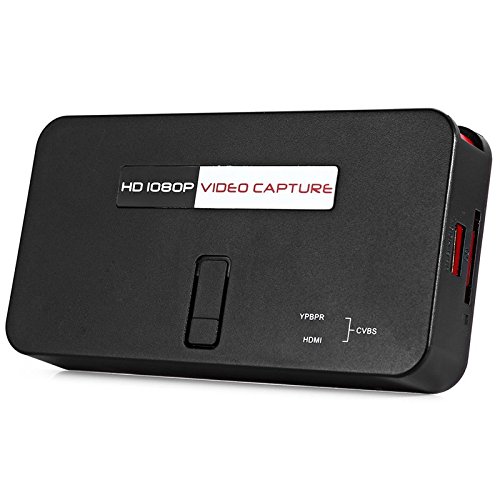
The EZCAP284 is a standalone HD video capture device designed for recording gameplay and other HDMI/YPbPr sources directly to a USB storage device without the need for a PC. It features HDMI pass-through for real-time viewинг.

Слика 1: Врх view of the EZCAP284 device, featuring a prominent record button.

Слика 2: Детаљно view of the input and output ports on the EZCAP284.
Слика 3: Дно view of the EZCAP284 device, indicating model and certification information.
Сетуп
- Повежите извор видео записа: Connect your game console (e.g., PS3) or other video source to the ХДМИ ИН or ИПбПр ИН port on the EZCAP284 using the appropriate cables.
- Повежи екран: Повежите свој телевизор или монитор са ХДМИ ОУТ port on the EZCAP284. This allows you to view your gameplay in real-time while recording.
- Connect USB Storage: Insert a USB flash drive or external hard drive (formatted as FAT32 or NTFS) into the УСБ 2.0 port on the EZCAP284. This is where your recordings will be saved.
- Прикључите напајање: Connect the power adapter to the DC IN port on the EZCAP284 and then plug it into a power outlet. The device will power on.
- Optional Audio Input: If you wish to record live commentary, connect a microphone to the 3.5 мм аудио улаз лука.
Упутство за употребу
Recording Gameplay
- Ensure all connections are secure as described in the Setup section.
- Turn on your video source (e.g., game console) and your display.
- Притисните тастер РЕЦ button on the EZCAP284 device or the remote control to start recording. The indicator light will change to show recording is in progress.
- Притисните тастер РЕЦ button again to stop recording. The indicator light will revert to its standby state.
- Your recorded video file will be saved to the connected USB storage device.
Adding Live Commentary
To record your voice along with the gameplay:
- Повежите микрофон на 3.5 мм аудио улаз port before starting your recording.
- The device will automatically mix the microphone audio with the video source audio during recording.
Репродукција
То view your recorded videos, safely remove the USB storage device from the EZCAP284 and connect it to a computer or a media player that supports the recorded video format.
Одржавање
- Чишћење: Користите меку, суву крпу за чишћење спољашњости уређаја. Не користите течна средства за чишћење или раствараче.
- Складиштење: Чувајте уређај на хладном и сувом месту, даље од директне сунчеве светлости и екстремних температура када се не користи.
- Фирмвер: Проверите произвођача website periodically for any firmware updates that may improve performance or add features.
Решавање проблема
| Проблем | Могући узрок | Решење |
|---|---|---|
| Нема видео излаза на екрану. | Incorrect cable connection; input source not active; display input not selected. | Check HDMI/YPbPr connections. Ensure video source is on. Select correct input on your TV/monitor. |
| Recording fails or stops unexpectedly. | USB storage full; USB drive not compatible; power interruption. | Ensure USB drive has sufficient space. Try a different USB drive (FAT32/NTFS). Check power connection. |
| No audio in recording. | Audio cables not connected; source audio muted; microphone not connected or faulty. | Verify audio connections from source. Ensure source audio is not muted. Check microphone connection and functionality. |
| Даљински управљач не ради. | Batteries low or inserted incorrectly; IR sensor blocked. | Replace batteries. Ensure line of sight to the device's IR sensor. |
Спецификације
| Феатуре | Опис |
|---|---|
| Модел | ЕЗЦАП284 |
| Тип | Adapter / Video Capture Device |
| Материјал | Бакар (унутрашње компоненте) |
| Интерфејси | 3.5mm Audio In, HDMI In, HDMI Out, YPbPr In, USB 2.0 |
| Резолуција снимања видео записа | До 1080п |
| Компатибилност платформе | PlayStation (and other HDMI/YPbPr sources) |
| Укључене компоненте | Ремоте Цонтрол |
| Боја | Црно |
| Димензије (Д к Ш к В) | 14.00 x 7.40 x 2.00 цм (приближно) |
| Тежина | 0.463 кг (приближна тежина паковања) |
Гаранција и подршка
За информације о гаранцији и техничку подршку, погледајте документацију коју сте добили уз куповину или се директно обратите продавцу/произвођачу. Сачувајте доказ о куповини за потребе подношења захтева за гаранцију.