
1. Увод
The Protmex MS6208A is a compact, portable handheld digital tachometer designed for precise contact measurement of rotational and linear speeds. It is equipped with a high-speed integrated chip for stable and reliable performance. This device is ideal for a wide range of applications, including measuring the speed of motors, fans, conveyor belts, and various industrial and automotive equipment.
This manual provides detailed instructions on the proper setup, operation, maintenance, and troubleshooting of your MS6208A tachometer to ensure accurate measurements and extend the product's lifespan.
2. Безбедносне информације
Молимо вас да прочитате и разумете сва безбедносна упутства пре руковања уређајем. Непоштовање ових упутстава може довести до повреда или оштећења инструмента.
- Always wear appropriate personal protective equipment (PPE) when taking measurements, especially when working with moving machinery.
- Do not attempt to measure rotating objects that are unstable or could pose a hazard.
- Ensure the device is clean and dry before use. Do not operate in wet or explosive environments.
- Држите уређај даље од јаких електромагнетних поља.
- Do not disassemble or modify the instrument. Refer all servicing to qualified personnel.
- Одмах замените батерије када се појави индикатор празне батерије како бисте осигурали тачна очитавања.
3. Садржај пакета
Проверите да ли су сви предмети присутни и у добром стању приликом распакивања.
- 1 x Protmex MS6208A Digital Tachometer
- 1 x 6-inch Idler Wheel
- 1 x 0.1m Idler Wheel
- 2 x Touch Tips (Protruding and Concave)
- 1 к Продужна шипка
- 4 к 1.5 В ААА батерије
- 1 x Упутство за употребу (овај документ)
- 1 x Meter Bag
4. Производ је готовview
The MS6208A tachometer is designed for versatility and ease of use, featuring a robust build and intuitive controls.

Figure 4.1: Labeled diagram of the Protmex MS6208A Digital Tachometer, showing the LCD screen, transmission shaft, power button, mode switch, data storage (MEM), data storage read (READ), and plus/minus buttons.
Кључне карактеристике:
- Highly Reliable Digital Tachometer: Features a 16-bit high-speed integrated chip for stable and reliable performance. The double-layer ABS casing, produced by secondary injection molding, offers an ergonomic design for easy operation and maintenance.
- Контактно мерење: Measures rotational speeds from 50 RPM to 19999 RPM and surface speeds. Includes 5 different contact accessories (idler wheels, touch tips) to suit various measurement needs.
- Више функција: Offers 5 unit selections (m/min, m/sec, ft/min, ft/sec, in/min). Features include 100 groups of data recording, data hold, and average value functions.
- ЛЦД позадинско осветљење: Equipped with an LCD backlight display for easy data reading in dark environments.
- Штедња енергије: Includes a low battery indicator and automatically powers off after 30 seconds of inactivity to conserve energy.
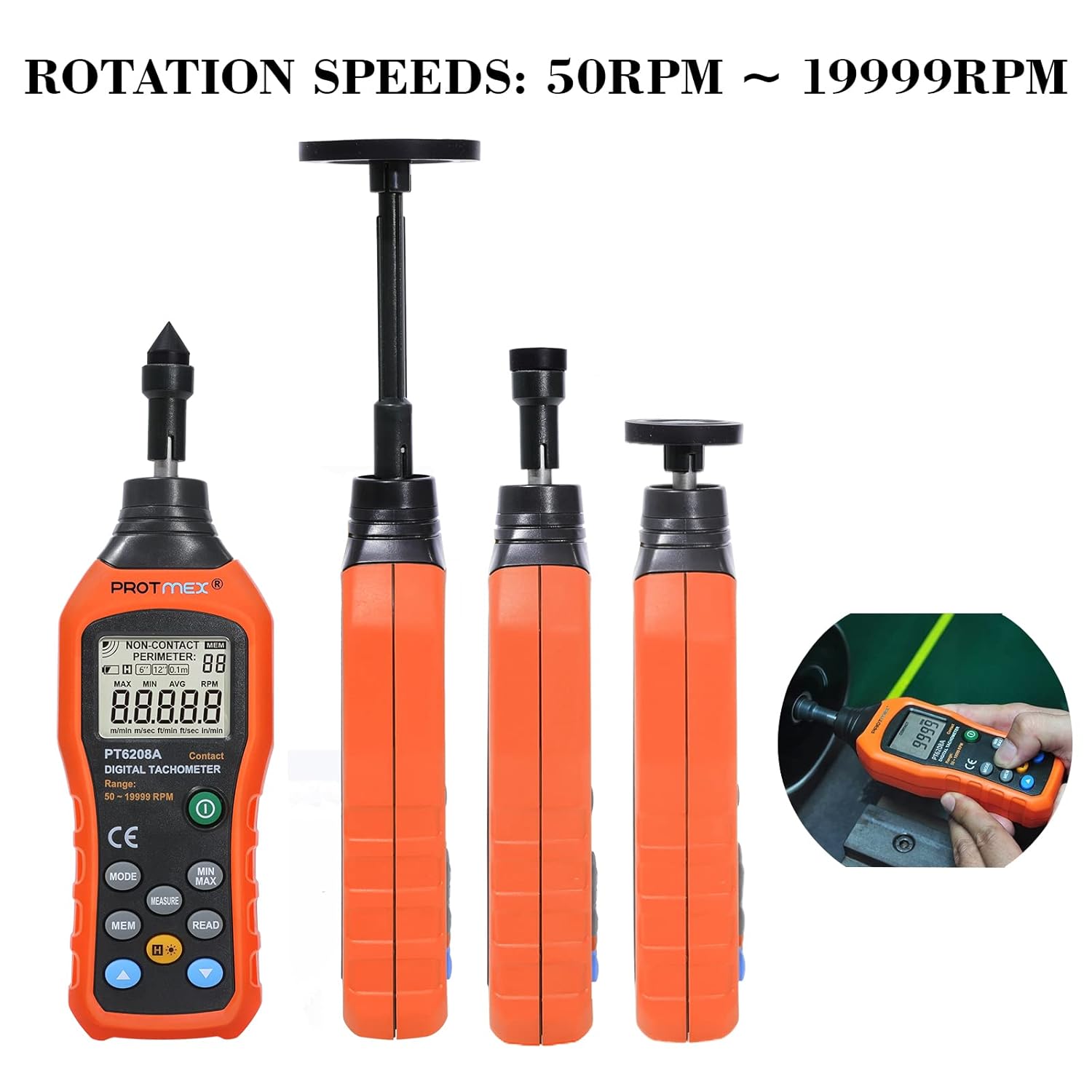
Figure 4.2: The Protmex MS6208A tachometer shown with different contact attachments, illustrating its capability to measure rotation speeds from 50 RPM to 19999 RPM.
5. Подешавање
5.1 Инсталација батерије
- Locate the battery compartment on the back of the tachometer.
- Open the battery cover by sliding it off or unscrewing it, depending on the model.
- Insert four (4) 1.5V AAA batteries, ensuring correct polarity (+ and -).
- Добро затворите одељак за батерије.

Слика 5.1: View of the Protmex MS6208A's battery compartment, showing the placement for four AAA batteries and the internal 16-bit low-power MCU chip.
5.2 Attaching Measurement Accessories
The tachometer comes with various accessories for different measurement scenarios.
- Select the appropriate contact accessory (idler wheel or touch tip) for your measurement task.
- Attach the chosen accessory firmly to the transmission shaft at the top of the tachometer. For extended reach, use the extension bar between the shaft and the accessory.

Figure 5.2: The Protmex MS6208A tachometer demonstrating its adaptability with a 0.1m/6in. idler wheel, protruding touch tip, and concave touch tip, along with an extension bar.
6. Упутство за употребу
6.1 Укључивање/искључивање
- Притисните тастер Повер дугме () да бисте укључили уређај.
- The device will automatically power off after 30 seconds of inactivity. To manually turn off, press and hold the Повер дугме.
6.2 Measurement Modes and Unit Selection
- After powering on, the device defaults to RPM measurement.
- Притисните тастер МОДЕ button to cycle through different measurement units: RPM, m/min, m/sec, ft/min, ft/sec, in/min.
- Ensure the selected unit matches your measurement requirement.
6.3 Мерење
- Attach the appropriate contact accessory to the tachometer.
- Gently press the contact accessory against the center of the rotating object or surface you wish to measure.
- Ensure stable contact. The LCD will display the real-time measurement.
- For surface speed measurements, use an idler wheel and press it against the moving surface.
6.4 Data Hold, MAX/MIN/AVG Functions
- Притисните тастер МЕАСУРЕ button to hold the current reading on the display. Press again to release.
- Притисните тастер МИН / МАКС button to cycle through Maximum, Minimum, and Average readings during a measurement session.
6.5 Data Storage (MEM) and Recall (READ)
Уређај може да сачува до 100 група података.

Figure 6.1: The Protmex MS6208A tachometer in use, demonstrating its ability to store up to 100 sets of measurement data.
- To store a reading, press the МЕМ button while a measurement is displayed. The display will show the storage location number.
- Да бисте позвали сачуване податке, притисните тастер ПРОЧИТАЈТЕ дугме. Користите плус (+) и минус (-) buttons to navigate through the stored data groups.
6.6 Позадинско осветљење
- Притисните тастер Позадинско осветљење дугме () to turn the LCD backlight on or off for improved visibility in low-light conditions.

Слика 6.2: Крупни план view of the Protmex MS6208A's backlit LCD display, showing clear readability of contact RPM measurements.
7. Одржавање
7.1 Чишћење
- Обришите уређај меком, сувом крпом. За тврдокорну прљавштину користите благоamp крпу благим детерџентом, а затим добро осушите.
- Не користите абразивна средства за чишћење или раствараче, јер могу оштетити цasinг или приказ.
- Keep the transmission shaft and contact accessories free from dust and debris to ensure smooth operation and accurate readings.
7.2 Складиштење
- Када се уређај не користи дуже време, извадите батерије како бисте спречили цурење и оштећење.
- Store the tachometer and its accessories in the provided meter bag in a cool, dry place, away from direct sunlight and extreme temperatures.
7.3 Замена батерије
- When the low battery indicator appears on the display, replace all four AAA batteries promptly.
- Пратите кораке за инсталацију батерије наведене у одељку 5.1.
КСНУМКС. Решавање проблема
If you encounter issues with your Protmex MS6208A, refer to the following common problems and solutions:
| Проблем | Могући узрок | Решење |
|---|---|---|
| Уређај се не укључује. | Мртве или неправилно инсталиране батерије. | Проверите поларитет батерија. Замените их новим ААА батеријама. |
| Нетачна очитавања. | Poor contact with the rotating object; incorrect accessory used; low battery. | Ensure firm and stable contact. Use the correct accessory for the surface. Replace batteries. |
| Екран је слаб или трепери. | Ниска батерија. | Замените новим ААА батеријама. |
| Cannot store data. | Memory full; incorrect operation. | Ensure you are pressing MEM during a live measurement. If memory is full, consider clearing data (refer to advanced functions in full manual if available). |
| Auto-off too quickly. | Normal operation (30 seconds inactivity). | This is a power-saving feature. Press any button to keep the device active. |
9. Спецификације
| Параметар | Валуе |
|---|---|
| Модел | MS6208A (PT6208A Contact Tachometer) |
| Меасуремент Типе | Контакт |
| Опсег мерења обртаја | 50 ~ 19999 о / мин |
| Прецизност | ± (0.03% + 2 цифара) |
| Меасуремент Дистанце | N/A (Contact Measurement) |
| Избор јединице | m/min, m/sec, ft/min, ft/sec, in/min |
| Запис података | 100 група |
| Функције | MAX/MIN/AVG, Data Hold, Display Backlight, Low Battery Indication |
| Аутоматско искључивање | 30 секунди неактивности |
| Повер Суппли | 4 к 1.5 В ААА батерије |
| Димензије производа (Д к Ш к В) | КСНУМКС к КСНУМКС к КСНУМКС цм (КСНУМКС к КСНУМКС к КСНУМКС инча) |
| Тежина производа | 120 г (0.26 лбс) |
| Материјал | АБС пластика |
| Цертификати | CE (LVE, EMC, RoHS) |
10. Гаранција и подршка
Protmex is committed to providing quality products and customer satisfaction. This product is CE (LVE, EMC, RoHS) certified.
For any questions, technical assistance, or support needs, please contact Protmex customer service. We provide friendly 24/7 online support to assist you with any inquiries regarding your MS6208A Digital Tachometer.
Please refer to your purchase documentation or the official Protmex webсајт за конкретне услове гаранције и контакт информације.