
1. Увод
Хвала вам на куповиниasing the Axess SPBT1041 Portable Bluetooth Speaker. This device is designed to provide high-quality audio playback from various sources, including Bluetooth-enabled devices, USB drives, SD cards, and auxiliary input. It also features an FM radio function and a built-in microphone for hands-free calls. Its portable design with an adjustable strap makes it suitable for both indoor and outdoor use.
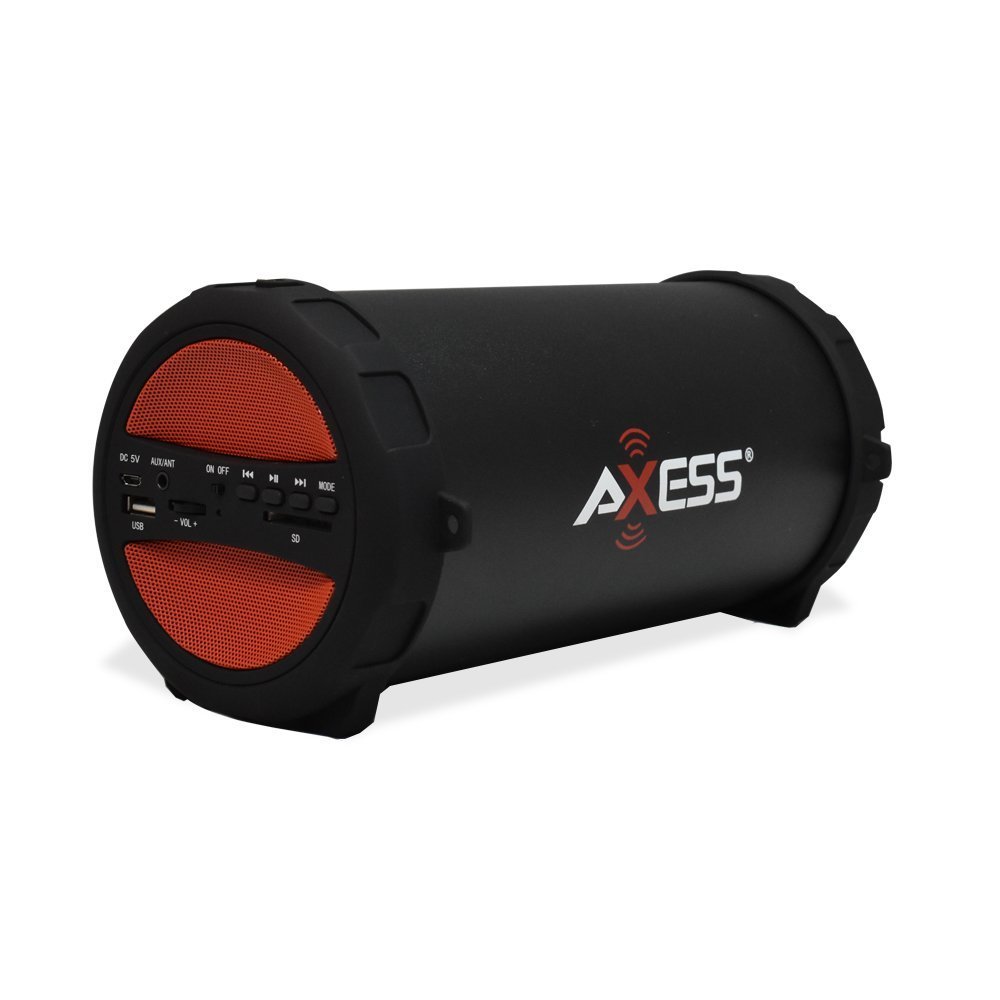
Figure 1: Axess SPBT1041 Portable Bluetooth Speaker (Red variant).

Figure 2: Key features of the SPBT1041 speaker, including FM Radio, USB Input, and AUX Input.
2. Садржај пакета
Молимо вас да проверите пакет за следеће ставке:
- Axess SPBT1041 Portable Bluetooth Speaker
- УСБ кабл за пуњење
- Помоћни аудио кабл
- Подесиви ремен за раме
- Упутство за употребу
3. Девице Оверview
Упознајте се са контролама и портовима звучника.

Figure 3: Control panel and ports of the Axess SPBT1041 speaker.
- ДЦ 5В порт: За пуњење звучника.
- AUX/ANT Port: For auxiliary audio input or connecting an external FM antenna.
- ОН/ОФФ прекидач: Укључује или искључује звучник.
- УСБ порт: За репродукцију звука са УСБ флеш диска.
- Слот за СД картицу: For playing audio from an SD memory card.
- Volume Control (-VOL +): Подешава јачину звука звучника.
- Previous Track/Rewind Button: Прескаче на претходну нумеру или премотава уназад.
- Дугме за репродукцију/паузу: Plays or pauses audio. Also answers/ends calls in Bluetooth mode.
- Next Track/Fast Forward Button: Прескаче на следећу нумеру или премотава унапред.
- Дугме МОДЕ: Пребацује између режима улаза Bluetooth, FM радио, USB, SD и AUX.
4. Подешавање
4.1 Пуњење звучника
Before first use, fully charge the speaker. Connect the provided USB charging cable to the DC 5V port on the speaker and the other end to a USB power source (e.g., computer USB port, USB wall adapter). The charging indicator light will illuminate during charging and turn off when fully charged.

Figure 4: The speaker can be played while charging, featuring a 1500 mAh battery.
4.2 Укључивање/искључивање
Померите ОН/ОФФ switch to the 'ON' position to power on the speaker. Slide it to 'OFF' to power off.
5. Упутство за употребу
5.1 Блуетоотх режим
- Укључите звучник. Аутоматски ће ући у режим упаривања путем Bluetooth-а, што ће бити назначено звучним обавештењем.
- Омогућите Блутут на свом мобилном уређају (паметном телефону, таблету итд.).
- Тражи available Bluetooth devices and select "SPBT1041" from the list.
- Once paired, the speaker will confirm with an audible sound. You can now play audio from your device through the speaker.
- To disconnect, disable Bluetooth on your device or press the MODE button on the speaker to switch modes.
5.2 USB/SD Card Mode
- Уметните USB флеш диск у USB порт или SD картицу у слот за SD картицу.
- The speaker will automatically detect the storage device and begin playing audio fileс. Ако не, притисните МОДЕ дугме за пребацивање на USB или SD режим.
- Користите дугмад Претходна/Следећа нумера за навигацију и дугме Репродукуј/Паузирај за контролу репродукције.
5.3 Режим ФМ радија
- Укључите звучник и притисните МОДЕ дугме док не чујете обавештење о ФМ радију.
- For better reception, connect the auxiliary audio cable to the AUX/ANT port; it acts as an external antenna.
- Притисните и држите Пусти/Паузирај дугме за аутоматско скенирање и чување доступних ФМ станица.
- Use the Previous/Next Track buttons to switch between saved stations.
5.4 Режим AUX улаза
- Connect one end of the auxiliary audio cable to the AUX/ANT port on the speaker and the other end to the audio output of your external device (e.g., MP3 player, laptop).
- Притисните тастер МОДЕ button until the speaker enters AUX mode.
- Контролишите репродукцију и јачину звука са свог екстерног уређаја.
5.5 Call Function (Bluetooth Mode)
- When a call comes in during Bluetooth mode, press the Пусти/Паузирај дугме за одговор.
- Притисните тастер Пусти/Паузирај тастер поново за завршетак позива.
Video 1: Demonstration of the Axess Portable Bluetooth Speaker's portability and ease of use in an outdoor setting. This video showcases the speaker's design and how it can be carried with its strap, highlighting its suitability for various activities.
6. Одржавање
6.1 Чишћење
Wipe the speaker with a soft, dry cloth. Do not use abrasive cleaners or solvents. Avoid exposing the speaker to excessive moisture.
6.2 Одржавање батерије
To prolong battery life, avoid fully discharging the speaker frequently. Recharge the battery when the low battery indicator or audible prompt is heard. If storing the speaker for an extended period, charge it to approximately 50% every few months.
6.3 Складиштење
Чувајте звучник на хладном и сувом месту, даље од директне сунчеве светлости и екстремних температура.
КСНУМКС. Решавање проблема
- Нема напајања: Ensure the speaker is charged. Connect the USB charging cable and try again.
- Нема звука: Check the volume level on both the speaker and your connected device. Ensure the correct input mode is selected (Bluetooth, USB, SD, AUX).
- Блуетоотх се не повезује: Ensure the speaker is in Bluetooth pairing mode. Disable and re-enable Bluetooth on your device, then search for "SPBT1041" again. Make sure the speaker is within the 30-foot operating range.
- Слаб ФМ пријем: Extend the auxiliary audio cable and position it for better signal reception. Try scanning for stations again.
- USB/SD Card Not Playing: Ensure the USB drive or SD card is inserted correctly and contains compatible audio fileс (нпр. МП3 формат).
8. Спецификације
| Феатуре | Детаљ |
|---|---|
| Назив модела | СПБТ1041 |
| Спеакер Типе | Спољни, Преносиви |
| Технологија повезивања | Блуетоотх |
| Бежична комуникациона технологија | Блуетоотх |
| Максимална излазна снага звучника | 10 Ваттс |
| Пречник сабвуфера | 3 инча |
| Капацитет батерије | 1500 Милиamp Сати (литијум-јонска) |
| Извор напајања | Баттери Поверед |
| Димензије производа | 7"Д к 8"Ш к 12"В |
| Тежина артикла | 2.1 фунти |
| Материјал | Пластика |
| Ниво отпорности на воду | Није водоотпоран |
| Укључене компоненте | Батерија |
9. Гаранција
The Axess SPBT1041 Portable Bluetooth Speaker comes with a Full Warranty. Please refer to the warranty card included in your package or contact Axess customer support for details regarding warranty terms and conditions.
10. Подршка
For further assistance, technical support, or inquiries regarding your Axess SPBT1041 speaker, please visit the official Axess webсајт или контактирајте њихову службу за кориснике. Контакт информације се обично могу наћи на паковању производа или на произвођачевој webсајту.