
BENINCA Bull 624R
Beninca Bull 624R Automatic Slide Gate Opener Instruction Manual
Model: Bull 624R | Brand: BENINCA
1. Увод
This manual provides essential instructions for the installation, operation, and maintenance of the Beninca Bull 624R Automatic Slide Gate Opener. Please read this manual thoroughly before proceeding with installation or operation to ensure proper function and safety.
The Beninca Bull 624R is an automatic sliding gate opener designed for residential driveways. It features an integrated energy-saving system (ESA SYSTEM) and can operate during power failures using a battery pack (sold separately). This system is engineered for maximum safety and precision during gate operation.
2. Кључне карактеристике
- Silent, powerful, and reliable 24VDC operator suitable for intensive use.
- LCD display for simplified programming and configuration.
- Internal limit-switches for precise gate positioning.
- Easy access to the control board for maintenance and adjustments.
- Multiple electronic settings with digital adjustment for torque and timing.
3. Садржај пакета
Проверите да ли се у вашем пакету налазе све ставке наведене у наставку:
- (1) Beninca Bull 624R Gate Opener with CPanel
- (1) Пријемник
- (2) Remote Controls
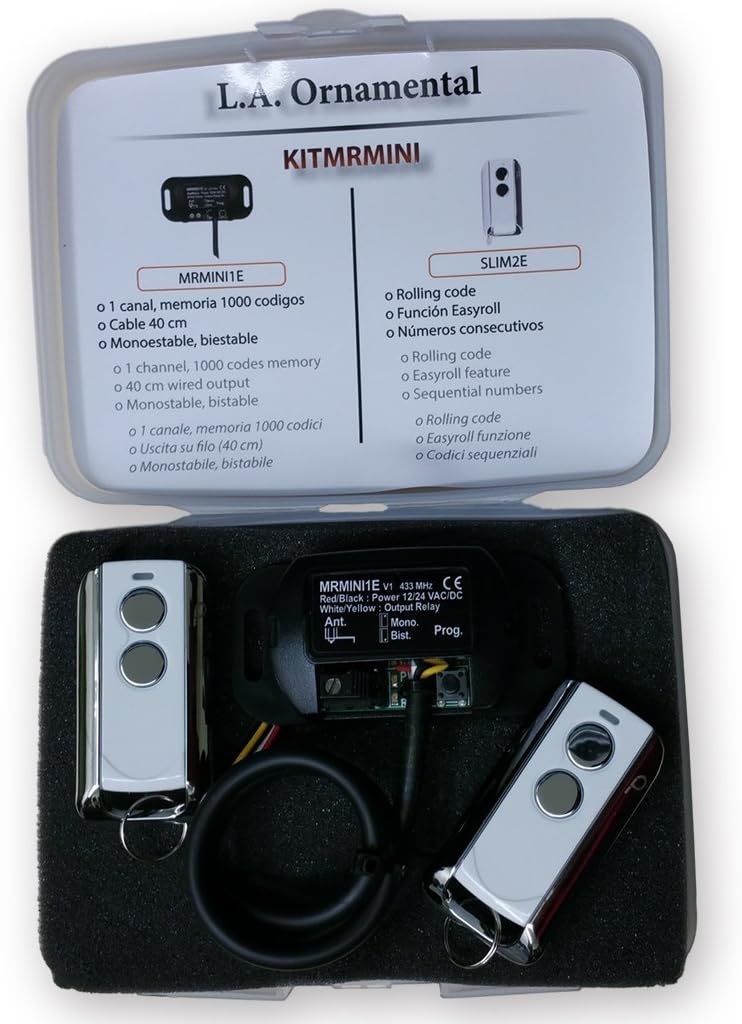
Слика 3.1: Contents of the Beninca Bull 624R package. This image displays the main gate opener unit, the receiver module, and two remote controls, as typically included in the kit.
4. Безбедносне информације
УПОЗОРЕЊЕ: Improper installation or use can lead to serious injury or property damage. Always follow these safety guidelines:
- Installation must be performed by qualified personnel in accordance with local electrical and safety codes.
- Ensure the gate is in good mechanical condition and moves freely before installing the opener.
- Do not allow children to play with or operate the gate opener controls.
- Keep hands and clothing clear of the gate and opener mechanism during operation.
- Install safety devices such as photocells and safety edges to prevent entrapment.
- Искључите напајање пре обављања било каквог одржавања или поправке.
5. Инсталација
5.1. Припрема локације
Ensure the gate track is clean and clear of obstructions. The gate must slide smoothly without excessive friction. Verify that the mounting surface for the opener is level and structurally sound.
5.2. Mounting the Opener
Position the Beninca Bull 624R opener on a concrete pad or suitable foundation next to the gate. Secure the unit using appropriate anchor bolts. Ensure proper alignment with the gate's rack (not included) to allow for smooth engagement.

Слика 5.1: The Beninca Bull 624R Automatic Slide Gate Opener. This image shows the primary unit of the gate opener, which houses the motor and control panel, ready for installation.
5.3. Електричне везе
Connect the main power supply (115 Vac or 230 Vac as required) to the control board. Wire the receiver, safety devices (photocells, safety edges), and any other accessories according to the wiring diagram provided in the full technical manual. Ensure all connections are secure and properly insulated.
5.4. Programming the System
Utilize the integrated LCD display on the CPanel to program the gate's opening and closing limits, operating speed, and other parameters. Refer to the detailed programming section in the complete technical manual for step-by-step instructions.
6. Операција
6.1. Коришћење даљинског управљача
Press the designated button on the remote control to activate the gate opener. A single press typically initiates an open or close cycle. Pressing again during operation will stop the gate. A third press will reverse its direction.
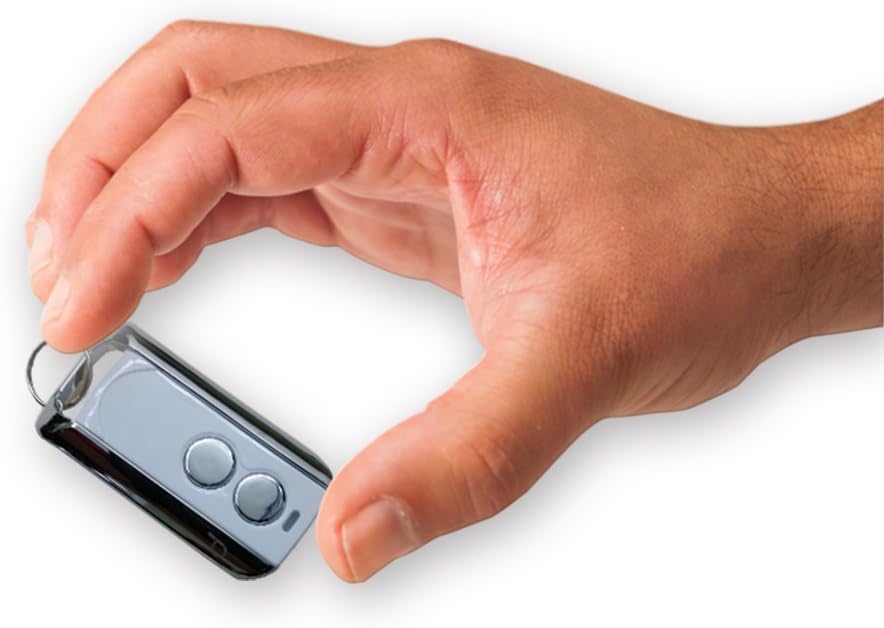
Слика 6.1: A Beninca remote control. This image shows one of the compact remote controls included with the system, designed for convenient gate operation.
6.2. Manual Release
In case of power failure or malfunction, the gate can be operated manually. Locate the manual release mechanism on the opener unit, typically secured by a key or lever. Follow the instructions on the unit to disengage the motor and move the gate by hand.
7. Одржавање
Regular maintenance ensures the longevity and safe operation of your gate opener.
- месечно: Inspect the gate for smooth movement, clear any debris from the track, and check for loose hardware.
- Квартално: Check the condition of the rack and pinion gear for wear. Lubricate moving parts as recommended by the manufacturer.
- Годишње: Have a qualified technician inspect the electrical connections, safety devices, and overall system performance.
Важно: Always disconnect power to the unit before performing any maintenance.
КСНУМКС. Решавање проблема
| Проблем | Могући узрок | Решење |
|---|---|---|
| Капија се не помера. | No power; remote control battery dead; safety device activated; manual release engaged. | Check power supply; replace remote battery; inspect safety sensors for obstructions; disengage manual release. |
| Gate stops unexpectedly. | Obstruction detected; safety device activated; motor overheating. | Remove obstruction; check safety sensors; allow motor to cool down. |
| Даљински управљач не ради. | Dead battery; out of range; not programmed correctly. | Replace battery; move closer to receiver; re-program remote control. |
For more complex issues, consult a qualified technician or refer to the comprehensive technical manual.
9. Техничке спецификације
| Параметар | Валуе |
|---|---|
| Улазни волtage | 115 Vac (230 Vac upon request) |
| Цуррент | 1 Amp |
| Обртни момент | 12 Нм |
| Потисак | 410 Н |
| Прилагодљива брзина | 10 in/sec (Z14) |
| Max Cycles | 200 циклуса/дан |
| Max Tested Gate Weight | 800 лб |
| Максимална дужина капије | 20 фт |
| Suggested Gate Ratings | 600 lb / 20 ft |
| Величина кутије | 13 cm Š x 9 cm D x 14 cm V |
| Тежина | 24 - 27 lb |
| Произвођач | Бенинка |
| Парт Нумбер | Beninca Bull 624R |
10. Гаранција и подршка
For warranty information and technical support, please refer to the documentation provided with your purchase or contact your authorized Beninca dealer. Keep your proof of purchase for warranty claims.
Ask a question about this manual
Ask about setup, troubleshooting, compatibility, parts, safety, or missing instructions. Manuals+ will review the question and use this page’s manual context to help answer it.