
Увод
This manual provides instructions for the installation and operation of your Satechi Aluminum USB-C 2.5-inch HDD/SSD Enclosure. This enclosure allows you to convert any 2.5-inch SATA hard drive (HDD) or solid-state drive (SSD) into a portable external storage device, utilizing a USB-C connection for data transfer speeds up to 10 Gbps.
Садржај пакета
- Satechi Aluminum USB-C 2.5-inch HDD/SSD Enclosure
- УСБ-Ц на УСБ-Ц кабл
- Мини Сцревдривер
- Монтажни завртњи
Подешавање и инсталација
Follow these steps to install your 2.5-inch HDD or SSD into the enclosure:
- Отворите кућиште: Use the provided mini screwdriver to remove the two small screws located on the side of the enclosure. Carefully slide the internal tray out from the aluminum casing.
- Убаците диск: Align your 2.5-inch SATA HDD or SSD with the SATA connector on the internal tray. Gently push the drive into the connector until it is firmly seated.
- Secure the Drive: Use the provided mounting screws to secure the HDD/SSD to the internal tray. Ensure the drive is stable and does not move.
- Затворите кућиште: Carefully slide the internal tray, with the installed drive, back into the aluminum casing. Re-insert and tighten the two small screws to secure the enclosure.

Image: Enclosure disassembled, revealing the internal tray and screws.
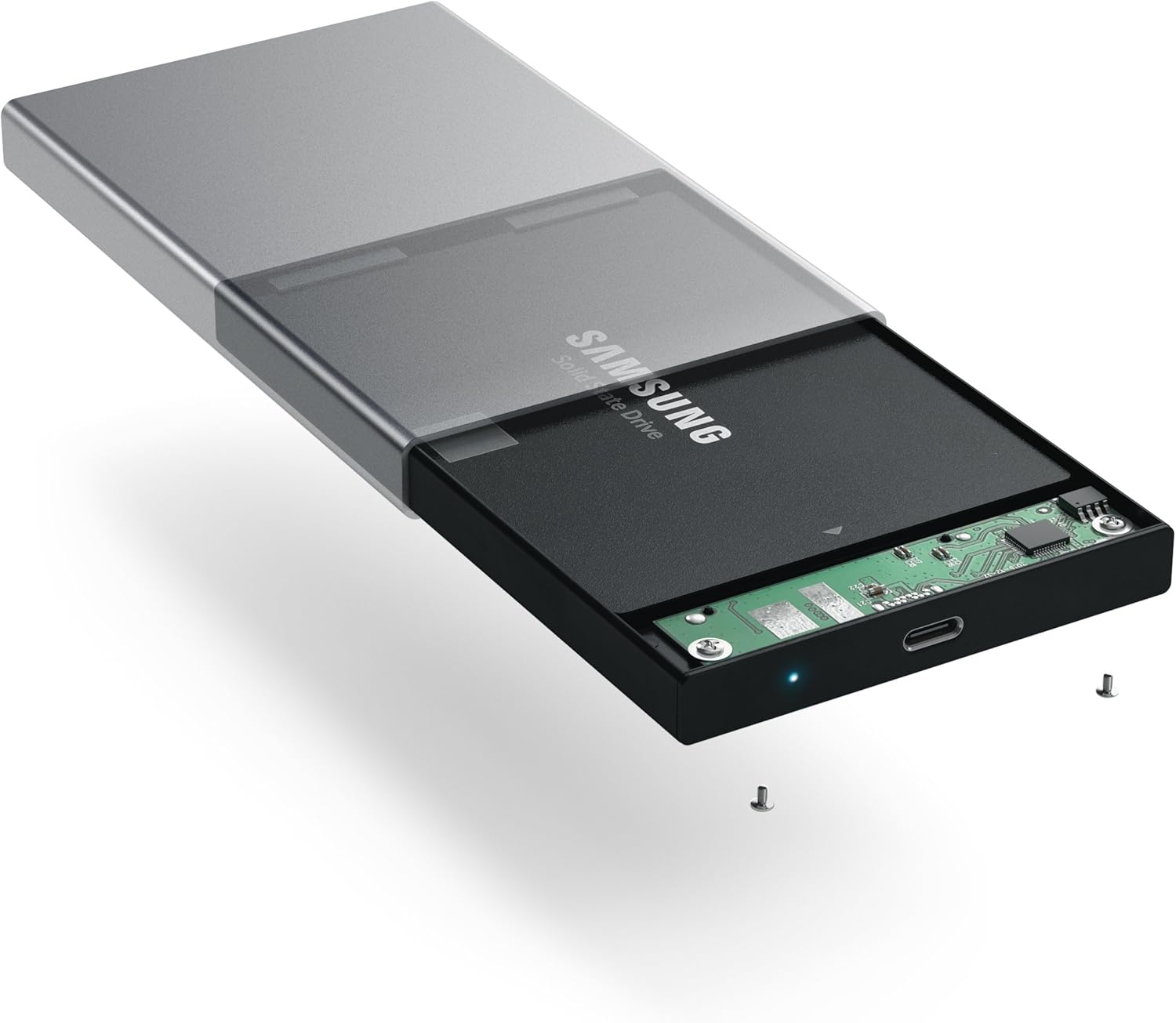
Image: Inserting a 2.5-inch SSD into the internal tray.

Image: SSD fully inserted and secured in the tray.
Упутство за употребу
- Повежите се са рачунаром: Use the included USB-C to USB-C cable to connect the enclosure to an available USB-C port on your computer.
- Индикатор напајања: A blue LED indicator light on the enclosure will illuminate when connected and powered, indicating readiness for use. The LED will blink during data transfer activity.
- Приступ диску: Your computer should automatically detect the external drive. If it is a new drive, you may need to format it before use. Refer to your operating system's documentation for drive formatting procedures.
- Пренос података: Превуците и испустите files to and from the external drive as you would with any other storage device. The enclosure supports data transfer speeds up to 10 Gbps, depending on your drive and computer's USB-C port capabilities.
- Безбедно уклањање: Always safely eject the external drive from your operating system before disconnecting the cable to prevent data corruption.

Image: Enclosure connected to a laptop.

Image: Enclosure with cable connected, showing the blue LED.
Одржавање
- Одржавајте кућиште чистим и без прашине. Користите меку, суву крпу за чишћење.
- Избегавајте излагање уређаја екстремним температурама, влажности или директној сунчевој светлости.
- Do not attempt to disassemble the enclosure beyond the initial drive installation, as this may void the warranty.
Решавање проблема
- Диск није откривен:
- Ensure the USB-C cable is securely connected to both the enclosure and your computer.
- Покушајте да се повежете са другим USB-C портом на рачунару.
- Verify that the HDD/SSD is correctly seated within the enclosure's SATA connector.
- If it is a new drive, ensure it has been formatted for your operating system.
- Споре брзине преноса:
- Ensure your computer's USB-C port supports USB 3.1 Gen 2 (10 Gbps) for optimal performance.
- The performance of the drive itself (HDD vs. SSD) will impact transfer speeds.
- Consider using a high-quality, certified USB-C cable, especially if experiencing intermittent disconnections or slower-than-expected speeds.
- Enclosure Disconnects Randomly:
- This can sometimes be caused by an incompatible or low-quality USB-C cable. Try using a different, certified USB-C cable.
- Ensure your computer's power settings are not configured to turn off USB ports to save power.
Спецификације
| Број модела | ST-TCDEM |
| УПЦ | 879961006242 |
| Материјал | Алуминијум |
| Компатибилни тип погона | 2.5-инчни SATA HDD/SSD |
| Максимални број подржаних уређаја | 1 |
| Брзина преноса података | Up to 10 Gigabits Per Second (USB 3.1 Gen 2) |
| Технологија повезивања | УСБ-Ц |
| Тежина артикла | 6.4 унци (181 грама) |
| Боја | Спаце Греи |
Гаранција и подршка
For warranty information and technical support, please refer to the official Satechi webсајт или директно контактирајте њихову корисничку службу. Сачувајте рачун за куповину за потребе гаранције.