
Јахитек ЈТ-00009601
Yaheetech Mobile Computer Desk Instruction Manual
Модел: ИТ-00009601
Увод
Хвала вам на куповиниasing the Yaheetech Mobile Computer Desk. This manual provides detailed instructions for assembly, operation, and maintenance to ensure safe and efficient use of your new desk. Please read this manual thoroughly before assembly and retain it for future reference.
Безбедносне информације
To prevent injury and damage to the product, please observe the following safety guidelines:
- Пре употребе осигурајте правилно склапање свих компоненти.
- Do not exceed the maximum weight limits for each shelf:
- Top: 30 kg (66.1 lb)
- Фиока: 2 кг (4.4 фунте)
- Middle Shelf: 20 kg (44.1 lb)
- Bottom Shelf: 10 kg (22 lb)
- Use the locks on the casters to stabilize the desk when it is in place.
- Држите мале делове даље од деце током монтаже.
- Избегавајте стављање врућих предмета директно на површину стола без заштите.
- Не стојте или не седите на столу.
Садржај пакета
Please verify that all components listed in your product's included parts list are present before beginning assembly. If any parts are missing or damaged, please contact customer support.
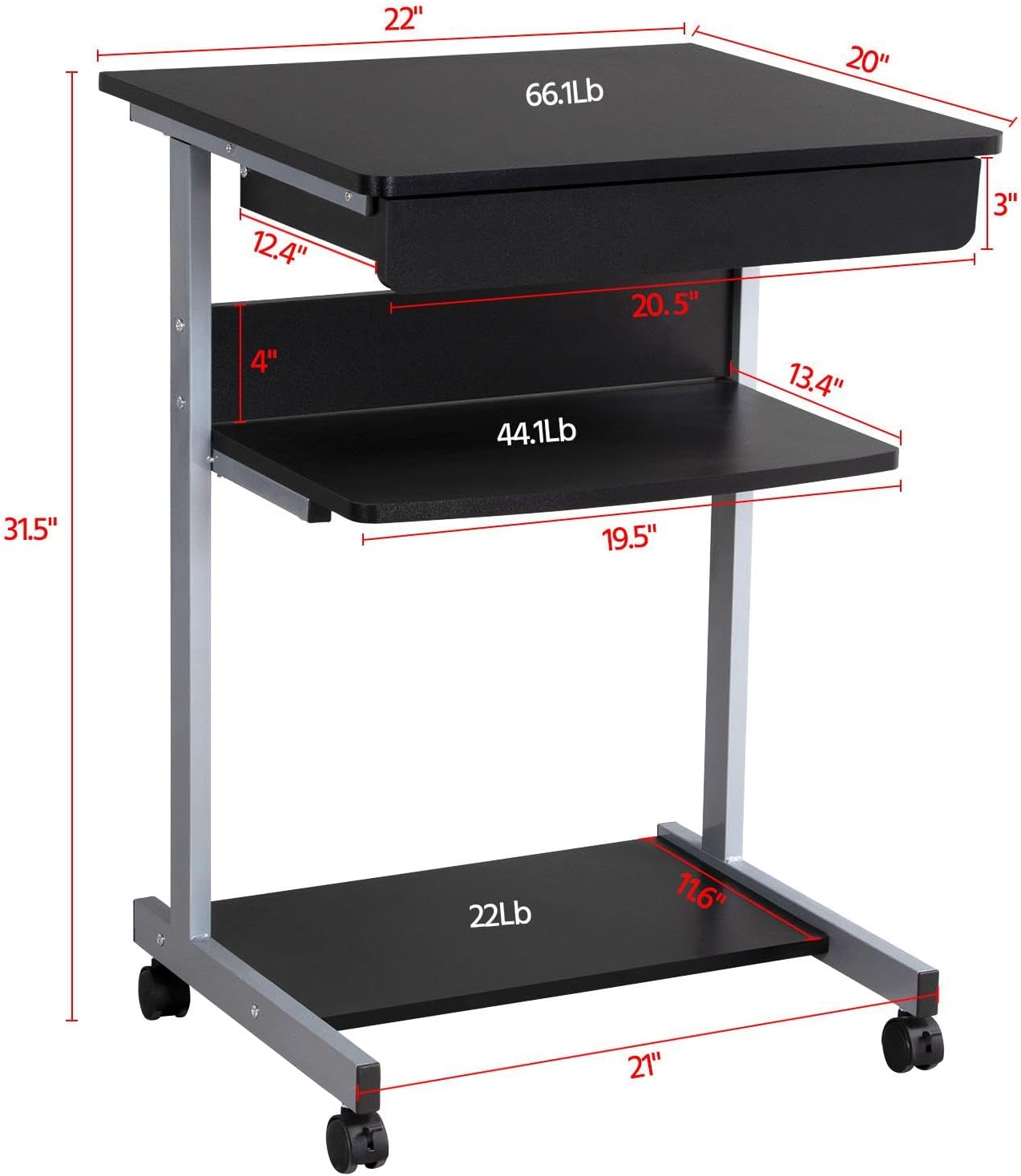
Image: Diagram showing the dimensions and weight capacities of the desk components.
Подешавање и монтажа
Assembly is designed to be straightforward. It is recommended to have a clear, spacious area for assembly. All necessary tools are included.
Кораци склапања:
- Attach the side frames: Secure the horizontal bars to the vertical support frames using the provided screws.
- Install casters: Screw the four rolling casters into the bottom of the desk frame. Ensure the two lockable casters are placed at the front for easy access.
- Mount the bottom shelf: Attach the bottom shelf to the lower section of the frame using the designated screws.
- Attach the middle shelf: Secure the middle shelf to the frame at the desired height.
- Install the keyboard tray slides: Attach the drawer slides to the desk frame. Ensure they are correctly oriented for smooth operation.
- Assemble the keyboard tray: Connect the sides and back of the keyboard tray, then slide the bottom panel into place. Attach the remaining drawer slides to the keyboard tray.
- Insert the keyboard tray: Carefully slide the assembled keyboard tray into the installed drawer slides on the desk frame.
- Attach the top desktop panel: Secure the main desktop panel to the top of the frame.
Video: Detailed installation instructions for the Yaheetech Mobile Computer Desk.

Слика: Крупни план view highlighting the heavy MDF boards, thickened frame, smooth steel ball drawer, open middle shelf, open bottom shelf, and lockable casters.
Упутство за употребу
Мобилност и стабилност:
- The desk is equipped with four rolling casters for easy movement.
- To secure the desk in place, engage the locks on the two front casters. Push the lever down to lock and up to unlock.
Коришћење полице за тастатуру:
- The keyboard tray slides smoothly on metal runners. Gently pull the tray outwards to extend it for use.
- Push the tray inwards until it is fully retracted when not in use to save space.
Полице за складиштење:
- The top surface is suitable for a laptop or monitor, with a maximum load of 30 kg (66.1 lb).
- The middle shelf can hold items up to 20 kg (44.1 lb), such as books or accessories. The back plate helps prevent items from falling.
- The bottom shelf is designed for a printer or other larger items, with a maximum load of 10 kg (22 lb).
Video: Demonstration of the small rolling computer desk cart for home office use, highlighting mobility and storage.

Image: The desk in use with a laptop, showing its compact design and functionality.
Одржавање
To maintain the appearance and longevity of your Yaheetech Mobile Computer Desk:
- Чишћење: Обришите површине огласомamp крпу. Избегавајте јаке хемикалије или абразивна средства за чишћење.
- инспекција: Периодично проверавајте све завртње и спојеве да бисте били сигурни да су чврсто затегнути. По потреби поново затегните.
- Котачићи: Keep the casters free of debris to ensure smooth rolling.
Решавање проблема
If you encounter any issues with your desk, please refer to the following common solutions:
- Сто је климав: Ensure all screws are securely tightened. Check that the desk is on a flat, even surface. Engage the locks on the casters.
- Keyboard tray not sliding smoothly: Check the drawer slides for any obstructions or debris. Ensure the slides are properly aligned and lubricated if necessary.
- Делови који недостају: Ако неки делови недостају по доласку, одмах контактирајте корисничку подршку.
За проблеме који нису овде обрађени, обратите се корисничкој подршци компаније Yaheetech.
Спецификације
| Бранд | Иахеетецх |
| Број модела | ИТ-00009601 |
| Димензије производа (Д x Ш x В) | 20" Д x 22" Ш x 31.1" В (56 x 51 x 79 цм) |
| Тежина артикла | 24.3 фунти |
| Боја | Црно |
| Врста материјала | Engineered Wood (MDF), Metal (Iron) |
| Препоручена максимална тежина (горе) | 30 килограма (66.1 фунти) |
| Препоручена максимална тежина (фиока) | 2 килограма (4.4 фунти) |
| Препоручена максимална тежина (средња полица) | 20 килограма (44.1 фунти) |
| Препоручена максимална тежина (доња полица) | 10 килограма (22 фунти) |
| Број фиока | 1 |
| Број полица | 2 (Отворене полице) |
| Посебна карактеристика | Compact, Mobile with Lockable Casters |
| Рекуиред Ассембли | Да |
| Укључује све алате за монтажу | Да |
Гаранција и подршка
For warranty information, please refer to the documentation included with your purchase or contact Yaheetech directly. Yaheetech aims to provide quality products and customer satisfaction.
If you require further assistance, have questions about assembly, or need to report missing/damaged parts, please contact Yaheetech customer support through their official webсајт или продавницу где је производ купљен.
Ask a question about this manual
Ask about setup, troubleshooting, compatibility, parts, safety, or missing instructions. Manuals+ will review the question and use this page’s manual context to help answer it.