
Важна безбедносна упутства
ПРЕ УПОТРЕБЕ ПАЖЉИВО ПРОЧИТАЈТЕ СВА УПУТСТВА.
- Увек искључите вентилатор из утичнице пре чишћења, сервисирања или померања.
- Не убацујте прсте или било које друге предмете кроз решетку док вентилатор ради.
- Немојте користити вентилатор са оштећеним каблом или утикачем. Одбаците вентилатор или га вратите у овлашћени сервис на преглед и/или поправку.
- Не провлачите кабл испод тепиха. Не покривајте кабл простиркама, клизачима или сличним покривачима. Поставите кабл даље од саобраћајне површине и где се неће спотакнути.
- Не користите вентилатор на мокром или дamp места као што су купатила или простори за прање веша.
- Овај вентилатор је намењен само за употребу у затвореном простору. Не користите га на отвореном.
- Keep the fan away from curtains, drapes, or any objects that may get caught in the fan blades.
- Надгледајте децу када је вентилатор у употреби.
Производ је завршенview
The Optimus 18-inch High Velocity Industrial Floor Fan is designed to provide powerful air circulation in various indoor environments. Its robust construction and high-velocity motor make it suitable for workshops, garages, and large rooms.
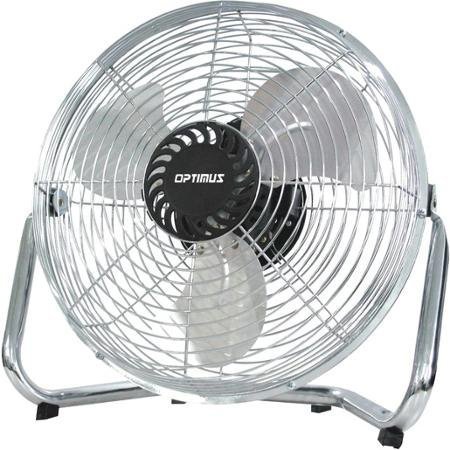
Image: Optimus 18-inch High Velocity Industrial Floor Fan. This image shows the fan with its silver metallic finish and sturdy floor stand.
Кључне карактеристике:
- 18-inch diameter for wide air distribution.
- Industrial-grade high velocity airflow.
- Durable metallic finish.
- Floor standing design for stable placement.
- Multiple power levels for adjustable airflow.
Упутства за подешавање
- Распакујте вентилатор: Carefully remove the fan and all components from the packaging. Retain packaging for future storage or transport.
- Assemble the Floor Stand:
- Attach the fan head to the floor stand using the provided screws and tools. Ensure all connections are secure.
- Verify the fan head can pivot smoothly on the stand.
- Пласман: Place the fan on a firm, level surface. Ensure there is adequate space around the fan for proper air circulation and to prevent obstruction of the air intake/output. Keep the fan at least 3 feet away from walls or furniture.
- Прикључак за напајање: Уверите се да је вентилатор у положају „ИСКЉУЧЕНО“ пре него што га укључите у стандардну електричну утичницу од 120 V AC.
Упутство за употребу
This fan features push-button controls for easy operation. A remote control may also be included for convenience.
- Укључивање/искључивање: Locate the power button on the control panel. Press the button once to turn the fan ON. Press it again to turn the fan OFF.
- Подешавање брзине вентилатора: The fan has 4 power levels. After turning the fan ON, repeatedly press the speed control button to cycle through the available speed settings (Low, Medium, High, Max). The fan will operate at the selected speed.
- Подешавање смера протока ваздуха: The fan head can be tilted manually to direct airflow upwards or downwards. Gently tilt the fan head to the desired angle. Do not force the fan head beyond its intended range of motion.
Одржавање
Редовно чишћење и одржавање ће осигурати оптималне перформансе и продужити век трајања вашег вентилатора.
- Чишћење вентилатора:
- Always unplug the fan from the power source before cleaning.
- Користите меку, дamp cloth to wipe the exterior surfaces of the fan. Do not use abrasive cleaners or harsh chemicals, as these may damage the finish.
- To clean the fan blades, carefully remove the front grille (if detachable, refer to assembly instructions for details). Wipe the blades with a soft cloth. Ensure the grille is securely reattached before operating the fan.
- Уверите се да су сви делови потпуно суви пре него што поново укључите вентилатор.
- Складиштење: Када се вентилатор не користи дуже време, чувајте га на хладном и сувом месту. Препоручује се да га чувате у оригиналном паковању како бисте га заштитили од прашине и оштећења.
Решавање проблема
| Проблем | Могући узрок | Решење |
|---|---|---|
| Вентилатор се не укључује. | Није укључено у струју; утичница не ради; прекидач вентилатора је искључен. | Ensure fan is securely plugged into a working outlet. Check household fuse/circuit breaker. Press the power button to turn the fan on. |
| Низак проток ваздуха. | Fan speed set too low; obstructed intake/output; dirty blades. | Increase fan speed. Clear any obstructions. Clean fan blades and grilles as per maintenance instructions. |
| Необична бука или звецкање. | Loose parts; fan not on a level surface; foreign object in blades. | Unplug the fan and check for any loose screws or components. Place the fan on a stable, level surface. Carefully inspect for and remove any foreign objects. |
Спецификације
| Феатуре | Детаљ |
|---|---|
| Бранд | Оптимус |
| Назив модела | Велика брзина |
| Број модела ставке | 306c1b92-f36b-4ccc-ac62-2ad33d5c9efb |
| Пречник | 18 инча |
| Боја | Сребро |
| Стиле | Индустриал |
| Извор напајања | Цордед Елецтриц |
| Број нивоа снаге | 4 |
| Контролни метод | Контрола дугмета |
| Унутрашња/спољна употреба | Индоор |
| Укључене компоненте | Floor Stand, Remote Control |
| Спецификација Мет | ОСХА |
Гаранција и подршка
Optimus products are manufactured to high-quality standards. This product is covered by a limited warranty against defects in materials and workmanship from the date of purchase. Please refer to the warranty card included with your product for specific terms and conditions.
For technical support, troubleshooting assistance, or warranty claims, please contact Optimus customer service. Contact information can typically be found on the product packaging or the official Optimus webсајту.
Молимо вас да сачувате доказ о куповини ради гаранције.