
1. Производ је готовview
This manual provides essential instructions for the safe and efficient installation, operation, and maintenance of your ZOTAC GeForce GTX 1080 AMP Extreme graphics card. Please read this manual thoroughly before proceeding with installation.
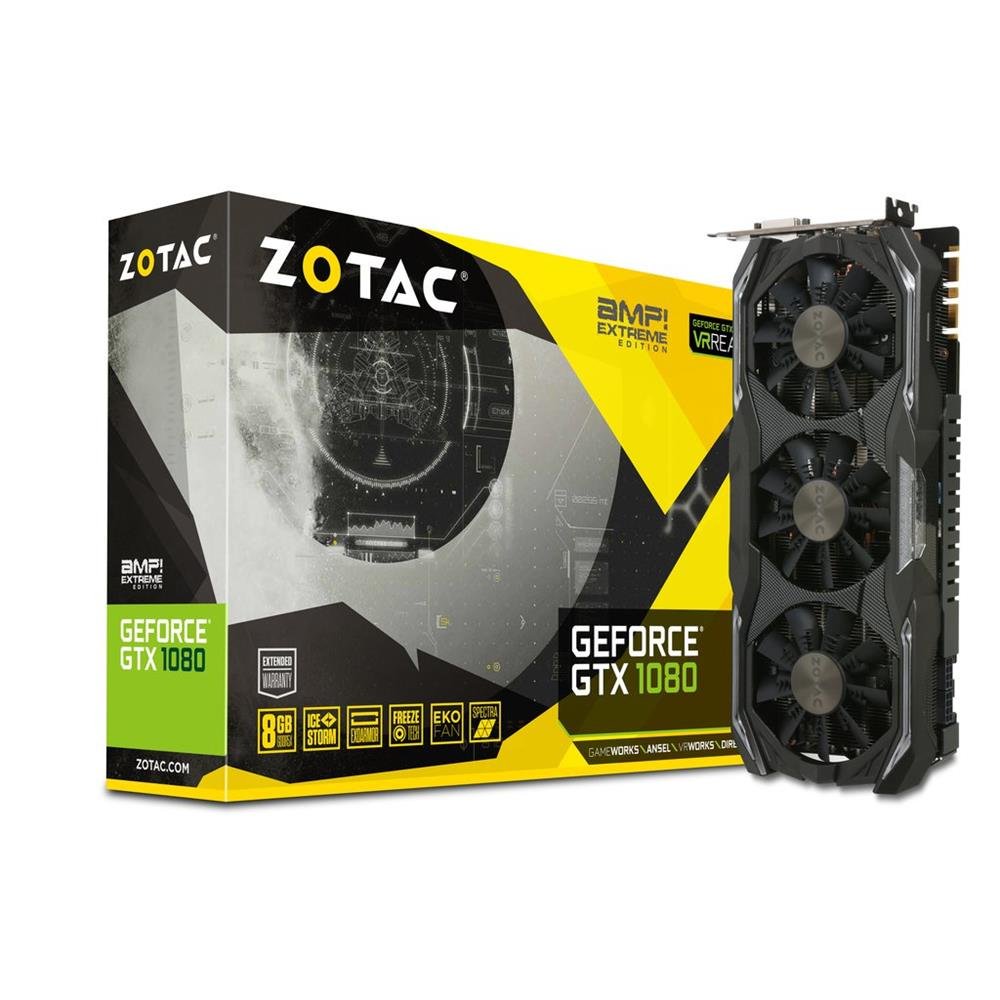
Image 1.1: ZOTAC GeForce GTX 1080 AMP Extreme Graphics Card. This image displays the front view of the graphics card, highlighting its triple-fan cooling system and overall design.
2. Садржај пакета
Проверите да ли се све ставке наведене у наставку налазе у паковању вашег производа:
- ZOTAC GeForce GTX 1080 AMP Extreme Graphics Card
- ДВИ-ВГА адаптер
- Dual 6-pin to 4 x 2-pin Power Cable
- ЦД са драјвером
- Упутство за употребу (овај документ)
3. Подешавање и инсталација
3.1. Системски захтеви
- PCI Express x16 slot on a compatible motherboard.
- Minimum 500W power supply with two 8-pin (or 6+2 pin) PCIe power connectors.
- Compatible operating system (e.g., Windows 7/8/10/11).
- At least 4GB of system memory (8GB recommended).
3.2. Физичка инсталација
- Искључивање: Потпуно искључите рачунар и искључите кабл за напајање из зидне утичнице.
- Отворени случај: Open your computer case to access the motherboard and expansion slots.
- Пронађите PCIe слот: Пронађите слободан PCI Express x16 слот на матичној плочи.
- Уклоните поклопац слота: Уклоните метални поклопац слота са задње стране кућишта рачунара који одговара изабраном PCIe слоту.
- Уметните графичку картицу: Carefully align the graphics card with the PCIe slot and press it firmly until it is fully seated. Ensure the retention clip on the slot locks into place.
- Безбедна картица: Secure the graphics card to the computer case with a screw or retention mechanism.
- Прикључите напајање: Connect the required PCIe power cables from your power supply to the graphics card. The ZOTAC GeForce GTX 1080 AMP Extreme typically requires two 8-pin (or 6+2 pin) power connectors. Use the provided dual 6-pin to 4 x 2-pin power cable if your power supply only has 6-pin connectors.
- Затвори случај: Затворите кућиште рачунара и поново повежите кабл за напајање.
3.3. Инсталација драјвера
- Систем за покретање: Power on your computer. The system may boot into a basic display mode.
- Инсталирајте драјвере: Insert the provided Driver CD into your optical drive and follow the on-screen instructions to install the NVIDIA graphics drivers. Alternatively, download the latest drivers directly from the official ZOTAC or NVIDIA webсајт за оптималне перформансе и компатибилност.
- Поново покрени: Поново покрените рачунар након што је инсталација драјвера завршена.
3.4. Повезивање екрана
Connect your monitor(s) to the appropriate output ports on the graphics card. This model supports HDMI, DisplayPort, and DVI connections. Use the DVI-VGA adapter if your monitor only supports VGA input.
4. Упутство за употребу
4.1. Основна операција
Once the drivers are installed, your graphics card will automatically manage display output and graphics processing. You can adjust display settings, resolution, and refresh rates through your operating system's display settings or the NVIDIA Control Panel.
4.2. Multi-Monitor Setup
The ZOTAC GeForce GTX 1080 AMP Extreme supports multiple displays. Connect additional monitors to the available video output ports. Use the NVIDIA Control Panel to configure display modes such as extended desktop, duplicate displays, or NVIDIA Surround for an immersive gaming experience.
5. Одржавање
Regular maintenance helps ensure optimal performance and longevity of your graphics card.
- Чишћење: Periodically clean the fans and heatsink to prevent dust buildup, which can impede airflow and lead to overheating. Use compressed air to gently remove dust from the cooling fins and fan blades. Ensure the system is powered off and unplugged before cleaning.
- Проток ваздуха: Ensure your computer case has adequate airflow to dissipate heat generated by the graphics card. Keep the area around your PC clear of obstructions.
- Ажурирања драјвера: Keep your graphics drivers updated by regularly checking the ZOTAC or NVIDIA webсајт за најновије верзије.
КСНУМКС. Решавање проблема
Ако наиђете на проблеме са графичком картицом, погледајте следеће уобичајене кораке за решавање проблема:
- Нема излаза на екран:
- Уверите се да је монитор правилно повезан и укључен.
- Проверите да ли је графичка картица потпуно уметнута у PCIe слот.
- Check that all PCIe power cables are securely connected to the graphics card.
- Try connecting the monitor to a different video output port on the card or to the motherboard's integrated graphics (if available) to isolate the issue.
- Проблеми са возачем:
- If you experience crashes, artifacts, or poor performance, try reinstalling the graphics drivers. Use a driver uninstaller utility to completely remove old drivers before installing new ones.
- Ensure you are installing the correct drivers for your operating system and graphics card model.
- Performance Problems:
- Check system temperatures using monitoring software. Overheating can lead to performance throttling.
- Уверите се да ваше напајање испуњава минималну снагуtagзахтеви за графичку картицу и остале системске компоненте.
- Verify that your system's BIOS/UEFI settings are configured correctly for a discrete graphics card.
7. Спецификације
| Феатуре | Детаљ |
|---|---|
| Бранд | ЗОТАЦ |
| Назив модела | ГТКС 1080 |
| Број модела | ZT-P10800B-10P |
| Грапхицс Цопроцессор | НВИДИА ГеФорце ГТКС 1080 |
| Величина графичке РАМ меморије | 8 ГБ ГДДР5Кс |
| Брзина меморије | 10800 МХз |
| Engine Clock Speed | 1771 MHz (Base), 1911 MHz (Boost) |
| Видео излазни интерфејс | HDMI, DisplayPort, DVI |
| Видео интерфејс | ПЦИ Екпресс |
| Максимална резолуција екрана | 7680к4320 |
| Број обожаватеља | 3 |
| Препоручена употреба | Гаминг |
| Тежина артикла | 1.6 килограма |
| УПЦ | 816264016721 |
8. Гаранција и подршка
8.1. Гаранција на производ
This ZOTAC graphics card comes with a 24-месечна гаранција од датума куповине. Молимо вас да сачувате доказ о куповини за потребе гаранције. Гаранција покрива производне недостатке и кварове при нормалној употреби. Не покрива штету насталу услед злоупотребе, незгода, неовлашћених модификација или неправилне инсталације.
8.2. Техничка подршка
For technical assistance, driver downloads, or further information, please visit the official ZOTAC webсајт:
You may also refer to the FAQ section on the ZOTAC website for solutions to common issues.