
La Crosse Technology C86224
La Crosse Technology C86224 Dual USB Charging Alarm with Nap Timer User Manual
Model: C86224 | Brand: La Crosse Technology
Увод
This manual provides comprehensive instructions for the La Crosse Technology C86224 Dual USB Charging Alarm with Nap Timer. It covers setup, operation, maintenance, and troubleshooting to ensure optimal use of your device. This alarm clock features a dynamic LCD screen, dual USB charging ports, an alarm with multiple settings, and a nap timer, along with displaying time, full calendar view, room temperature, and humidity.
Кључне карактеристике
- Двоструки УСБ портови за пуњење: Two USB ports (1 Amp и 2 Amp output) for charging devices, includes a dual-tip tangle-free USB to micro-USB/lightning cable.
- ЛЦД екран у боји: Bright, dynamic color LCD screen with adjustable backlight (Hi/Lo/Off) for clear visibility.
- Тајмер за спавање: Programmable nap timer with duration settings from 5 minutes to 120 minutes.
- Indoor Environment Monitoring: Displays indoor temperature (Fahrenheit/Celsius) and humidity (%RH).
- Прилагодљиви аларм: Crescendo alarm with settings for single, Monday-Friday, and weekend alarms.
- Full Calendar View: Displays full day, month, and year.
Садржај пакета
- La Crosse Technology C86224 Alarm Clock
- АЦ адаптер
- 2 AAA Alkaline Batteries (for backup)
- Упутство за употребу (овај документ)
Производ је завршенview
Familiarize yourself with the components of your C86224 alarm clock.

Слика 1: Предња страна View of the C86224 Alarm Clock
This image displays the main screen with time (12:34 PM), day (Wednesday), date (Oct 24), indoor temperature (72°F), and humidity (45%). Below the screen are two USB charging ports, labeled 1 Amp и 2 Amp.
Горња дугмад:
- +/- Дугмад: Adjust values during setting, or change display options.
- Alarm Button (Bell icon): Access and set alarm times.
- NAP Button: Activate and adjust the nap timer.
- СЕТ дугме: Enter and confirm settings for time, date, and other functions.
- Zz/Light Button: Snooze active alarm or adjust display backlight brightness (Hi, Lo, Off).
Предњи панел:
- ЛЦД екран: Shows time, date, temperature, humidity, and charging indicators.
- 1 Amp УСБ пуњач: For charging smaller devices.
- 2 Amp УСБ пуњач: For faster charging of compatible devices.
Задња плоча:
- ДЦ 5В прикључак за напајање: Connects to the included AC power adapter.
- Одељак за батерије: Holds 2 AAA batteries for time and setting backup during power outagес.
- Кабловска кука: Helps manage charging cables.
Сетуп
- Инсталирајте резервне батерије:
Open the battery compartment on the back of the clock. Insert 2 new AAA alkaline batteries, observing the correct polarity (+ and -). These batteries provide backup power to maintain time and settings during a power outage.
- Connect AC Power Adapter:
Plug the AC power adapter into the DC 5V power jack on the back of the clock, then plug the adapter into a standard wall outlet. The display will illuminate.
- Initial Settings (Time, Date, Temperature Unit):
Притисните и држите СЕТ button for 3 seconds to enter the settings menu. Use the +/- дугмад за подешавање вредности и СЕТ button to confirm and move to the next setting. The sequence is typically: 12/24 Hour Format → Hour → Minute → Year → Month → Date → Fahrenheit/Celsius → Snooze Duration.
Video 1: Setting Time and Date on La Crosse Technology C86224
This video demonstrates how to navigate the settings menu using the SET and +/- buttons to adjust the time, date, and other preferences on the alarm clock. - Избор језика:
The clock may offer English and Spanish language options for the calendar and menu. Navigate through the settings using the СЕТ button until the language option appears, then use +/- да бисте изабрали жељени језик.
Операција
Читање екрана:
The multi-color LCD display shows the following information:
- време: Large digits at the top, with AM/PM indicator.
- Day & Date: Full day of the week, month, and day.
- Унутрашња температура: Current room temperature in °F or °C.
- Влажност у затвореном простору: Current room humidity in %RH.
- USB Charging Indicators: Icons illuminate when devices are connected and charging.
Подешавање аларма:
- Притисните тастер Аларм button (bell icon) to view тренутно време аларма.
- Притисните и држите Аларм button for 3 seconds to enter alarm setting mode. The alarm hour will flash.
- Користите +/- дугмад за подешавање сата, а затим притисните Аларм потврдити.
- Понављајте неколико минута.
- Select alarm type: Single, Monday-Friday, or Weekend. Use +/- to cycle through options, then press Аларм потврдити.
- Да бисте активирали/деактивирали аларм, притисните дугме Аларм button repeatedly until the desired alarm icon appears/disappears on the display.
Using the Nap Timer:
- Притисните тастер НАП button to activate the nap timer. The default nap time is 10 minutes.
- To adjust the nap time, press the НАП button repeatedly to cycle through preset times (e.g., 10, 20, 30, 60, 90, 120 minutes).
- The nap timer will count down, and an alarm will sound when it reaches zero.
- To cancel the nap timer, press and hold the НАП дугме.
Подешавање осветљености екрана:
Притисните тастер Zz/Light button repeatedly to cycle through the backlight brightness settings: High, Low, and Off. This allows you to customize visibility for different lighting conditions.
Коришћење УСБ портова за пуњење:
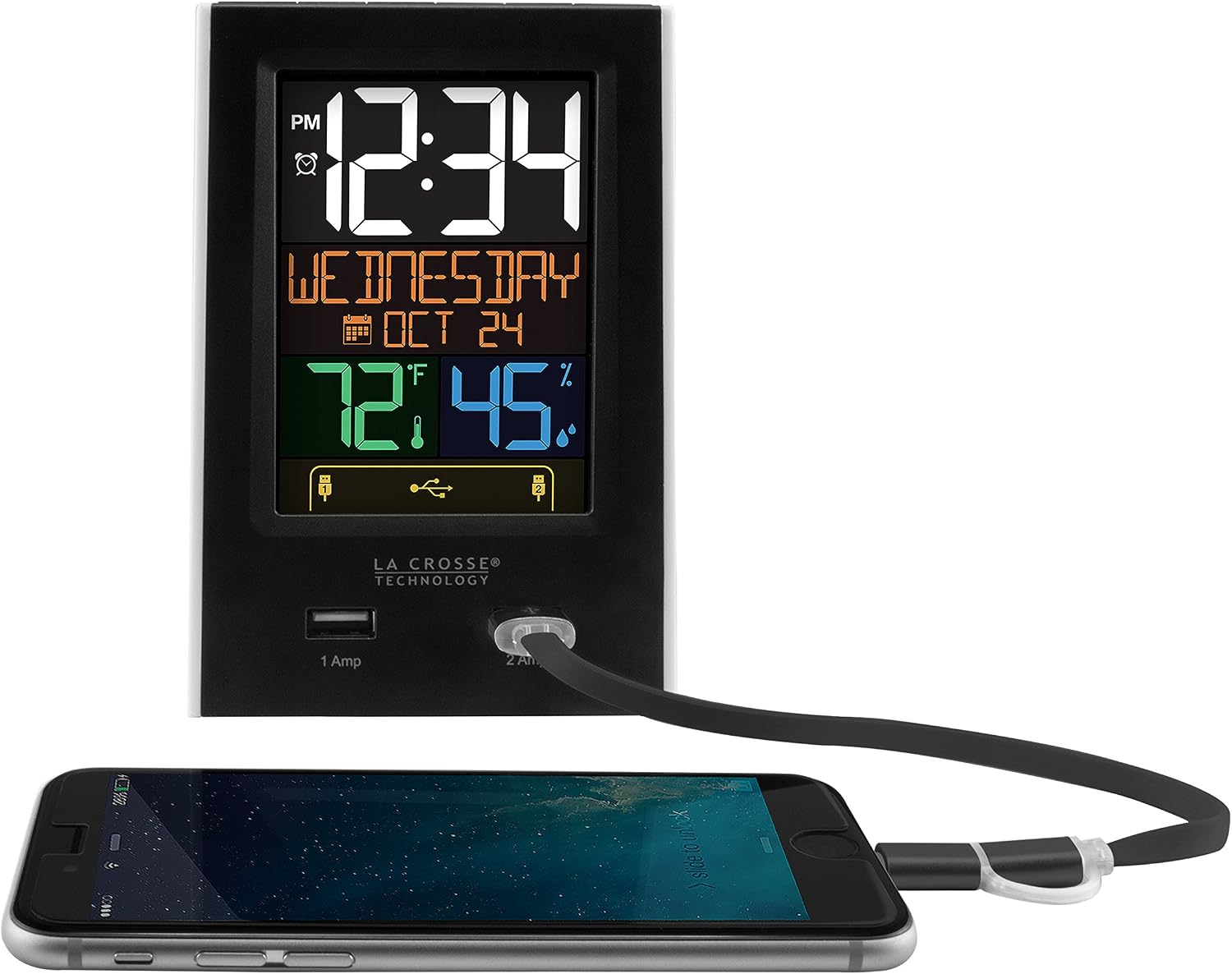
Figure 2: USB Charging in Use
This image shows a smartphone connected to the 2 Amp USB port on the C86224 alarm clock, indicating active charging.
The C86224 features two USB charging ports on the front:
- 1 Amp Порт: Suitable for charging smaller electronic devices like smartphones.
- 2 Amp Порт: Provides faster charging for compatible devices, including tablets or larger smartphones.
Simply connect your device's USB charging cable to the appropriate port. The display will show an indicator when a device is connected and charging.
Одржавање
- Чишћење: Користите меку, дamp cloth to clean the display and casinг. Избегавајте абразивна средства за чишћење или раствараче.
- Замена батерије: Replace backup batteries annually or when the low battery indicator appears to ensure settings are retained during power outagес.
- Пласман: Place the clock on a stable, flat surface away from direct sunlight, heat sources, or excessive moisture.
Решавање проблема
| Проблем | Решење |
|---|---|
| Display is dark or unreadable. |
|
| Time is incorrect or losing minutes. |
|
| УСБ портови за пуњење не раде. |
|
| Аларм се не оглашава. |
|
Спецификације
| Феатуре | Детаљ |
|---|---|
| Број модела | Ц86224 |
| Бранд | Ла Цроссе Тецхнологи |
| Дисплаи Типе | Digital, Color LCD |
| Извор напајања | Електрични уређај са каблом (AC адаптер) |
| Баттери Бацкуп | 2 ААА батерија (укључено) |
| УСБ портови за пуњење | 1 Amp (x1), 2 Amp (к1) |
| Димензије производа | 3.74" Ш x 5.24" В |
| Тежина артикла | 0.4 фунти |
| Материјал | Пластика |
| Посебне карактеристике | Adjustable brightness, Alarm, Programmable, Charging port, Temperature, Calendar, Nap timer |
Гаранција и подршка
The La Crosse Technology C86224 comes with a Једногодишња ограничена гаранција на делове и рад од произвођача.
For further assistance, troubleshooting, or to explore other products, please visit the official Продавница техничке опреме у Ла Кросу.
Ask a question about this manual
Ask about setup, troubleshooting, compatibility, parts, safety, or missing instructions. Manuals+ will review the question and use this page’s manual context to help answer it.