
1. Производ је готовview
The Excelvan Wireless Weather Station (Model AOK-5061A) is designed to provide accurate indoor and outdoor temperature and humidity readings, along with weather forecasts and an alarm clock function. It features a large, colorful LCD display with LED backlight for easy readability.
Кључне карактеристике:
- Мерење температуре и влажности у затвореном/спољашњем простору
- Weather Forecast with 5 Icons (Sunny, Partially Sunny, Cloudy, Rain, Heavy Rain)
- DCF Radio-Controlled Clock with Manual Setting
- Alarm with Snooze Function
- Large Color LCD Display with LED Backlight
- DST (Daylight Saving Time) Automatic Update
- Wireless Outdoor Sensor with up to 50m range

Слика 1: Предња страна view of the Excelvan Wireless Weather Station main unit, displaying weather forecast, outdoor/indoor temperature and humidity, and time.
2. Водич за подешавање
2.1 Садржај пакета
Пре него што наставите са подешавањем, уверите се да су све ставке присутне у пакету:
- 1 к Главна јединица метеоролошке станице
- 1 x Бежични даљински сензор
- 1 к адаптер за наизменичну струју
- 1 к Упутство за употребу

Figure 2: The complete package contents, including the main weather station unit, wireless remote sensor, power adapter, and user manual.
2.2 Напајање главне јединице
- Инсталација батерије (опционо): Open the battery compartment on the back of the main unit. Insert 3 x 1.5V AA batteries (not included), ensuring correct polarity. The LED backlight will stay on for 5 minutes when powered by batteries.
- AC Power Adapter (Recommended): For continuous backlight, connect the provided AC power adapter (4.5V, 150mA) to the main unit's power input and then plug it into a wall outlet.

Слика 3: Задња страна view of the main unit showing the battery compartment with the cover removed, ready for battery insertion.

Слика 4: Задња страна view of the main unit with the AC power adapter connected, illustrating the power input port.
2.3 Powering the Wireless Remote Sensor
- Open the battery compartment of the wireless remote sensor.
- Уметните 2 x 1.5 V AAA батерије (нису укључене), водећи рачуна о исправном поларитету.
- Добро затворите одељак за батерије.

Figure 5: The wireless remote sensor, showing its display and the battery compartment on the back.
2.4 Постављање сензора
- The main unit is intended for indoor use only.
- Place the wireless remote sensor outdoors in a sheltered area, away from direct sunlight and rain, to ensure accurate readings.
- Ensure the sensor is within 50 meters (open space) of the main unit for optimal signal reception.
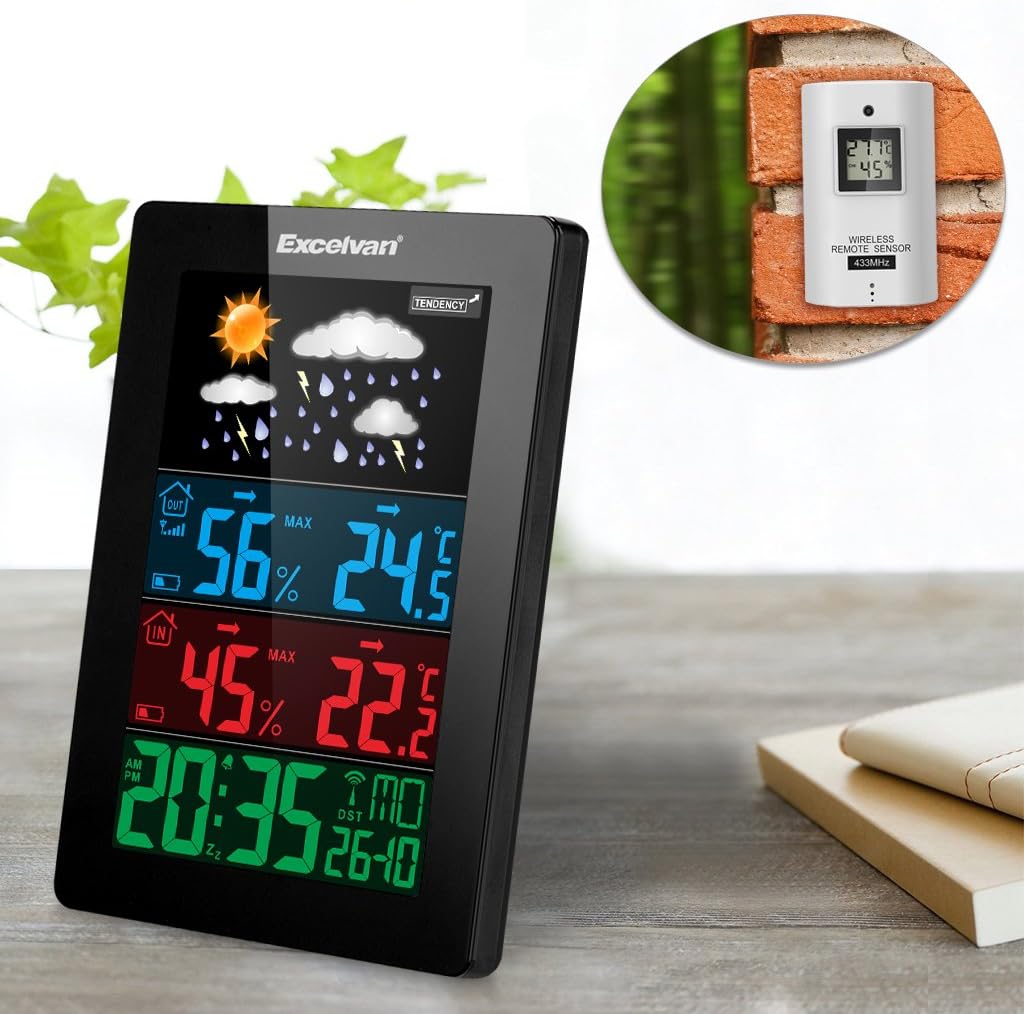
Figure 6: An illustration showing the main weather station unit indoors and the wireless remote sensor mounted on an outdoor wall.

Figure 7: A diagram highlighting the effective wireless transmission distance of 50 meters between the main unit and the remote sensor.
3. Упутство за употребу
3.1 Почетна синхронизација
After powering both units, the main unit will automatically attempt to synchronize with the remote sensor and receive the DCF radio-controlled time signal. This process may take a few minutes.
3.2 Приказ прекоview
Велики ЛЦД екран приказује разне информације:
- Горњи део: Weather forecast icons (sunny, cloudy, rainy, etc.) and weather tendency indicator.
- Middle-Top Section (Blue): Outdoor humidity and temperature.
- Middle-Bottom Section (Red): Indoor humidity and temperature.
- Bottom Section (Green): Current time (12/24 hour format), day of the week, and date.
Figure 8: Close-up of the main unit's display, illustrating the different data sections for weather, outdoor/indoor conditions, and time.
3.3 Setting Time and Date Manually
While the unit is radio-controlled, manual adjustments can be made:
- Притисните тастер МОДЕ button to cycle through display modes.
- Држите МОДЕ button for a few seconds to enter time setting mode.
- Користите + и - дугмад за подешавање вредности.
- Притисните МОДЕ again to confirm and move to the next setting (e.g., hour, minute, year, month, day, language for day of week).
3.4 Функција аларма и одлагања
- Притисните тастер АЛАРМ дугме за view or set the alarm time.
- Држите АЛАРМ дугме за улазак у режим подешавања аларма. Користите + и - прилагодити.
- Да бисте активирали/деактивирали аларм, притисните дугме АЛАРМ дугме кратко. Икона аларма ће се појавити/нестати на екрану.
- Када се аларм огласи, додирните СНООЗЕ / СВЕТЛО button on top of the unit to activate the snooze function. The alarm will sound again after a few minutes.
- To stop the alarm completely, press any other button.

Figure 9: Top edge of the main unit, highlighting the "SNOOZE/LIGHT" touch-sensitive button for alarm snooze and backlight activation.
3.5 Избор јединице температуре
Притисните тастер - button to switch between Celsius (°C) and Fahrenheit (°F) temperature units.
3.6 Временска прогноза
The weather station predicts weather conditions based on atmospheric pressure changes. The icons (sunny, partially sunny, cloudy, rain, heavy rain) indicate the forecast for the next 12-24 hours, not the current weather.
4. Одржавање
- Чишћење: Обришите главну јединицу и сензор меком крпомamp тканина. Немојте користити абразивна средства за чишћење или раствараче.
- Замена батерије: Replace batteries in both the main unit and the remote sensor when the low battery indicator appears on the display. Ensure correct polarity.
- Положај сензора: Periodically check the outdoor sensor's placement to ensure it remains sheltered and within range.
- Складиштење: If storing the unit for an extended period, remove all batteries to prevent leakage.
КСНУМКС. Решавање проблема
| Проблем | Могући узрок | Решење |
|---|---|---|
| Нема очитавања спољне температуре/влажности. |
|
|
| Нетачан приказ времена. |
|
|
| Екран је туман или празан. |
|
|
6. Спецификације
| Феатуре | Детаљ |
|---|---|
| Радио контролисани сат | ДЦФ77 |
| Распон температуре у затвореном | 0 ° Ц до +50 ° Ц (32 ° Ф до 122 ° Ф) |
| Опсег спољне температуре | -20 °Ц до +60 °Ц (-4 °Ф до 140 °Ф) |
| Прецизност мерења температуре | ±2 °Ц |
| Распон влажности у затвореном/спољашњем простору | 20-90 % РХ |
| Резолуција влаге | 1 % |
| Wireless Sensor Frequency | 433 МХз |
| Домет бежичног сигнала | До 50 метара (отворени простор) |
| Probe Cable Length (for external probe, if applicable) | 1 м |
| Waterproof Level of Sensor | ИПКС3 |
| Main Station Power | 3 x 1.5V AA batteries (not included) or 4.5V, 150mA AC adapter (included) |
| Напајање даљинског сензора | 2 к 1.5В ААА батерије (нису укључене) |
| Main Station Dimensions | 148 × 110 × 30 мм |
| Main Station Weight (without batteries) | 242 г |
| Remote Sensor Dimensions | 60 × 100 × 20 мм |
| Remote Sensor Weight (without batteries) | 50 г |
| Day of Week Languages | German, English, Italian, French, Dutch, Spanish, Danish |
7. Гаранција и подршка
For warranty information or technical support, please refer to the documentation provided with your purchase or contact Excelvan customer service through their official webсајту или вашем продавцу.
Напомена: Овај приручник је само у информативне сврхе. Спецификације се могу променити без претходне најаве.