
1. Увод
This manual provides detailed instructions for the setup, operation, maintenance, and troubleshooting of your EXCELVAN E300 Portable Thermal Printer. Please read this manual carefully before using the printer to ensure proper function and longevity of the device.
The EXCELVAN E300 is a compact and efficient thermal printer designed for printing receipts and tickets. It features high-speed printing, a durable print head, and versatile connectivity options including Bluetooth and USB, making it suitable for various point-of-sale (POS) environments.
2. Производ је готовview
2.1 Садржај пакета
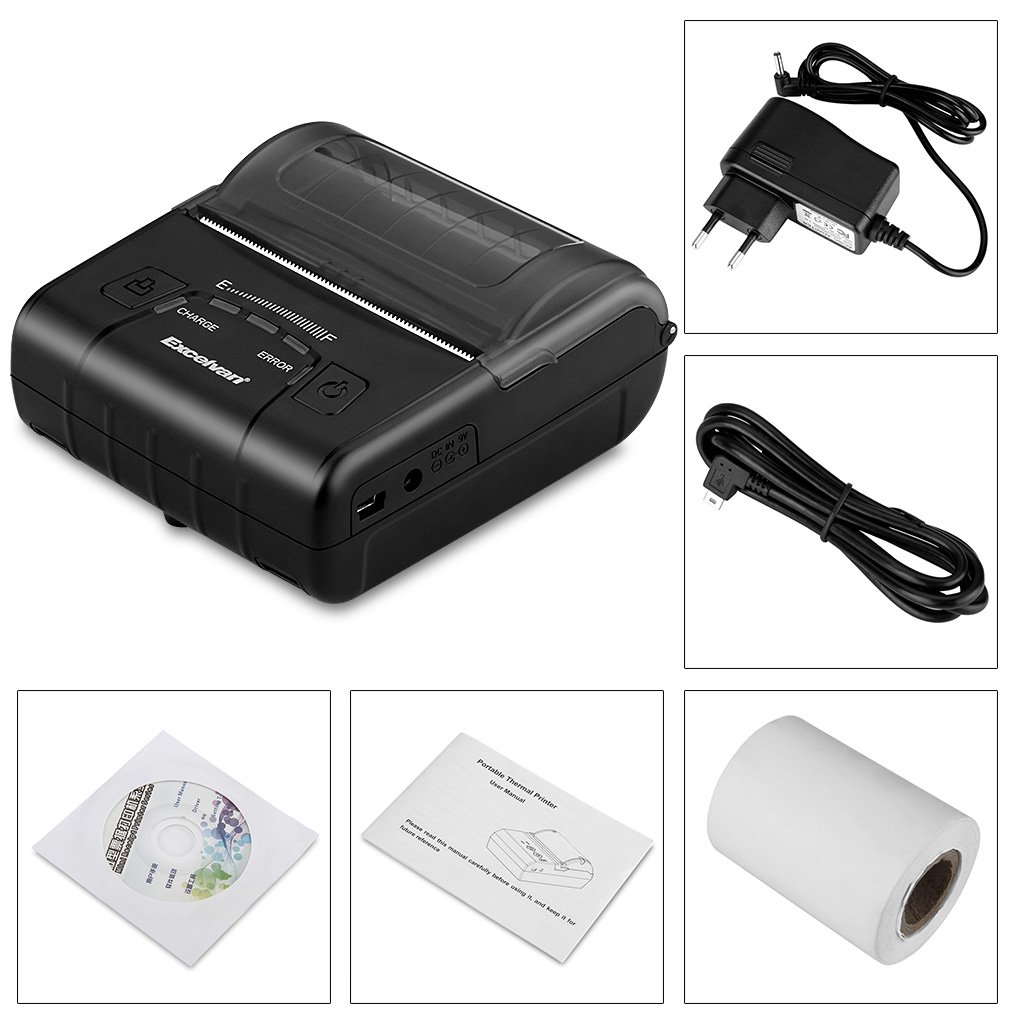
Приликом распакивања, молимо вас да проверите да ли су укључене све доле наведене ставке:
- 1 x 80mm Thermal Printer
- 1 к адаптер за напајање
- 1 к литијумска батерија
- 1 к УСБ кабл (110 цм)
- 1 к ролна термо папира
- 1 x Упутство за употребу (овај документ)
- 1 x CD (containing drivers and software)
2.2 Компоненте штампача
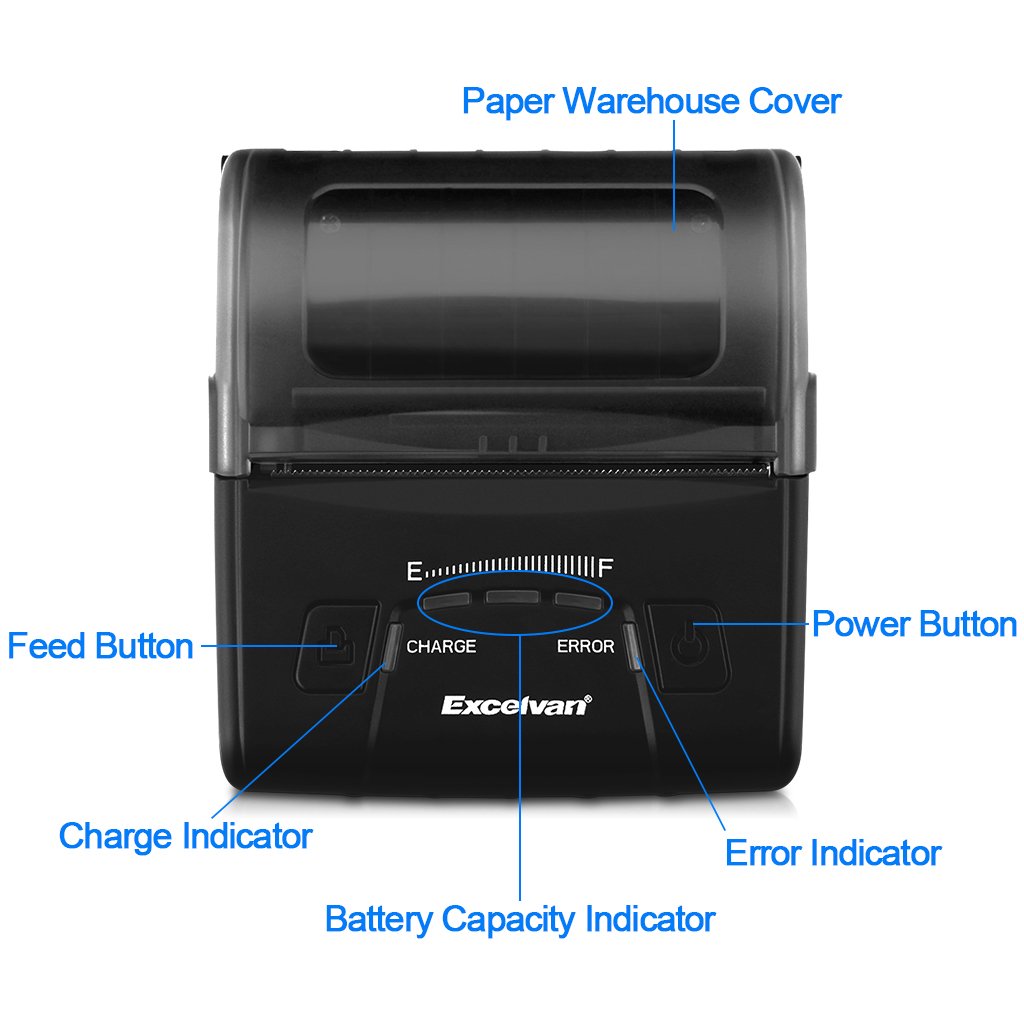
Familiarize yourself with the main components of your EXCELVAN E300 printer:

Слика 1: Фронт view of the EXCELVAN E300 printer with key components labeled.
- Paper Warehouse Cover: Protects the paper roll compartment.
- Дугме за унос: Advances the paper.
- Индикатор пуњења: Lights up when the battery is charging.
- Индикатор капацитета батерије: Приказује тренутни ниво батерије.
- Индикатор грешке: Lights up to indicate an error (e.g., paper out, cover open).
- Дугме за напајање: Укључује/искључује штампач.
3. Подешавање
3.1 Инсталација батерије
- Open the battery compartment cover located on the bottom of the printer.
- Insert the provided lithium battery, ensuring the contacts align correctly.
- Важно: Remove any insulating tape from the battery contacts before installation or charging.
Слика 2: Battery installation and warning to remove insulating tape.
- Добро затворите поклопац одељка за батерије.
3.2 Пуњење батерије
Before first use, fully charge the printer battery.
- Connect the power adapter to the printer's DC IN 9V port.
- Укључите адаптер за напајање у зидну утичницу.
- The Charge Indicator light will illuminate during charging. It will turn off or change color (depending on model) when fully charged.
- Напомена: The USB cable is for data connection to a computer only and does not charge the device.
Слика 3: Charging port and USB port. Use the power adapter for charging.
3.3 Убацивање термалног папира
The printer uses 80mm wide thermal paper rolls.
- Open the Paper Warehouse Cover by gently lifting it.
- Insert the thermal paper roll into the compartment, ensuring the paper feeds from the bottom and the leading edge comes out towards the front of the printer.
- Pull a small amount of paper out past the cutting edge.
- Close the Paper Warehouse Cover firmly until it clicks into place.
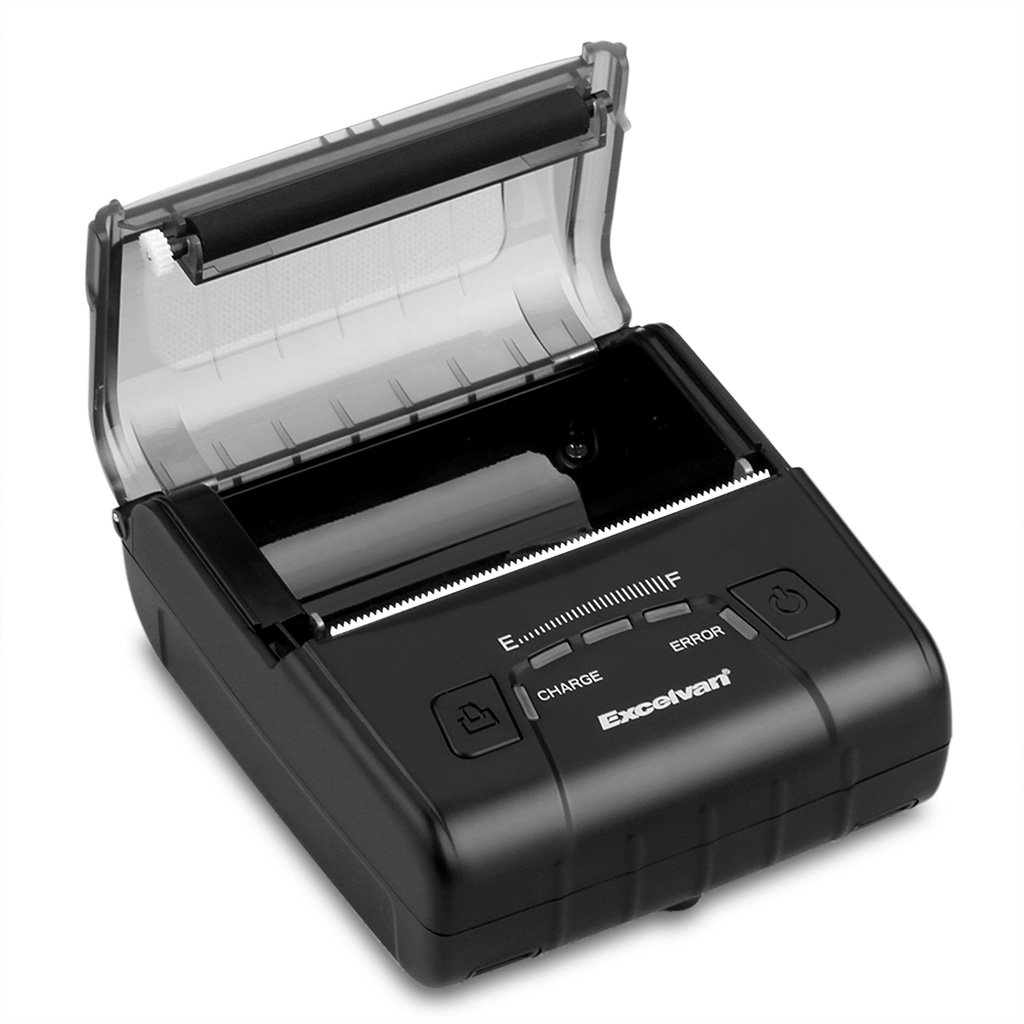
Слика 4: Loading thermal paper into the printer.
4. Упутство за употребу
4.1 Укључивање/искључивање
- За укључивање: Press and hold the Power Button until the indicator lights illuminate.
- За искључивање: Press and hold the Power Button until the indicator lights turn off.
4.2 Инсталација драјвера
Install the appropriate drivers for your operating system from the provided CD or download them from the official EXCELVAN webсајт (ако је доступан).
- Supported Operating Systems: Android, iOS, Linux, Windows (2000, 2003, XP, 7, 8, 8.1, 10).
4.3 Повезивање штампача
The EXCELVAN E300 supports both Bluetooth and USB connectivity.
4.3.1 Блуетоотх веза
- Уверите се да је штампач укључен.
- На свом уређају (паметном телефону, таблету, рачунару) омогућите Блутут и потражите доступне уређаје.
- Select "EXCELVAN E300" or a similar name from the list.
- Enter the pairing PIN (usually "0000" or "1234") if prompted.
- Once paired, you can select the printer from your application's print settings.
4.3.2 УСБ веза
- Connect one end of the USB cable to the printer's USB port.
- Повежите други крај са доступним УСБ портом на рачунару.
- Ensure the necessary drivers are installed. The printer should appear as an available printing device in your system settings.
4.4 Штампање
Once connected and drivers are installed, you can initiate printing from your application.

Слика 5: The printer in operation, producing a receipt.
- Use the Feed Button to advance paper manually if needed.
- The printer supports ESC/POS commands for advanced control.
- Graphic printing, including bitmaps and QR codes, is supported.
5. Одржавање
5.1 Чишћење главе за штампање
Regular cleaning of the print head ensures optimal print quality and extends the printer's lifespan.
- Turn off the printer and disconnect the power adapter.
- Open the Paper Warehouse Cover.
- Use a cotton swab lightly dampened with isopropyl alcohol to gently wipe the thermal print head (the dark strip inside the cover).
- Оставите главу за штампање да се потпуно осуши пре него што затворите поклопац и укључите штампач.
5.2 Одржавање батерије
- Избегавајте често потпуно пражњење батерије.
- Charge the battery regularly, even if the printer is not in use for extended periods.
- Чувајте штампач на хладном и сувом месту када га не користите.
КСНУМКС. Решавање проблема
This section addresses common issues you might encounter with your EXCELVAN E300 printer.
| Проблем | Могући узрок | Решење |
|---|---|---|
| Штампач се не укључује. | Слаба батерија или нема напајања. | Charge the battery using the power adapter. Ensure the power adapter is correctly connected. |
| No paper output. | Paper out, paper jam, or cover not closed. | Check if the paper roll is empty and replace if necessary. Clear any paper jams. Ensure the Paper Warehouse Cover is securely closed. |
| Error Indicator is lit. | Нестало је папира, поклопац је отворен или се глава за штампање прегрева. | Check paper status and cover. If the printer has been printing continuously, allow it to cool down. |
| Лош квалитет штампе. | Dirty print head, low battery, or incorrect paper. | Clean the print head (see Section 5.1). Ensure the battery is sufficiently charged. Use high-quality thermal paper. |
| Не могу се повезати преко Bluetooth-а. | Bluetooth not enabled, incorrect pairing, or interference. | Ensure Bluetooth is enabled on both devices. Re-attempt pairing. Move closer to the printer and away from other wireless devices. |
7. Спецификације
Detailed technical specifications for the EXCELVAN E300 Thermal Printer:
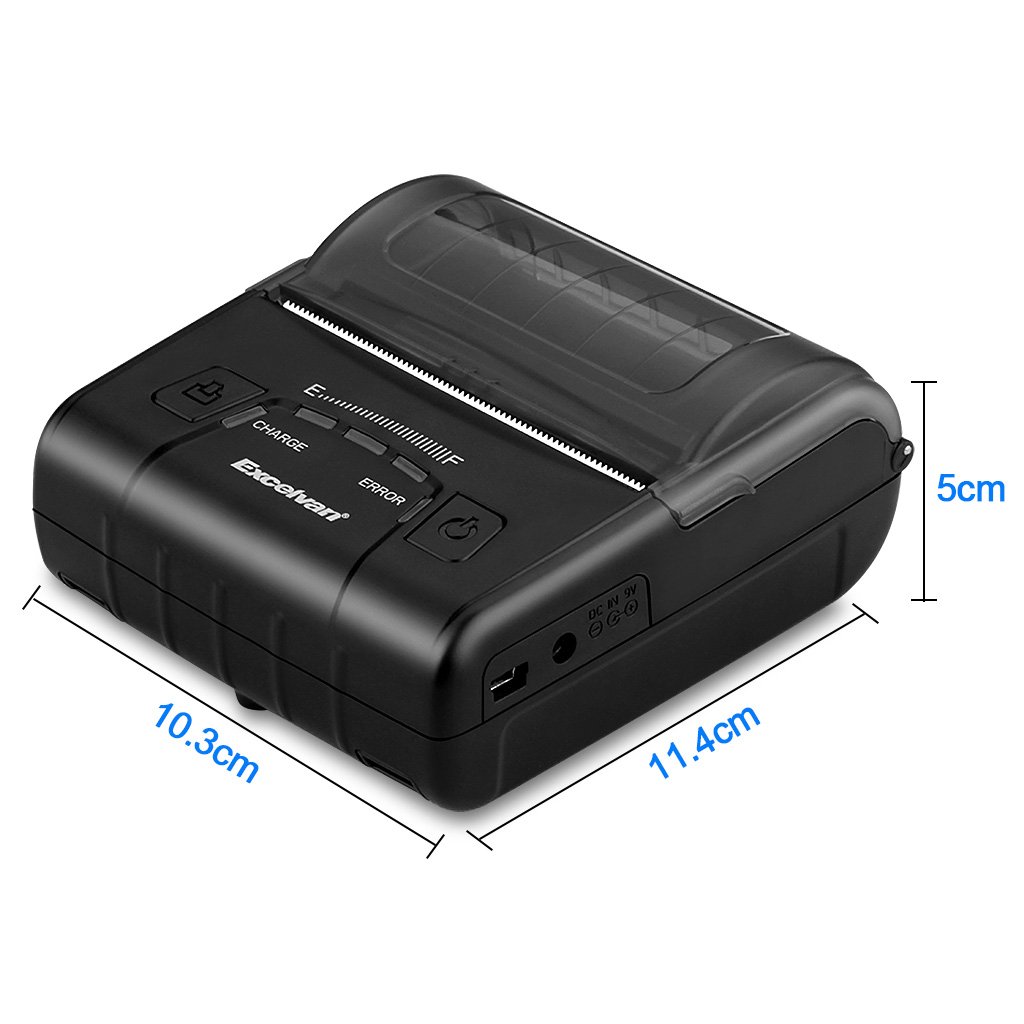
Слика 6: EXCELVAN E300 Printer Dimensions.
| Феатуре | Спецификација |
|---|---|
| Принтинг Метход | Термално штампање |
| Ефективна ширина штампе | 72 мм |
| Резолуција | 384 тачке/линија |
| Брзина штампања | 90 мм/с |
| Интерфејс | УСБ, Блуетоотх |
| Папер Типе | Термални папир |
| Папер Видтх | 79.5 ± 0.5 мм |
| Пречник папира | ≤ 43 mm (40 mm recommended) |
| Команде | ESC/POS compatible |
| Повер Суппли | Пуњива полимер литијумска батерија |
| Капацитет батерије | КСНУМКС мАх / КСНУМКС В |
| Излаз адаптера за напајање | 9.0 В / 2 А |
| Дривер Софтваре | Android, iOS, Linux, Win2000/2003/XP/7/8/8.1/10 |
| Живот главе штампача | 50 km (Print Density ≤ 12.5) |
| Радна температура | 5 °Ц ~ 45 °Ц |
| Радна влажност | 10% ~ 80% |
| Димензије (Д к Ш к В) | 11 x 5 x 10 цм (приближно) |
| Тежина | 285 грама |
8. Гаранција и подршка
8.1 Информације о гаранцији
The EXCELVAN E300 printer comes with a standard manufacturer's warranty. Please refer to the warranty card included in your package or contact your retailer for specific terms and conditions regarding warranty coverage and duration.
8.2 Корисничка подршка
For technical assistance, troubleshooting not covered in this manual, or inquiries about your product, please contact EXCELVAN customer support or your authorized dealer. Contact information can typically be found on the product packaging or the official EXCELVAN webсајту.