
АТ&Т ЕЛ52345
AT&T EL52345 Упутство за употребу бежичног телефонског система
Model: EL52345 | Brand: AT&T
Производ је завршенview
The AT&T EL52345 is an expandable cordless phone system featuring three handsets, an integrated digital answering system, and Caller ID/Call Waiting functionality. Designed for home or small office use, this system provides clear, interference-free communication using DECT 6.0 technology. The digital answering system offers up to 22 minutes of recording time, ensuring you never miss an important message. Each handset includes a backlit LCD screen for easy viewing of Caller ID entries and menu navigation.
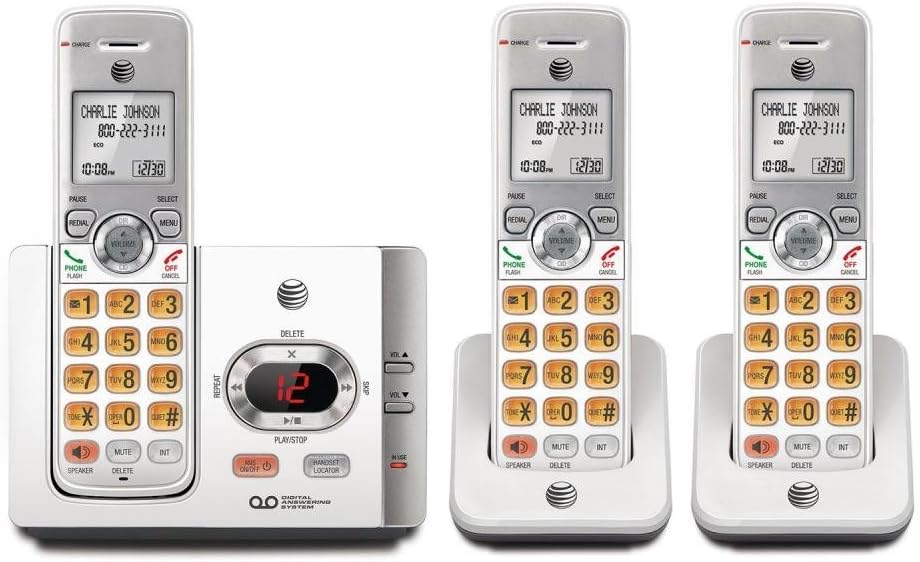
This image displays the complete AT&T EL52345 cordless phone system. It includes the main base unit with an integrated digital answering system, and three cordless handsets. Two of the handsets are shown in their individual charging cradles, while the third is docked in the main base unit. The handsets feature a backlit LCD screen, a full numeric keypad, and dedicated buttons for call functions, menu navigation, volume control, speakerphone, mute, and intercom. The main base unit has controls for the answering system, including message playback, skip, repeat, and volume adjustment, along with a message counter display.
Водич за подешавање
Follow these steps to set up your AT&T EL52345 cordless phone system:
- Инсталација батерије: Open the battery compartment on each handset. Insert the supplied AAA batteries, ensuring correct polarity. Close the compartment cover.
- Charging Handsets: Place each handset in its respective charging cradle or the main base unit. The CHARGE indicator on the handset will illuminate. Allow at least 16 hours for the initial charge before first use.
- Повежите основну јединицу:
- Повежите један крај телефонског кабла са TEL LINE прикључком на задњој страни базне јединице.
- Прикључите други крај телефонског кабла на телефонску утичницу у зиду.
- Укључите већи крај адаптера за напајање у електричну утичницу која није контролисана зидним прекидачем.
- Укључите мањи крај адаптера за напајање у POWER прикључак на задњој страни основне јединице.
- Handset Registration: Handsets are pre-registered to the base unit. If a handset displays "To register HS..." or similar, refer to the troubleshooting section for manual registration instructions.
- Подесите датум и време: After the initial charge, the handset will prompt you to set the date and time. Follow the on-screen instructions using the MENU and SELECT buttons.
Упутство за употребу
Упућивање и примање позива
- Да бисте упутили позив: Притисните ТЕЛЕФОН / ФЛАСХ or СПЕАКЕР, затим позовите број.
- Да одговорите на позив: Притисните ТЕЛЕФОН / ФЛАСХ or СПЕАКЕР када телефон зазвони.
- Да бисте прекинули позив: Притисните ОФФ/ЦАНЦЕЛ или ставите слушалицу у базу за пуњење.
- Поновно бирање: Притисните РЕДИАЛ to call the last dialed number.
Ансверинг Систем
The digital answering system records messages when you are away or unable to answer calls.
- Укључи/искључи: Притисните АНС ОН/ОФФ на базној јединици.
- Message Playback: Притисните ПЛАИ/СТОП on the base unit to listen to new messages.
- Skip Message: Током репродукције, притисните СКИП (right arrow) to skip to the next message.
- Repeat Message: Током репродукције, притисните РЕПЕАТ (left arrow) to repeat the current message. Press twice to go to the previous message.
- Delete Message: Током репродукције, притисните ИЗБРИШИ на базној јединици.
- Подесите јачину звука: Користите Јачина звука ▲ or ВОЛ ▼ on the base unit to adjust playback volume.
ИД позиваоца
The Caller ID feature displays the caller's name and number (if available) on the handset screen.
- Review Дневник позива: Притисните ЦИД on the handset to scroll through the call log.
- Позове: Док viewунос идентификације позиваоца, притисните ТЕЛЕФОН / ФЛАСХ да позовете број.
Одржавање
- Чишћење: Очистите телефон и базну јединицу меком, благо длакомamp крпа. Не користите спрејеве за чишћење или јаке хемикалије.
- Одржавање батерије: To ensure optimal battery life, fully charge the handsets for 16 hours before first use. If the phone will not be used for an extended period, remove the batteries.
- Локација: Place the base unit in a central location away from other electronic devices (e.g., microwaves, Wi-Fi routers) to minimize interference.
Решавање проблема
| Проблем | Решење |
|---|---|
| Нема тона за бирање. | Ensure the telephone line cord is securely plugged into the base unit and the wall jack. Check if the power adapter is properly connected to the base unit and a working electrical outlet. |
| Handset displays "To register HS..." | To manually register a handset: Place the handset in the base unit. Press and hold the ЛОКАТОР СЛУШАЈА button on the base unit for about 4 seconds until the IN USE light flashes. The handset will display "Registering..." and then "Handset Registered" when successful. |
| Лош квалитет звука или статички шум. | Move the handset closer to the base unit. Ensure the base unit is not near other electronic devices that may cause interference. Check the telephone line cord for damage. |
| Handset battery does not hold a charge. | Ensure the handset is properly seated in the charging cradle. Clean the charging contacts on both the handset and cradle with a dry cloth. If the issue persists, the battery may need replacement. |
| Секретна секретарица не снима поруке. | Уверите се да је телефонска секретарица укључена. Проверите да ли је меморија пуна; обришите старе поруке ако је потребно. |
Спецификације
| Феатуре | Детаљ |
|---|---|
| Број модела | ЕЛ52345 |
| Тип телефона | Бежични |
| Број слушалица | 3 (прошириво) |
| Тип система за одговор | Дигитал |
| Капацитет снимања | До 22 минута |
| ИД позиваоца / Позив на чекању | Да |
| Технологија | ДЕЦТ 6.0 |
| Батерије су потребне | 3 AAA batteries (per handset) |
| Боја | Сребрна, бела |
| Материјал | Пластика |
| Димензије производа (основна јединица) | 11.1 к 6.9 к 5.5 инча |
| Тежина артикла | 1.3 фунти |
| Компатибилни уређаји | PSTN Networks |
Подршка и гаранција
For further assistance, technical support, or warranty information regarding your AT&T EL52345 cordless phone system, please refer to the official AT&T product support channels. Typically, warranty details are provided with the product packaging or can be found on the manufacturer's official webсајту.
Note: No official product videos were provided in the source data for embedding in this manual.
Ask a question about this manual
Ask about setup, troubleshooting, compatibility, parts, safety, or missing instructions. Manuals+ will review the question and use this page’s manual context to help answer it.