
LyxPro SPA-5.5
LyxPro SPA-5.5 Small PA Speaker Monitor Instruction Manual
Model: SPA-5.5
1. Увод
This manual provides detailed instructions for the proper setup, operation, and maintenance of your LyxPro SPA-5.5 Small PA Speaker Monitor. Please read this manual thoroughly before using the device to ensure optimal performance and safety.
The LyxPro SPA-5.5 is a compact and powerful active speaker system featuring a Class-D amplifier, a 3-channel mixer, and a 3-band equalizer. It is designed for various applications including vocal and instrument monitoring, public address, and as a guitar amplifier or karaoke system.
2. Безбедносна упутства
- Извор напајања: Connect the unit only to the specified power supply (100V – 240V AC). Ensure the power cord is not damaged or pinched.
- вентилација: Не блокирајте вентилационе отворе. Обезбедите адекватан проток ваздуха око уређаја како бисте спречили прегревање.
- Вода и влага: Не излажите уређај киши, влази или било којим течностима. Не стављајте предмете напуњене течношћу на уређај.
- Извори топлоте: Држите уређај даље од извора топлоте као што су радијатори, грејни уређаји, шпорети или други уређаји који производе топлоту.
- Чишћење: Чистите само сувом крпом. Искључите из струје пре чишћења.
- Сервисирање: Не покушавајте сами да сервисирате овај производ. Све сервисирање препустите квалификованом сервисном особљу.
- Пласман: Place the unit on a stable surface. If mounting on a microphone stand, ensure the stand is stable and capable of supporting the unit's weight.
3. Садржај пакета
Проверите да ли су све ставке присутне у пакету:
- LyxPro SPA-5.5 Speaker Monitor
- Повер Цабле
- Microphone Stand Mounting Hardware
- Кориснички приручник (овај документ)
4. Карактеристике производа
- 125W RMS / 150W Peak Class-D Ampлифиер
- Integrated 3-Channel Mixer
- 3-Band Equalizer (Bass, Mid, Treble)
- +48V Phantom Power Supply for Condenser Microphones
- Multiple Inputs: XLR, 1/4" (6.35mm), RCA, and 3.5mm (1/8") Aux
- Instrument Switch for Direct Instrument Connection
- XLR Thru Connection for Daisy-Chaining
- Ецхо Цонтрол
- Уграђена Блуетоотх веза
- Компатибилност са СД картицом
- Mounts on Standard Microphone Stands
- Durable and Compact Design
5. Контроле и везе
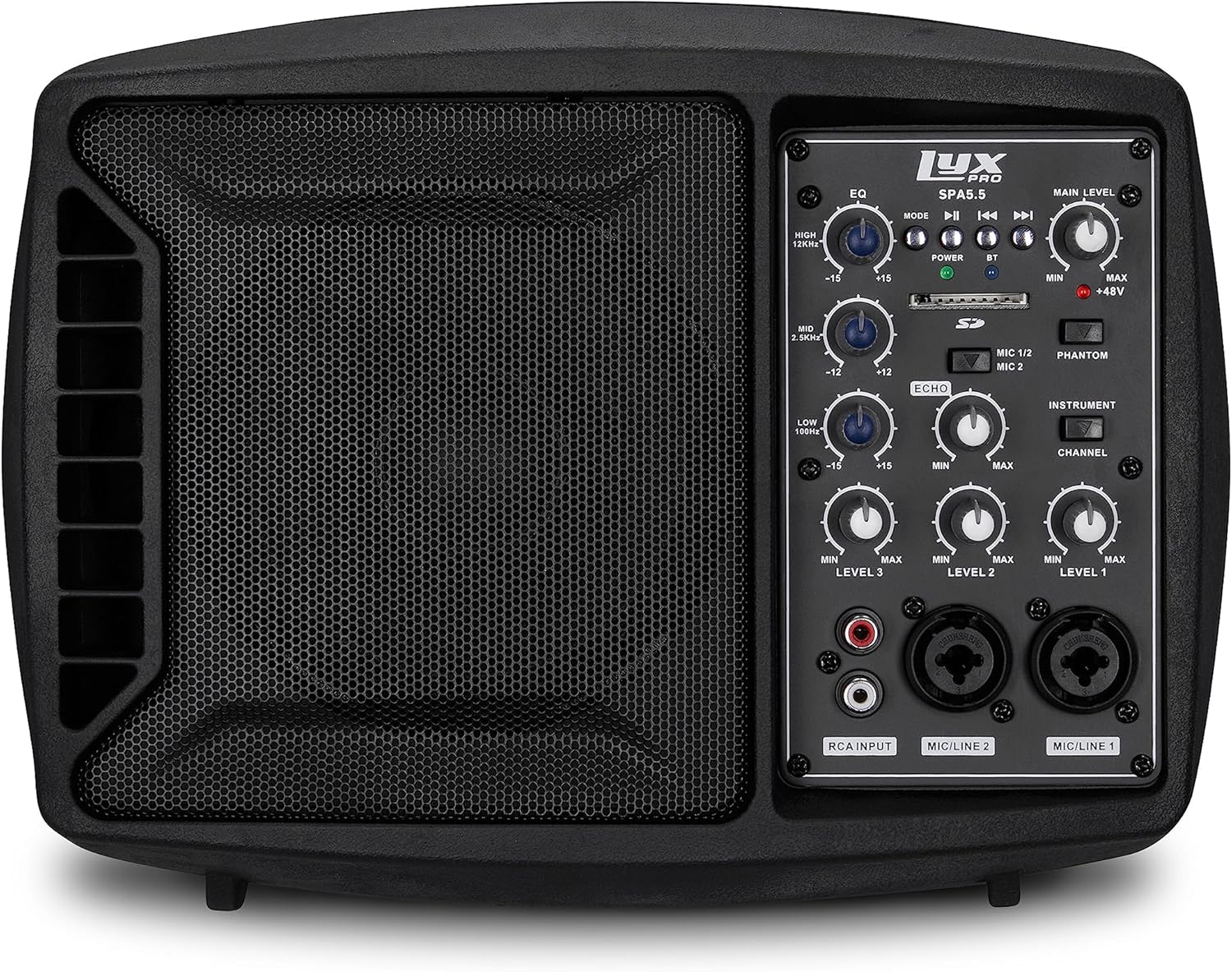
Слика 5.1: Предња страна view of the LyxPro SPA-5.5 speaker monitor, showing the speaker grille and control panel.
5.1 Контроле на предњој плочи

Figure 5.2: Detailed diagram of the LyxPro SPA-5.5 front control panel with labeled components.
- Еквилајзер (ЕК):
- HIGH (12kHz): Adjusts high frequencies. Range: ±15dB.
- MID (2.5kHz): Adjusts mid frequencies. Range: ±15dB.
- LOW (80Hz): Adjusts low frequencies. Range: ±15dB.
- Главни ниво: Controls the overall output volume of the speaker.
- Повер Лигхт: Показује када је уређај укључен.
- BT (Bluetooth) Light: Означава статус Блуетоотх везе.
- Слот за СД картицу: За репродукцију звука fileс са СД картице.
- Phantom Power Switch (+48V): Activates +48V phantom power for condenser microphones connected to MIC 1 or MIC 2.
- MIC 1/2 Switch: Selects between MIC 1 and MIC 2 inputs for Channel 1.
- Instrument Switch: Optimizes input impedance for direct connection of instruments (e.g., guitar) to Channel 1.
- Контрола еха: Adjusts the level of echo effect applied to microphone inputs.
- Channel Level Controls (LEVEL 1, LEVEL 2, LEVEL 3): Adjusts the individual volume for each input channel.
- RCA Input (LINE 3): Stereo RCA inputs for connecting devices like CD players, MP3 players, or keyboards.
- MIC/LINE 2 Input: Combo XLR/1/4" (6.35mm) input for microphones or line-level devices.
- MIC/LINE 1 Input: Combo XLR/1/4" (6.35mm) input for microphones or line-level devices.
5.2 Прикључци задње плоче

Figure 5.3: Detailed diagram of the LyxPro SPA-5.5 rear panel with labeled connections.
- MAIN IN (XLR): Main input for connecting external audio sources.
- MIC/LINE Level Switch: Selects between microphone or line level for the MAIN IN.
- THRU (XLR): XLR output for daisy-chaining to other speakers or sending the mixed signal to another device.
- Прекидач: Укључује или искључује јединицу.
- АЦ ИНПУТ: Power connector for the included AC power cable (100V – 240V AC).
6. Подешавање
6.1 Почетно укључивање
- Ensure all level controls (Main Level, Channel Levels) are set to minimum.
- Connect the provided AC power cable to the AC INPUT on the rear panel and then to a suitable power outlet.
- Flip the Power Switch on the rear panel to the "ON" position. The Power Light on the front panel will illuminate.
6.2 Опције монтаже
The SPA-5.5 can be used in various configurations:
- Подни монитор: Place the unit on the floor in front of the performer, angled upwards.
- Плоча стола: Поставите на равну, стабилну површину.
- Microphone Stand Mounting: The unit includes hardware to mount it directly onto a standard microphone stand.

Figure 6.1: The LyxPro SPA-5.5 speaker monitor positioned on a microphone stand, demonstrating its use as a personal monitor for a musician.

Figure 6.2: A band performing outdoors, utilizing the compact LyxPro SPA-5.5 speaker for sound reinforcement.
7. Упутство за употребу
7.1 Повезивање микрофона и инструмената
- микрофони: Connect dynamic or condenser microphones to the MIC/LINE 1 or MIC/LINE 2 inputs using XLR cables. If using a condenser microphone, activate the +48V Phantom Power Switch. Adjust the corresponding Channel Level control.
- Инструменти: Connect instruments (e.g., guitar, bass) directly to MIC/LINE 1 or MIC/LINE 2 using a 1/4" (6.35mm) cable. Engage the Instrument Switch for optimal impedance matching. Adjust the corresponding Channel Level control.
- Уређаји линијског нивоа: Connect devices like keyboards or audio interfaces to MIC/LINE 1 or MIC/LINE 2 using 1/4" (6.35mm) cables. Ensure the Instrument Switch is disengaged. Adjust the corresponding Channel Level control.
- Stereo Audio Sources: Connect CD players, MP3 players, or other stereo sources to the RCA Input (LINE 3). Adjust LEVEL 3.
7.2 Подешавање звука
- Channel Levels: Use the LEVEL 1, LEVEL 2, and LEVEL 3 controls to balance the volume of individual inputs.
- Главни ниво: Adjust the Main Level knob to control the overall output volume of the speaker.
- Еквилајзер (ЕК): Use the HIGH, MID, and LOW knobs to shape the tone of your sound.
- Increase HIGH for brighter sound.
- Adjust MID for vocal clarity or instrument presence.
- Increase LOW for more bass.
- Контрола еха: Turn the Echo knob to add a reverberation effect to the microphone inputs.
7.3 Media Playback (SD Card & Bluetooth)

Figure 7.1: Icons indicating SD card compatibility and built-in Bluetooth functionality on the LyxPro SPA-5.5.
- СД картица: Insert an SD card containing audio files into the SD Card Slot. The unit will automatically detect and begin playback. Use the built-in controls (Mode, Play/Pause, Skip) to manage playback.
- Блуетоотх:
- Уверите се да је јединица укључена.
- Активирајте Блуетоотх на свом мобилном уређају.
- Тражи "LyxPro SPA-5.5" in your device's Bluetooth settings and pair. The BT light on the unit will indicate a successful connection.
- Play audio from your device. Adjust volume using both your device and the SPA-5.5's Main Level control.

Figure 7.2: A musician utilizing the LyxPro SPA-5.5 as a personal monitor in a studio environment.
8. Одржавање
- Чишћење: Користите меку, суву крпу за чишћење спољашњости уређаја. Не користите течна средства за чишћење или аеросоле.
- Складиштење: Када се уређај не користи дуже време, чувајте га на хладном и сувом месту, даље од директне сунчеве светлости и екстремних температура.
- Замена осигурача: If the unit does not power on, check the fuse located near the AC input. Replace with a fuse of the same type and rating (T 3.15 A H 250V). Refer to qualified personnel if unsure.
КСНУМКС. Решавање проблема
| Проблем | Могући узрок | Решење |
|---|---|---|
| Нема струје | Power cable disconnected; Power switch off; Blown fuse | Check power cable connection; Turn power switch on; Replace fuse (refer to Maintenance section) |
| Нема излаза звука | Main Level or Channel Levels too low; Input device not connected or muted; Incorrect input selected | Increase Main Level and Channel Levels; Check input device connection and volume; Verify correct input is used |
| Изобличен звук | Input signal too high; Main Level too high; EQ settings incorrect | Reduce input device volume; Lower Main Level; Adjust EQ settings |
| Microphone not working (condenser mic) | Phantom power not enabled | Activate the +48V Phantom Power Switch |
| Блуетоотх се не повезује | Unit not in pairing mode; Device too far; Incorrect device selected | Ensure Bluetooth is active on SPA-5.5 and device; Move device closer; Select "LyxPro SPA-5.5" from device list |
10. Спецификације

Figure 10.1: Diagram illustrating the compact dimensions of the LyxPro SPA-5.5 speaker monitor.
| Феатуре | Детаљ |
|---|---|
| Излазна снага | 125В РМС / 150В Пеак |
| Величина звучника | 5 инча |
| Ampдизалица Тип | Класа Д |
| Фреквенцијски одзив (-10дБ) | 80Хз – 14кХз |
| Фреквенцијски одзив (-3дБ) | 100Хз – 10кХз |
| Макс. СПЛ | 114dB SPL @ 1M |
| Пхантом Повер | +48В |
| Инпут Импеданце | 20К Ω |
| EQ High (12kHz) | ±15дБ |
| EQ Mid (2.5kHz) | ±15дБ |
| EQ Low (80Hz) | ±15дБ |
| Улазни волtage | 100В – 240В АЦ |
| Потрошња енергије | 180В макс. |
| Димензије (Д к Ш к В) | 13.5" x 9" x 11.8" (34.3 цм x 22.9 цм x 30 цм) |
| Тежина | 6.1 фунти (2.77 кг) |
11. Гаранција и подршка
For warranty information and technical support, please refer to the warranty card included with your product or visit the official LyxPro webсајт. Сачувајте рачун као доказ о куповини.
For further assistance, contact LyxPro customer support.