
Амазон Басицс К001575
Amazon Basics LCD Computer Monitor Stand Riser User Manual
Model: K001575 | Brand: Amazon Basics
1. Увод
This user manual provides comprehensive instructions for the assembly, operation, maintenance, and troubleshooting of your Amazon Basics LCD Computer Monitor Free-Standing Desk Stand Riser. Designed to enhance your ergonomic workspace, this stand allows for flexible adjustment of your monitor to achieve optimal viewуглове и удобност.

Слика 1.1: Предња страна view of the Amazon Basics LCD Computer Monitor Stand Riser.
2. Карактеристике
- Подешавање висине: Set the height of your LCD for a comfortable computing experience.
- Multi-directional Movement: With fingertip effort, raise or lower your display, pan left/right, tilt, and rotate.
- Капацитет тежине: Supports monitors weighing between 6-16 pounds.
- Компатибилност величине екрана: Designed for screens up to 24 inches.
- Вертикално подешавање висине: Offers 5 inches of monitor height adjustability.
- ротација: Monitor can be used in portrait or landscape orientation (360° rotation).
- Опсег нагиба: +25/-5 degree tilt capability.
- Опсег померања: 270° right/left pan from the base.
- ВЕСА компатибилност: Supports VESA 100 x 100 mm and 75 x 75 mm mounting patterns.
- Управљање кабловима: Integrated cable pass-through channel near the base keeps cables organized.
3. Садржај пакета
Молимо вас да се уверите да су све компоненте присутне пре почетка монтаже:
- Monitor Stand Base and Arm Assembly
- VESA монтажна плоча
- Mounting Screws (various sizes for VESA 75x75mm and 100x100mm)
- Allen Key (for adjustments and assembly)

Figure 3.1: Typical components included with the monitor stand.
4. Упутства за подешавање
- Припремите штанд: Place the monitor stand base on a stable, flat surface. Ensure the Allen key is accessible, often stored at the bottom of the base.
- Причврстите ВЕСА плочу на монитор: Carefully lay your monitor face down on a soft, clean surface to prevent scratches. Align the VESA mounting plate with the screw holes on the back of your monitor. Use the appropriate mounting screws (M4 or M5, depending on your monitor) to secure the plate to the monitor. Do not overtighten.
- Mount Monitor to Stand: With the VESA plate attached to your monitor, carefully lift the monitor and slide the VESA plate onto the arm of the stand. Ensure it clicks securely into place.
- Adjust Tension (if necessary): If the monitor sags or is too stiff to adjust, use the included Allen key to adjust the tension screws on the arm. These are typically located near the VESA plate attachment point or along the arm's pivot points. Turn clockwise to increase tension (stiffer movement) and counter-clockwise to decrease tension (looser movement).
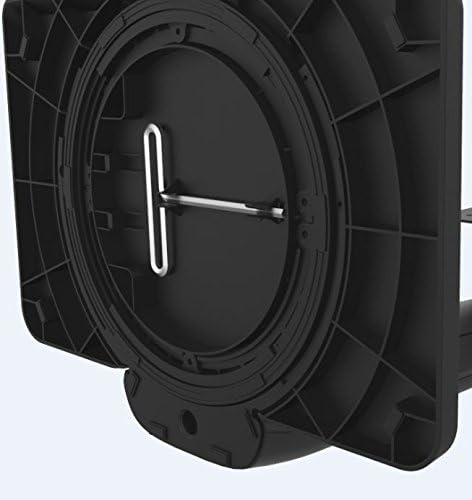
Figure 4.1: Allen key storage on the underside of the stand base.
5. Упутство за употребу
The Amazon Basics LCD Monitor Riser offers a range of adjustments for optimal viewутеха:
- Подешавање висине: Gently push or pull the monitor up or down to your desired height. The stand is designed to hold its position once released.
- Подешавање нагиба: Grasp the top and bottom edges of your monitor and gently tilt it forward or backward to achieve the perfect viewугао уласка.
- Подешавање померања: Rotate the entire stand base left or right on your desk for horizontal viewприлагођавања.
- Ротација (портрет/пејзаж): Rotate the monitor 360 degrees to switch between landscape and portrait orientations. Ensure no cables are tangled during rotation.

Figure 5.1: Monitor on stand in landscape orientation.

Figure 5.2: Monitor on stand in portrait orientation, side view.
5.1. Званични видео производа
Video 5.1: An official product video demonstrating the features and adjustments of the Amazon Basics LCD Monitor Stand Adjustable Riser.
6. Одржавање
- Чишћење: Користите меку, суву крпу да обришете постоље. За тврдокорне мрље, благо дamp cloth with mild soap can be used, followed by drying. Avoid abrasive cleaners or solvents.
- Редовне провере: Periodically check all screws and connections to ensure they are secure. Retighten if necessary using the provided Allen key.
- Управљање кабловима: Ensure cables are routed neatly through the cable pass-through channel to prevent strain or damage.
КСНУМКС. Решавање проблема
- Monitor Sags or Won't Stay Up:
This indicates that the tension on the arm is too loose. Use the Allen key to tighten the tension screws on the arm until the monitor holds its position securely. Refer to Section 4, Step 4 for guidance.
- Monitor is Too Stiff to Adjust:
The tension on the arm may be too tight. Use the Allen key to loosen the tension screws slightly until movement is smooth but still holds position.
- Monitor Wobbles:
Ensure the stand is placed on a stable, flat surface. Check that all assembly screws are tightened securely, including those attaching the VESA plate to the monitor and the monitor to the stand.
- Cables are Tangled:
Utilize the integrated cable pass-through channel at the base of the stand to route cables neatly. This prevents tangling and keeps your workspace tidy.
8. Спецификације
| Атрибут | Валуе |
|---|---|
| Број модела | К001575 |
| Бранд | Амазон Басицс |
| Материјал | Алуминијум |
| Боја | Црно |
| Тежина артикла | 5 фунте (2.27 кг) |
| Димензије производа (ДкШкВ) | 12 к 10.2 к 15.8 инча (30.5 к 25.9 к 40.1 цм) |
| Max Screen Size Supported | 24 инча |
| Weight Adjustable Range | 6-16 pounds (2.7-7.2 kg) |
| Могућност подешавања висине | 5 инча (12.7 цм) |
| Угао нагиба | +25/-5 степени |
| Пан Англе | 270 degrees (right/left from base) |
| Ротација | 360 degrees (portrait/landscape) |
| ВЕСА компатибилност | 75к75мм, 100к100мм |
9. Гаранција и подршка
This product is backed by an Amazon Basics 1-Year Limited Warranty. For detailed warranty information or technical support, please refer to the official Amazon Basics webсајт или директно контактирајте корисничку службу Амазона.
Подршка на мрежи: Посетите Амазон корисничка служба